1. Introduktion
This manual provides detailed instructions for the installation, operation, and maintenance of your Shanrya 12.3-inch Car Stereo Radio Navigation GPS Player. Please read this manual thoroughly before using the product to ensure proper function and to prevent damage. This device is designed to enhance your driving experience with advanced navigation, entertainment, and connectivity features.
2. Sikkerhedsoplysninger
- Professionel installation anbefales: Due to the complexity of car electrical systems, professional installation is strongly advised to avoid damage to the unit or your vehicle.
- Kørselssikkerhed: Brug ikke enheden på en måde, der distraherer dig fra kørslen. Prioritér altid trafiksikkerhed.
- Strømforsyning: Ensure the unit is connected to the correct vehicle power supply (12V DC). Incorrect voltage kan forårsage skade.
- Temperatur: Undgå at udsætte enheden for ekstreme temperaturer eller direkte sollys i længere perioder.
- Fugtighed: Hold enheden væk fra vand og overdreven fugt.
- Rensning: Brug en blød, tør klud til rengøring. Brug ikke slibende rengøringsmidler eller opløsningsmidler.
3. Pakkens indhold
Bekræft at alle varer er til stede i pakken:
- 1 x Main Head Unit (12.3-inch display)
- 1 x Air Vent Assembly
- 1 x GPS-antenne
- 1 x Power Harness
- 2 x USB-kabler
- 1 x ekstern mikrofon
- 1 x RCA Cable Set
- 1 x Brugermanual (dette dokument)
- Other necessary installation accessories (brackets, trim tools, etc.)
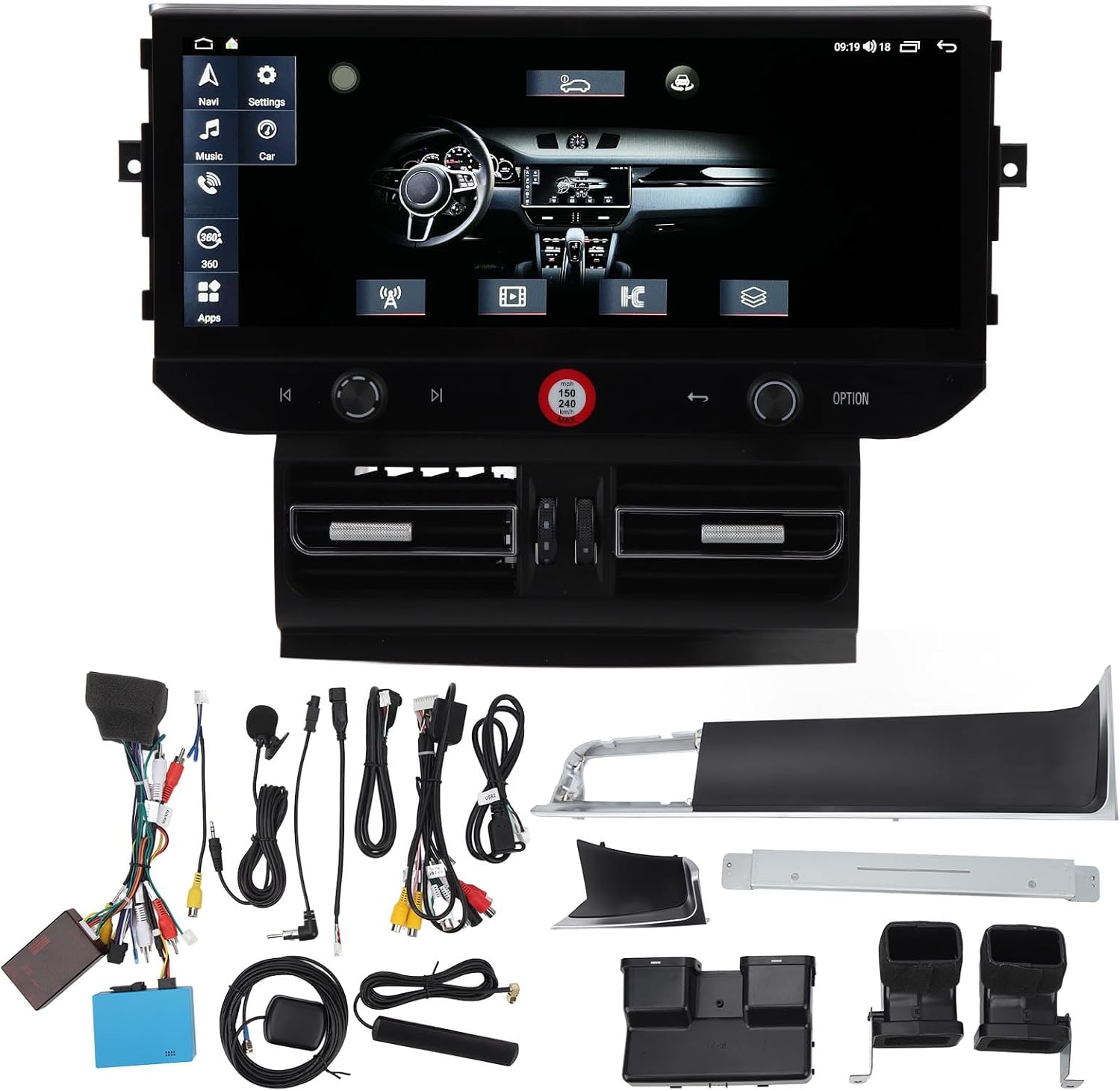
Billede 3.1: All components of the Shanrya car stereo system, including the main head unit, wiring harnesses, GPS antenna, USB cables, and other accessories.
4. Produktet er slutview
Familiarize yourself with the main components and their functions.
4.1 Main Head Unit

Billede 4.1.1: Front view of the Shanrya 12.3-inch car stereo head unit, showing the large display and integrated controls.
- 12.3-tommer berøringsskærm: High-resolution display for navigation, media, and applications.
- Kontrolknapper: Located on the lower bezel for volume, tuning, and menu navigation.
- Fysiske knapper: For quick access to functions like navigation, music, car settings, and apps.
4.2 Air Vent Assembly

Billede 4.2.1: Close-up of the integrated air vents and controls located directly below the main screen.
- Integrated Air Vents: Designed to seamlessly replace the original vehicle air vents.
- Climate Controls: May include integrated controls for vehicle climate functions, depending on the specific vehicle model.
5. Installationsvejledning (opsætning)
Dette afsnit giver en generel overview of the installation process. Due to variations in vehicle models and electrical systems, professional installation is highly recommended.
5.1 Kontrol før installation
- Sørg for, at køretøjets tænding er slukket, og at batteriet er frakoblet.
- Confirm compatibility with your vehicle model (Macan LHD 2014-2016).
- Gather all necessary tools (trim removal tools, screwdrivers, wire cutters, etc.).
5.2 Removal of Original Unit
- Carefully remove the existing car stereo and air vent assembly using appropriate trim removal tools.
- Disconnect all wiring harnesses from the original unit.
5.3 Ledningsforbindelser
- Connect the provided power harness to the vehicle's wiring. Ensure all connections are secure.
- Tilslut GPS-antennen, og før den til en placering med en fri bane view of the sky (e.g., dashboard).
- Connect USB cables and route them to a convenient location for external devices.
- Tilslut den eksterne mikrofon til håndfri opkald.
- Connect any other auxiliary inputs/outputs as required (e.g., reverse camera, external amplivligere).
5.4 Mounting the New Unit
- Integrate the new air vent assembly and main head unit into the dashboard opening.
- Fastgør enheden med de medfølgende monteringsbeslag og skruer.
- Ensure all cables are neatly tucked away and not pinched.

Billede 5.4.1: The Shanrya car stereo unit seamlessly installed in a Macan dashboard, demonstrating its fit and appearance.
5.5 Efterinstallation
- Tilslut køretøjets batteri igen.
- Turn on the ignition and test all functions of the unit (power, audio, navigation, Bluetooth, etc.).
- Juster indstillinger efter behov.
6. Betjeningsvejledning
6.1 Tænd/sluk og lydstyrke
- Tænd: The unit typically powers on automatically with the vehicle's ignition.
- Sluk: The unit powers off with the vehicle's ignition. A long press on the power button (if available) may put it into standby.
- Lydstyrkekontrol: Use the dedicated knob or touchscreen controls to adjust the audio volume.
6.2 Navigation
- Tap the 'Navi' icon on the main screen to access the navigation application.
- Enter your destination using the on-screen keyboard.
- Follow the voice prompts and visual directions for your route.
6.3 Bluetooth 5.0-forbindelse
- Gå til 'Indstillinger' > 'Bluetooth'.
- Aktiver Bluetooth på din mobilenhed, og søg efter tilgængelige enheder.
- Select the car stereo from the list and pair. Confirm the pairing code if prompted.
- Når du er tilsluttet, kan du foretage/modtage opkald og streame lyd.

Billede 6.3.1: A user interacting with the car stereo's touchscreen, demonstrating the on-screen dialer for Bluetooth calls.
6.4 Trådløs CarPlay / Android Auto
- Ensure your iPhone or Android device has CarPlay/Android Auto enabled.
- Connect your device via Bluetooth or USB (for initial setup or wired connection).
- The unit should automatically detect and launch CarPlay/Android Auto.
- Access phone contacts, navigation, music, and voice assistants directly from the car stereo screen.

Billede 6.4.1: The car stereo display showing the CarPlay interface, allowing access to mobile phone features.
6.5 Radio and Media Playback
- Radio: Select the 'Radio' application to access FM/AM stations. Use the scan function or manual tuning.
- Musik/Video: Play media from USB drives, Bluetooth streaming, or internal storage via the 'Music' or 'Video' applications.
7. Funktioner og funktioner
- 12.3-inch High-Definition Display: Provides a clear and expansive view til alle funktioner.
- Integreret GPS-navigation: Supports various navigation apps for accurate routing.
- Bluetooth 5.0: For stable and fast wireless connection to mobile devices for calls and audio streaming.
- Trådløs CarPlay og Android Auto: Seamless integration with smartphones for enhanced functionality.
- Panoramic Image Support: May refer to support for 360-degree camera systems (if installed separately).
- Multimedieafspilning: Supports various audio and video formats from multiple sources.
- Steering Wheel Control Integration: Compatible with existing steering wheel controls for convenience.
8. Vedligeholdelse
- Rengøring af skærm: Use a soft, lint-free cloth specifically designed for electronics screens. Do not spray cleaners directly onto the screen.
- Softwareopdateringer: Periodically check for software updates from the manufacturer or seller to ensure optimal performance and access to new features. Updates are typically performed via USB.
- Generel pleje: Avoid placing heavy objects on the unit or exposing it to sharp objects that could scratch the screen.
9. Fejlfinding
Hvis du støder på problemer, kan du se følgende almindelige problemer og løsninger:
| Problem | Mulig årsag | Løsning |
|---|---|---|
| Ingen strøm | Loose wiring, blown fuse, vehicle battery issue. | Check all power connections. Inspect vehicle fuses. Ensure vehicle battery is charged. |
| Ingen lyd | Lydstyrken er for lav, forkert lydkilde, problem med højttalerledningerne. | Øg lydstyrken. Vælg den korrekte lydkilde. Kontroller højttalertilslutningerne. |
| GPS'en virker ikke | GPS antenna not connected or poorly positioned, no satellite signal. | Sørg for, at GPS-antennen er korrekt tilsluttet og har en klar view af himlen. |
| Problemer med Bluetooth-parring | Bluetooth not enabled, device not discoverable, incorrect pairing code. | Ensure Bluetooth is on for both devices. Make device discoverable. Re-enter pairing code. |
| Touchscreen reagerer ikke | Softwarefejl, skærmskade. | Restart the unit (if possible). If issue persists, contact support. |
Hvis disse løsninger ikke løser problemet, bedes du kontakte kundesupport.
10. Specifikationer
- Skærmstørrelse: 12.3 tommer
- Skærmtype: Touchskærm
- Forbindelse: Bluetooth 5.0, USB
- Navigation: Integreret GPS
- Smartphone-integration: Trådløs CarPlay, Android Auto
- Kompatibilitet: Macan LHD 2014-2016
- Strømforsyning: 12V DC (Vehicle specific)
- Hukommelse/lagring: (6+128G) - 6GB RAM, 128GB Internal Storage
11. Garanti og support
For warranty information and technical support, please refer to the documentation provided at the time of purchase or contact your seller directly. Keep your purchase receipt as proof of purchase.


