1. Introduktion
This manual provides comprehensive instructions for the setup, operation, and maintenance of your AULA F2023 Wired USB Gaming Keyboard. Please read this manual carefully to ensure proper use and to maximize your gaming and typing experience.

Image 1.1: The AULA F2023 Wired USB Gaming Keyboard, showcasing dens fulde layout og RGB-baggrundsbelysning.
2. Pakkens indhold
Sørg for at alle varer er til stede i pakken:
- AULA F2023 Wired USB Gaming Keyboard
- Keycap aftrækker
- Brugervejledning (dette dokument)
3. Opsætningsvejledning
- Pak tastaturet ud: Tag forsigtigt tastaturet og alt tilbehør ud af emballagen.
- Tilslut til computer: Locate an available USB-A port on your computer. Insert the USB connector of the AULA F2023 keyboard into the USB-A port.
- Driver installation: Tastaturet er plug-and-play. Dit operativsystem (Windows, macOS, Linux) burde automatisk registrere og installere de nødvendige drivere. Der kræves typisk ingen yderligere softwareinstallation.
- Placering: Position the keyboard comfortably on your desk. The integrated phone holder can be used to conveniently place your smartphone.
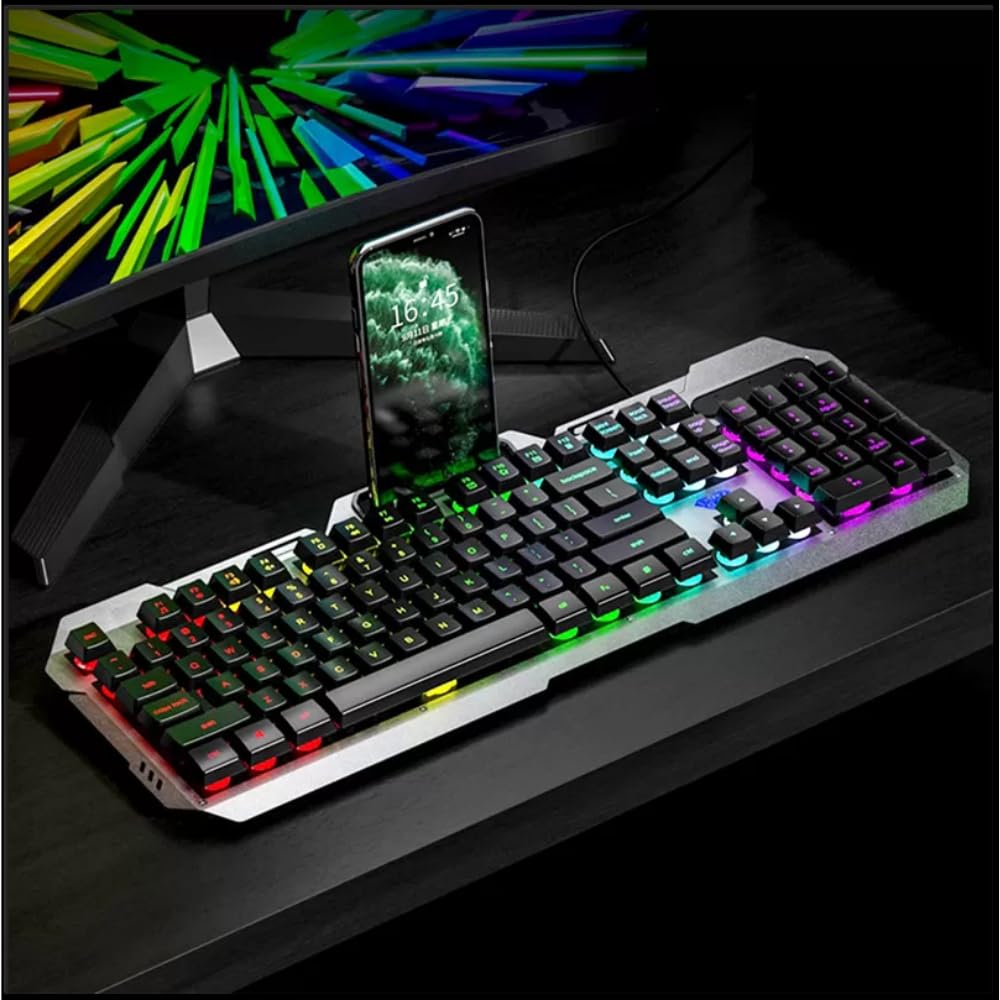
Image 3.1: The AULA F2023 keyboard in use, demonstrating the integrated smartphone holder for convenience.
4. Betjeningsvejledning
4.1. Multimedia Controls
The AULA F2023 keyboard features dedicated function keys for multimedia control. Press the Fn key in combination with the corresponding F-key:
- Fn+F2: Lydstyrke ned
- Fn+F3: Lydstyrke op
- Fn+F4: Stum
- Fn+F5: Stop afspilning
- Fn+F6: Forrige spor
- Fn+F7: Afspil/pause
- Fn+F8: Næste spor
4.2. Baggrundslysstyring
The keyboard features customizable RGB rainbow backlighting. Adjust the lighting effects and brightness using the following key combinations:
- Fn + PgUp: Increase Brightness / Frequency of lighting effect.
- Fn + PgDn: Decrease Brightness / Frequency of lighting effect.
- Fn + 1: Activates lighting mode, allowing adjustment between 3 types of light effects.

Billede 4.1: Et nærbillede view of the keyboard's function keys, highlighting the Fn key and its role in activating lighting modes and other functions.
4.3. Anti-Ghosting and Win Lock
- 26-Key Rollover Anti-Ghosting: This technology ensures that up to 26 keys pressed simultaneously are registered accurately, which is crucial for intense gaming scenarios.
- Win Lock Function: The Win Lock function prevents accidental presses of the Windows key during gaming or typing, avoiding interruptions.

Billede 4.2: En detaljeret view of the keyboard's keys, illustrating the design that supports 26-key rollover for enhanced gaming performance.
4.4. Kompatibilitet
The AULA F2023 keyboard is compatible with a wide range of operating systems and devices:
- Operativsystemer: Windows XP / Vista / 7 / 8 / 10, macOS, Linux
- Enheder: PC, Laptop, Google TV, Smart TV, PS4, Xbox One
5. Vedligeholdelse
To ensure the longevity and optimal performance of your AULA F2023 keyboard, follow these maintenance guidelines:
- Rensning: Regularly clean the keyboard with a soft, dry cloth. For deeper cleaning, use a can of compressed air to remove dust and debris from between the keys.
- Fjernelse af nøglekapsel: Use the included keycap puller to carefully remove keycaps for thorough cleaning. Avoid excessive force to prevent damage.
- Undgå væsker: Udsæt ikke tastaturet for væsker. I tilfælde af utilsigtet spild skal du straks frakoble tastaturet og lade det tørre helt, før du tilslutter det igen.
- Opbevaring: Opbevar tastaturet et køligt, tørt sted væk fra direkte sollys og ekstreme temperaturer, når det ikke er i brug i længere perioder.
6. Fejlfinding
If you encounter issues with your AULA F2023 keyboard, refer to the following common solutions:
- Tastaturet reagerer ikke:
- Sørg for, at USB-kablet er korrekt tilsluttet til både tastaturet og computeren.
- Prøv at tilslutte tastaturet til en anden USB-port på din computer.
- Genstart din computer.
- Test tastaturet på en anden computer for at afgøre, om problemet er med tastaturet eller computeren.
- Baggrundsbelysning virker ikke eller er dæmpet:
- Check if the backlight brightness is set to maximum using Fn + PgUp.
- Ensure no software or system settings are overriding the keyboard's backlight controls.
- Nøgler registreres ikke korrekt:
- Clean the affected keys and surrounding areas to remove any debris that might be obstructing key presses.
- If using a KVM switch or USB hub, try connecting the keyboard directly to the computer.
- Keyboard Enters Sleep Mode: The keyboard is designed to automatically enter sleep mode after 5 minutes of inactivity. Press any key to wake it up.
7. Specifikationer
Detailed technical specifications for the AULA F2023 Wired USB Gaming Keyboard:
| Feature | Detalje |
|---|---|
| Mærke | AULA |
| Modelnummer | F2023 |
| Forbindelsesteknologi | USB-A (kablet) |
| Tastaturbeskrivelse | Gaming, Membrane |
| Materiale | Top-grade Aluminium Alloy Panel |
| Farve | Sort |
| Anti-Ghosting | 26-nøgleovergang |
| Baggrundsbelysning | RGB Rainbow Backlight |
| Produktmål (LxBxH) | 45.7 x 16.6 x 2.8 cm |
| Varens vægt | 562 g |
| Operativsystemkompatibilitet | Linux, Windows XP, Vista, 7, 8, 10, macOS |
| Inkluderede komponenter | Keycap aftrækker |

Image 7.1: A visual representation of the AULA F2023 keyboard's dimensions, indicating its length, width, and height.
8. Garantioplysninger
The AULA F2023 Wired USB Gaming Keyboard comes with a 1 års garanti fra købsdatoen. Denne garanti dækker fabrikationsfejl og funktionsfejl ved normal brug. Den dækker ikke skader forårsaget af misbrug, ulykker, uautoriserede ændringer eller normal slitage.
Gem venligst dit købsbevis for garantikrav.
9. Support
For further assistance, technical support, or warranty inquiries, please contact your retailer or the official AULA support channels. Refer to the product packaging or the AULA official webwebsted for kontaktoplysninger.


