1. Introduktion
Thank you for choosing the Brightever Solar Outdoor Motion Sensor Security Lights. This manual provides essential information for the safe and efficient operation of your new solar lights. Please read these instructions carefully before installation and use, and retain them for future reference.
These solar-powered lights are designed for outdoor use, featuring 388 LED beads for bright, wide-angle illumination, a motion sensor, and three distinct lighting modes. Their waterproof and durable construction ensures reliable performance in various weather conditions.
2. Sikkerhedsoplysninger
- Ensure the solar panel receives direct sunlight for optimal charging. Avoid shaded areas.
- Forsøg ikke at skille produktet ad eller ændre det. Dette kan ugyldiggøre garantien og udgøre en sikkerhedsrisiko.
- Hold produktet væk fra ild eller ekstreme varmekilder.
- Do not immerse the product in water, despite its waterproof rating. The IP65 rating protects against jets of water and dust, not submersion.
- Install the lights securely to prevent them from falling.
- Bortskaf batterier i henhold til lokale regler.
3. Pakkens indhold
Bekræft at alle komponenter er til stede i din pakke:
- Brightever Solar Outdoor Motion Sensor Security Lights (4 units)
- Mounting Hardware (screws and wall plugs)
- Brugervejledning (dette dokument)
4. Produktfunktioner
- Højeffektivt solpanel: Utilizes monocrystalline silicon solar cells with up to 20.5% conversion rate for efficient charging.
- Super skarp belysning: Each light features 388 LED beads, providing 270° wide-angle lighting.
- Avanceret bevægelsessensor: Built-in PIR motion sensor with a 120-degree detection angle and a 16-foot range.
- Tre lystilstande: Adaptable lighting options for various security and ambient needs.
- Holdbar og vejrbestandig: Constructed from upgraded ABS material, IP65 waterproof, heat-resistant, and frost-resistant.
- Energibesparelse: Solar-powered operation eliminates electricity costs and reduces environmental impact.
- Nem installation: No wiring required; simple screw-mounting for quick setup.

Image 1: Four Brightever Solar Outdoor Motion Sensor Security Lights. Each light features a solar panel on top, a motion sensor in the center, and multiple LED lights below.

Image 2: Diagram illustrating the solar charging process during the day (6-8 hours) and automatic illumination at night for 15 seconds when motion is detected. The image shows a light mounted on a house at night.
5. Specifikationer
| Feature | Detalje |
|---|---|
| Mærke | Brightever |
| Modelnavn | HSG-T22LB-A-4PK |
| Lyskildetype | LED (388 beads per light) |
| Lysstyrke | 600LM (per light, as per product description); 4000 Lumen (as per product specifications) |
| Farvetemperatur | 6500K (as per product description); 6000 Kelvin (as per product specifications) |
| Bevægelsessensorvinkel | 120 grader |
| Bevægelsessensor rækkevidde | 16 fod |
| Belysningsvinkel | 270 grader |
| Vandtæt vurdering | IP65 |
| Materiale til hus | ABS+PC |
| Strømkilde | Solcelledrevet |
| Batteri | 1 lithium-ion batteri (medfølger) |
| Opladningstid | 6-8 timer i direkte sollys |
| Belysningstid | Up to 8-10 hours (after full charge) |
| Produktdimensioner | 8.66 cm L x 2.6 cm B x 3.8 cm H |
| Varens vægt | 2.83 pund (i alt for 4-pak) |

Billede 3: Detaljeret view of the product, highlighting its dimensions (8.66in L x 2.6in W x 3.8in H) and key components: Mode Button, Ultra-Bright LED array, Sensitive Motion Sensor, and High Efficiency Solar Panel.
6. Opsætning og installation
The Brightever Solar Lights are designed for easy, wire-free installation. Follow these steps for optimal performance:
- Vælg en placering: Select an outdoor location where the solar panel can receive 6-8 hours of direct sunlight daily. Avoid areas under eaves, trees, or other obstructions that might shade the panel.
- Indledende opkrævning: Before first use, it is recommended to allow the lights to charge in direct sunlight for at least 6-8 hours with the power button pressed (usually the default ON state).
- Markér borepunkter: Hold the light in the desired mounting position and mark the locations for the screws.
- Bore huller: Use an appropriate drill bit to drill holes at the marked points.
- Indsæt vægstik: If installing on masonry or concrete, insert the provided wall plugs into the drilled holes.
- Monter lyset: Align the light with the holes and secure it using the provided screws. Ensure it is firmly attached.
These lights are suitable for various outdoor applications, including walls, gardens, fences, yards, patios, garages, driveways, porches, and gutters.

Image 4: Collage showing the solar lights installed in different outdoor environments: on a fence, along a building wall near stairs, above a garage door, and on a deck next to a house.
7. Betjeningsvejledning
The lights feature a mode button, typically located on the front or bottom of the unit, to cycle through three distinct lighting modes. Press the button to switch between modes.
- Stay-on Mode (Mode 1):
- The light automatically turns on at 50% brightness at dusk and remains on throughout the night.
- It automatically turns off at dawn.
- No motion detection in this mode.
- Dim Light Sensor Mode (Mode 2):
- The light stays at a low brightness (approximately 30%) when no motion is detected at night.
- When motion is detected, it switches to full brightness (100%) for 15 seconds.
- After 15 seconds without motion, it returns to dim brightness.
- Strong Light Sensing Mode (Mode 3):
- The light remains off when no motion is detected at night.
- When motion is detected, it turns on at full brightness (100%) for 15 seconds.
- After 15 seconds without motion, it turns off completely.
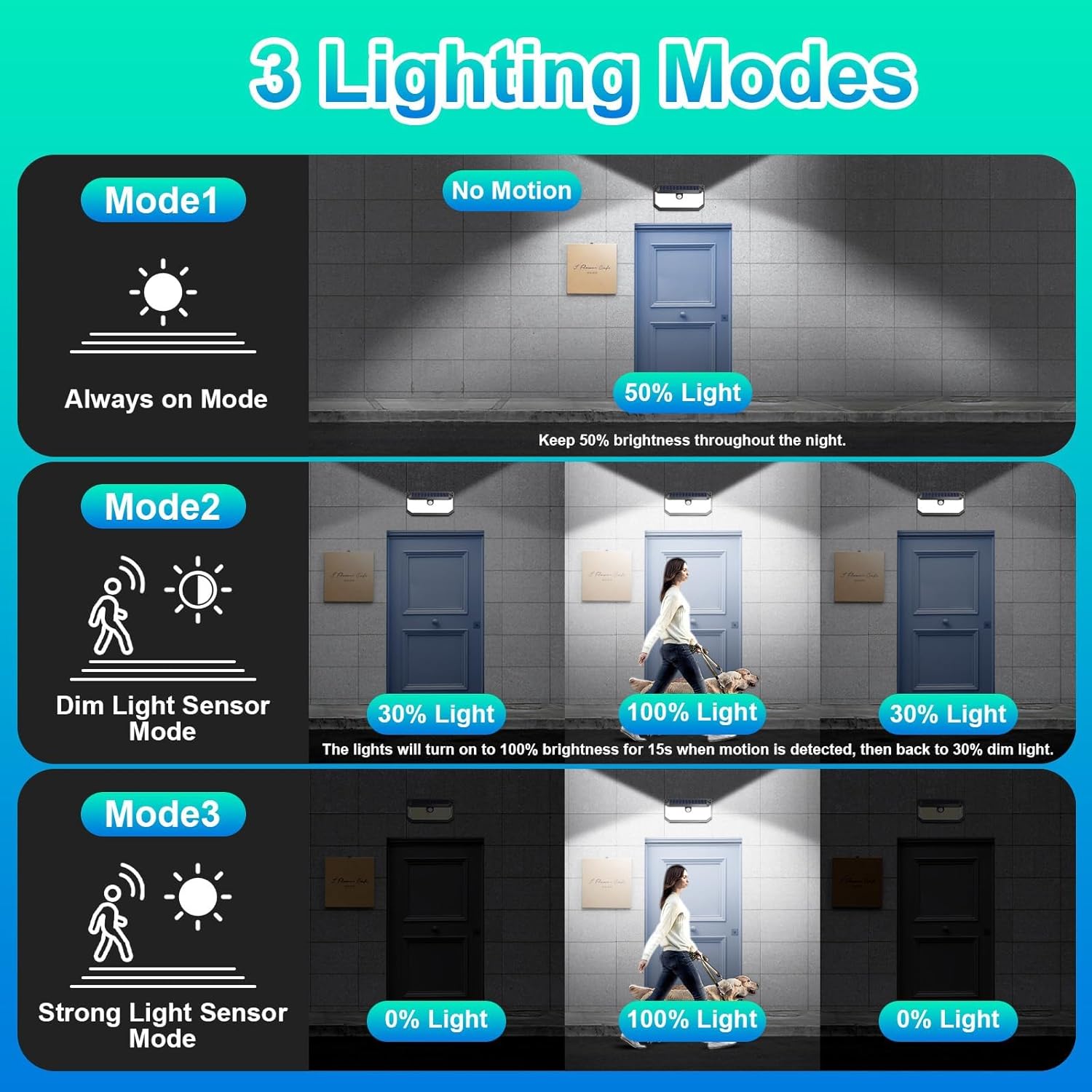
Image 5: Visual representation of the three lighting modes: Mode 1 (Always on at 50% light), Mode 2 (Dim light, then 100% for 15s upon motion), and Mode 3 (Off, then 100% for 15s upon motion).
8. Vedligeholdelse
- Rens solpanel: Tør solpanelet regelmæssigt af med en blød, tør klud.amp klud til at fjerne støv, snavs eller affald. Et rent panel sikrer maksimal opladningseffektivitet.
- Ryd forhindringer: Periodically check that no new obstructions (e.g., growing branches, new installations) are shading the solar panel.
- Batteripleje: The integrated Lithium Ion battery is designed for long life. If the light's performance significantly degrades over time, ensure the panel is clean and receiving adequate sunlight. Battery replacement is not typically user-serviceable.
- Generel rengøring: Clean the light fixture itself with a damp klud efter behov for at bevare dets udseende.
9. Fejlfinding
| Problem | Mulig årsag | Løsning |
|---|---|---|
| Lyset tænder ikke om natten. | Utilstrækkelig solopladning. | Sørg for, at solpanelet er i direkte sollys i 6-8 timer dagligt. Rengør solpanelet. |
| Light stays dim or turns off too quickly. | Battery not fully charged or degraded. | Flyt lampen til et område med mere direkte sollys. Sørg for, at solpanelet er rent. |
| Bevægelsessensoren registrerer ikke bevægelse. | Sensor blokeret eller forkert tilstand. | Ensure the sensor is clear of obstructions. Check that the light is in Mode 2 or Mode 3. |
| Lyset er ikke så klart som forventet. | Low battery charge or dirty LED cover. | Allow for a full day's charge. Clean the LED protective screen. |

Image 6: Comparison chart highlighting features of Brightever lights (270° Lighting Angle, 120° Motion Sensor Angle, 388 LED Chip Quantity, 16FT Detection Distance, IP65 Waterproof, With Reflector) against generic "Others" (90° Lighting Angle, 60° Motion Sensor Angle, 120pcs LED Chip Quantity, 10FT Detection Distance, Not Waterproof, Without Reflector).

Image 7: Illustration of the solar light's premium material and all-weather resistance, showing it functioning during rain, with icons for IP65 Waterproof, Heat-resistant, and Frost-resistant.
10. Garanti og support
Brightever stands behind its products. If you encounter any issues with your solar security lights within three months of purchase, please contact Brightever customer support via the message box on the platform where you purchased the product. We aim to respond and assist within 24 hours.
For additional support or inquiries, please refer to the Brightever brand store or contact their customer service directly.


