Indledning
This manual provides detailed instructions for the GRENARO S12 Wireless Microphone system. It covers everything from initial setup and operation to maintenance and troubleshooting, ensuring you get the best performance from your device. The GRENARO S12 is designed for high-quality audio recording and live streaming, compatible with both Android and iOS devices.

Figure 1: GRENARO S12 Wireless Microphone System Components
The image displays the GRENARO S12 Wireless Microphone system, including the charging case, two wireless microphones, a Type-C receiver, and a Type-C to Lightning adapter for iOS devices. All components are neatly arranged, showcasindet kompakte og bærbare design.
Hvad er der i æsken
Kontroller venligst, at alle følgende komponenter er inkluderet i din pakke:
- 2 x Wireless Microphone Transmitters: The main microphone units.
- 1 x Type-C Receiver: Connects to your recording device.
- 1 x Type-C to Lightning Adapter for iOS: For compatibility with Apple devices.
- 1 x 1 USB to 2 Type-C Cable: For charging the components.
- 1 x Digital Display Charging Case: Stores and charges the microphones and receiver.
Opsætningsvejledning
1. Første opladning
For first-time use, it is recommended to fully charge the microphones and the charging case. The first charge may take longer as the battery management system initializes. The charging case features a digital display to show the remaining power and a microphone charging indicator. A green light indicates a fully charged microphone.
2. Removing the Protective Partition
Upon receiving the product, please remove the small protective partition located at the charging port of the microphone. This partition is designed to prevent dust and dirt from entering the port during shipping.
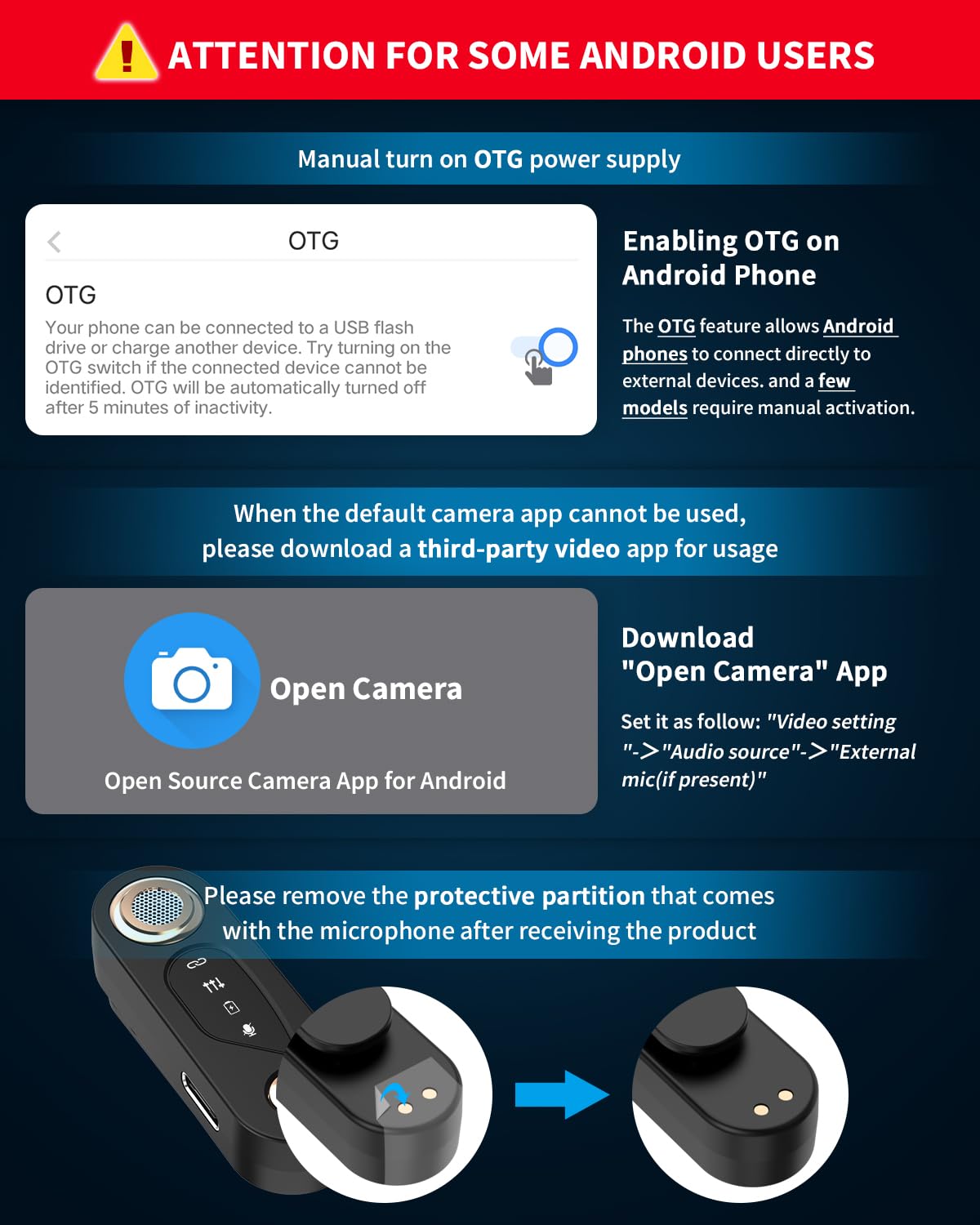
Figure 2: Protective Partition Removal and Android OTG Settings
This image illustrates two key setup steps: first, how to remove the protective partition from the microphone's charging port, and second, a visual guide for enabling the OTG function on Android devices, which is crucial for proper microphone connectivity.
3. Tilslutning til din enhed
The GRENARO S12 Wireless Microphone system uses 2.4G technology for fast and stable connection. No app is required for basic functionality.
- For Android-enheder: Plug the Type-C receiver into your smartphone or tablet's Type-C port. Ensure your device supports OTG function. If connection is unsuccessful, enable OTG in your device settings.
- Til iOS-enheder: Attach the Type-C to Lightning adapter to the Type-C receiver, then plug the combined unit into your iPhone or iPad's Lightning port.
The microphone and receiver will automatically pair within 1 second after booting. The red indicator light on the receiver and the green indicator light on the microphone will remain on, indicating a successful connection.

Figure 3: Device Compatibility and Charging
The image demonstrates the wide compatibility of the GRENARO S12 with both Android (via Type-C receiver) and iOS (via Type-C to Lightning adapter) devices. It also highlights the convenient feature of being able to charge the microphone while it is in use, ensuring continuous operation.
Betjeningsvejledning
1. Grundlæggende funktioner
The microphone features intuitive controls for various functions:
- Langt tryk: Activates/deactivates the microphone.
- Enkelt tryk: Toggles noise reduction on/off.
- Dobbelt tryk: Slår mikrofonen til/fra.
- Triple Press: Toggles reverb effect on/off.

Figure 4: Microphone Controls and Digital Display
This visual guide details the various functions accessible via the microphone's button: long press for power, single press for noise reduction, double press for mute, and triple press for reverb. It also showcases the new digital display on the charging case, providing clear battery level indication.
2. Støjreduktion
The GRENARO S12 features a streamlined one-click noise reduction system. This single level provides powerful noise cancellation, equivalent to the former highest level of three-level noise reduction, simplifying the user experience while maintaining high performance.

Figur 5: Støjreduktion med ét klik
The image visually explains the noise cancellation process, showing raw audio with noise, the application of Active Noise Cancellation (ANC), and the resulting clean audio after filtering. This demonstrates the effectiveness of the microphone's noise reduction feature.
3. Langdistancetransmission
Utilizing the latest 2.4G technology, the GRENARO S12 supports ultra-long-distance transmission up to 102 feet (30 meters). This ensures stable and reliable audio and video synchronization, making it ideal for outdoor recording, large spaces, and live streaming.

Figure 6: 102ft Long-Range Transmission
This image depicts the impressive 102-foot (30-meter) long-range transmission capability of the GRENARO S12 wireless microphone, showing a user recording from a distance with their smartphone, highlighting its suitability for various environments.
4. Omnidirectional Recording
The microphone features a high-sensitivity, 360° omnidirectional pickup pattern, ensuring every detail of your audio is captured. This wide-range recording capability is perfect for interviews, vlogs, and any scenario where capturing sound from all directions is beneficial.
5. Battery Life and Charging Case
The charging case provides a total usage time of 25 hours, while each microphone offers 5 hours of continuous use, for a combined total of 30 hours. The digital display on the charging case allows you to easily monitor the remaining power.

Figure 7: 30H Long Duration
This image highlights the extended battery life of the GRENARO S12 system, indicating 2 hours for full charging, 5 hours of continuous podcasting, and a total usage time of 30 hours when combined with the charging case, ensuring prolonged recording sessions.
Opretholdelse
Tip til opladning
- Første gangs opladning: The initial charge may take several hours as the battery management system undergoes a slow charge to optimize its lifespan.
- 80% Charging Behavior: When the battery reaches approximately 80% charge, the internal software may calibrate the battery capacity, causing the level to temporarily remain at 80%. It will then continue charging to 100% after calibration.
Almen pleje
To ensure the longevity of your GRENARO S12 Wireless Microphone:
- Hold enheden ren og fri for støv og fugt.
- Store the microphones in the charging case when not in use to protect them and keep them charged.
- Undgå ekstreme temperaturer.
Fejlfinding
Android Connection Issues
If you experience connection issues with an Android device:
- Enable OTG: Ensure the OTG (On-The-Go) feature is enabled in your Android device's settings. This feature allows Android phones to connect directly to external devices. Some models may require manual activation.
- Tredjeparts kameraapp: If your default camera app does not support external microphones, download a third-party application like "Open Camera". Within the "Open Camera" app, go to Settings > Video Settings > Audio Source and select "External mic (if present)".
Audio Quality or Noise Cancellation Issues
If you encounter issues such as malfunction, damage affecting audio quality, or a loss of noise cancellation, please refer to the Warranty & Support section for assistance.
Specifikationer
| Feature | Detalje |
|---|---|
| Model | Dual Universal - Rose gold (S12) |
| Farve | Sort |
| Forbindelsesteknologi | 2.4GHz Wireless |
| Connector Type | USB Type-C |
| Kompatible enheder | iPhone, iPad, Android Smartphones, Tablets, Laptops |
| Polar mønster | Omnidirektionel |
| Transmissionsafstand | Op til 102 fod (30 meter) |
| Microphone Continuous Use | 5 timer |
| Charging Case Total Usage Time | 25 timer (ekstra) |
| Combined Total Usage Time | 30 timer |
| Varens vægt | 6.9 gram (pr. mikrofon) |
| Produktdimensioner | 6.3 x 5.5 x 2.5 cm |
| Signal-støjforhold | 70 dB |
| Frekvensrespons | 20 KHz |
Garanti og support
1-Year Product Care
GRENARO S12 trådløs mikrofon er dækket af en 1 års garanti starting from the date of purchase. To register and activate your warranty, please send your order ID to the customer service email provided below. This ensures you receive full warranty coverage and dedicated support.

Figure 8: GRENARO 12-Months Product Care
This banner highlights the 12-month product care and warranty provided by GRENARO, emphasizing the commitment to customer satisfaction and product reliability.
Kundesupport
For any questions regarding usage, technical issues, or assistance, please do not hesitate to contact our dedicated support team. We are committed to resolving your concerns promptly.

Figure 9: Customer Care Contact Information
The image provides essential customer care contact details, including the email address and WhatsApp number for GRENARO support, ensuring users can easily reach out for assistance.
- E-mail: kundeservice@grenaro.com
- Tlf / WhatsApp: +91 9667585067


