1. Introduktion
Thank you for choosing the ARROWMAX SES PRO Electric Precision Screwdriver. This cordless tool is designed for precision tasks, featuring smart motion control and a comprehensive set of 34 magnetic bits. It is ideal for electronics, laptops, glasses, and other delicate applications. This manual provides essential information for safe operation, setup, maintenance, and troubleshooting to ensure optimal performance and longevity of your device.
2. Sikkerhedsoplysninger
Please read all safety warnings and instructions carefully before using this product. Failure to follow these instructions may result in electric shock, fire, and/or serious injury.
- Hold arbejdsområdet rent og godt oplyst. Rodede eller mørke områder inviterer til ulykker.
- Brug ikke elværktøj i eksplosive atmosfærer, såsom i nærheden af brændbare væsker, gasser eller støv. Elværktøj danner gnister, som kan antænde støv eller dampe.
- Hold børn og omkringstående væk, mens du betjener et elværktøj. Distraktioner kan få dig til at miste kontrollen.
- Undgå utilsigtet start. Sørg for, at kontakten er i slukket position, før du tilslutter batteriet, løfter eller bærer værktøjet.
- Gå ikke for langt. Hold altid ordentligt fodfæste og balance. Dette giver bedre kontrol over elværktøjet i uventede situationer.
- Klæd dig ordentligt på. Bær ikke løstsiddende tøj eller smykker. Hold dit hår og tøj væk fra bevægelige dele. Løst tøj, smykker eller langt hår kan blive fanget i bevægelige dele.
- Brug personlige værnemidler. Bær altid øjenværn. Beskyttelsesudstyr såsom støvmaske, skridsikre sikkerhedssko, sikkerhedshjelm eller høreværn, der bruges til passende forhold, vil reducere personskader.
- Opbevar inaktivt elværktøj utilgængeligt for børn, og lad ikke personer, der ikke er bekendt med elværktøjet eller disse instruktioner, betjene elværktøjet.
- Vedligehold elværktøj. Kontroller for fejljustering eller fastklæbning af bevægelige dele, brud på dele og enhver anden tilstand, der kan påvirke elværktøjets funktion. Hvis det er beskadiget, skal elværktøjet repareres før brug.
- Brug elværktøjet, tilbehøret og værktøjsbits osv. i overensstemmelse med denne vejledning, under hensyntagen til arbejdsforholdene og det arbejde, der skal udføres. Brug af elværktøjet til andre operationer end dem, der er beregnet til, kan resultere i en farlig situation.
- Genoplad kun med den oplader, der er specificeret af producenten. En oplader, der er egnet til én type batteripakke, kan skabe en brandrisiko, når den bruges sammen med en anden batteripakke.
- Brug ikke værktøjet, hvis kontakten ikke tænder og slukker for det. Ethvert elværktøj, der ikke kan styres med kontakten, er farligt og skal repareres.
- Frakobl batteripakken fra elværktøjet, før du foretager justeringer, udskifter tilbehør eller opbevarer elværktøj. Sådanne forebyggende sikkerhedsforanstaltninger reducerer risikoen for at starte elværktøjet ved et uheld.
3. Pakkens indhold
The ARROWMAX SES PRO Electric Precision Screwdriver package typically includes the following items:
- 1 x ARROWMAX SES PRO Electric Precision Screwdriver
- 1 x Magnetic Storage Case
- 34 x Magnetic Precision Bits (S2 Steel, 4mm)
- 1 x USB-A til USB-C opladningskabel

Image: The ARROWMAX SES PRO Electric Precision Screwdriver, its magnetic bit case, and the included 34 precision bits.
4. Produktet er slutview og komponenter
Familiarize yourself with the main components of your ARROWMAX SES PRO screwdriver:

Image: Labeled diagram of the ARROWMAX SES PRO screwdriver's key components.
- Type-C opladningsport: Located at the top for recharging the internal battery.
- LED-statusvisning: An OLED screen showing battery level, torque setting, and operational status.
- Power knap: Used to turn the device on/off and adjust torque settings.
- Aluminiumlegeringskrop: Holdbar og let konstruktion.
- LED lys: Oplyser arbejdsområdet for bedre udsyn.
- Bit Installation Port: Where precision bits are inserted.
5. Opsætning
5.1 Opladning af skruetrækkeren
- Locate the USB-C charging port at the top of the screwdriver.
- Connect the provided USB-A to USB-C charging cable to the screwdriver and a compatible USB-A power adapter (not included).
- The LED Status Display will indicate the charging progress. A full charge allows for tightening approximately 900 screws.
- Vigtig bemærkning: This electric screwdriver only supports USB-A to USB-C charging and is not compatible with USB-C PD (Power Delivery) chargers.

Billede: Overview of charging port, battery, torque adjustment, and OLED display.
5.2 Installing Precision Bits
- Select the appropriate precision bit from the magnetic storage case. The case features a pop-up design for easy access.
- Insert the bit firmly into the Bit Installation Port at the tip of the screwdriver. The magnetic holder will secure the bit in place.
- To remove a bit, simply pull it out.
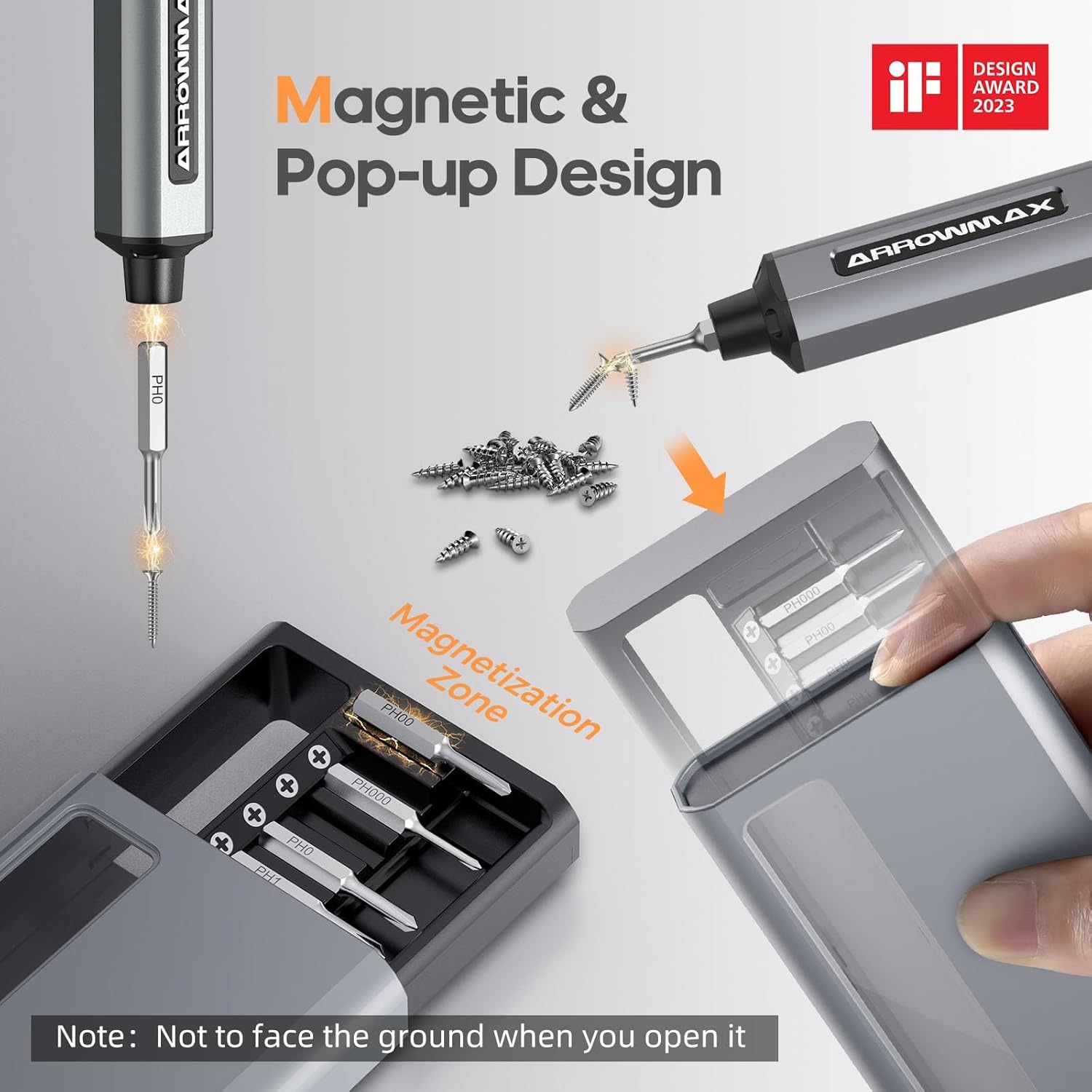
Image: Magnetic pop-up bit case design and bit magnetization zone.
6. Betjeningsvejledning
6.1 Tænd/sluk
Press and hold the Power Button for a few seconds to turn the screwdriver on or off. The OLED screen will illuminate upon activation.
6.2 Justering af momentindstillinger
The SES PRO offers 5 adjustable torque levels, including an auto-sensing mode, to suit various tasks. The electric torque ranges from 0.049 N.m to 0.30-0.35 N.m, with a manual torque of 3 N.m.
- With the screwdriver powered on, press the Power Button three times continuously to cycle through the torque settings.
- The OLED screen will display the current torque level (e.g., 1, 2, 3, 4, A for Auto-Sensing).
- Select a lower torque for delicate items like glasses or small electronics, and higher torque for more robust applications.
- For screws that are too tight for the electric motor, the screwdriver can be used in manual mode by applying direct force.
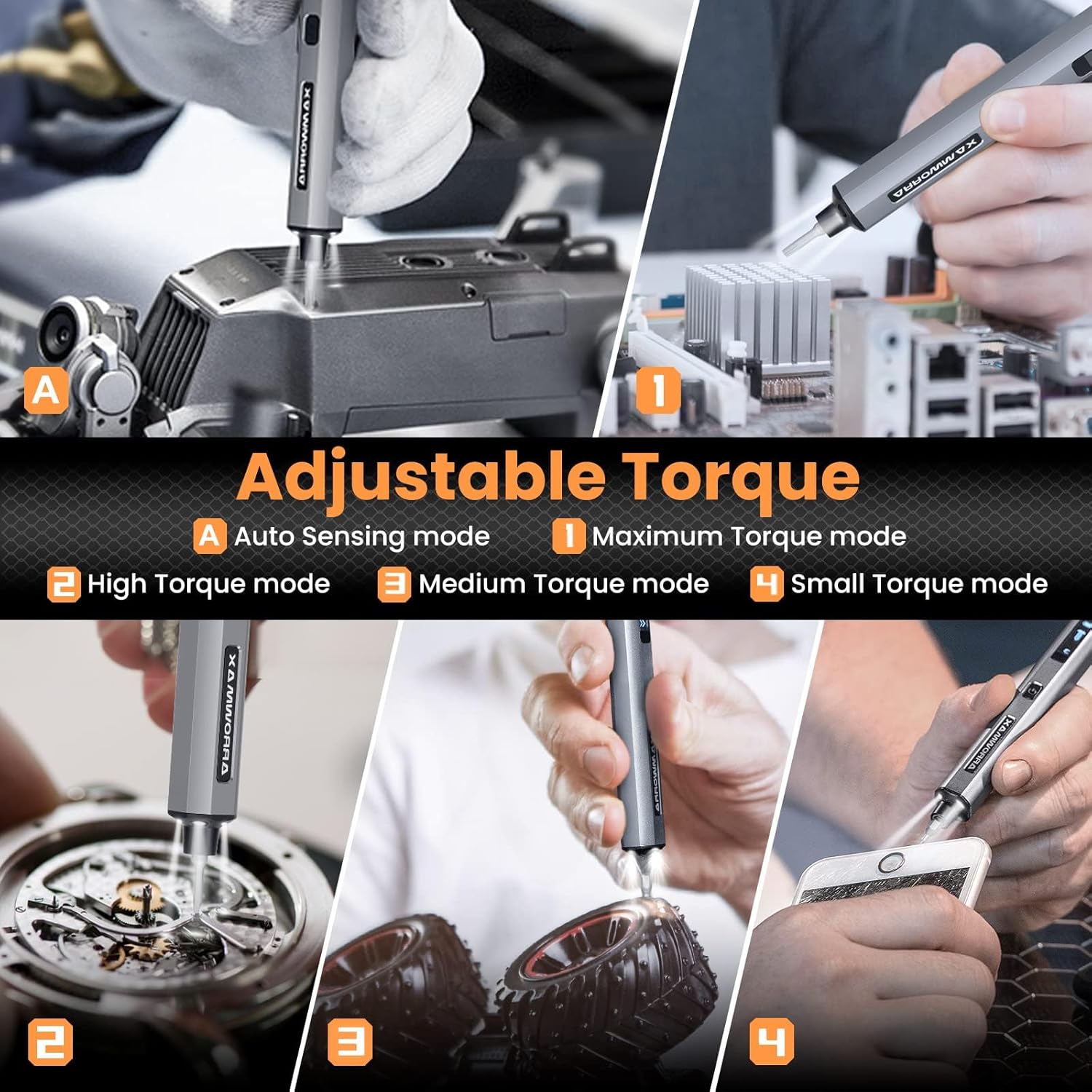
Image: Adjustable torque settings for various applications.
6.3 Body Sensory Dual-Mode (Forward/Reverse)
The SES PRO features a body sensory dual-mode for intuitive control of rotation direction.
- To drive a screw in (tighten), gently rotate your wrist in a clockwise direction while holding the screwdriver.
- To remove a screw (loosen), gently rotate your wrist in a counter-clockwise direction.
- The screwdriver's internal gyroscope detects your wrist movement and activates the motor accordingly.
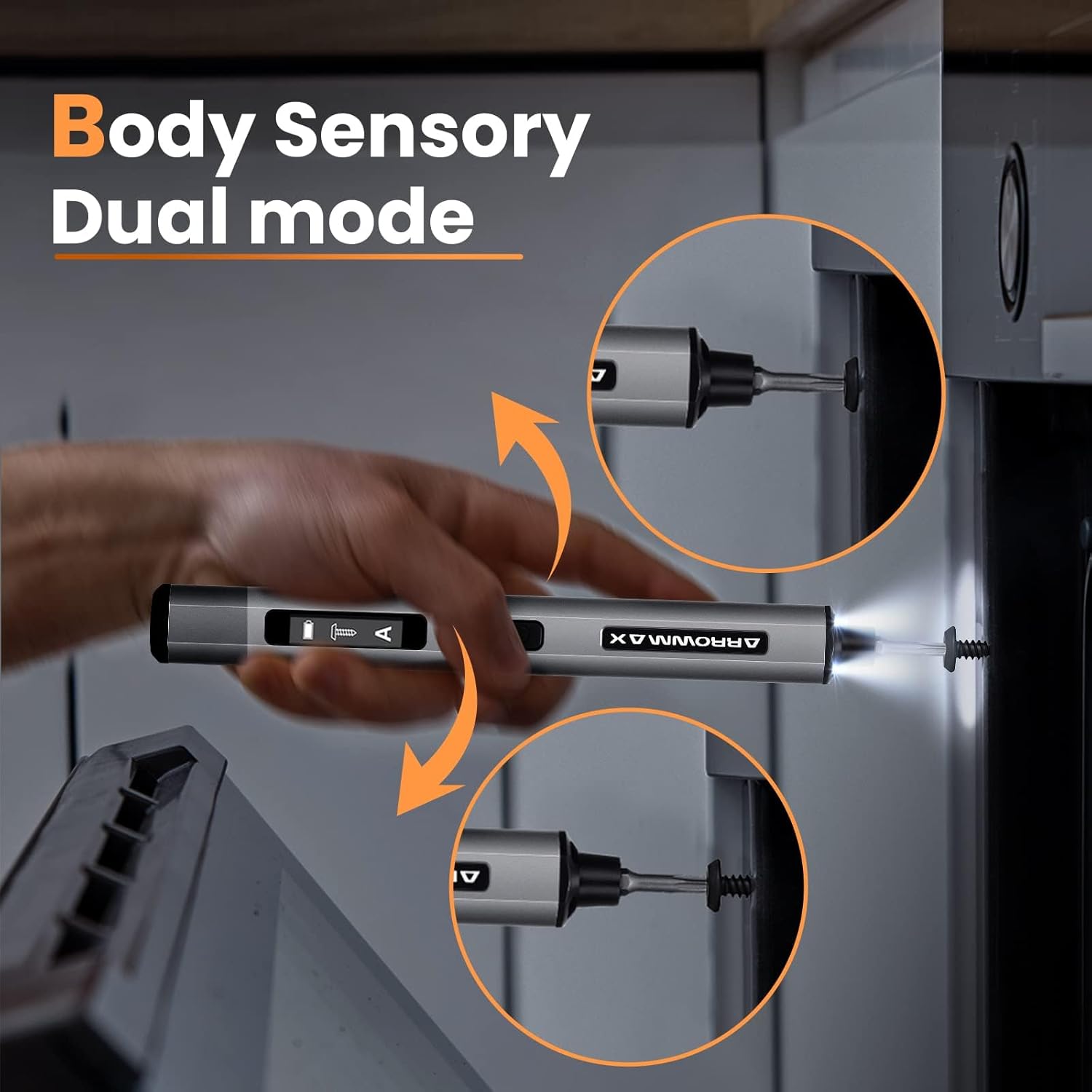
Image: Body sensory dual-mode in action for forward and reverse operation.
6.4 LED Work Lights
The integrated LED lights at the tip of the screwdriver automatically illuminate when the motor is active, providing clear visibility of your work area.
7. Vedligeholdelse
7.1 Rengøring
- Wipe the screwdriver body with a soft, dry cloth. Do not use abrasive cleaners or solvents.
- Ensure the bit installation port is free of debris.
7.2 Pleje af batterier
- For at forlænge batteriets levetid bør du undgå at aflade batteriet helt ofte.
- Store the screwdriver in a cool, dry place when not in use.
- Recharge the battery periodically if stored for extended periods to prevent deep discharge.

Image: The SES PRO's long-lasting battery capacity.
7.3 Bit Care
- Keep the precision bits clean and free of rust.
- Store bits securely in the magnetic case to prevent loss and damage.
8. Fejlfinding
If you encounter issues with your ARROWMAX SES PRO screwdriver, refer to the following common problems and solutions:
| Problem | Mulig årsag | Løsning |
|---|---|---|
| Screwdriver does not turn on or respond. | Lavt batteri; enheden er slukket. | Charge the screwdriver using the provided USB-A to USB-C cable. Ensure the power button is pressed to turn it on. |
| Screwdriver does not charge. | Incorrect charger type; faulty cable/adapter. | Ensure you are using a USB-A to USB-C cable and a standard USB-A power adapter. USB-C PD chargers are not supported. Try a different cable or adapter. |
| Motor lacks power or cannot loosen/tighten screws. | Low battery; incorrect torque setting; screw is too tight for electric mode. | Charge the screwdriver. Increase the torque setting. For very tight screws, manually loosen or tighten them first, then use the electric mode. |
| Directional control (forward/reverse) is inconsistent. | Improper wrist movement; gyroscope calibration issue. | Ensure clear and deliberate wrist movements. If issues persist, try restarting the device. |
| Bits fall out or are not held securely. | Bit installation port is dirty; bit is not fully inserted. | Clean the bit installation port. Ensure the bit is pushed in firmly until it clicks or feels secure. |
9. Specifikationer
Key technical specifications for the ARROWMAX SES PRO Electric Precision Screwdriver:
| Feature | Specifikation |
|---|---|
| Mærke | ARROWMAX |
| Model | SES PRO (AM-199913-G) |
| Hastighed | 200 RPM |
| Strømkilde | Batteridrevet |
| Voltage | 3.7 volt (DC) |
| Elektrisk moment | 0.049 N.m - 0.30-0.35 N.m (Adjustable) |
| Manuel moment | 3 Nm |
| Batteritype | Litium-ion (500mAh) |
| Opladningsport | USB-C (USB-A to USB-C charging only) |
| Varens vægt | 13.7 ounce |
| Pakkedimensioner | 7.48 x 3.43 x 1.73 tommer |
| Særlige funktioner | OLED Screen, Smart Motion Control, Ergonomic Design, LED Lights |
10. Garanti og support
The manufacturer's warranty information for this product is not explicitly provided in the available data. For details regarding warranty coverage, duration, and terms, please refer to the documentation included with your purchase or contact the retailer where the product was acquired.
For technical support, product inquiries, or assistance with troubleshooting that is not covered in this manual, please visit the official ARROWMAX website or contact their customer service department. Contact information can typically be found on the product packaging or the manufacturer's official online channels.


