1. Introduktion
The EPOS Impact 1061T is a double-sided Active Noise Cancelling (ANC) headset designed for modern open office environments. It integrates EPOS BrainAdapt™ technology to minimize brain fatigue, features industry-leading voice pickup powered by EPOS AI™, and adaptive ANC for clear communication. This headset offers all-day wearing comfort with its lightweight design, soft cushions, headband padding, and Super Wideband for natural listening. Enjoy total ease of use with a contactless charging stand, intuitive on-headset controls, and a suite of smart features.
2. Hvad er der i æsken
- IMPACT 1061T Headset
- IMPACT 1000 ørepuder
- IMPACT 1000 ANC ear pads
- Batteri
- Contactless charging stand (CH 40)
- USB-C-kabel
3. Opsætning
3.1 Indledende opladning
Before first use, fully charge your headset using the provided USB-C cable or the contactless charging stand (CH 40). Connect the USB-C cable to the headset and a power source, or place the headset on the charging stand ensuring proper alignment.
3.2 Tilslutning til enheder
The EPOS Impact 1061T Headset offers versatile connectivity:
- Trådløs forbindelse: The headset utilizes Bluetooth technology (Bluetooth Version 5.0) for wireless connection. Power on the headset and put it into pairing mode. Søg efter "EPOS Impact 1061T" on your device's Bluetooth settings and select to pair.
- PC Connection via Dongle: For optimal performance with PCs and UC softphones, use the dedicated USB-C dongle. Plug the dongle into an available USB-C port on your computer. The headset will automatically connect to the dongle. If your PC only has USB-A ports, an adapter may be required (not included unless specified in the box contents).
- Tilslutning til flere enheder: Stay connected wirelessly with up to three devices simultaneously, allowing seamless switching between your laptop, tablet, and smartphone.
3.3 Hot Desking Environments
This headset is designed to operate without a base station, making it ideal for hot desking. Simply connect your headset to the available device via Bluetooth or the USB dongle for immediate use.
4. Betjeningsvejledning
4.1 Grundlæggende kontroller
The headset features intuitive on-headset controls for managing calls and audio:
- Besvar/afslut opkald: Use the dedicated call button on the earcup or simply move the boom arm down to answer and up to end calls.
- Slå mikrofon fra: Mute calls by moving the boom arm up or using the mute button.
- Lydstyrkekontrol: Adjust audio volume using the dedicated buttons on the earcup.
- travlt: An intuitive busylight clearly signals when you are on a call and not to be disturbed.
4.2 Avancerede funktioner
- Aktiv støjreduktion (ANC): Activate adaptive ANC to reduce background noise and enhance focus for both sides of the conversation.
- EPOS AI™ and BrainAdapt™ Technology: Benefit from industry-leading voice pickup and technology designed to reduce brain fatigue, ensuring clear speech in noisy environments.
- Talk-Through: Communicate easily with in-office colleagues without removing the headset, maintaining environmental awareness during calls.
- Super Wideband Audio: Enjoy clear speech and natural listening experience with super wideband audio and stereo sound.
5. Medier
5.1 Produktbilleder
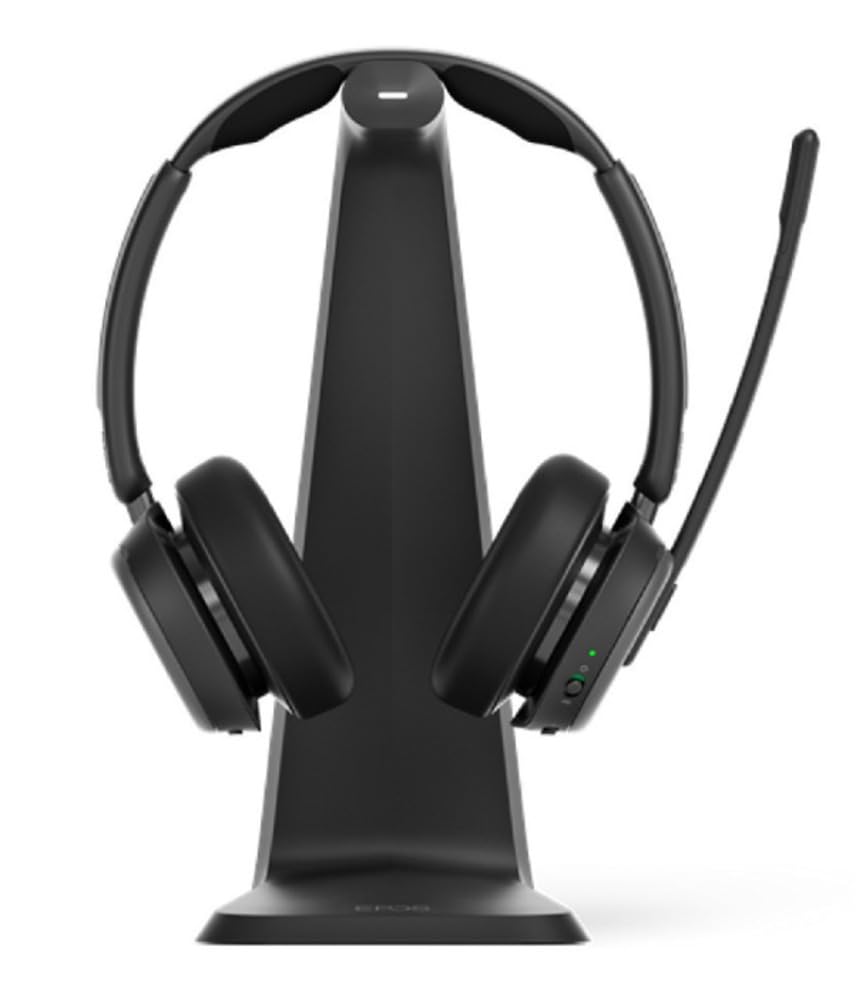
Billede 1: The EPOS Impact 1061T Headset, shown in black, featuring its over-ear design with a flexible microphone boom arm. The headset is designed for comfort and clear communication in professional settings.
6. Specifikationer
| Feature | Detalje |
|---|---|
| Modelnavn | IMPACT 1000 |
| Forbindelsesteknologi | Trådløs (Bluetooth 5.0) |
| Støjkontrol | Aktiv støjreduktion |
| Ørestykke form | På øret |
| Varens vægt | 6 ounce (0.17 kilo) |
| Produktdimensioner | 9.5 x 9.25 x 4.5 tommer |
| Batteri | 1 lithium-ion batteri (medfølger) |
| Særlige funktioner | Ambient Noise, Breathable, Comfortable, Lightweight, Microphone Included, Mute Light Indicator, Noise Cancellation, Padded Headband, Talk-Through, USB Charging, Wideband Audio |
| Kompatible enheder | Laptops, Desktops, Tablets, Smartphones, Smart Speakers, Gaming Consoles, Telephones |
7. Vedligeholdelse
7.1 Rengøring
Regularly clean your headset to ensure hygiene and longevity. Use a soft, dry cloth to wipe the earcups and headband. For stubborn dirt, a slightly damp cloth with mild soap can be used, ensuring no moisture enters the electronic components. Do not use harsh chemicals or abrasive materials.
7.2 Opbevaring
When not in use, store the headset in its soft carry pouch to protect it from dust and damage. Avoid storing in extreme temperatures or high humidity.
7.3 Earpad Replacement
The IMPACT 1000 ear pads and IMPACT 1000 ANC ear pads are replaceable. Refer to the EPOS support website for instructions on how to replace them if they become worn or damaged.
8. Fejlfinding
- Ingen lyd/dårlig lydkvalitet:
- Sørg for, at headsettet er fuldt opladet.
- Kontroller, at headsettet er korrekt parret og tilsluttet din enhed.
- Kontroller lydstyrkeniveauerne på både headsettet og din tilsluttede enhed.
- If using a dongle, ensure it is securely plugged into the PC.
- Mikrofonen virker ikke:
- Sørg for, at mikrofonarmen er sænket ned og ikke er slået fra.
- Check microphone settings on your connected device/application.
- Forbindelsesproblemer:
- Move closer to your connected device to ensure you are within range.
- Frakobl headsettet og par det med din enhed igen.
- Genstart din tilsluttede enhed.
- ANC Not Functioning:
- Ensure ANC is activated via the headset controls.
- Check for any obstructions around the external microphones.
9. Garanti og support
The EPOS Impact 1061T Headset comes with a manufacturer's warranty. For detailed warranty information, product support, or to access additional resources, please visit the official EPOS webwebstedet eller kontakt deres kundeservice. Gem din købsbevis til garantikrav.


