
Indledning
This manual provides comprehensive instructions for the operation and maintenance of your ATTOP X-PACK 18 Drone with Camera. Please read this manual thoroughly before operating the drone to ensure safe and optimal performance. The ATTOP X-PACK 18 is a foldable drone equipped with a 1080P 120° wide-angle FPV Wi-Fi camera, offering features like one-key take-off/landing, headless mode, 3-speed modes, 360° flip, emergency stop, one-key return, and various APP-controlled functions including gesture, voice, and gravity control, as well as flight path mode.

Image: ATTOP Drone with remote control, batteries, and carrying case.
Hvad er der i æsken
Bekræft at alle komponenter er til stede i pakken:
- ATTOP X-PACK 18 Drone
- Fjernbetjening
- 2 x 3.7V / 1100mAh Rechargeable Batteries
- Bæretaske
- Ekstra knive
- USB opladningskabel
- Skruetrækker
- Telefonholder

Image: Visual representation of the drone, remote, batteries, and accessories included in the package.
Opsætningsvejledning
Folder dronen ud
Carefully unfold the drone arms until they are fully extended. Ensure all arms click into place securely.

Image: Illustration of the drone's foldable design and dimensions.
Installation af batteri
Insert the fully charged battery into the designated compartment on the drone. Ensure it is securely latched.
Telefon Clamp Installation (for Remote Control)
Tilslut telefonen clamp to the remote control. Secure your smartphone into the clamp for FPV viewog APP-kontrol.
Image: Close-up of the remote control with a smartphone mounted in the clamp.
Tænd
Press and hold the power button on the drone until the indicator lights illuminate. Power on the remote control.
Parring
After powering on both the drone and remote, push the left control stick on the remote fully up and then fully down to pair the devices. The drone lights will stop flashing once paired.
Kalibrering
If playing for the first time, press the calibration button on the remote control. This ensures stable flight.
APP download og tilslutning
Download the "ATTOP CLUB" APP from your device's app store. Connect your phone to the drone's Wi-Fi network (e.g., "X-PACK 18-XXXXXX"). Open the APP and select "X-PACK 18" to connect and access advanced features and FPV view.
Video: Demonstrates the ATTOP CLUB APP download, Wi-Fi connection, and interface display for the X-PACK 18 drone.
Betjeningsvejledning
Familiarize yourself with the drone's controls and features for an optimal flight experience.
Video: Comprehensive guide demonstrating drone setup, basic flight controls, and advanced features like 360° stunts and headless mode.
Grundlæggende flyvekontrol:
- One-key start/landing: Press the dedicated button on the remote or APP for automatic take-off or landing.
- Ascend & Descend: Use the left control stick to adjust the drone's altitude.
- Altitude Holding: The drone maintains a stable hover at a set altitude, ideal for capturing steady photos and videos.
- Trimning: Adjust the drone's flight path to correct any drifting.
- Flying Forward/Backward: Use the right control stick to move the drone in the desired direction.
- Venstre/højre drejning: Rotate the drone left or right using the left control stick.
- Venstre/højre sideflyvning: Move the drone sideways using the right control stick.
Avancerede funktioner:
- 360° Stunt (Flip): Udfør imponerende luftige saltoer med et enkelt tryk på en knap.
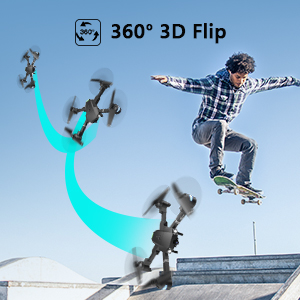
Image: Sequence showing the drone executing a 360-degree flip.
- Hastighedstilstande: Switch between 3 different speeds (30%, 60%, 100%) to match your skill level and environment.
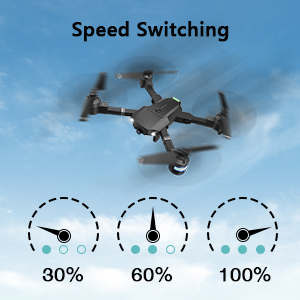
Image: Visual representation of the three-speed modes (30%, 60%, 100%).
- Hovedløs tilstand: Simplifies flight by orienting the drone relative to the pilot, regardless of the drone's actual front direction.
- Cirkelflue: Dronen kan udføre cirkulære flyvemønstre.
- Taking Pictures & Videos: Use the dedicated buttons on the remote or APP to capture 1080P HD photos and videos.
Image: Close-up of the drone's 1080P HD camera.
- Nødstop: Instantly stop the drone in case of an emergency to prevent damage or injury.
- One-key return: The drone will automatically return to its take-off point.
APP-Controlled Functions:
- Bevægelseskontrol: Udfør specifikke håndbevægelser for at udløse foto- eller videooptagelse.
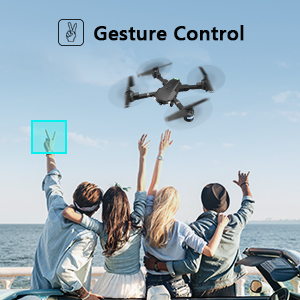
Image: People making a "V" gesture to activate the drone camera.
- Stemmestyring: Command the drone using voice commands for various flight actions (e.g., "Take off", "Landing", "Forward").

Billede: Eksamples of voice commands like "Take off" and "Right side" for drone control.
- Tyngdekraftskontrol: Control the drone's movement by tilting your smartphone, utilizing its built-in G-sensor.
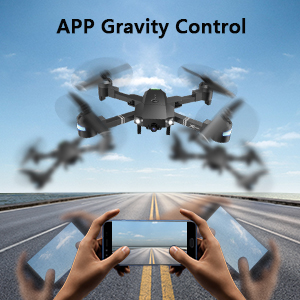
Image: Hands holding a smartphone, demonstrating how tilting controls the drone's direction.
- Flight Path Mode: Tegn en ønsket flyverute på din smartphone-skærm, og dronen vil automatisk følge den.
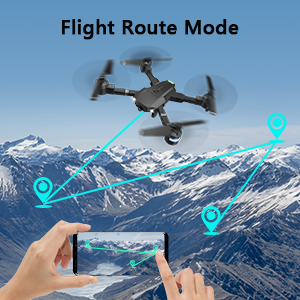
Image: A smartphone screen displaying a drawn flight path for the drone to follow.
- VR-tilstand: Compatible with VR glasses for an immersive first-person view flight experience.
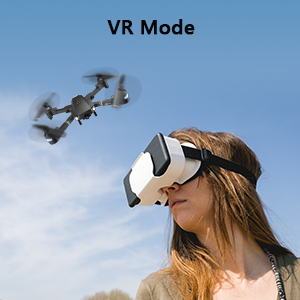
Image: A person wearing VR glasses, experiencing the drone's first-person view.
Opretholdelse
Regelmæssig vedligeholdelse sikrer din drones levetid og optimale ydeevne.
- Rensning: Brug en blød, tør klud til at rengøre dronens hus og kameralinsen. Undgå at bruge skrappe kemikalier.
- Propelinspektion: Kontrollér regelmæssigt propellerne for skader (revner, bøjninger). Udskift beskadigede propeller med det samme med de medfølgende reserveblade og skruetrækkere.
- Batteripleje: Opbevar batterier et køligt og tørt sted. Overoplades eller overaflades ikke. Hvis de opbevares i længere perioder, skal de oplades til ca. 50% kapacitet.
- Motorpleje: Hold motorerne fri for støv og snavs. Undgå at bruge dem i sandede eller støvede omgivelser.
- Opbevaring: When not in use, fold the drone and store it in its carrying case to protect it from dust and physical damage.
Fejlfinding
| Problem | Mulig årsag | Løsning |
|---|---|---|
| Dronen reagerer ikke på fjernbetjeningen. | Ikke parret, lavt batteri, interferens. | Ensure drone and remote are powered on and paired correctly. Recharge batteries. Move away from sources of interference. |
| Drone driver afsted under flyvning. | Not calibrated, uneven surface for take-off, wind. | Perform calibration on a flat surface. Use trimming functions to correct drift. Avoid flying in strong winds. |
| Camera not working or FPV feed is unstable. | Wi-Fi not connected, APP issue, low drone battery. | Ensure phone is connected to drone's Wi-Fi. Restart APP and drone. Charge drone battery. |
| Kort flyvetid. | Batteriet er ikke fuldt opladet, gammelt batteri. | Fully charge batteries before each flight. Consider replacing old batteries. |
| Drone styrter ofte ned. | Lack of experience, environmental factors, damaged propellers. | Practice in open areas. Avoid obstacles. Check and replace damaged propellers. |
Specifikationer
| Feature | Detalje |
|---|---|
| Mærke | ATTOP |
| Modelnavn | X-PACK 18 |
| Særlige funktioner | 360 Degree Flip, Speed Adjustment, Foldable, First Person View (FPV), Long Battery Life |
| Aldersinterval (beskrivelse) | 96 måneder og opefter |
| Farve | Jet Black |
| Videooptagelsesopløsning | 1080p |
| Forbindelsesteknologi | Wi-Fi |
| Færdighedsniveau | Alle |
| Batterikapacitet | 1100 mAh (pr. batteri) |
| Flyvetid | Op til 20 minutter (med 2 batterier)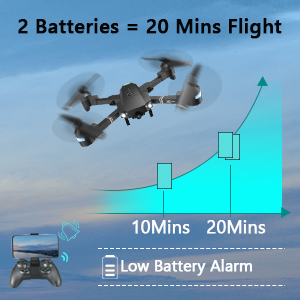 Image: Graph showing flight time with two batteries. |
| Videooptagelsesformat | MP4 |
| Fjernbetjeningsteknologi | Wi-Fi |
| Kontroltype | Fjernbetjening |
| Maksimal rækkevidde | 80 meter |
| Materiale | Plastic or Reinforced Plastic |
| Produktdimensioner | 13.8 cm L x 12.6 cm B x 2.76 cm H |
| Varens vægt | 1.76 pund |
| Udgivelsesdato | 12. november 2023 |
Garanti og support
ATTOP provides customer support and assistance for your drone. For any questions or to inquire about extended warranty, please refer to the following:
- E-mail support: support@attoptoys.com
- Online support: Scan QR-koden nedenfor eller besøg attop.efterservice.vip for assistance og garantioplysninger.

Image: QR code for quick access to ATTOP customer service and extended warranty information.


