1. Introduktion og overview
The FXTUL M3-A is a handheld motorcycle diagnostic tool designed for comprehensive fault detection and analysis across various motorcycle brands, including Yamaha, Honda, Kawasaki, and general OBD2 compatible motorcycles. This device allows users to quickly read and clear diagnostic trouble codes, view live data streams, perform active tests, and retrieve vehicle information, making it an essential tool for both professional technicians and DIY enthusiasts.
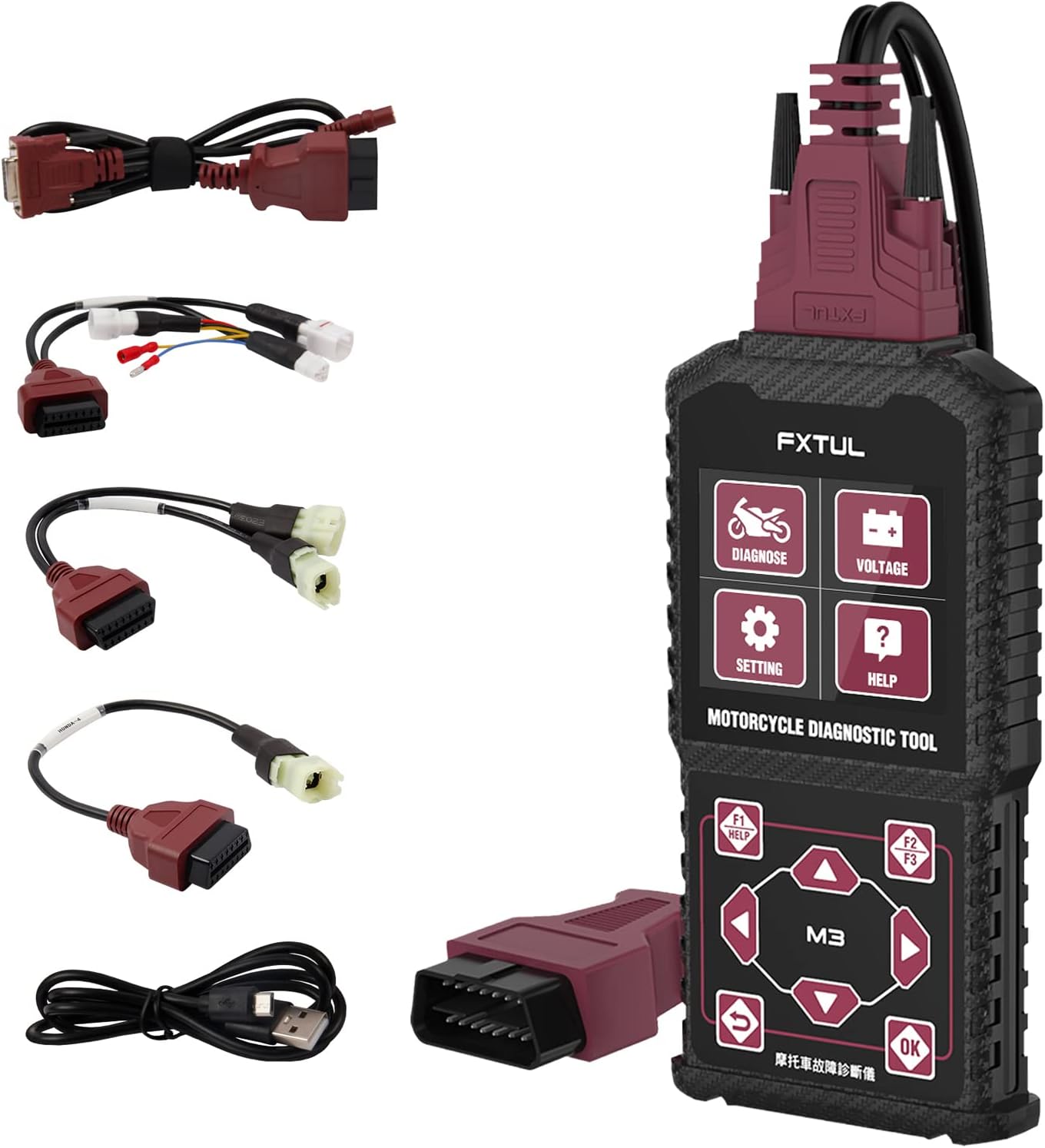
Figure 1.1: FXTUL M3-A Motorcycle Diagnostic Tool and included cables.
2. Nøglefunktioner
- Systemdiagnose: Supports engine, ABS, tire pressure, and anti-theft systems. Capable of reading and clearing DTCs, viewing freeze frame data, displaying data streams, and performing active tests.
- Brugervenlighed: Handheld design with a clear interface, making it user-friendly for quick diagnosis and repairs.
- Bred kompatibilitet: Supports Asian, European, and American multi-brand motorcycles, specifically Yamaha, Honda, Kawasaki, and general OBD2.
- Flersproget support: Offers 11 language options for diverse users.
- Portabilitet: Lightweight and compact, allowing for convenient use anywhere without an internet connection.
- Free Software Upgrade: Software can be updated via a computer connection.
- Voltage Detektion: Real-time OBD battery voltage afsløring.

Figur 2.1: Overview of FXTUL M3-A's main diagnostic capabilities.
3. Opsætning
Before using the FXTUL M3-A, ensure the device is fully charged or connected to a stable power source if applicable. Connect the appropriate diagnostic cable to the M3-A unit and then to your motorcycle's diagnostic port. The device is designed for immediate use without complex internet setup.

Figure 3.1: Connecting the diagnostic tool to the motorcycle via the appropriate cable.
4. Betjeningsvejledning
The M3-A features an intuitive interface with dedicated buttons for navigation and function selection. Below are common operations:
4.1. Navigering i grænsefladen
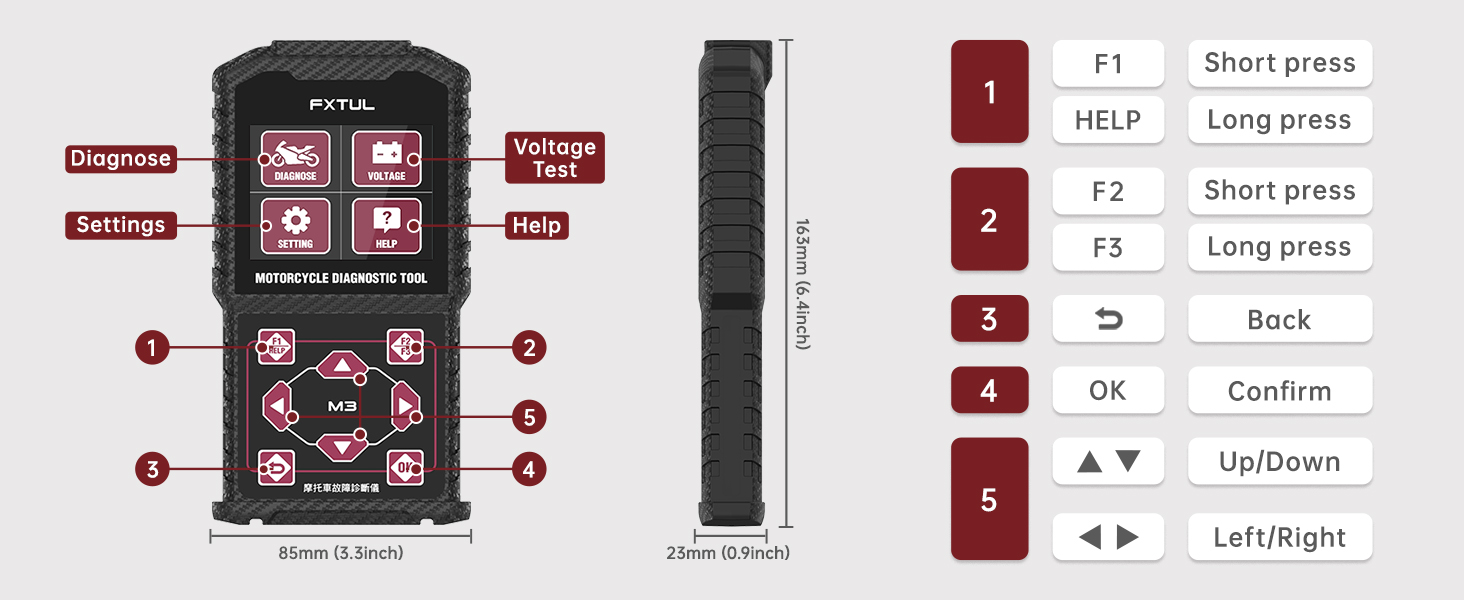
Figure 4.1: M3-A button layout and functions.
- Brug Op/Ned og Venstre/Højre arrow buttons to navigate through menus and options.
- Tryk på OK button to confirm a selection.
- De Tilbage button returns to the previous screen.
- F1, F2, F3 buttons provide context-sensitive functions, often indicated on the screen. Long press HJÆLP for assistance.
4.2. System Diagnosis
From the main menu, select "Diagnose" to begin a diagnostic session. The tool will automatically scan the vehicle's systems.
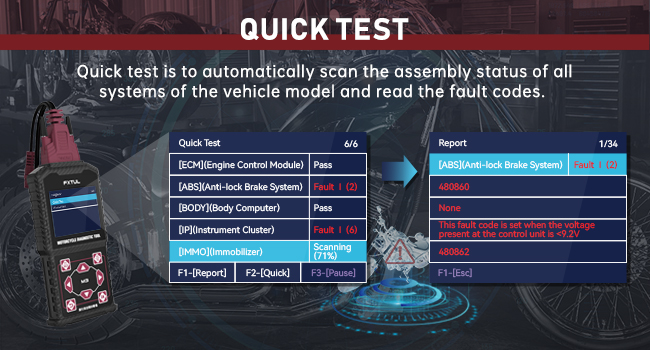
Figur 4.2: Eksample of a Quick Test result screen.
- Læs fejlkoder: Displays current and pending diagnostic trouble codes.
- Ryd fejlkoder: Erases stored fault codes from the vehicle's ECU. Confirm before proceeding.
- View Datastrøm: Shows real-time data from various sensors and components (e.g., engine speed, temperature, voltagog).
- Frys rammedata: Captures a snapshot of sensor readings at the moment a fault code was set.
- Aktiveringstest: Allows you to test specific components by sending commands to the ECU.
4.3. bindtage Test
The M3-A can perform real-time OBD battery voltage detection. Select "Voltage" from the main menu to access this feature.

Figure 4.3: Real-time voltage test display.
4.4. Valg af sprog
To change the operating language, navigate to "Setting" from the main menu and select "Language". Choose from the available 11 languages.

Figure 4.4: Multi-language selection interface.
4.5. Officiel produktvideo
Video 4.5: Officiel overview of the FXTUL M3-A Motorcycle Diagnostic Tool, demonstrating its features and components.
5. Vedligeholdelse
5.1. Softwareopgradering
The FXTUL M3-A diagnostic tool supports free software upgrades to ensure compatibility with new motorcycle models and improved functionalities. To upgrade the software:
- Connect the M3-A device to your computer using the provided USB data cable.
- Wait for the computer to recognize the device. A new drive symbol will appear.
- Obtain the latest "DIAGNOSE" upgrade folder by contacting customer service.
- Open the newly recognized drive on your computer and replace the existing "DIAGNOSE" folder with the downloaded upgrade folder.
- Safely eject the device from your computer and power it on again to complete the update.

Figure 5.1: Software upgrade process via USB connection to a computer.
6. Fejlfinding
This section addresses common issues you might encounter with your FXTUL M3-A diagnostic tool.
| Problem | Mulig årsag | Løsning |
|---|---|---|
| Enheden tænder ikke. | No power from vehicle's OBD port; faulty cable; device malfunction. | Ensure proper connection to the motorcycle's diagnostic port. Check vehicle battery voltage. Try a different diagnostic cable if available. Contact customer service if issue persists. |
| "No Communication" error. | Incorrect vehicle protocol selected; loose connection; vehicle ECU issue. | Verify the correct motorcycle brand/model is selected in the tool. Ensure all cable connections are secure. Check vehicle's ignition status. |
| Softwareopdatering mislykkes. | Ukorrekt file placement; corrupted download; USB connection issue. | Ensure the "DIAGNOSE" folder is correctly replaced. Re-download the update files. Try a different USB port or cable. |
| Inaccurate readings or data. | Outdated software; sensor malfunction on vehicle. | Perform a software upgrade. Verify vehicle sensors are functioning correctly. |
7. Specifikationer
| Attribut | Detalje |
|---|---|
| Modelnummer | FXTUL-M3-A |
| Mærke | FXTUL |
| Varens vægt | 1.46 pund |
| Pakkedimensioner | 8.43 x 5.43 x 3.11 tommer |
| Strømkilde | Elektrisk med ledning |
| Operating System (for PC connection) | Windows XP (as per specification, newer OS likely compatible) |
| Understøttede sprog | 11 languages (e.g., English, Spanish, Chinese) |
8. Garanti og support
FXTUL products are backed by a three-year warranty. For any technical assistance, troubleshooting, or inquiries regarding software updates, please contact FXTUL customer service. They are available 24 hours to provide support.
For custom motorcycle model support or large demands, you may also contact customer service to discuss customization options for the diagnostic instrument.
For the most up-to-date contact information, please refer to the official FXTUL webwebstedet eller din købsdokumentation.


