1. Introduktion
This manual provides detailed instructions for the setup, operation, and maintenance of your CHESONA Rugged Keyboard Case for iPad 10.2-inch. Please read this manual thoroughly before using the product to ensure proper functionality and longevity.

Image 1.1: The CHESONA Rugged Keyboard Case with an iPad in landscape orientation, featuring the integrated keyboard and trackpad.
2. Kompatibilitet
The CHESONA Rugged Keyboard Case is designed for specific iPad 10.2-inch models. Verify your iPad's model number on the back of the device to ensure compatibility.
- iPad 9th Generation (2021): Model Numbers A2602, A2603, A2604, A2605
- iPad 8th Generation (2020): Model Numbers A2430, A2270, A2428, A2429
- iPad 7th Generation (2019): Model Numbers A2197, A2198, A2200
This product does not include the iPad tablet or Apple Pencil.
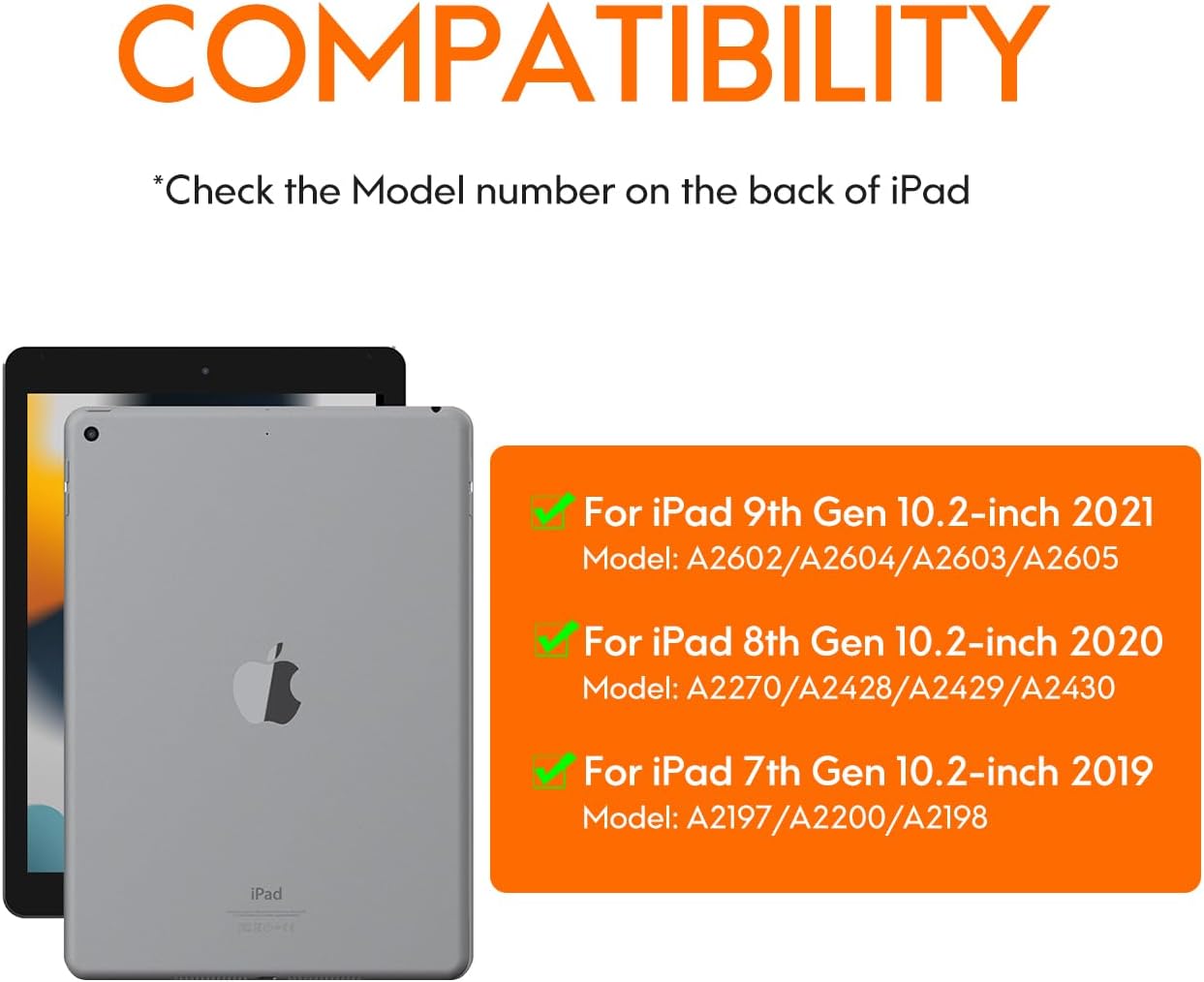
Image 2.1: Visual guide for identifying compatible iPad models and their corresponding model numbers.
3. Pakkens indhold
Tjek venligst pakken for følgende varer:
- CHESONA Rugged Keyboard Case
- USB-C ladekabel
- Brugervejledning (dette dokument)
4. Produktet er slutview
The CHESONA Rugged Keyboard Case features a magnetic detachable design, integrated trackpad, and backlit keyboard to enhance your iPad experience.

Image 4.1: The keyboard case with an iPad magnetically attached, illustrating the detachable design.

Image 4.2: An exploded diagram showing the multi-layered construction of the rugged keyboard case, emphasizing its protective features.
5. Opsætning
5.1 Tilslutning af iPad'en
- Align your iPad with the protective back case.
- Gently press the iPad into the case until it is securely seated. Ensure all edges are properly covered.
- The keyboard component attaches magnetically to the back case. Position the keyboard so it aligns with the magnetic points.
The case features a dedicated slot for the Apple Pencil. For optimal stability in landscape or portrait mode, ensure the Apple Pencil slot is positioned at the top or right side.
5.2 Connecting the Keyboard (Bluetooth Pairing)
- Ensure the keyboard is charged (refer to section 5.3).
- Tænd tastaturet ved at skubbe tænd/sluk-knappen. Indikatorlampen blinker.
- På din iPad skal du gå til Indstillinger > Bluetooth.
- Slå Bluetooth til. Din iPad vil søge efter tilgængelige enheder.
- Select "CHESONA Keyboard" (or similar name) from the list of devices.
- If prompted, enter the pairing code displayed on your iPad using the keyboard and press Indtast.
- Once paired, the indicator light on the keyboard will turn off, and your iPad will show the keyboard as "Connected."
5.3 Opladning af tastaturet
Connect the included USB-C charging cable to the charging port on the keyboard and the other end to a USB power adapter (not included). The charging indicator light will illuminate during charging and turn off when fully charged. A full charge typically takes 3-4 hours.
The keyboard is powered by a Lithium Polymer battery (included).
6. Betjeningsvejledning
6.1 Tastaturfunktioner
The keyboard provides a full suite of iOS shortcuts for enhanced productivity.

Image 6.1: Illustration of the keyboard layout highlighting dedicated iOS shortcut keys for quick access to functions like home, search, media control, and volume.
Justering af baggrundslys
The keyboard features adjustable backlighting with 7 colors and 3 brightness levels.
- Sådan justerer du lysstyrken: Tryk på Fn + Flytte (up arrow key).
- To switch backlight colors (7 available): Press Fn + Retur (right arrow key).

Image 6.2: Instructions for adjusting keyboard backlight brightness and changing colors using function key combinations.
6.2 Pegefeltets funktioner
The integrated multi-gesture trackpad allows for precise navigation and interaction with your iPad. Ensure the trackpad is enabled in your iPad's settings if it is not responsive.

Image 6.3: Detail of the trackpad, indicating support for iOS shortcuts, multi-touch gestures, and manual on/off control.
6.3 Justerbart stativ
The case features a fully adjustable stand, allowing you to set your iPad at angles from 15° to 180° for comfortable viewindtastning og skrivning.
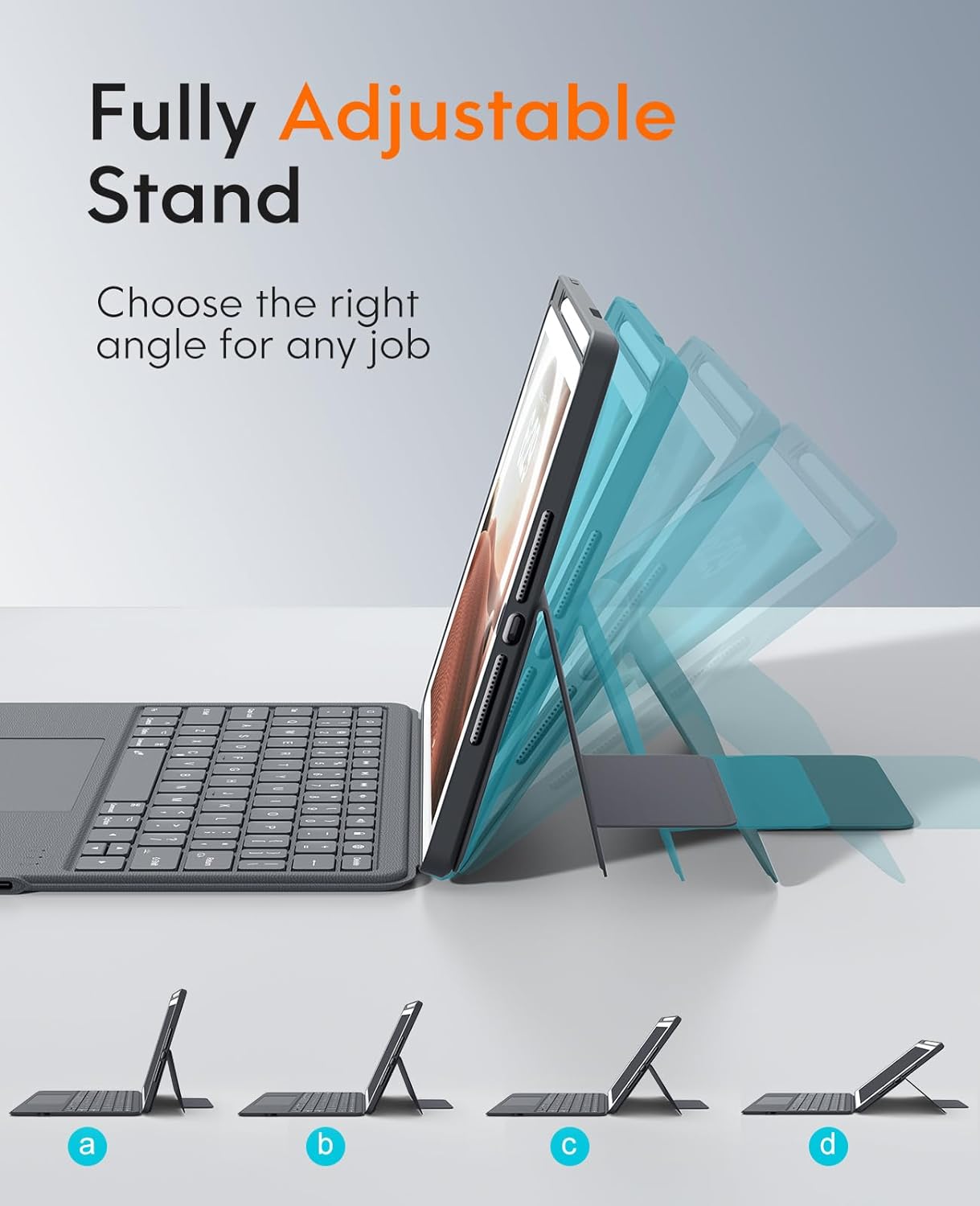
Image 6.4: Visual representation of the adjustable stand, demonstrating its flexibility to achieve different viewing vinkler.
6.4 Multi-Scene Modes
The versatile design supports multiple usage modes:
- Landskabstilstand: Ideal for typing, watching videos, or general use.
- Portrættilstand: Suitable for reading documents or browsing vertically.
- Carry-on Mode: Detach the keyboard for a lighter, tablet-only experience.
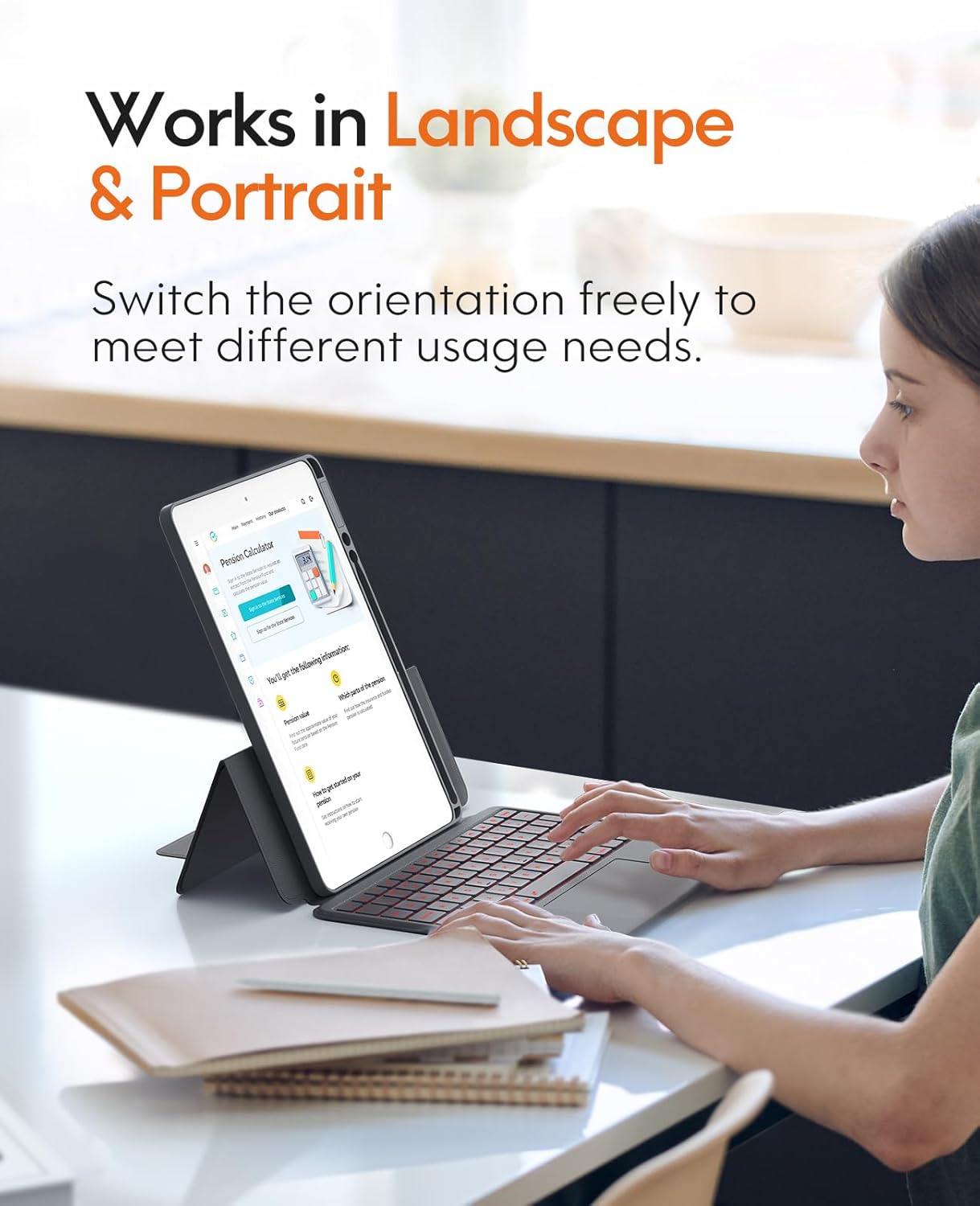
Image 6.5: The keyboard case supporting both landscape and portrait orientations for varied user needs.
7. Vedligeholdelse
To ensure the longevity and optimal performance of your keyboard case, follow these maintenance guidelines:
- Rensning: Brug en blød, damp cloth to wipe the exterior of the case and keyboard. Avoid harsh chemicals or abrasive cleaners. For keyboard keys, a soft brush or compressed air can remove debris.
- Opbevaring: When not in use for extended periods, store the case in a cool, dry place.
- Batteripleje: Undgå at aflade batteriet helt for ofte. Oplad tastaturet regelmæssigt for at opretholde batteriets tilstand.

Billede 7.1: En detaljeret view of the keyboard keys, illustrating areas that may require cleaning to remove dust or debris.
8. Fejlfinding
| Problem | Mulig årsag | Løsning |
|---|---|---|
| Tastaturet opretter ikke forbindelse via Bluetooth. | Keyboard battery is low or off. Bluetooth on iPad is off. Keyboard not in pairing mode. | Charge the keyboard. Ensure keyboard is powered on. Turn on iPad Bluetooth. Put keyboard in pairing mode and re-attempt pairing (refer to section 5.2). |
| Tasterne reagerer ikke. | Low battery. Connection issue. Software glitch. | Charge the keyboard. Reconnect Bluetooth. Restart your iPad. |
| Trackpad not working. | Trackpad disabled. Connection issue. | Ensure trackpad is enabled in iPad settings. Reconnect Bluetooth. |
| Backlight not working or changing. | Low battery. Incorrect key combination. | Charge the keyboard. Refer to section 6.1 for correct key combinations. |
9. Specifikationer
| Feature | Detalje |
|---|---|
| Model | CHESONA Rugged Keyboard Case for iPad 10.2-inch |
| Kompatibilitet | iPad 9th/8th/7th Generation (10.2-inch) |
| Forbindelse | Trådløs (Bluetooth) |
| Tastaturtype | Backlit with Trackpad |
| Baggrundslys farver | 7 farver, 3 lysstyrkeniveauer |
| Justering af stativ | 15° - 180° |
| Materiale | PU læder |
| Strømkilde | Genopladeligt Lithium Polymer batteri |
| Opladningsport | USB-C |
| Inkluderede komponenter | USB kabel |
| Varens vægt | 1.83 pund (ca. 0.83 kg) |
| Dimensioner (pakke) | 11.18 x 7.91 x 1.06 tommer (ca. 28.4 x 20.1 x 2.7 cm) |
10. Garanti og support
CHESONA products are designed for reliability and performance. For warranty information, technical support, or customer service inquiries, please refer to the contact information provided with your purchase or visit the official CHESONA webwebsted.
Du kan også besøge CHESONA Store on Amazon for yderligere produktinformation og supportressourcer.


