1. Introduktion
The DieseRC Smart WIFI 2-Channel Relay Module is a versatile and reliable wireless smart switch designed for remote control of various electrical devices. It offers stable performance with high reception sensitivity via 2.4 GHz WIFI, allowing you to operate connected machines from anywhere using the eWelink APP. This module supports both inching and self-locking modes, providing flexibility for different applications. It is also compatible with popular voice assistants like Amazon Alexa and Google Home, enabling convenient voice control.

Image: The DieseRC 2-Channel Smart WIFI Relay Module, showcasing its compact design and dual relay configuration.
2. Produktfunktioner
- Wireless WIFI Connectivity: Operates on 2.4 GHz WIFI for stable and reliable remote control.
- eWelink APP Control: Full control via the popular eWelink application (Android & iOS), offering unlimited wireless control from anywhere.
- Stemmekontrolkompatibilitet: Seamless integration with Amazon Alexa and Google Home for hands-free operation.
- Fleksible driftstilstande: Supports 2 working modes: Inching (momentary switch) and Self-locking (toggle switch), easily configurable to suit your needs.
- Dual Independent Relays: Features two independent relays, allowing separate control of two devices.
- High-Quality 10A Relays: Equipped with robust 10A relays for reliable switching.
- Passive Output (Dry Contacts): Provides normally open (NO), common (COM), and normally closed (NC) terminals for versatile wiring.
- Wide Voltage Kompatibilitet: Supports DC 5V or DC 7V~48V input, making it suitable for various power sources (DC 5V/12V/24V/36V/48V).
- Kompakt design: Measures 60x32x17 mm (2.4x1.3x0.7 inches), allowing easy concealment in electrical boxes or junction boxes.
- Advanced APP Functions: Includes scheduling, timing, and countdown features, with the ability to share control with family members.
- Bluetooth Remote Compatibility: Can be paired with an RM2.4G Bluetooth remote control (not included).

Billede: Overview of the module's multiple control modes (APP, voice, remote) and its compact dimensions.

Billede: Eksamples of devices that can be made smart using the DieseRC module, such as various types of switches, fans, and coffee makers.
3. Specifikationer
| Attribut | Værdi |
|---|---|
| Fabrikant | DieseRC |
| Produktmål (L x B x H) | 12.7 x 8.3 x 2.2 cm; 41 gram |
| Modelnummer | EW748 |
| Farve | 2CH-EW |
| Magt | 10 watt |
| Skift stil | Vippekontakt |
| Certificering | CE |
| Komponenter inkluderet | 1 (Module) |
| Batterier påkrævet | Ingen |
| Kontaktmateriale | Metal |
| Kontakttype | Normalt åben |
| Nuværende vurdering | 10 A |
| Driftstilstand | Til/Fra |
| Coil Voltage | 5 volt (DC) |
| Minimum Switching Voltage | 5 volt (DC) |

Billede: En detaljeret view of the module's circuit board, highlighting the relay indicator light, pairing button, WIFI network indicator, and input USB port. Dimensions are also provided.
4. Sikkerhedsoplysninger
Please read and understand all safety instructions before installing or operating the DieseRC Smart WIFI 2-Channel Relay Module. Failure to follow these instructions may result in electric shock, fire, or property damage.
- Elektrisk sikkerhed: Always disconnect power to the circuit at the circuit breaker or fuse box before performing any wiring.
- Kvalificeret installation: Installationen skal udføres af en kvalificeret elektriker eller en person med et indgående kendskab til elektriske ledninger.
- Voltage Kompatibilitet: Sørg for, at input voltage (DC 5V or DC 7V~48V) matches the requirements of your power supply. Do not exceed the maximum current rating of 10A per relay.
- Kun indendørs brug: This device is designed for indoor use in dry environments. Avoid exposure to moisture, extreme temperatures, or corrosive substances.
- Korrekt ledningsføring: Sørg for, at alle ledningsforbindelser er sikre og korrekt isolerede for at forhindre kortslutninger.
- Belastningskompatibilitet: Do not connect loads that exceed the maximum power rating of the module.
5. Opsætning
5.1. Download the eWelink APP
The DieseRC Smart WIFI Relay Module is controlled via the eWelink application. Download the app from your smartphone's app store (Google Play for Android or Apple App Store for iOS) or by scanning the QR code below:

Scan this QR code to download the eWelink App, or visit http://app.coolkit.cc/dl.html
5.2. Strømforsyning til modulet
The module can be powered by either a DC 5V USB power supply or a DC 7V-48V adapter.

Image: Illustration of the two power input options: DC 5V via USB or DC 7V-48V via screw terminals.
5.3. Pairing with eWelink APP
- Ensure the module is powered on. The WIFI network indicator light will start blinking.
- Open the eWelink APP on your smartphone.
- Tryk på ikonet '+' for at tilføje en ny enhed.
- Select 'Quick Pairing Mode' or 'Compatible Pairing Mode' as instructed by the app.
- Follow the on-screen prompts to connect the module to your 2.4 GHz WIFI network.
- Once successfully paired, the WIFI network indicator light will become solid, and the device will appear in your eWelink app.
6. Ledningsdiagrammer
The DieseRC Smart WIFI Relay Module provides passive output (dry contacts) with Normally Open (NO), Common (COM), and Normally Closed (NC) terminals for each relay. This allows for flexible integration with various circuits.

Image: Diagram illustrating the Normally Open (NO), Common (COM), and Normally Closed (NC) pins for each relay.
6.1. Understanding Relay Contacts
- NEJ (normalt åben): The circuit between COM and NO is open when the relay is off and closes when the relay is activated.
- COM (Fælles): The common terminal for the relay.
- NC (normalt lukket): The circuit between COM and NC is closed when the relay is off and opens when the relay is activated.
6.2. Common Wiring Modes
Nedenfor er examples of common wiring configurations for different types of devices. Always ensure power is disconnected before wiring.
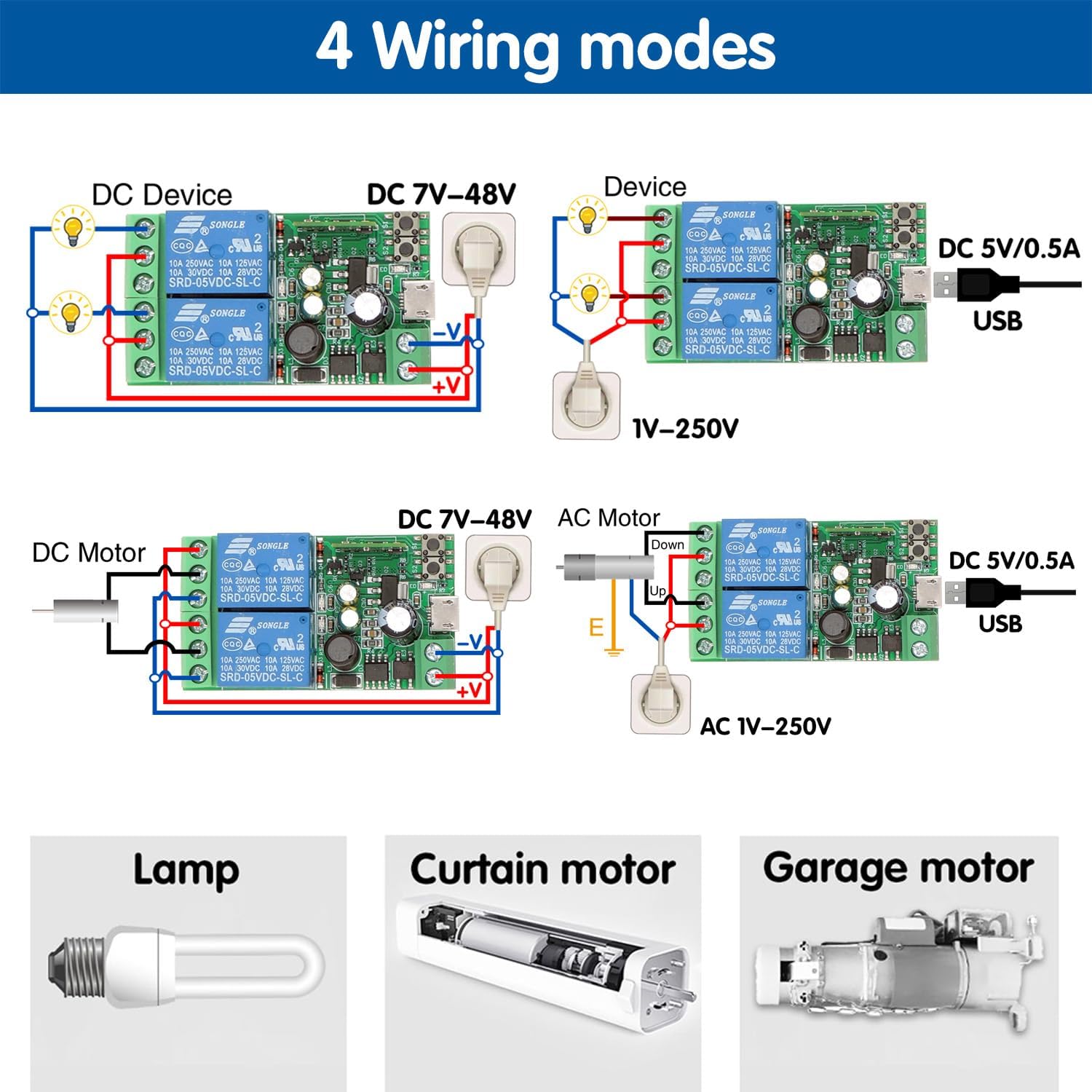
Image: Illustrations of four different wiring modes: DC device with DC 7V-48V, DC device with DC 5V/0.5A USB, DC motor with DC 7V-48V, and AC motor with AC 1V-250V.
- DC Device Wiring (e.g., LED strip, DC fan): Connect the DC power source to the module's input terminals. Connect the device to the NO and COM terminals of the desired relay.
- AC Device Wiring (e.g., lamp, AC fan): Connect the AC power source to the module's input terminals. Connect the device to the NO and COM terminals of the desired relay. Ensure proper isolation for AC circuits.
- DC Motor Control: Use both relays for directional control. Connect the motor to the NO/COM/NC terminals of both relays as per the diagram for forward/reverse operation.
- Garage Door Opener/Gate Control: Typically uses the inching mode. Connect the module's NO and COM terminals to the garage door opener's push-button input terminals.
7. Driftstilstande
7.1. Inching Mode (Momentary)
In inching mode, the relay will activate for a brief, configurable duration (e.g., 0.5 seconds to 3600 seconds) and then automatically turn off. This mode is ideal for applications like garage door openers, gate controls, or momentary button presses.
7.2. Self-locking Mode (Toggle)
In self-locking mode, the relay acts as a traditional on/off switch. One press will turn the device on, and another press will turn it off. This mode is suitable for controlling lights, fans, or other devices that require continuous power until manually switched off.
You can configure these modes within the eWelink APP for each independent relay.

Image: A visual comparison showing how the smart relay module can replace or enhance traditional switches for various applications.
7.3. APP Control (eWelink)
Once paired, you can control your devices from anywhere using the eWelink APP. The app provides:
- Fjernbetjening til/fra: Instantly turn devices on or off.
- Tidsplan og planlægning: Set one-time, repeating, or countdown timers to automate device operation.
- Sceneoprettelse: Group multiple devices and control them with a single tap or based on specific conditions.
- Deling af enhed: Del kontrollen over din smarte switch med familiemedlemmer.

Image: Demonstrates remote control via the eWelink app, showing a user controlling a garage door from a beach, highlighting the 'no distance limit' feature.

Image: Illustrates the timing, scheduling, and countdown functions available in the eWelink app, allowing users to automate device operation.
7.4. Stemmestyring (Alexa og Google Home)
Integrate your DieseRC Smart Switch with Amazon Alexa or Google Home for convenient voice control. After linking your eWelink account in the Alexa or Google Home app, you can use commands like:
-
Relaterede dokumenter - 2CH-EW

DieseRC 1204 Relæ Fjernbetjeningsafbryder Manual
Brugermanual til DieseRC 1204 relæfjernbetjeningsafbryderen, med detaljerede produktoplysninger, ledningsdiagrammer, driftstilstande (momentan, vippe, låst), programmeringsinstruktioner og fejlfinding.
DieseRC Relæ Fjernbetjeningsafbryder Type 2201 - Brugermanual
Omfattende brugermanual til DieseRC Type 2201 relæfjernbetjeningsafbryderen, med detaljerede tekniske specifikationer, ledningsdiagrammer, driftstilstande (momentær, vippe, låst), programmeringsinstruktioner, fejlfinding og kontaktoplysninger.
DieseRC 1201 Relæ Fjernbetjening Brugermanual
Brugermanual til DieseRC 1201 relæfjernbetjeningsafbryderen, med detaljerede produktoplysninger, ledningsdiagrammer, driftstilstande (momentær, vippe, låst, forsinkelse), programmeringsinstruktioner og fejlfinding.
DieseRC 2202 Relæ Fjernbetjeningsafbryder - Produktmanual
Denne produktmanual indeholder detaljerede oplysninger om DieseRC 2202 relæfjernbetjeningsafbryderen. Den dækker tekniske specifikationer, driftstilstande (momentær, vippe, låst), programmeringsinstruktioner, fejlfindingstips og kontaktoplysninger til kundesupport fra Huizhou Wenqiao Electronic Technology Co., Ltd.
Produktmanual til DieseRC 5302G relæfjernbetjeningsafbryder
Produktmanual til DieseRC 5302G relæfjernbetjeningsafbryderen. Indeholder tekniske data, ledningsdiagrammer, driftstilstande (Momentær, Toggle, Latched), programmeringsinstruktioner og fejlfinding for denne 433MHz RF-modtager.
DieseRC 5301 trådløs fjernbetjeningsmanual
Brugermanual til DieseRC 5301 trådløs fjernbetjening, med detaljerede tekniske specifikationer, ledningsdiagrammer, driftstilstande (Momentær, Toggle, Latched, Delay), programmeringsinstruktioner og fejlfinding.