Indledning
The Google Pixel 8 is an advanced Android smartphone engineered by Google, designed to offer a seamless and intelligent user experience. It features a powerful camera, robust security measures, and an all-day battery. Leveraging Google AI, the Pixel 8 enhances various functionalities, from photo editing and call screening to providing quick answers and ensuring personal safety.
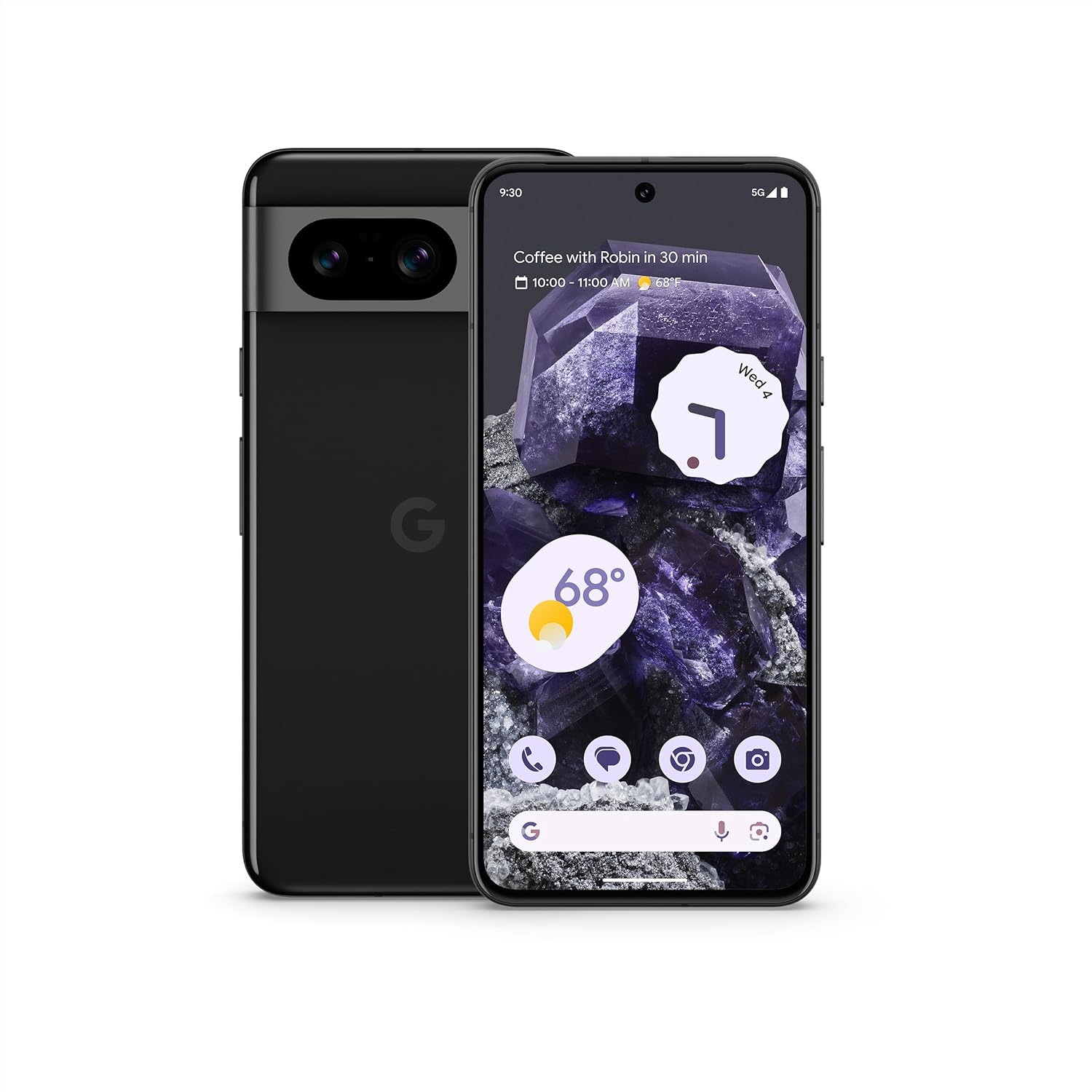
Billede: Forside og bagside view of the Google Pixel 8 smartphone in Obsidian color, showcasing dens elegante design og kamerabjælke.
Opsætning
1. Hvad er der i æsken
Your Google Pixel 8 package includes the following items:
- Google Pixel 8-smartphone
- SIM-bakkeudkaster
- Quick Switch Adapter (for data transfer)
- USB-kabel (USB-C til USB-C)
2. Første opstart og opsætning
To power on your Pixel 8 for the first time, press and hold the power button located on the right side of the device until the Google logo appears. Follow the on-screen prompts to select your language, connect to Wi-Fi, and set up your Google account.
3. SIM-kort installation
Locate the SIM card tray on the side of your Pixel 8. Use the provided SIM tray ejector tool to open the tray. Insert your Nano-SIM card into the tray, ensuring it is correctly oriented. Gently push the tray back into the device until it clicks into place.
4. Data Transfer from Old Device
Utilize the included Quick Switch Adapter and USB cable to transfer data from your old smartphone to your new Pixel 8. Connect your old phone to the Pixel 8 using the adapter and cable, then follow the on-screen instructions to migrate contacts, photos, apps, and other data.
Operating Your Pixel 8
1. Display og navigation
The Pixel 8 features a 6.2-inch Actua display with a resolution of 1080 x 2400 pixels and a refresh rate of up to 120 Hz, providing a smooth and vibrant visual experience. Navigate the device using touch gestures or the traditional three-button navigation bar, which can be configured in settings.

Image: Visual representation of the Pixel 8's 6.2-inch high-res Actua display, dual rear camera, and contoured edges with a satin finish, highlighting its modern design.
2. Kamerafunktioner
The Pixel 8 is equipped with an advanced Pixel Camera system, including a 10.5 MP front camera, a 50 MP rear wide lens, and a 12 MP rear ultrawide lens. Key camera functionalities include:
- Bedste bud: Combines similar photos to ensure everyone looks their best.
- Makrofokus: Indfanger indviklede detaljer i små motiver.
- Lyd Magisk Viskelæder: Reduces unwanted noise in videos, such as cars or construction sounds.
- Superopløsningszoom: Digital zoom up to 8x for distant subjects.

Image: Demonstrates the Pixel 8's camera capabilities, including "Best Take" for group photos, "Macro Focus" for close-up shots, and "Audio Magic Eraser" for video sound enhancement.
3. Google AI-funktioner
Leverage Google's integrated AI for enhanced productivity and convenience:
- Opkaldsskærm: Helps identify and avoid spam calls.
- Ring mig direkte: Provides optimal times to call businesses and guides you through automated menus.
- Google Assistant: Offers hands-free assistance, including holding calls until callers are ready.
- Liveoversættelse: Translates languages on the spot for real-time communication.
- Ring om for at søge: Instantly search for anything on your screen by circling, highlighting, or scribbling.

Image: Illustrates how the Pixel 8 assists with call management, showing features like Call Screen, Direct My Call, and Google Assistant holding calls.

Image: Depicts the Pixel 8's ability to enhance communication, showing clear call audio in noisy environments, efficient Google Assistant use, and on-the-spot language translation with Live Translate.

Image: Shows the "Circle to Search" feature in action, demonstrating how users can easily search for on-screen content by circling an object in an image or video.
4. Forbindelse
The Pixel 8 supports various connectivity options:
- Mobil: Unlocked 5G phone compatible with major carriers (Google Fi, Verizon, T-Mobile, AT&T).
- Wi-Fi: Opret forbindelse til trådløse netværk for at få internetadgang.
- Bluetooth: Pair with wireless accessories like headphones and smartwatches.
- NFC: Til kontaktløs betaling og hurtig parring med kompatible enheder.
5. Batteristyring
The Pixel 8 is equipped with a 4575 mAh Adaptive Battery designed to last over 24 hours. For extended use, enable Extreme Battery Saver, which can prolong battery life up to 72 hours. The device supports fast charging and Qi-Certified wireless charging.
Opretholdelse
1. Softwareopdateringer
Google provides 7 years of security updates and regular "Feature Drops" to enhance your Pixel's functionality and security over time. Ensure your device is connected to Wi-Fi to download and install these updates automatically or manually check for them in your phone's settings.
2. Rengøring af din enhed
To clean your Pixel 8, gently wipe the screen and body with a soft, lint-free cloth. For stubborn smudges, slightly dampen the cloth with water. Avoid using harsh chemicals or abrasive materials, as they can damage the screen and finish.
3. Pleje og holdbarhed
The Pixel 8 is designed to handle slips, spills, and dust, offering enhanced durability. While robust, it is recommended to use a protective case and screen protector to safeguard your device against accidental damage and prolong its lifespan.

Image: Highlights the Pixel 8's robust construction and long-lasting battery, showing a user with the phone in an outdoor setting, emphasizing its resilience and 24-hour battery life.
Fejlfinding
1. Almindelige problemer
- Batteriet aflades hurtigt: Check background app usage, reduce screen brightness, or enable Extreme Battery Saver.
- Forbindelsesproblemer: Toggle Wi-Fi/Bluetooth/Cellular off and on, restart the device, or reset network settings.
- App-nedbrud: Clear app cache, update the app, or reinstall it.
- Enheden reagerer ikke: Tryk og hold tænd/sluk-knappen nede i cirka 30 sekunder for at fremtvinge en genstart.
2. Personlige sikkerhedsfunktioner
The Pixel 8 includes features designed for your safety:
- Bilulykkesdetektion: Automatically calls 911 and shares your location with emergency contacts in the event of a severe car crash.
- Nødlokaliseringstjeneste (ELS): Provides your location to emergency responders when you call or text an emergency number.

Image: Displays the Pixel 8's personal safety features, including the Car Crash Detection interface and information about the Emergency Location Service, emphasizing peace of mind.
Specifikationer
| Feature | Detalje |
|---|---|
| Modelnavn | Pixel 8 (G9BQD) |
| Dimensioner | 5.92 x 2.79 x 0.35 tommer |
| Vægt | 6.6 ounces (0.41 pund) |
| Skærmstørrelse | 6.2 Inches Actua Display |
| Opløsning | 1080 x 2400 pixels |
| Opdateringshastighed | Op til 120 Hz |
| Operativsystem | Android 13.0 (kan opgraderes) |
| Processor | Google Tensor G3 (1.2GHz Cortex A13 Processor, 4 GHz CPU Speed) |
| VÆDDER | 8 GB |
| Lagerkapacitet | 128 GB (som pr. nuværende model) |
| Bagkamera | 50 MP Wide, 12 MP Ultrawide |
| Forreste kamera | 10.5 MP |
| Batterikapacitet | 4575 mAh |
| Taletid | Op til 24 timer |
| Opladning | Fast Charging, Qi-Certified Wireless Charging |
| Forbindelse | 5G Cellular, Wi-Fi, Bluetooth, NFC, GPS |
| Særlige funktioner | Google AI, Titan M2 Security Chip, VPN by Google One, Car Crash Detection, Emergency Location Service |

Image: A comparison table detailing the specifications of the Pixel 8 and Pixel 8 Pro, including display, camera hardware, camera software, memory, storage, and battery features.

Image: A visual representation of the Google Tensor G3 chip, highlighting its role in powering the Pixel 8's advanced features and Google AI capabilities.
Garanti og support
Your Google Pixel 8 comes with a standard manufacturer's warranty. For detailed warranty information, including coverage and duration, please refer to the warranty card included in your product packaging or visit the official Google support webwebsted.
For technical assistance, troubleshooting, or to access additional resources, please visit the Google Pixel Phone Help Center. You can also find community forums and contact support directly through the webwebsted.
Google is committed to providing 7 years of security updates for your Pixel 8, ensuring your device remains secure and up-to-date with the latest features.

Image: Illustrates the security measures of the Pixel 8, including VPN by Google One, 7 years of security updates, and the Titan M2 security chip, ensuring user data protection.


