Indledning
The OWON HDS2202S is a versatile 3-in-1 digital handheld device integrating an oscilloscope, a 20,000-count multimeter, and a 1-channel waveform generator. Designed for portability and convenience, it is ideal for outdoor maintenance, rapid on-site measurements, automobile maintenance, and power detection. Its compact size and robust features make it an essential tool for professionals and enthusiasts alike.

Figure 1: OWON HDS2202S device and standard accessories.
Nøglefunktioner
- 3-i-1 funktionalitet: Combines a digital oscilloscope, a 20,000-count true RMS multimeter, and a 1-channel waveform generator.
- Højtydende oscilloskop: 200MHz bandwidth, 1GSa/s sample rate, 8K record length, 10,000 wfrms/s waveform refresh rate, 8 bits vertical resolution, 10mV/div - 10V/div vertical sensitivity.
- Advanced Multimeter: 20,000 count resolution, auto-ranging, supports measuring voltage (AC 750V/DC 1000V max input), current (DC 10A/AC 10A max input), resistance, diode, capacitance, and continuity.
- Versatile Waveform Generator: 25MHz signal generator, 125MSa/s sampling rate, 20 mVpp - 5 Vpp amplitude range (high impedance), 8K waveform length, 14-bit vertical resolution, 50Ω output impedance. Outputs Sine (0.1Hz - 25MHz), Square/Pulse/Arbitrary (0.1Hz - 5MHz), and Ramp (0.1Hz - 1MHz) waveforms.
- Ryd skærm: 3.5-inch color LCD with adjustable brightness and backlight time for optimal readability in various lighting conditions.
- Forbindelse: USB Type-C interface for communication with a computer and support for external power banks. Standard SCPI communication function for secondary development.
- Sikkerhed: Built-in fuse for automatic device protection.

Figur 2: Overview of the HDS2202S's integrated functions.
Hvad er der i æsken
The standard package for your OWON HDS2202S includes the following items:
- 1 x OWON HDS2202S Main Unit
- 2 x Oscilloscope Probes (pairs of probe and probe adjust)
- 2 x BNC Leads (including BNC to Alligator Clip and BNC Q9 cable)
- 1 x Multimeter Lead (pair)
- 1 x Multimeter Test Lead (additional set)
- 1 x USB Type-C kabel
- 1 x strømadapter
- 1 x blød bæretaske
- 1 x Produktmanual (dette dokument)
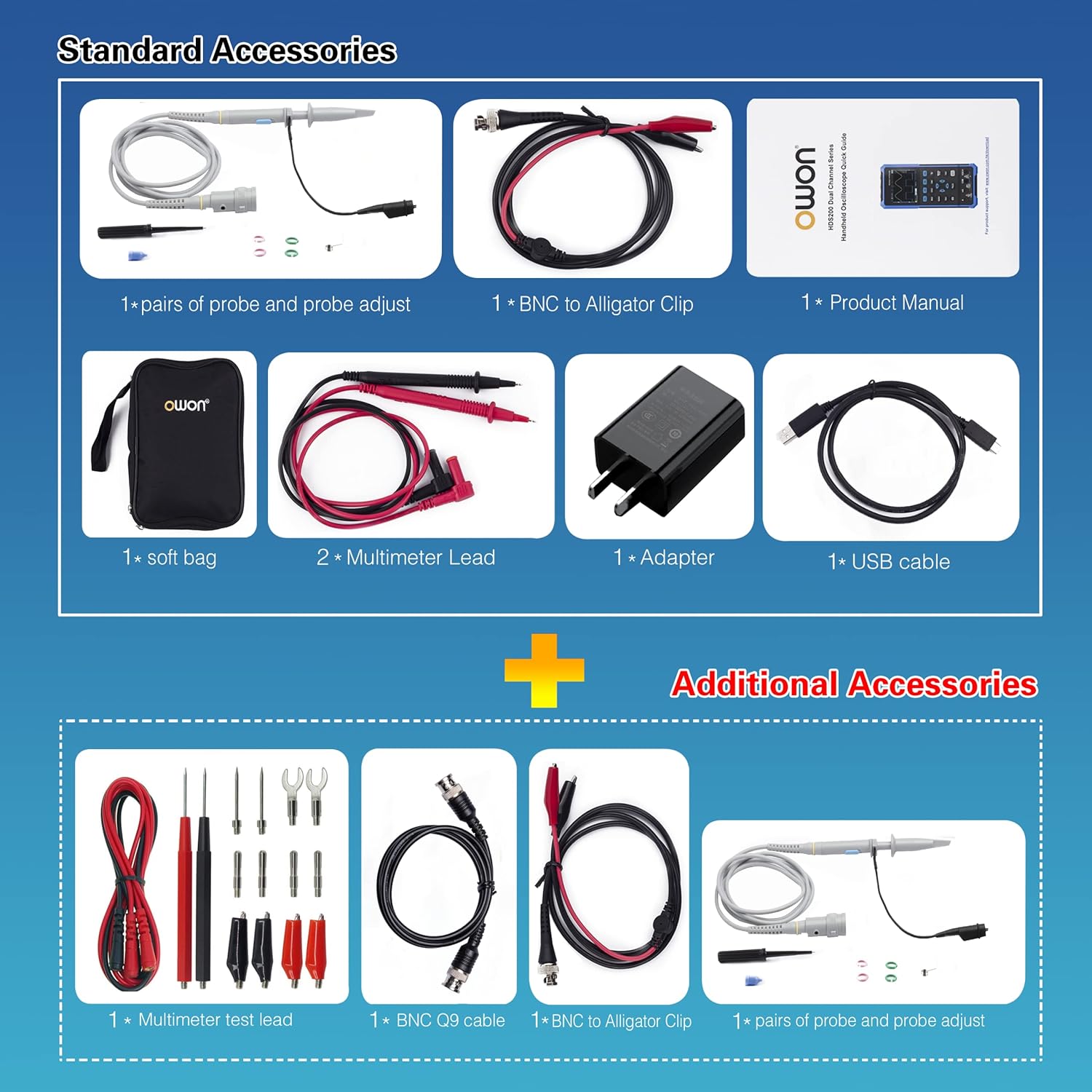
Figure 3: All included accessories for the HDS2202S.
Opsætning
1. Opladning af enheden
The HDS2202S comes with built-in lithium-ion batteries. Before first use, fully charge the device using the provided USB Type-C cable and power adapter. A full charge typically provides approximately 6 hours of continuous operation.
- Connect the USB Type-C cable to the port on the side of the device.
- Connect the other end of the USB cable to the power adapter and plug it into a wall outlet.
- The charging indicator on the device will show charging status.

Figure 4: HDS2202S internal battery and fuse for protection.
2. Initial Power On and Display Settings
Press and hold the power button to turn on the device. Upon first power-on, you may wish to adjust display settings for optimal viewing.
- Naviger til System menu.
- Tilpasse Lysstyrke (System → F1 → F1) and Baggrundslys tid (System → F1 → F2) as needed.
- The device features a 3.5-inch color LCD.

Figure 5: HDS2202S LCD display features.
3. Connecting Probes and Leads
Connect the appropriate probes or leads based on the function you intend to use (Oscilloscope, Multimeter, or Waveform Generator). Ensure secure connections for accurate measurements.

Figure 6: HDS2202S port locations and dimensions.
Betjeningsvejledning
Skift tilstande
The HDS2202S allows seamless switching between Oscilloscope, Multimeter, and Waveform Generator modes. Use the Mode button to cycle through the available functions.
1. Oscilloskopets funktion
The oscilloscope mode allows for waveform observation and analysis. It features 2 channels with 200MHz bandwidth and 1GSa/s sample sats.
- Connect oscilloscope probes to CH1 and/or CH2 input connectors.
- Trykke Mode until the oscilloscope interface is displayed.
- Use the navigation buttons to adjust vertical sensitivity (V/div), horizontal time base (s/div), and trigger settings.
- De Auto Knappen kan automatisk indstille optimale visningsparametre for indgangssignalet.
- Utilize cursor measurement and multiple auto measurement functions for detailed analysis.


Figure 7: Oscilloscope mode displaying waveforms.
2. Multimeterfunktion
The multimeter mode provides precise measurements of various electrical parameters with 20,000 counts resolution.
- Connect the multimeter leads to the appropriate input jacks (VΩ+C, mA, A, COM).
- Trykke Mode until the multimeter interface is displayed.
- Use the function buttons (F1-F4) or navigation to select the desired measurement type (Voltage, Current, Resistance, Diode, Capacitance, Continuity).
- The device supports auto-ranging for ease of use.

Figure 8: Multimeter mode displaying voltage måling.
3. Waveform Generator Function
The built-in waveform generator can output various standard and arbitrary waveforms for testing and calibration purposes.
- Connect a BNC lead to the GEN OUT connector.
- Trykke Mode until the waveform generator interface is displayed.
- Adjust parameters such as frequency, amplitude (Vpp), offset, and waveform type (Sine, Square, Ramp, Pulse, Arbitrary) using the navigation and function buttons.

Figure 9: Waveform Generator mode settings.
4. PC kommunikation
The HDS2202S can connect to a computer via its USB Type-C interface for data transfer and remote control using compatible software. It supports standard SCPI commands for advanced users and secondary development.
- Connect the device to your computer using the provided USB Type-C cable.
- Install the necessary drivers and software (available from the manufacturer's webwebsted).
- Follow the software instructions for data logging, waveform analysis, and remote control.

Figure 10: HDS2202S connected to PC for software interaction.
Official Product Video Demonstration
Video 1: Official product video demonstrating the key features and portability of the OWON HDS series, highlighting its use in various applications like outdoor maintenance, on-site measurement, and power detection. It also showcases the multimeter and waveform generator functions.
Opretholdelse
- Rensning: Brug en blød, tør klud til at rengøre enheden. Brug ikke slibende rengøringsmidler eller opløsningsmidler.
- Opbevaring: Store the device in a cool, dry place away from direct sunlight and extreme temperatures. Use the provided soft bag for protection during storage and transport.
- Batteripleje: For long-term storage, ensure the battery is charged to approximately 50%. Recharge every few months to prevent deep discharge.
- Probepleje: Handle probes and leads carefully. Avoid sharp bends or excessive pulling that could damage the cables. Regularly inspect for wear and tear.
- Udskiftning af sikring: The device has a built-in fuse for protection. If the device stops functioning due to an overload, the fuse may need replacement. Refer to a qualified technician for fuse replacement.
Fejlfinding
| Problem | Mulig årsag | Løsning |
|---|---|---|
| Enheden tænder ikke. | Low battery; Power button not pressed long enough; Internal fault. | Charge the device fully. Press and hold the power button for a few seconds. If problem persists, contact support. |
| No waveform displayed in Oscilloscope mode. | Probes not connected correctly; Input signal too small or too large; Incorrect time base or vertical scale settings; Trigger not set correctly. | Ensure probes are securely connected. Adjust V/div and s/div settings. Use the Auto button. Check trigger level and mode. |
| Multimeter readings are inaccurate or "OL" (Overload). | Incorrect measurement range; Leads not connected properly; Faulty leads. | Ensure correct measurement type is selected. Check lead connections. Try different leads if available. The device supports auto-ranging, but manual range selection might be needed for specific cases. |
| Waveform generator output is incorrect or absent. | Incorrect settings (frequency, amplitude, offset); Output not enabled; Faulty BNC cable. | Verify all waveform generator settings. Ensure "Output ON" is selected. Check the BNC cable for damage or poor connection. |
| Kan ikke oprette forbindelse til pc'en. | USB cable issue; Driver not installed; Software not running or configured correctly. | Use the provided USB Type-C cable. Install the latest drivers from the manufacturer. Ensure the PC software is correctly installed and configured. |
Specifikationer
| Parameter | Detalje |
|---|---|
| Modelnummer | HDS2202S |
| Produktdimensioner | 7.8 x 1.5 x 3.78 tommer (198 x 38 x 96 mm) |
| Vægt | 1.31 Pounds (Approx. 0.6 kg without battery) |
| Oscilloskop båndbredde | 200 MHz |
| Oscilloskop Sample Sats | 1GSa/s |
| Oscilloskopkanaler | 2 kanaler |
| Rekordlængde | 8K |
| Opdateringshastighed for bølgeform | 10,000 wfrms/s |
| Lodret opløsning | 8 bits |
| Vertikal følsomhed | 10mV/div - 10V/div |
| Multimetertællinger | 20,000 tæller |
| Maks. Input voltage (Multimeter) | AC 750V / DC 1000V |
| Max Input Current (Multimeter) | DC 10A / AC 10A |
| Waveform Generator Frequency | Sine (0.1Hz - 25MHz), Square/Pulse/Arbitrary (0.1Hz - 5MHz), Ramp (0.1Hz - 1MHz) |
| Bølgeformgenerator Amplitude | 20 mVpp - 5 Vpp (high impedance) |
| Vertikal opløsning af bølgeformgenerator | 14 bits |
| Vise | 3.5 tommer farve LCD |
| Batteritype | 2 lithium-ion-batterier (medfølger) |
Garanti og support
OWON products are designed for reliability and performance. For warranty information, technical support, or service inquiries, please refer to the official OWON webwebstedet eller kontakt din lokale forhandler. Gem din købskvittering som købsbevis i tilfælde af garantikrav.
For the latest software updates and additional resources, visit the official OWON support page.


