1. Introduktion
The SenseCAP Multi-Platform LoRaWAN Indoor Gateway (SX1302-4G) is a robust and versatile device designed to establish and manage LoRaWAN networks. It offers broad compatibility with various LoRaWAN Network Servers and provides a user-friendly interface for configuration and monitoring. This manual provides essential information for setting up, operating, maintaining, and troubleshooting your SenseCAP M2 gateway.
Nøglefunktioner:
- Multi-Platform LoRaWAN Network Server Support: Compatible with AWS, TTN, ChirpStack, and more, utilizing Packet Forwarder / Basics Station mode.
- Built-in LoRaWAN Network Server: Integrates Chirpstack for a reliable and quick LoRaWAN network solution.
- SenseCAP Local Console: Easy device configuration via Web UI using Wi-Fi AP and Ethernet.
- Power-over-Ethernet (PoE) Support: Simplifies deployment by allowing power delivery through the Ethernet cable.
- Udvidet dækning: Provides up to 10km of LoRaWAN coverage with strong signal strength for long-range data transmission.
2. Opsætningsvejledning
Setting up your SenseCAP M2 gateway is a straightforward process designed for quick deployment. Follow these steps to get your gateway online and ready to connect sensors.

Figur 2.1: Overview of the 4-step setup process.
- Scan the QR Code for Device Binding:
Locate the QR code on your SenseCAP M2 device. Use the SenseCAP Mate App on your smartphone to scan this QR code. This action initiates the device binding process, linking your gateway to your account on the SenseCAP platform.
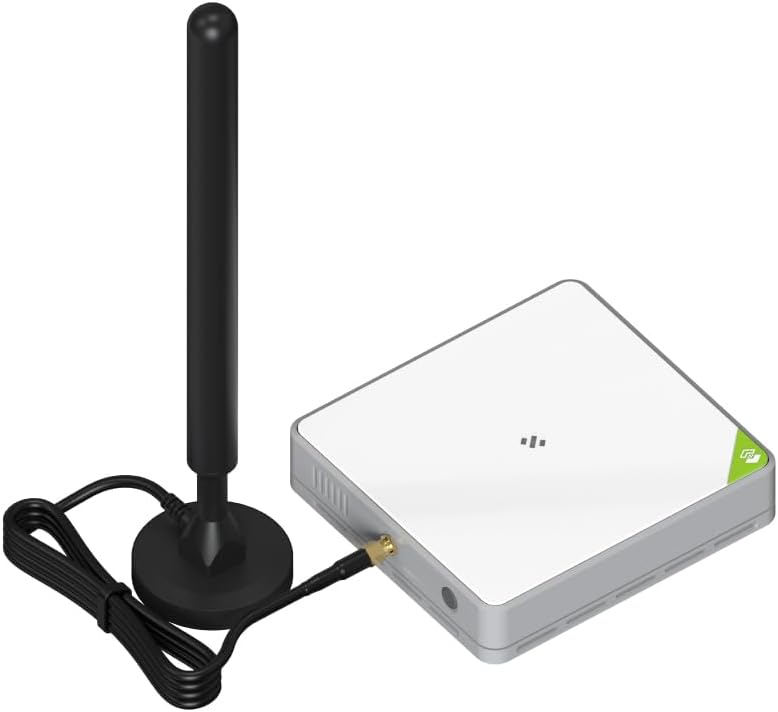
Figure 2.2: SenseCAP M2 Gateway with antenna.
- Connect Gateway to Internet and Power On:
Connect the gateway to your internet network using an Ethernet cable. If using PoE, ensure your Ethernet switch or injector provides power. Otherwise, connect the provided power adapter to the gateway and plug it into a power outlet. The device will power on automatically.

Figur 2.3: Pakkens indhold.
- Check Gateway Status on the SenseCAP Platform:
Once powered on and connected to the internet, log in to your SenseCAP Portal account (or use the SenseCAP Mate App). Verify that your gateway appears online and its status is healthy. This confirms successful network connection and platform registration.
- Connect Sensors to the Network and Upload Data to the Cloud:
With the gateway operational, you can now connect your LoRaWAN sensors. Configure your sensors to transmit data through the SenseCAP M2 gateway. The gateway will then forward this data to your chosen LoRaWAN Network Server and ultimately to the cloud for analysis and application use.
3. Betjening af gatewayen
The SenseCAP M2 gateway is designed for continuous operation, acting as a bridge between LoRaWAN end devices and network servers. Understanding its operational modes and connectivity options is key to maximizing its utility.
Network Architecture and Connectivity:
The gateway supports various network configurations, allowing flexibility in how your LoRaWAN network is structured.

Figure 3.1: SenseCAP M2 Network Architecture.
- Packet Forwarder / Basics Station Mode: This mode allows the gateway to forward LoRaWAN packets to external Network Servers such as AWS IoT Core for LoRaWAN, The Things Network (TTN), or ChirpStack. This provides flexibility for integrating with existing LoRaWAN infrastructures.
- Built-in ChirpStack Network Server: For standalone or private network deployments, the SenseCAP M2 includes a built-in ChirpStack instance. This allows you to manage your LoRaWAN devices directly from the gateway without needing an external server.
- Local Console Access: You can access the gateway's local configuration interface via Wi-Fi AP mode or by connecting directly via Ethernet. This web-based UI allows for detailed network settings, firmware updates, and diagnostics.
- Power over Ethernet (PoE): The gateway supports PoE, simplifying installation by delivering both power and data over a single Ethernet cable. This is particularly useful in locations where power outlets are scarce or inconvenient.
Ansøgninger:
The SenseCAP M2 gateway is suitable for a wide range of AIoT applications due to its robust LoRaWAN capabilities:
- Smart landbrug: Monitoring soil moisture, temperature, and other environmental factors in farms.
- Smart City: Applications like smart parking, waste management, and environmental monitoring in urban areas.
- Miljøovervågning: Tracking air quality, water levels, and other environmental parameters.
- Aktiv sporing: Locating and monitoring assets over long distances.
4. Vedligeholdelse
To ensure optimal performance and longevity of your SenseCAP M2 gateway, regular maintenance is recommended.
- Firmwareopdateringer: Periodically check for and install the latest firmware updates from the official seeed studio website or through the SenseCAP platform. Firmware updates often include performance improvements, bug fixes, and new features.
- Fysisk inspektion: Regularly inspect the gateway for any physical damage, loose connections, or excessive dust accumulation. Keep the ventilation grilles clear to prevent overheating.
- Miljøforhold: Ensure the gateway is operating within its specified temperature and humidity ranges. Avoid exposing it to direct sunlight, extreme temperatures, or high moisture.
- Power Cycle: If the device experiences minor issues, a simple power cycle (unplugging and replugging the power adapter after 10-15 seconds) can often resolve them.
5. Fejlfinding
This section addresses common issues you might encounter with your SenseCAP M2 gateway and provides potential solutions.
| Problem | Mulig årsag | Løsning |
|---|---|---|
| Gateway frequently stops working or requires constant reboots. | Software instability, network connectivity issues, power fluctuations, overheating. | Ensure stable power supply. Check network cable and internet connection. Update firmware to the latest version. Ensure adequate ventilation to prevent overheating. If issues persist, contact support. |
| Cannot access the local web UI. | Incorrect IP address, Wi-Fi AP mode not active, network configuration issues, browser cache. | Verify the gateway's IP address. Ensure your device is connected to the gateway's Wi-Fi AP (if using Wi-Fi mode). Clear your browser's cache and cookies. Try a different browser or device. |
| Email verification issues during setup/account creation. | Email delays, spam filters, incorrect email address, expired verification links. | Check your spam/junk folder. Wait a few minutes and try resending the verification email. Ensure the email address is entered correctly. If the link expires quickly, try to complete the process immediately after receiving the email. |
| Unable to reset password for local console or platform. | Incorrect reset procedure, system glitch, lack of documentation. | Refer to the official SenseCAP documentation for password reset procedures. For the local console, the default password might be on a sticker on the device. If all else fails, contact seeed studio technical support for assistance. |
| LoRaWAN devices not connecting to the gateway. | Incorrect frequency plan, misconfigured device EUI/AppKey/NwkKey, gateway not online, antenna issues. | Ensure the gateway and devices are configured for the correct frequency band (e.g., US915). Double-check device credentials (DevEUI, AppKey, NwkKey) on both the device and the network server. Verify the gateway is online and its antenna is securely connected. |
6. Specifikationer
Detailed technical specifications for the SenseCAP Multi-Platform LoRaWAN Indoor Gateway (SX1302-4G) - US915 (M2- US915).
| Feature | Detalje |
|---|---|
| Produktdimensioner | 13.2 x 9 x 2.5 tommer |
| Varens vægt | 1.79 pund |
| Varemodelnummer | SenseCAP M2 |
| Fabrikant | Seeed studio |
| Oprindelsesland | Kina |
| Frekvensbåndsklasse | Single-Band (US915) |
| Standard for trådløs kommunikation | 802.11n, 802.11b, 802.11g |
| Kompatible enheder | Computer, iPhone |
| Frekvens | 915 Hz |
| Anbefalede anvendelser | Indendørs/Udendørs |
| Forbindelsesteknologi | LoRaWAN |
7. Garanti og support
For warranty information and technical support, please refer to the official channels provided by seeed studio.
- Officiel Webwebsted: Visit the seeed studio official website for the most up-to-date warranty policies, technical documentation, and support resources.
- Online support: Many common issues can be resolved by consulting the knowledge base or FAQ sections on the manufacturer's support portal.
- Kontakt support: If you encounter issues that cannot be resolved through self-help resources, contact seeed studio's customer support team directly. Provide your product model (SenseCAP M2) and a detailed description of the problem for efficient assistance.


