1. Introduktion
This manual provides detailed instructions for the installation, operation, and maintenance of the SODOLA 16-Port 2.5G Ethernet Switch with 2x 10G SFP+. Please read this manual thoroughly before using the device to ensure proper functionality and safety.
2. Produktfunktioner
- Højhastighedsforbindelse: Equipped with 16 RJ45 ports supporting 100/1000/2500 Mbps and 2 SFP+ ports supporting 10G, offering a total switching capacity of 120 Gbps.
- Industry Standard Compliance: Supports IEEE 802.3, IEEE 802.3u, IEEE 802.3ab, IEEE 802.3bz, IEEE 802.3ae, and IEEE 802.3x for broad compatibility.
- Automatisk konfiguration: Features automatic duplex mode negotiation and Auto MDI/MDIX, simplifying network connections.
- Fixed VLAN Mode: Allows for port isolation where ports 1-14 are isolated from each other but can communicate with uplink ports 15-18, which helps in reducing network congestion. This is not a managed VLAN feature.
- Plug and Play-betjening: As an unmanaged Ethernet switch, it requires no complex configuration for immediate use.
- Lydløs drift: Designed with a metal casing and no integrated fan, ensuring quiet performance.
- Fleksibel installation: Supports both desktop placement and 1U rack-mount installation.
- Forbedret beskyttelse: Includes 6KV lightning protection for increased durability.

Billede: Overview of the SODOLA 2.5G Ethernet Switch highlighting its key features including 2.5Gbps ports, 10G SFP+ ports, rack mountable design, 6KV lightning protection, fanless operation, and plug & play functionality.

Image: Visual representation of additional features such as high backplane bandwidth (120Gbps), plug-and-play functionality, 6KV lightning protection, and fanless, noiseless operation.
3. Pakkens indhold
Bekræft at alle varer er til stede i din pakke:
- SODOLA 16-ports 2.5G Ethernet-switch
- Strømledning
- Brugervejledning (dette dokument)
4. Fysisk beskrivelse
4.1 Frontpanel

Billede: Forside og bagside view of the SODOLA 2.5G Ethernet Switch, detailing the layout of ports, indicators, and power input.
- SYS Indicator Light: Angiver systemstatus.
- PWR Indicator Light: Indikerer strømstatus.
- 1-18 Link/Data Indicator Lights: Indicate link status and data activity for each corresponding port.
- SM Button: A recessed button used to adjust the default speed of the SFP+ ports. Pressing and holding for 10 seconds toggles the SFP+ port speed between 10G/2.5G adaptive and 10G/1G adaptive.
- VLAN Dipswitch: A switch to enable or disable fixed VLAN mode. When ON, ports 1-14 are isolated but communicate with uplink ports 15-18. When OFF, VLAN mode is disabled.
- 16 x 10M/100M/1000M/2.5G Ports: Standard RJ45 Ethernet ports.
- 2 x SFP+ Ports: Supports 2.5G/10G adaptive or 1G/10G adaptive SFP+ modules.
4.2 Bagpanel
- AC Input 100-240V 12V 4A: Power input connector for the included power adapter.
5. Opsætningsvejledning
5.1 Placering
The switch offers versatile placement options, including desktop use or installation in a 1U rack.

Image: The SODOLA 2.5G Ethernet Switch demonstrating its compatibility with both desktop placement and 1U rack mounting, along with its physical dimensions (44mm height, 440mm width, 205mm depth).
- Ensure the switch is placed in an area with adequate ventilation to prevent overheating.
- Avoid direct exposure to heat sources, direct sunlight, or excessive moisture.
- For rack mounting, use appropriate rack-mount brackets (not included) to secure the switch in a standard 1U rack space.
5.2 Tilslutning af enheder
- Connect your network devices, such as computers, Network Attached Storage (NAS), Wi-Fi Access Points (APs), or routers, to the 16 RJ45 2.5G ports using standard Ethernet cables. For optimal performance at 2.5G speeds, CAT5e, CAT6, or CAT6a cables are recommended.
- For higher bandwidth connections, insert compatible SFP+ modules (purchased separately) into the 2 SFP+ ports and connect them to your 10G-capable devices.
- Sørg for, at alle kabelforbindelser er faste og sikre.
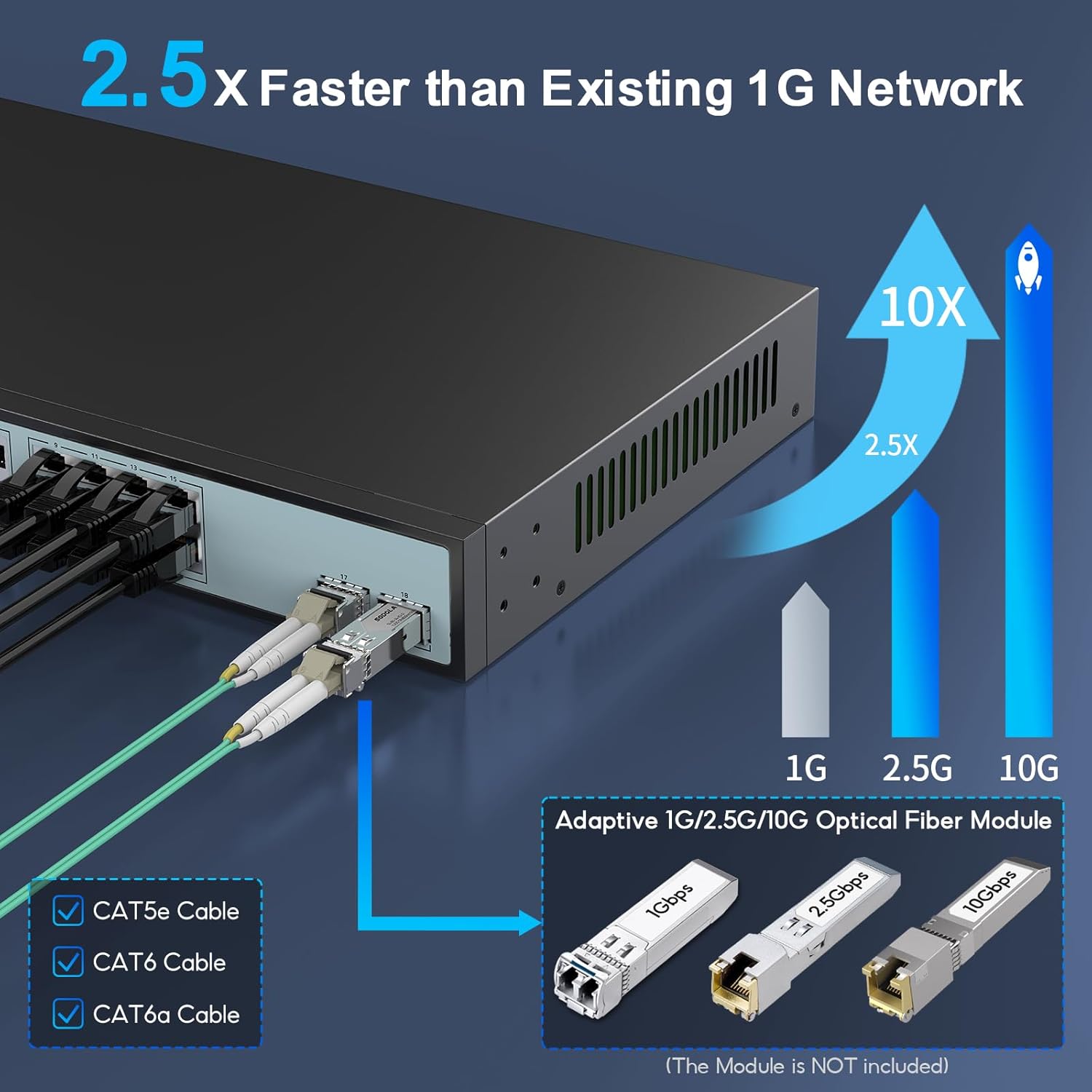
Image: A diagram illustrating the speed capabilities of the switch (1G, 2.5G, 10G) and recommending CAT5e, CAT6, or CAT6a cables for optimal performance. It also shows SFP+ modules for 1G, 2.5G, and 10G connections (modules not included).
5.3 Tænd
- Connect the provided power cord to the AC input port located on the rear panel of the switch.
- Sæt den anden ende af netledningen i en almindelig stikkontakt.
- Upon successful power-up, the PWR indicator light on the front panel will illuminate. The SYS indicator light will also light up, indicating that the system is operational.
6. Betjeningsvejledning
6.1 Basic Operation (Plug and Play)
The SODOLA 2.5G Ethernet Switch is an unmanaged device designed for simplicity. Once powered on and connected to your network devices, it will automatically detect and configure the connections. No further user configuration is typically required for standard network operation.
6.2 VLAN Mode
To enable or disable the fixed VLAN mode:
- Locate the VLAN Dipswitch on the front panel of the switch.
- Indstil kontakten til "PÅ" position to enable VLAN mode. In this mode, ports 1-14 are isolated from each other, meaning they cannot directly communicate. However, they can all communicate with the uplink ports (15-18). This configuration is useful for segmenting network traffic and reducing broadcast domains.
- Indstil kontakten til "SLUKKET" position to disable VLAN mode. In this default state, all ports operate as a single broadcast domain, allowing all connected devices to communicate freely.
6.3 SFP+ Port Speed Adjustment
The SFP+ ports (17 and 18) have a default adaptive speed of 10G/2.5G. To change this to 10G/1G adaptive mode:
- Identify the recessed "SM Button" på frontpanelet.
- Using a thin, pointed object (such as a paperclip or pen tip), press and hold the SM Button for approximately 10 seconds.
- Release the button. The SFP+ ports will now operate in 10G/1G adaptive mode.
- To revert the SFP+ ports to their default 10G/2.5G adaptive mode, repeat the same procedure.
7. Vedligeholdelse
- Rensning: To clean the exterior of the switch, use a soft, dry, lint-free cloth. Avoid using liquid cleaners, aerosol sprays, or abrasive materials, as these can damage the device.
- Ventilation: Regularly check that the ventilation openings on the sides of the switch are clear of dust and obstructions. Proper airflow is essential to prevent overheating and ensure stable operation.
- Firmware: As an unmanaged switch, this device typically does not require user-initiated firmware updates. Any necessary updates are usually handled internally by the manufacturer.
8. Fejlfinding
- Ingen strøm:
- Ensure the power cord is securely connected to both the switch's AC input and a functional electrical outlet.
- Verify that the power outlet is supplying power.
- Check if the PWR indicator light on the front panel is illuminated. If not, try a different power outlet or power cord.
- No Link or Data Activity:
- Inspect the Ethernet cable connections for the affected port and the connected device. Ensure they are firmly seated.
- Confirm that the connected device is powered on and operating correctly.
- Observe the Link/Data indicator light for the specific port. It should be illuminated and blinking to indicate activity.
- Try using a different Ethernet cable or connecting to another port on the switch.
- If using SFP+ ports, ensure the SFP+ module is correctly inserted and compatible with both the switch and the connected device.
- Langsom netværkshastighed:
- Verify that you are using appropriate Ethernet cables (CAT5e, CAT6, or CAT6a) for 2.5G and 10G connections, as older or lower-quality cables may limit speed.
- Check the network adapter settings on your connected devices to ensure they are configured for the desired speed (e.g., 2.5G or 10G).
- If using SFP+ ports, confirm the speed setting of the SFP+ port using the SM button (refer to Section 6.3 for adjustment instructions).
- If VLAN mode is enabled, consider if your network topology and traffic flow are optimized for this configuration.
- Intermitterende forbindelse:
- Check for any loose cable connections at both the switch and the connected devices.
- Ensure the switch is placed in a well-ventilated area and is not experiencing overheating.
- Verify the stability of the power supply to the switch.
9. Specifikationer
| Feature | Beskrivelse |
|---|---|
| Modelnummer | 16X2.5G+10G SFP+ |
| Havne | 16 x 100/1000/2500 Mbps RJ45, 2 x 10G SFP+ |
| Skiftekapacitet | 120 Gbps |
| Standarder | IEEE 802.3, 802.3u, 802.3ab, 802.3bz, 802.3ae, 802.3x |
| Interface Type | RJ45, SFP+ |
| Dataoverførselshastighed | Up to 2500 Mbps per RJ45 port, 10 Gbps per SFP+ port |
| Materiale til hus | Metal |
| Fanless Design | Ja |
| Monteringsmuligheder | Desktop, 1U Rack Mount |
| Kompatible enheder | Desktop computers, gaming consoles, routers, printers, laptops, cameras |
| Varens vægt | 3.05 kilo |
| Farve | Sort |
| Maksimal driftstemperatur | 35 grader Celsius |
| Fabrikant | Shenzhen Hongyavision Technology Co., Ltd. |
| Dato først tilgængelig | 4. november 2023 |

Billede: En top-down view of the SODOLA 16-Port 2.5G Ethernet Switch, showcasing dens kompakte design og portlayout.
10. Garanti og support
SODOLA provides a one-year warranty and lifetime technical support for this product.
For technical assistance, warranty claims, or further inquiries, please refer to the contact information provided with your purchase or visit the official SODOLA webwebsted for supportressourcer.


