Indledning
This manual provides comprehensive instructions for the installation, operation, and maintenance of your Ctronics 4K 8MP 16X Optical Zoom PTZ WiFi Outdoor Security Camera. This advanced camera offers superior surveillance capabilities with its high-resolution imaging, extensive zoom, and intelligent detection features. Please read this manual thoroughly before using the product to ensure optimal performance and safety.
Pakkens indhold
Kontroller venligst, at alle nedenstående varer er inkluderet i din pakke:
- 1 x Ctronics 4K 16X Camera
- 1 x 3m Power Cable (with plug)
- 1 x netværkskabel
- 1 x Accessories Kit (screws, anchors, etc.)
- 1 x brugermanual
Produkt overview og nøglefunktioner
The Ctronics CTIPC-640C-Z16 camera is designed for robust outdoor surveillance, offering a range of advanced features:
4K 8MP Ultra HD & 16X Optical Zoom
Experience crystal-clear imaging with 4K Ultra HD resolution. The 16X optical zoom allows you to magnify distant objects without compromising image quality, enabling clear identification of faces or license plates.

Image: Ctronics 4K 8MP 16X Optical Zoom PTZ WiFi Outdoor Security Camera, showing the camera unit and a smartphone screen displaying 4K 8MP resolution and 16x zoom capability.
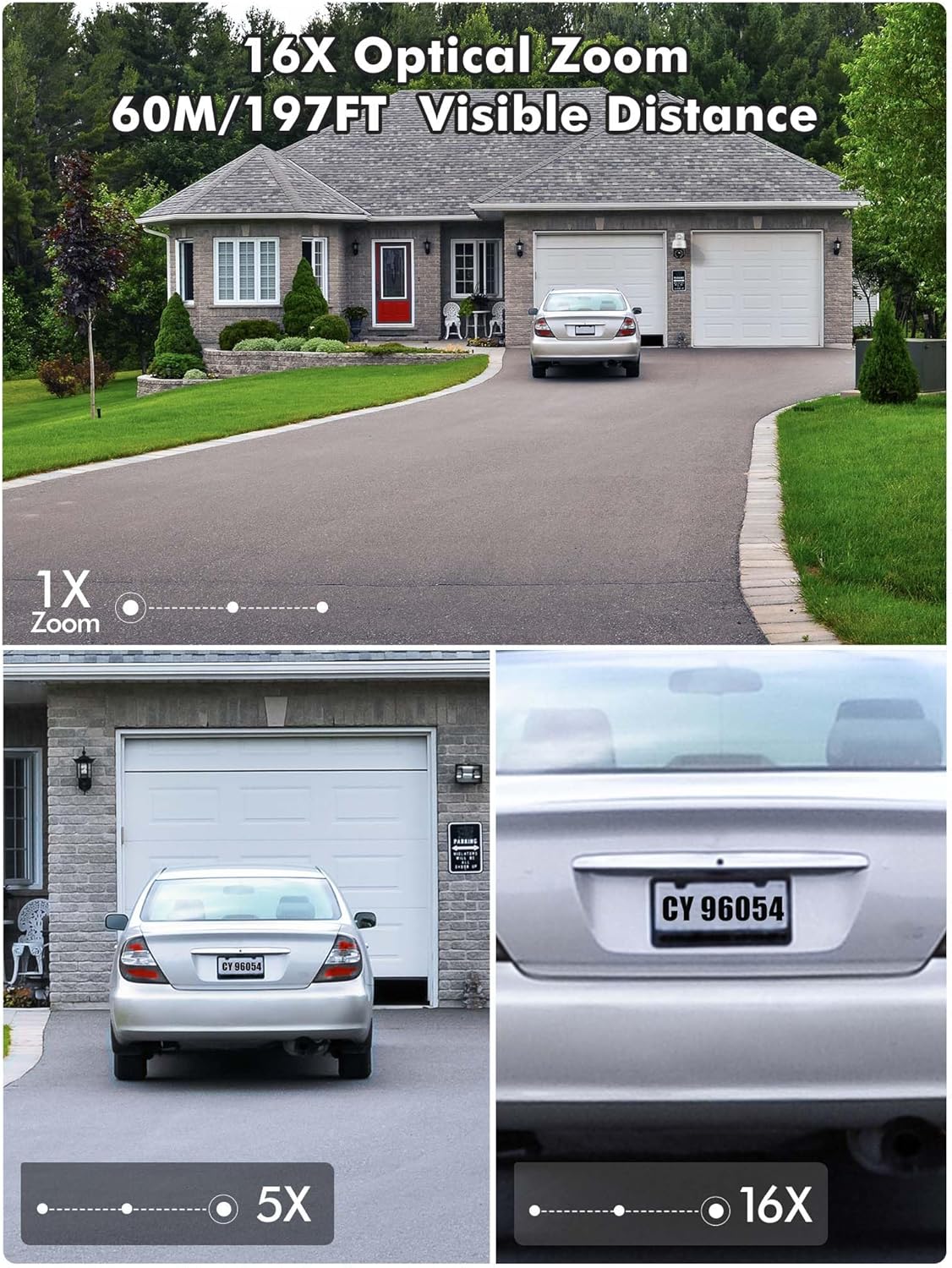
Image: Demonstration of 16X optical zoom, showing a car's license plate clearly visible at 16x magnification compared to 1x and 5x zoom levels. The visible distance is up to 60 meters (197 feet).

Image: Intelligent Optical Zoom feature, demonstrating auto-zoom within 1 second and auto-tracking. A person is shown being zoomed in on as they move, with magnification automatically adjusted based on distance.
Avanceret nattesyn
Equipped with a starlight lens and Sony sensors, the camera provides clear night vision up to 60m (infrared) and color night vision up to 45m, ensuring visibility even in complete darkness.
Video: Product presentation highlighting features like full metal housing, 4K UHD video, human/vehicle/pet detection, 360-degree field of view, cruise control, auto-tracking, 60m infrared night vision, 45m color night vision, 2.4GHz & 5GHz WiFi connection, and red/blue light acoustic alarms. Please note that while the video mentions 30X optical zoom, this product features 16X optical zoom. This video is titled "640C-Z16 Product Presentation".
355° Pan & 90° Tilt (PTZ) with Auto Cruise/Tracking
Eliminate blind spots with a full 355° horizontal and 90° vertical coverage. The camera supports automatic cruise control with up to 30 preset points, and automatically tracks and zooms in on moving objects for ultimate convenience.

Image: Automatic Zoom Cruise feature, illustrating the camera's 355° pan and 90° tilt capabilities with multiple preset points around a house.
Video: Demonstration of setting up automatic tracking (Suivi automatique) by saving a preset position. The video shows a person walking and the camera automatically tracking their movement. This video is titled "640C-Z16 Product Presentation".
Intelligent Detection & Two-Way Audio
The camera can distinguish between people, vehicles, and pets, significantly reducing false alarms. With built-in two-way audio, you can listen and speak in real-time to deter intruders or communicate with visitors.
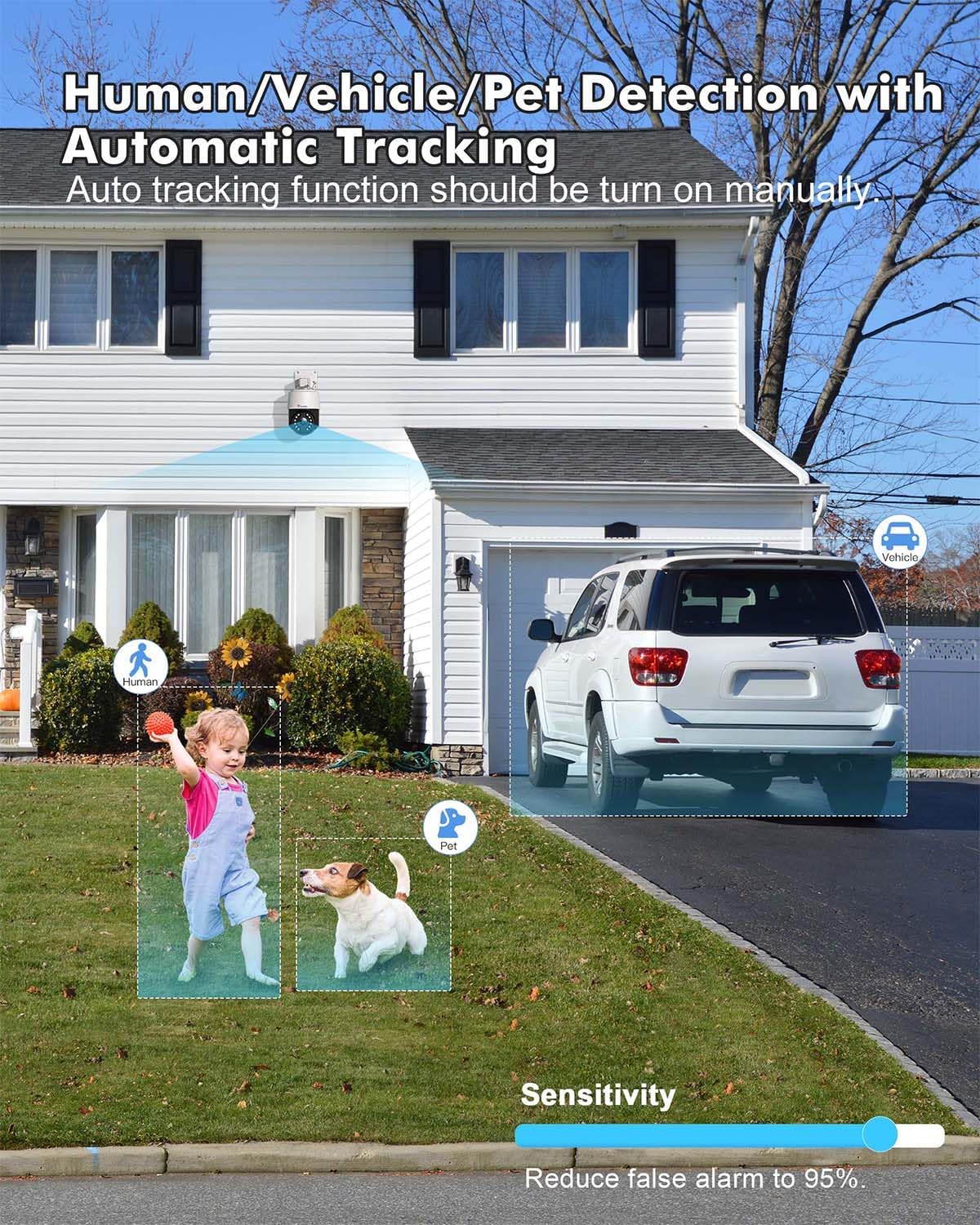
Image: Human/Vehicle/Pet Detection feature, showing the camera identifying a child, a dog, and a vehicle with bounding boxes, and a sensitivity slider to reduce false alarms.

Image: Instant Alarm and 24-Hour Monitoring, showing a person running past the camera at night, triggering sound and light alarms, and a notification on a smartphone.
Multiple Recording Options & IP66 Weather Resistance
Supports 24/7 continuous recording, or scheduled recording, with videos automatically saved to the cloud or a TF card (up to 256GB, not included). Constructed from metal, the camera boasts IP66 weather resistance for durability in various outdoor conditions.

Image: Various storage options available for the camera, including up to 256GB TF card, NVR/NAS 24/7 recording, FTP, and Ctronics Cloud storage.
Dual-Band WiFi & Broad Compatibility
Connects via 2.4GHz for longer transmission range or 5GHz for stronger network connection. Compatible with iOS, Android, Windows, and Mac OS via the Ctronics Pro app and HIP2P Client.

Image: Dual-band WiFi connectivity, showing the camera installed on a house with circles indicating 5GHz for stronger connection and 2.4GHz for longer transmission range.

Image: Broad compatibility of the camera with various operating systems and applications, including iOS, Android, Windows, Mac OS, Ctronics Pro, and HIP2P Client, showing a laptop, tablet, and smartphone displaying camera feeds.
Opsætningsvejledning
1. Første tilslutning
For the initial setup, it is recommended to connect the camera to your router via an Ethernet cable for a stable connection. Once configured, you can switch to Wi-Fi.
- Tilslut kameraet til en stikkontakt ved hjælp af den medfølgende strømadapter.
- Connect one end of the network cable to the camera's Ethernet port and the other end to your router.
- Wait for the camera to power on and initialize (indicated by a status light, refer to the camera's LED indicator guide for details).
2. Appinstallation og parring
Download the Ctronics Pro app on your smartphone or tablet. The app is available for both iOS and Android devices.
- Søg efter "Ctronics Pro" in your device's app store (Apple App Store for iOS, Google Play Store for Android).
- Installer appen, og opret en konto, hvis du ikke har en.
- Open the app and follow the on-screen instructions to add your camera. This typically involves scanning a QR code on the camera or manually entering its UID.
- Once the camera is detected, follow the prompts to connect it to your Wi-Fi network (2.4GHz or 5GHz).
3. Montering af kameraet
The camera supports wall or ceiling mounting. Choose a location that provides optimal viewing coverage and is within range of your Wi-Fi signal and power source.
- Brug den medfølgende monteringsskabelon (hvis medfølger), eller marker borehullerne på den ønskede overflade.
- Bor huller og isæt vægankrene.
- Fastgør monteringsbeslaget til væggen/loftet med de medfølgende skruer.
- Attach the camera to the mounting bracket, ensuring it is securely fastened.
- Juster kameraets vinkel for at dække det ønskede område.
Betjeningsvejledning
1. Lev View og afspilning
Få adgang til live videofeeds og genindlæsview optaget footage through the Ctronics Pro app or desktop client.
- Levende View: Åbn appen, og vælg dit kamera fra enhedslisten for at view realtidsfeedet.
- Afspilning: Navigate to the playback section in the app to access recorded videos from your TF card or cloud storage.
2. PTZ Control and Optical Zoom
Control the camera's pan, tilt, and zoom functions directly from the app.
- Use the directional controls in the app to pan (horizontal movement) and tilt (vertical movement) the camera.
- Use the zoom in/out buttons to activate the 16X optical zoom.
3. Auto Cruise and Preset Points
Set up automated patrol routes for comprehensive area coverage.
- In the app, move the camera to a desired position and save it as a preset point. You can set up to 30 preset points.
- Configure an auto-cruise route by selecting the desired preset points and the order in which the camera should visit them.
- Activate the auto-cruise function to have the camera automatically patrol the defined route.
4. Intelligent Detection Configuration
Customize detection settings to receive accurate alerts.
- Få adgang til detektionsindstillingerne i appen.
- Enable human, vehicle, or pet detection as needed.
- Juster følsomhedsniveauerne for at minimere falske alarmer.
- Enable automatic tracking to have the camera follow detected objects.
5. Tovejslyd
Kommuniker via kameraet ved hjælp af tovejslydfunktionen.
- I live view, tryk på mikrofonikonet for at tale gennem kameraets højttaler.
- Tryk på højttalerikonet for at lytte til lyd fra kameraets mikrofon.
6. Optagelsesindstillinger
Manage how your footage is recorded and stored.
- Configure 24/7 continuous recording or set specific recording schedules.
- Choose your preferred storage method: TF card, NVR/NAS, or cloud storage.
- Ensure your TF card is properly inserted and formatted if using local storage.
Opretholdelse
1. Rensning
Regularly clean the camera lens and housing to ensure clear image quality and proper operation.
- Brug en blød, damp klud til at tørre kameraets yderside af.
- Brug en specialklud og -opløsning til linsen for at undgå ridser.
- Brug ikke skrappe kemikalier eller slibende materialer.
2. Firmwareopdateringer
Keep your camera's firmware updated to benefit from the latest features, security enhancements, and bug fixes.
- Check for firmware updates periodically through the Ctronics Pro app.
- Follow the app's instructions carefully during the update process. Ensure a stable power supply and internet connection during updates.
3. Weather Resistance Care
While the camera is IP66 weather-resistant, proper installation and occasional checks can prolong its lifespan.
- Ensure all cables are properly sealed and protected from moisture.
- Kontroller regelmæssigt monteringens stabilitet, især efter barske vejrforhold.
Fejlfinding
If you encounter issues with your Ctronics camera, refer to the following common troubleshooting steps:
- Ingen strøm: Sørg for, at strømadapteren er korrekt tilsluttet både kameraet og en fungerende stikkontakt.
- Ingen netværksforbindelse:
- Bekræft, at din Wi-Fi-adgangskode er korrekt.
- Sørg for, at kameraet er inden for rækkevidde af din Wi-Fi-router.
- Prøv at genstarte din router og kameraet.
- For initial setup, try connecting via Ethernet cable first.
- Dårlig billedkvalitet:
- Rengør kameralinsen.
- Check your network speed; a slow connection can affect streaming quality.
- Ensure the camera's resolution setting in the app is set to 4K/HD.
- Falske alarmer:
- Juster detektionsfølsomheden i appen.
- Ensure human/vehicle/pet detection is enabled if you wish to filter out other movements.
- Optagelsesproblemer:
- Check if the TF card is inserted correctly and is not full.
- Format the TF card if necessary (this will erase all data).
- Verify your cloud storage subscription status if using cloud recording.
For yderligere assistance, kontakt venligst Ctronics kundesupport.
Specifikationer
| Feature | Detalje |
|---|---|
| Videooptagelsesopløsning | 4K |
| Farve | Hvid |
| Antal genstande | 1 |
| Trådløs kommunikationsteknologi | Wi-Fi |
| Viewi vinkel | 355 degrees (Pan), 90 degrees (Tilt) |
| Night Vision Range | 60 Meters (IR), 45 Meters (Color) |
| Materiale | Metal, Acrylonitril Butadien Styren (ABS) |
| Voltage | 12 volt |
| Magt | 24 watt |
| Varedimensioner (L x B x H) | 17 x 15 x 15 centimeter |
| Vandmodstandsniveau | Vandtæt (IP66) |
| Optisk zoom | 16X Multiplier |
| Særlige funktioner | Auto Cruise/Tracking/Zoom, Night Vision, 4K Ultra HD, Human, Vehicle, Animal Detection |
| Model | CTIPC-640C-Z16 |
| Effektiv stillopløsning | 8 megapixel |
| Anbefalede anvendelser | Udendørs sikkerhed |
| Forbindelsesteknologi | WiFi |
| Indendørs/Udendørs brug | Udendørs |
| Kompatible enheder | Smartphone |
| Strømkilde | Elektrisk med ledning |
| Monteringstype | Vægmontering, loftmontering |
Garanti og support
Ctronics offers a tre års garanti on this product. For any technical assistance, inquiries, or warranty claims, please contact Ctronics customer support. Many users have reported positive experiences with their support team, specifically mentioning helpful representatives like Eric and Candy.
You can typically find contact information on the official Ctronics website or within the Ctronics Pro application.


