Indledning
This manual provides comprehensive instructions for the Mibro 3 True Wireless Bluetooth Earbuds. It covers essential information regarding setup, operation, maintenance, troubleshooting, and product specifications to ensure optimal performance and longevity of your device. The Mibro 3 earbuds offer a perfect blend of style and functionality, featuring an attractive design, long battery life, an LED display, and impressive sound quality.
Produkt overview
Familiarize yourself with the components of your Mibro 3 True Wireless Bluetooth Earbuds.
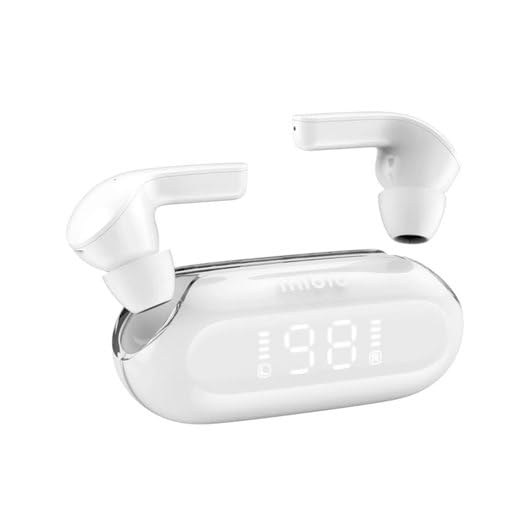
Figur 1: Mibro 3 True Wireless Bluetooth Earbuds and Charging Case. This image displays the white earbuds, one removed from the charging case and one partially visible, alongside the sleek white charging case which features a clear lid and an LED display showing '98', indicating battery percentage.
Komponenter:
- høretelefoner Left and Right True Wireless Earbuds.
- Opladningsetui: Portable case for charging and storing earbuds, with an integrated LED display.
- Ladekabel: (Typically USB-C, though not specified) For charging the case.
- Ørespidser: (Various sizes, though not specified) For comfortable fit.
Opsætning
1. Første opladning
- Placer begge ørepropper i opladningsetuiet.
- Connect the charging cable (not included in product details, but standard) to the charging port on the case and a power source.
- LED-displayet på opladningsetuiet viser opladningsstatus. Sørg for, at etuiet og ørepropperne er fuldt opladet, inden de tages i brug første gang.
2. Parring med en enhed
- Open the charging case. The earbuds will automatically enter pairing mode (indicated by a flashing light on the earbuds, if applicable).
- Aktiver Bluetooth på din enhed (smartphone, tablet, computer).
- Søg efter "Mibro 3" or a similar name in the list of available Bluetooth devices.
- Select "Mibro 3" to connect. Once connected, a voice prompt or indicator light will confirm successful pairing.
- If pairing fails, place the earbuds back in the case, close the lid, wait a few seconds, and then repeat the steps.
Betjeningsvejledning
Tænd/sluk
- Tænd: Open the charging case, and the earbuds will automatically power on and connect to the last paired device. Alternatively, press and hold the touch control area on both earbuds for 2-3 seconds.
- Sluk: Place the earbuds back into the charging case and close the lid. They will automatically disconnect and power off. Alternatively, press and hold the touch control area on both earbuds for 5 seconds.
Touch Controls (Typical Functions)
The Mibro 3 earbuds feature intuitive touch controls. Specific functions may vary slightly, but common operations include:
- Afspil/pause: Et enkelt tryk på begge øretelefoner.
- Næste nummer: Dobbelttryk på den højre øreprop.
- Forrige nummer: Dobbelttryk på den venstre øreprop.
- Besvar/afslut opkald: Enkelt tryk på begge øretelefoner under et indgående opkald.
- Afvis opkald: Tryk og hold på en af øretelefonerne i 2 sekunder under et indgående opkald.
- Aktiver stemmeassistent: Tryk tre gange på en af øretelefonerne.
- Lydstyrkekontrol: (If supported) Tap and hold on the right earbud to increase volume, tap and hold on the left earbud to decrease volume.
Iført øretelefoner
Gently insert the earbuds into your ear canal. Rotate them slightly until they fit snugly and comfortably. Ensure the microphone is pointing towards your mouth for optimal call quality.
Opretholdelse
Rensning
- Brug en blød, tør og fnugfri klud til at tørre ørepropperne og opladningsetuiet af.
- Til genstridigt snavs, let dampda kluden med vand eller et mildt, ikke-slibende rengøringsmiddel.
- Brug ikke skrappe kemikalier, alkohol eller slibende materialer.
- Regularly clean the eartips and the mesh covers to prevent wax buildup, which can affect sound quality.
Opbevaring
- Opbevar altid ørepropperne i deres opladningsetui, når de ikke er i brug, for at beskytte dem og holde dem opladede.
- Store the device in a cool, dry place, away from direct sunlight, extreme temperatures, and humidity.
Batteripleje
- Undgå at aflade batteriet helt ofte.
- Oplad enheden regelmæssigt, selvom den ikke bruges hyppigt, for at opretholde batteriets sundhedstilstand.
- Udsæt ikke enheden for ekstrem varme eller kulde, da dette kan forringe batteriets ydeevne.
Fejlfinding
If you encounter issues with your Mibro 3 earbuds, try the following solutions:
| Problem | Mulig løsning |
|---|---|
| Øretelefoner parres ikke med enheden. |
|
| Kun én øretelefon virker. |
|
| Ingen lyd eller lav lydstyrke. |
|
| Opladningsetuiet oplader ikke. |
|
Specifikationer
Key technical specifications for the Mibro 3 True Wireless Bluetooth Earbuds:
| Feature | Detalje |
|---|---|
| Modelnummer | sol-me3 |
| Mærke | Mikro |
| Forbindelsesteknologi | Trådløs (Bluetooth) |
| Formfaktor | In-Ear |
| Farve | Hvid |
| Materiale | Plast |
| Varens vægt | 100 gram |
| Særlige funktioner | Letvægts |
| Genopladeligt batteri | Ja |
| Kontroltype | Volume Control (and touch controls for playback/calls) |
Garanti og support
Garantioplysninger
The Mibro 3 True Wireless Bluetooth Earbuds are covered by a standard manufacturer's warranty. Please refer to the warranty card included with your purchase or visit the official Mibro webwebstedet for detaljerede vilkår og betingelser vedrørende garantidækning og varighed.
Kundesupport
For technical assistance, product inquiries, or warranty claims, please contact Mibro customer support. Contact information can typically be found on the official Mibro website or within the product packaging. When contacting support, please have your product model number (sol-me3) and purchase details ready.


