1. Produktet er slutview
The Vorago BSP-500-V2 is a portable Bluetooth speaker designed for robust performance and durability. It features IPX5 water resistance, making it suitable for various environments, including outdoor adventures and parties. This manual provides detailed instructions for setting up, operating, and maintaining your speaker.
Nøglefunktioner:
- Ægte trådløs stereo (TWS)-forbindelse: Connect two BSP-500-V2 speakers for an immersive stereo sound experience.
- Forlænget batterilevetid: Enjoy up to 7 hours of music playback at 70% volume, thanks to its 2000 mAh battery.
- USB Type-C opladning: Convenient and modern USB-C port for charging.
- Alsidig tilslutning: Supports Bluetooth for wireless streaming and a 3.5mm auxiliary input for wired connections.
- IPX5 vandtæthed: Protected against low-pressure water jets from any direction.
Pakkeindhold:
- Vorago BSP-500-V2 Bluetooth-højttaler
- USB Type-C opladerkabel
- 3.5 mm lydkabel
- Brugervejledning (dette dokument)
Produktdiagram:

Figur 1.1: Forside view of the Vorago BSP-500-V2 Bluetooth speaker, showcasing its mesh grille and central Vorago logo.

Figur 1.2: Vinklet view of the speaker, highlighting its robust, rectangular design and integrated carrying strap.

Figur 1.3: Øverst view showing the control panel with power, volume down, play/pause, and volume up buttons.
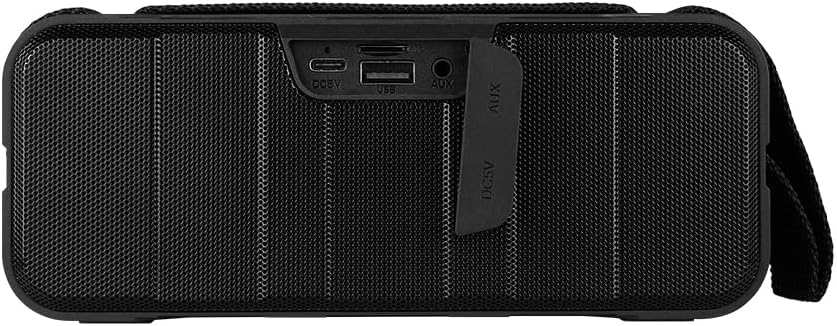
Figur 1.4: Bagside view of the speaker, showing the protective flap covering the input ports.

Figure 1.5: Close-up of the input ports, including DC 5V (USB-C), USB-A, and AUX (3.5mm) inputs, protected by a rubber cover.
2. Sikkerhedsoplysninger
- Do not expose the speaker to extreme temperatures (hot or cold).
- Undgå at tabe eller udsætte højttaleren for kraftige stød.
- Keep the speaker away from direct sunlight and heat sources.
- Du må ikke selv adskille, reparere eller ændre højttaleren. Dette vil ugyldiggøre garantien.
- Ensure the port cover is securely closed when using the speaker near water to maintain IPX5 water resistance.
- Do not immerse the speaker in water. IPX5 rating protects against splashes and light rain, not submersion.
- Use only the provided charging cable or a certified USB Type-C cable for charging.
- Rengør højttaleren med en blød, tør klud. Brug ikke slibende rengøringsmidler eller opløsningsmidler.
3. Opsætning
3.1 Opladning af højttaleren
- Open the protective rubber cover on the rear of the speaker to access the charging port.
- Connect the USB Type-C end of the charging cable to the speaker's DC 5V port.
- Tilslut den anden ende af USB-kablet til en USB-strømadapter (medfølger ikke) eller en computers USB-port.
- Opladningsindikatorlampen lyser under opladning og slukker, når den er fuldt opladet.
- Once charging is complete, securely close the protective rubber cover to maintain water resistance.
3.2 Tænd/sluk
- For at tænde: Tryk og hold på Power-knap on the top panel for approximately 3 seconds until you hear an audible prompt.
- For at slukke: Tryk og hold på Power-knap for approximately 3 seconds until you hear an audible prompt.
3.3 Bluetooth -parring
- Ensure the speaker is powered on. It will automatically enter Bluetooth pairing mode, indicated by a flashing LED light.
- Aktiver Bluetooth på din enhed (smartphone, tablet, bærbar computer), og søg efter tilgængelige enheder.
- Select "BSP-500-V2" from the list of found devices.
- Once successfully paired, the speaker will emit an audible confirmation, and the LED light will stop flashing and remain solid.
- Højttaleren genopretter automatisk forbindelsen til den sidst parrede enhed, når den tændes, hvis enheden er inden for rækkevidde, og Bluetooth er aktiveret.
3.4 Ægte trådløs stereo (TWS) parring
TWS allows you to connect two BSP-500-V2 speakers together for a true stereo sound experience.
- Ensure both BSP-500-V2 speakers are powered on and not connected to any other Bluetooth device.
- On one of the speakers (this will be the primary speaker), double-press the Afspil/pause knap. The speaker will enter TWS pairing mode.
- The two speakers will automatically search for and connect to each other. You will hear an audible confirmation once they are successfully paired.
- Once TWS is established, connect your device to the primary speaker via Bluetooth as described in Section 3.3.
- To disconnect TWS, double-press the Afspil/pause knap på begge højttalere.
3.5 Auxiliary (AUX) Connection
For devices without Bluetooth, you can use the 3.5mm audio cable.
- Open the protective rubber cover on the rear of the speaker.
- Connect one end of the 3.5mm audio cable to the speaker's AUX port.
- Tilslut den anden ende af kablet til lydudgangsstikket på din enhed.
- Højttaleren skifter automatisk til AUX-tilstand.
- Once disconnected, securely close the protective rubber cover.
4. Betjeningsvejledning
4.1 Knapfunktioner:
| Knap | Funktion (kort tryk) | Funktion (langt tryk) |
|---|---|---|
| Power-knap | N/A | Tænd/sluk |
| Lydstyrke ned-knap | Sænk lydstyrken | Forrige spor |
| Afspil/pause knap | Afspil/pause musik, besvar/afslut opkald | Reject Call, Double-press for TWS Pairing |
| Lydstyrke op-knap | Øg lydstyrken | Næste spor |
5. Vedligeholdelse
- Rensning: Use a soft, dry, lint-free cloth to clean the speaker's surface. For stubborn dirt, slightly dampen the cloth with water. Do not use harsh chemicals, cleaning solvents, or strong detergents.
- Vandafvisende pleje: Always ensure the rubber port cover on the back of the speaker is fully and securely sealed when using the speaker outdoors or near water. This maintains its IPX5 water resistance. After exposure to water, wipe the speaker dry before opening the port cover for charging or auxiliary connections.
- Opbevaring: When not in use for extended periods, store the speaker in a cool, dry place, away from direct sunlight and extreme temperatures. It is recommended to charge the speaker fully before storing and to recharge it every few months to maintain battery health.
- Batteripleje: To prolong battery life, avoid fully discharging the battery frequently. Charge the speaker when the low battery indicator is active.
6. Fejlfinding
| Problem | Mulig årsag | Løsning |
|---|---|---|
| Højttaleren tænder ikke. | Lavt batteri. | Charge the speaker fully using the provided USB Type-C cable. |
| Kan ikke parres via Bluetooth. | Speaker is not in pairing mode; Device's Bluetooth is off; Speaker is already connected to another device; Device is too far from speaker. | Ensure speaker is powered on and flashing (pairing mode). Turn on Bluetooth on your device. Disconnect from other devices. Move device closer to speaker (within 10 meters). |
| Ingen lyd eller lav lydstyrke. | Volume too low on speaker or device; Incorrect input mode; Speaker not connected. | Increase volume on both speaker and connected device. Ensure correct mode (Bluetooth or AUX) is active. Verify successful Bluetooth pairing or AUX cable connection. |
| Lydforvrængning. | Lydstyrken er for høj; Enheden er for langt fra højttaleren; Interferens. | Reduce volume on speaker and/or device. Move device closer to speaker. Avoid obstacles between speaker and device. |
| TWS-parring mislykkes. | Speakers are already paired to a device; Speakers are too far apart. | Ensure both speakers are disconnected from any Bluetooth devices. Place speakers close to each other during TWS pairing. |
7. Specifikationer
| Feature | Detalje |
|---|---|
| Modelnavn | BSP-500-V2 |
| Højttaler type | Multimedier |
| Speciel funktion | Bluetooth |
| Anbefalet brug | For music players |
| Kompatible enheder | Bærbar computer, MP3-afspiller, smartphone, tablet |
| Controller type | Knap |
| Surround Sound Kanalkonfiguration | 5.0 |
| Batterilevetid | 7 timer |
| Komponenter inkluderet | Højttaler |
| Produktdimensioner | 5D x 15W x 18H centimeter |
| Produktets vægt | 1 kilo |
| Vandtæt | Ja (IPX5) |
| Batterikapacitet | 2000 mAh |
| Amplivligere Type | Aktiv |
| Strømkilde | Batteri |
| Frekvensrespons | 180 Hz |
| Forbindelsesteknologi | Bluetooth |
| Lydudgangstilstand | Stereoanlæg |
| Monteringstype | Bordplademontering |
8. Garanti og support
The Vorago BSP-500-V2 Bluetooth Speaker comes with a limited warranty. Please refer to the warranty card included with your product for specific terms and conditions, or visit the official Vorago webwebsted for flere detaljer.
For technical support, troubleshooting assistance, or warranty claims, please contact Vorago customer service through their official channels. You can find more information and contact details on the Vorago Brand Store on Amazon eller deres embedsmand webwebsted.
Gem venligst din købsbevis af garantihensyn.


