Indledning
Tak for købetasing the Panasonic TX-55MZ1500E 55-inch 4K OLED TV. This television combines advanced OLED display technology with smart features and high-performance processing to deliver an exceptional viewing and gaming experience. This manual provides essential information for setting up, operating, and maintaining your new television. Please read it thoroughly before use and retain it for future reference.

Billede 1: Forside view of the Panasonic TX-55MZ1500E 55-inch 4K OLED TV, showcasing its display quality with a night city scene.
Vigtige sikkerhedsoplysninger
For at sikre sikker drift og forhindre skader, bedes du overholde følgende sikkerhedsforanstaltninger:
- Strømforsyning: Connect the TV only to an AC power source as indicated on the rating label.
- Ventilation: Bloker ikke ventilationsåbningerne. Sørg for tilstrækkelig plads omkring tv'et for korrekt luftgennemstrømning.
- Vand og fugt: Udsæt ikke tv'et for regn eller fugt. Placer ikke genstande fyldt med væsker, såsom vaser, oven på tv'et.
- Rensning: Tag stikket ud af tv'et før rengøring. Brug en blød, tør klud. Undgå flydende rengøringsmidler eller aerosolspray.
- Placering: Placer tv'et på en stabil, plan overflade. Undgå at placere det i direkte sollys eller i nærheden af varmekilder.
- Børn: Hold opsyn med børn for at forhindre dem i at klatre op på tv'et eller stativet.
- Service: Forsøg ikke selv at servicere dette produkt. Overlad al service til kvalificeret servicepersonale.
Pakkens indhold
Før du fortsætter med opsætningen, skal du kontrollere, at alle nedenstående varer er inkluderet i din pakke:
- Panasonic TX-55MZ1500E 55-inch 4K OLED TV
- Remote Control (requires 1 AA battery, not always included)
- Strømledning
- TV Stand (if applicable, assembly required)
- Hurtig startvejledning
- Safety Information Leaflet
Note: The remote control requires one AA battery. Ensure you have this battery available for initial setup.
Opsætningsvejledning
1. Udpakning og placering
- Carefully remove the TV from its packaging. It is recommended to have two people for this process due to the size and weight.
- Place the TV on a flat, stable surface or prepare for wall mounting (wall mount sold separately).
- Ensure there is adequate space around the TV for ventilation (at least 10 cm on all sides).
2. Montering af stativ (hvis relevant)
If you are using the included TV stand, follow these steps:
- Placer tv-skærmen med nedad på en blød, ren klud for at forhindre ridser.
- Attach the stand base to the TV using the provided screws, ensuring it is securely fastened. Refer to the Quick Start Guide for specific screw locations and types.
- Carefully lift the TV with the stand and place it in your desired viewing placering.
3. Tilslutning af enheder
The TX-55MZ1500E offers various connectivity options. Refer to the side view billede for havneplaceringer.

Billede 2: Side profile of the Panasonic TX-55MZ1500E, highlighting the slim design and accessible input ports.
- HDMI: Connect your Blu-ray player, game console, or set-top box to the HDMI ports. This model supports HDMI 2.1 for high-refresh-rate gaming and advanced features.
- USB: Tilslut USB-lagerenheder til medieafspilning eller softwareopdateringer. TV'et har 1 USB-port.
- Antenne/kabel: Tilslut din antenne eller kabel-tv-feed til udsendelseskanaler.
- Ethernet (LAN): For en stabil kablet internetforbindelse.
- Optisk digital lydudgang: Til tilslutning til et eksternt lydsystem.
4. Strømtilslutning og første opsætning
- Tilslut netledningen til tv'et og derefter til en stikkontakt.
- Insert the AA battery into the remote control.
- Tryk på tænd/sluk-knappen på fjernbetjeningen for at tænde for tv'et.
- Følg instruktionerne på skærmen for at fuldføre den indledende opsætning, som typisk omfatter:
- Valg af sprog
- Valg af land/region
- Netværksforbindelse (Wi-Fi eller kabelbaseret Ethernet)
- Kanalscanning (for antenne/kabel)
- Tidszoneindstillinger
Betjening af dit tv
Grundlæggende funktioner
- Tænd/sluk: Tryk på Magt knappen på fjernbetjeningen.
- Lydstyrkekontrol: Brug Lydstyrke op/ned knapper.
- Kanalvalg: Brug Kanal op/ned buttons or enter channel numbers directly.
- Valg af input: Tryk på Input button to switch between connected devices (HDMI 1, HDMI 2, etc.).
- Menu navigation: Brug piletasterne og OK button to navigate on-screen menus.
Smart TV Features (Smart TV OS)
Your Panasonic TX-55MZ1500E runs on a Smart TV OS, providing access to a wide range of online content and applications.
- Adgang til apps: From the home screen, select your desired application, such as Netflix or YouTube.
- Internet browsing: Brug den indbyggede web browser at få adgang til webwebsteder.
- Trådløs streaming: Utilize features like Mirroring, Swipe & Share, and DLNA to stream content from compatible devices.
Billed- og lydindstillinger
The TV features the HCX Pro AI processor for advanced image processing and supports various HDR formats.
- Billedtilstande: Select from various preset picture modes (e.g., Standard, Cinema, Game, Custom) to optimize viewtil forskelligt indhold.
- HDR-understøttelse: The TV supports HDR10+, HDR10, HLG, and Dolby Vision, automatically adjusting for optimal contrast and color with compatible content.
- Lydtilstande: Adjust audio settings for different content types (e.g., Standard, Music, Speech).
Spilfunktioner
Designed for a high-level gaming experience, this TV includes:
- Lav inputforsinkelse: Minimizes delay between controller input and on-screen action.
- HDMI 2.1: Supports advanced gaming features like Variable Refresh Rate (VRR) and Auto Low Latency Mode (ALLM) on compatible devices.
- Game Control Board: Access specific gaming settings and information quickly.
Vedligeholdelse og pleje
Korrekt pleje vil forlænge levetiden på dit fjernsyn.
- Rengøring af skærm: Tør forsigtigt skærmen af med en blød, tør mikrofiberklud. Ved genstridige mærker, tør letampen the cloth with water or a specialized screen cleaner (apply to cloth, not directly to screen). Do not use alcohol, benzene, or abrasive cleaners.
- Skabsrengøring: Tør tv-kabinettet af med en blød, tør klud.
- Støvning: Støv regelmæssigt ventilationsåbningerne for at forhindre overophedning.
- Sluk: Tag altid stikket ud af stikkontakten før rengøring.
Fejlfinding
Hvis du støder på problemer med dit tv, kan du se følgende almindelige problemer og løsninger:
| Problem | Mulig årsag/løsning |
|---|---|
| Ingen strøm |
|
| Intet billede, men der er lyd |
|
| Ingen lyd, men der er billede |
|
| Kan ikke oprette forbindelse til Wi-Fi |
|
| Fjernbetjening virker ikke |
|
Specifikationer
Key technical specifications for the Panasonic TX-55MZ1500E:
| Feature | Detalje |
|---|---|
| Modelnavn | TX-55MZ1500E |
| Mærke | Panasonic |
| Skærmstørrelse | 55 tommer (139 cm) |
| Displayteknologi | OLED |
| Opløsning | 4K Ultra HD (3840 x 2160) |
| Opdateringshastighed | 100 Hz |
| Processor | HCX Pro AI |
| HDR-understøttelse | HDR10+, HDR10, HLG, Dolby Vision |
| Operativsystem | Smart TV OS |
| Internettjenester | Netflix, YouTube, and more |
| Forbindelse | HDMI (HDMI 2.1 compatible), Wi-Fi, USB (1 port) |
| Aspektforhold | 16:9 |
| Inkluderede komponenter | Fjernbetjening |
| Strømforbrug (SDR) | 84 kWh/1000h |
| Strømforbrug (HDR) | 120 kWh/1000h |
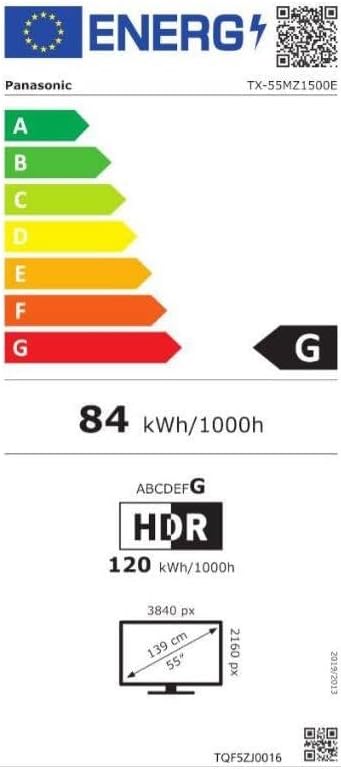
Image 3: Energy efficiency label for the Panasonic TX-55MZ1500E, detailing power consumption and display resolution.
Garanti og support
Panasonic products are manufactured to high-quality standards. For information regarding your product's warranty, please refer to the warranty card included in your package or visit the official Panasonic webwebsted for din region.
For technical support, troubleshooting assistance beyond this manual, or service inquiries, please contact Panasonic customer support. Contact details can typically be found on the Panasonic webwebstedet eller i din produktdokumentation.


