1. Introduktion
This manual provides detailed instructions for the operation and maintenance of your Smile S666 Multimedia Speaker. Please read this manual thoroughly before using the product to ensure proper functionality and to prevent damage.
2. Sikkerhedsoplysninger
To ensure safe operation and prolong the lifespan of your speaker, please observe the following precautions:
- Do not expose the speaker to water or excessive moisture. This product is ikke vandafvisende.
- Undgå at placere højttaleren i direkte sollys eller i nærheden af varmekilder.
- Du må ikke selv adskille eller forsøge at reparere højttaleren. Overlad al service til kvalificeret personale.
- Brug kun den strømadapter og de kabler, der er medfølgende eller anbefalet af producenten.
- Opbevares utilgængeligt for børn.
3. Pakkens indhold
Tjek venligst pakken for følgende varer:
- Smile S666 Multimedia Speaker
- USB strømkabel
- Lydkabel (3.5 mm jack)
- Brugermanual

Figure 3.1: The Smile S666 Multimedia Speaker as packaged in its retail box.
4. Produktet er slutview
The Smile S666 is a compact multimedia speaker designed for desktop use, offering clear audio output for your computer or other compatible devices.
4.1 Komponenter
- Hovedhøjttalerenhed: Houses the audio drivers and control circuitry.
- Lydstyrkeknap: Located on the top surface, used to adjust audio output level.
- USB strømport: For connecting the speaker to a power source.
- Audio Input Port (3.5mm): For connecting to audio sources like computers, phones, etc.

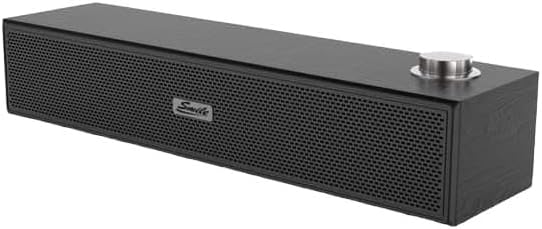
Figur 4.1: Forside og top view of the Smile S666 Multimedia Speaker, showing the speaker grille and volume knob. The speaker is available in different finishes, including wood grain and black.
5. Opsætning
Follow these steps to set up your Smile S666 Multimedia Speaker:
- Placering: Place the speaker on a stable, flat surface near your computer or audio source. Ensure there is adequate ventilation around the speaker.
- Tilslut strøm: Insert the USB power cable into the speaker's USB power port. Connect the other end of the USB cable to a powered USB port on your computer or a USB wall adapter (5V/1A recommended).
- Tilslut lyd: Insert one end of the 3.5mm audio cable into the audio input port on the speaker. Connect the other end of the 3.5mm audio cable to the headphone jack or audio output port of your computer, laptop, or other audio device.
- Tænd: The speaker will typically power on automatically once connected to a power source. Some models may have a power switch integrated with the volume knob; turn the knob clockwise until you hear a click to power on.
6. Betjeningsvejledning
6.1 Justering af lydstyrke
Rotate the volume knob on the top of the speaker clockwise to increase the volume and counter-clockwise to decrease it. You can also adjust the volume from your connected device.
6.2 Lydafspilning
Once connected, play audio from your computer or device. The sound will be output through the Smile S666 speaker.
7. Vedligeholdelse
Sådan holder du din højttaler i optimal stand:
- Rensning: Use a soft, dry cloth to wipe the exterior of the speaker. Do not use liquid cleaners or abrasive chemicals.
- Opbevaring: Når højttaleren ikke er i brug i længere perioder, skal den opbevares køligt og tørt, væk fra direkte sollys og ekstreme temperaturer.
- Kabelpleje: Avoid bending or crimping the power and audio cables excessively.
8. Fejlfinding
| Problem | Mulig årsag | Løsning |
|---|---|---|
| Ingen lyd | Speaker not powered on; Cables not connected properly; Volume too low; Incorrect audio output selected on device. | Ensure speaker is powered on; Check all cable connections; Increase speaker and device volume; Select the correct audio output on your computer/device. |
| Forvrænget lyd | Volume too high; Poor audio source quality; Damaged cable. | Lower the volume; Try a different audio source; Replace the audio cable. |
| Speaker not recognized by computer | Driver issue (rare for plug-and-play speakers); USB port issue. | Prøv en anden USB-port; Genstart computeren. |
9. Specifikationer
| Feature | Detalje |
|---|---|
| Produktdimensioner | 40 x 5 x 5 cm |
| Første ledige dato | 7. august 2023 |
| Fabrikant | smail |
| ASIN | B0CDZBFRQ5 |
| Brand Name (as listed) | Generel |
| Forbindelsesteknologi | Wired (3.5mm Audio Jack), Bluetooth |
| Monteringstype | Bordplademontering |
| Modelnavn | S666 |
| Højttaler type | Multimedier |
| Kompatible enheder | Personlig computer |
| Subwoofer diameter | 12 tommer |
| Farve | Levende farve |
| Vandmodstand | Ingen |
10. Garanti og support
This product comes with a standard manufacturer's warranty. For specific warranty terms and conditions, please refer to the warranty card included in the package or contact your point of purchase. For technical support or service inquiries, please contact the retailer or manufacturer directly.
For yderligere assistance kan du besøge producentens webwebstedet eller kontakt deres kundeserviceafdeling. Gem din købskvittering som købsbevis i tilfælde af garantikrav.


