1. Produktet er slutview
The PETGUGU PF1 Smart App Control Cat Water Fountain is designed to provide fresh, filtered water for your pets while allowing you to monitor their drinking habits via a dedicated mobile application. This manual provides instructions for setup, operation, maintenance, and troubleshooting.

Image 1.1: PETGUGU PF1 2L Smart App Control Cat Water Fountain. This image shows the complete water fountain unit with a transparent top reservoir and a white base, alongside a smartphone displaying the companion app interface.
2. Pakkens indhold
- PETGUGU PF1 Water Fountain Unit (Base, Water Reservoir, Water Tray)
- Trådløs vandpumpe
- Filter Element (Pre-installed or separate)
- Strømadapter og kabel
- Brugervejledning (dette dokument)
3. Opsætningsvejledning
3.1 Montering
- Pak alle komponenter ud af emballagen.
- Place the wireless water pump into its designated slot in the base unit. Ensure it is securely seated.
- Install the filter element into the filter tray.
- Place the water tray onto the reservoir, ensuring it aligns correctly.
- Position the assembled reservoir and tray onto the base unit.

Image 3.1: Disassembled PETGUGU PF1 Water Fountain. This image illustrates the main components of the fountain, including the base, water reservoir, and filter assembly, highlighting the wireless pump design.
3.2 Initial Water Fill
- Fill the water reservoir with clean water up to the 'MAX' line indicated on the side. Do not overfill.
- Ensure the water tray is properly seated after filling.

Image 3.2: PETGUGU PF1 Water Fountain showing MAX fill line. This image highlights the transparent water reservoir with a clear 'MAX' indicator, demonstrating the 2L capacity.
3.3 App Download and Device Connection
The PETGUGU app allows for smart control and health monitoring. The device only supports 2.4G Wi-Fi networks; 5GHz networks are not supported.
- Download the PETGUGU app from the App Store (iOS) or Google Play Store (Android). You can scan the QR code provided in Image 3.3.
- Ensure your mobile phone's Bluetooth and 2.4G Wi-Fi are enabled.
- Open the app and add your pet's information for the first time.
- Long press the power button on the water dispenser until the right indicator light blinks.
- In the app, navigate to the 'Device' interface and select 'Add Device'.
- Follow the on-screen prompts to connect the water dispenser, inputting your 2.4G Wi-Fi password when requested.

Image 3.3: PETGUGU App Download. This image displays a smartphone screen showing the PETGUGU app in an app store, along with QR codes for direct download from Apple App Store and Google Play Store.

Image 3.4: PETGUGU App Connection Steps. This image provides a visual guide to connecting the water fountain to the app, showing sequential screenshots of the app interface during the pairing process.
4. Betjeningsvejledning
4.1 Water Dispensing Modes
The fountain offers two water outlet modes, selectable via the app or the physical button:
- Kontinuerlig tilstand: Vandet strømmer kontinuerligt.
- Intermittent Mode (Energy-Saving): Water flows for 30 seconds and then pauses for 3 minutes.
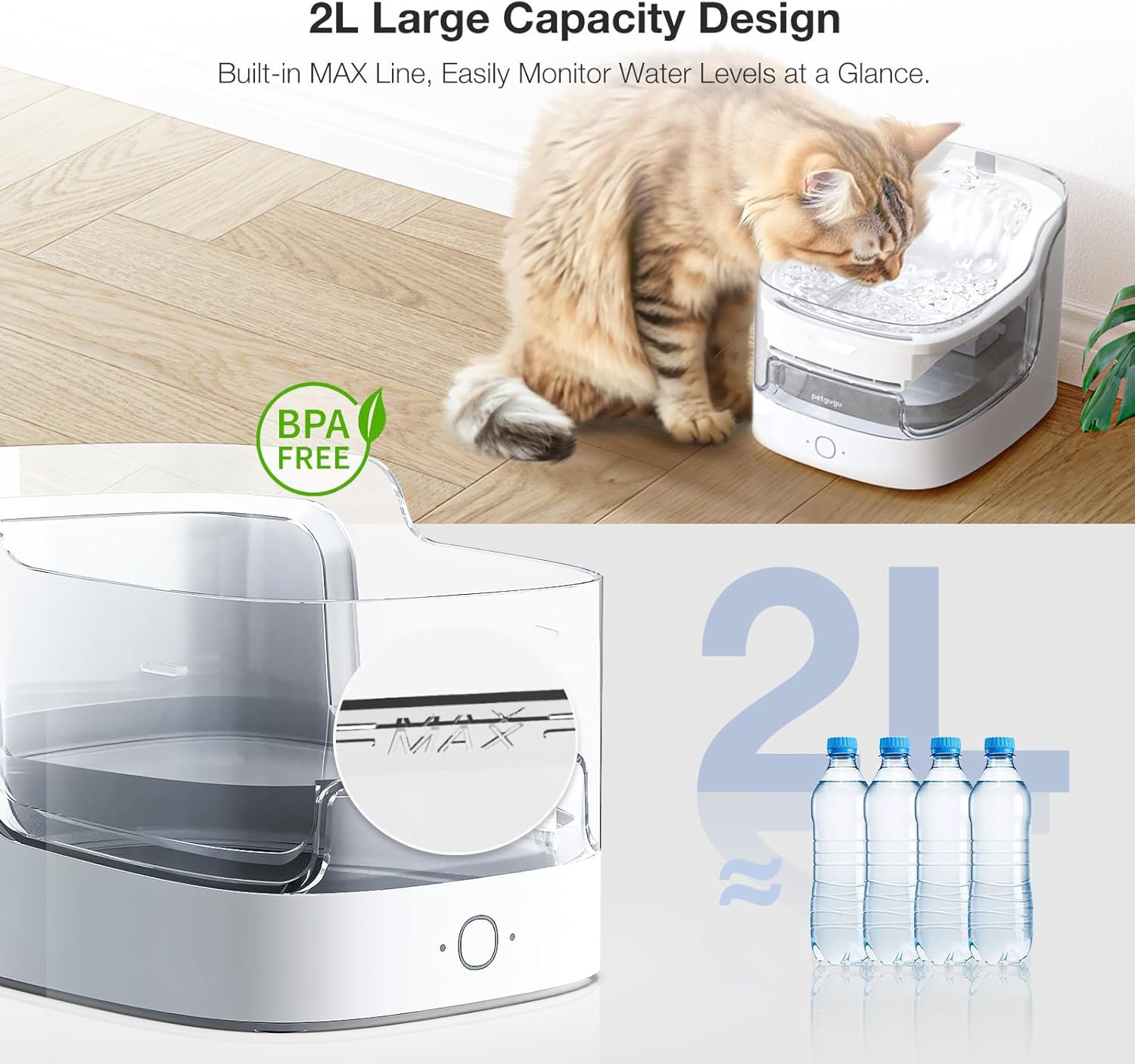
Image 4.1: PETGUGU PF1 Dual Water Modes. This image shows the water fountain in operation with a cat nearby, illustrating the two available water dispensing modes: Continuous and Intermittent, selectable via the app.
4.2 Smart App Health Monitoring
The PETGUGU app provides real-time monitoring of your pet's drinking data, accurate to grams. It records daily, weekly, monthly, and yearly water intake, allowing you to detect any abnormal drinking patterns promptly.
- View historical drinking data.
- Receive alerts for low water levels.
- Monitor filter cartridge lifespan.
- Share app access with family members for collaborative pet care.

Image 4.2: PETGUGU App Health Monitoring. This image displays two graphs comparing normal and abnormal pet drinking data, as shown on the PETGUGU app, emphasizing its role in pet health management.

Image 4.3: PETGUGU App Interface with Drinking Data. This image shows a close-up of the PETGUGU app interface on a smartphone, displaying a graph of a pet's weekly drinking volume and recommended intake.
4.3 Live Body Detection
The fountain is equipped with a live body detection function. When a pet is detected within 50cm, the water pump will start to work. If the pet continues to drink, the fountain will continue to operate. When the pet stops drinking, it will switch back to energy-saving mode.

Image 4.4: PETGUGU PF1 Inductive Water Dispensing. This image illustrates the fountain's inductive water dispensing feature, showing a cat approaching the fountain and a 50cm detection radius.
5. Vedligeholdelse
5.1 Rengøring af fontænen
Regular cleaning is essential for maintaining water quality and extending the product's lifespan. The modular design allows for easy disassembly and cleaning.
- Frakobl strømadapteren før rengøring.
- Disassemble the water tray, reservoir, and filter assembly.
- Hand wash all removable parts with mild soap and water. Rinse thoroughly to remove any soap residue.
- Clean the wireless pump and its housing. The main base unit is not washable; wipe it with a damp klud om nødvendigt.
- Reassemble all components once dry.

Image 5.1: PETGUGU PF1 Easy to Clean. This image shows the disassembled water fountain components being cleaned in a kitchen sink, emphasizing the ease of maintenance.
5.2 Filterudskiftning
The PETGUGU PF1 features an 8-layer filtration system to remove impurities, soften water, and eliminate odors. The app will remind you when it's time to replace the filter cartridge.
- It is recommended to replace the filter element every 30-60 days, or as indicated by the app, to ensure optimal water quality.
- To replace, remove the water tray and old filter. Insert a new filter element into the filter tray.
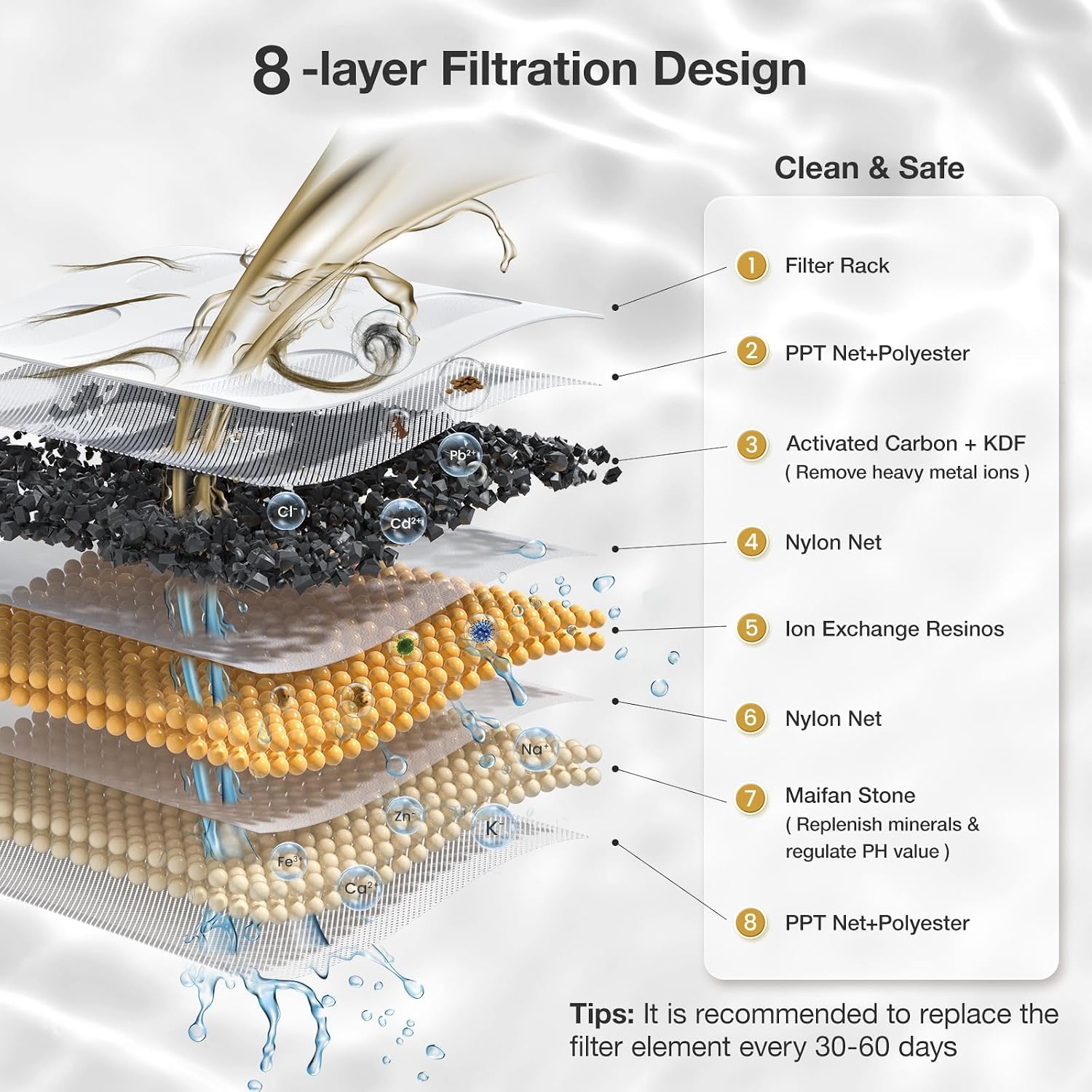
Image 5.2: PETGUGU PF1 8-Layer Filtration Design. This detailed diagram illustrates the eight layers of the filtration system, including activated carbon, ion exchange resin, and KDF materials, highlighting their function in purifying water.

Image 5.3: PETGUGU PF1 Low Water Alert. This image shows the water fountain with a low water level, and a smartphone displaying an app notification to replenish water, along with drinking data.
6. Fejlfinding
- Ingen vandgennemstrømning: Check if the water level is sufficient. Ensure the wireless pump is correctly seated in the base and the power adapter is securely connected.
- Problemer med appforbindelse: Verify that your router is broadcasting a 2.4G Wi-Fi signal. Restart the app and the water fountain, then attempt to re-pair the device following the instructions in Section 3.3.
- Alarm om lavt vand: The app will notify you when the water level is low. Replenish water up to the MAX line.
- Abnormal Drinking Data: If the app indicates unusual drinking patterns for your pet, consult a veterinarian for advice.
7. Specifikationer
| Feature | Specifikation |
|---|---|
| Modelnavn | PF1 |
| Kapacitet | 2 liter |
| Materiale | Acrylonitril Butadien Styren (ABS) |
| Varens vægt | 4.63 pund |
| Produktmål (LxBxH) | 10.23 cm x 8.26 cm x 8.5 cm |
| Forbindelse | 2.4G Wi-Fi Only |
| Plejevejledning | Håndvask (aftagelige dele) |
8. Garanti og support
8.1 Garantioplysninger
The PETGUGU PF1 Cat Water Fountain comes with a 2 års garanti fra købsdatoen, dækker fabrikationsfejl. Gem venligst din købsbevis i tilfælde af garantikrav.
8.2 Kundesupport
For any questions, technical assistance, or warranty claims, please contact PETGUGU customer service through the official website or your retailer's support channels. Provide your product model and purchase details for efficient service.


