1. Produktet er slutview
The SKMEI Model 2004 is a versatile digital watch featuring a durable design and multiple functions. It is suitable for daily wear and various activities.

Nøglefunktioner
- Sleek & Stylish Design: Blends fashion with function, featuring light or dark face options.
- Durable & Comfortable Build: Crafted with a premium zinc alloy case and stainless steel band, ensuring long-lasting wear with an adjustable band.
- Water-Resistant & Reliable: Designed with 3ATM water resistance (30 meters), it withstands splashes, rain, and brief water exposure.
- Multi-Functional Digital Display: Features dual time display, stopwatch, countdown timer, daily alarm, and date/week display.
- Nighttime Visibility & Easy Operation: Includes an EL backlight for clear visibility in the dark. Simple mode and reset buttons provide effortless control.

2. Urkomponenter
Familiarize yourself with the buttons and display elements of your SKMEI 2004 watch.

The watch features four primary buttons:
- LYS: (Top Left) Activates the EL backlight for illumination.
- KØRSELSVEJLEDNING: (Bottom Left) Cycles through different modes (Time, Alarm, Stopwatch, Countdown).
- STARTE: (Top Right) Used to start/stop functions in Stopwatch/Countdown modes, and to adjust values during setting.
- NULSTIL: (Bottom Right) Used to reset functions in Stopwatch/Countdown modes, and to select items during setting.
3. Opsætningsvejledning
3.1. Indstilling af tid og dato
- Fra den normale tidsvisning skal du trykke på MODE knappen gentagne gange, indtil sekunderne begynder at blinke. Dette indikerer, at du er i tidsindstillingstilstand.
- Tryk på NULSTIL button to cycle through the setting options: Seconds → Hour → Minute → Year → Month → Day.
- Brug STARTE knappen for at justere den blinkende værdi. Hold STARTE at ændre værdier hurtigere.
- Når alle indstillinger er korrekte, skal du trykke på MODE knappen for at afslutte indstillingstilstanden og vende tilbage til den normale tidsvisning.
3.2. 12/24 timers format
In the normal time display, press the STARTE knappen for at skifte mellem 12-timers og 24-timers formater.
4. Betjeningsvejledning
4.1. EL Baggrundsbelysning
Tryk på LYS button to illuminate the display for a few seconds, providing visibility in low-light conditions.
4.2. Alarmindstilling
- Fra den normale tidsvisning skal du trykke på MODE button once to enter Alarm Mode.
- Tryk på NULSTIL button to select the hour or minute to be set. The selected value will flash.
- Brug STARTE knappen for at justere den blinkende time eller minut.
- Tryk på MODE button to confirm and exit Alarm Setting Mode.
- For at aktivere/deaktivere alarmen skal du trykke på STARTE knappen i alarmtilstand. Et alarmikon vil vises/forsvinde på displayet.
4.3. Stopur-funktion
- Fra den normale tidsvisning skal du trykke på MODE button twice to enter Stopwatch Mode. The display will show 00:00:00.
- Tryk på STARTE knappen for at starte tidtagningen.
- Tryk på STARTE knappen igen for at sætte tidtagningen på pause.
- Tryk på NULSTIL knappen for at nulstille stopuret til 00:00:00.
- For at registrere splittider, tryk på NULSTIL mens stopuret kører. Splittiden vises. Tryk på NULSTIL igen for at vende tilbage til det løbende stopur.
4.4. Nedtællingstimer
- Fra den normale tidsvisning skal du trykke på MODE button repeatedly until you reach the Countdown Timer Mode. The display will show a time, possibly flashing.
- Tryk på NULSTIL button to select the hour, minute, or second to be set.
- Brug STARTE knappen for at justere den blinkende værdi.
- Når den ønskede nedtællingstid er indstillet, skal du trykke på STARTE knappen for at starte nedtællingen.
- Tryk på STARTE button again to pause the countdown. Press STARTE igen for at genoptage.
- Tryk på NULSTIL button to stop and reset the countdown timer to its initial set value.
- Tryk på MODE button to exit Countdown Timer Mode.
4.5. Dobbelt tidsvisning
The watch features a dual time display, allowing you to view two different time zones simultaneously. The secondary time zone is typically set independently. Consult the display indicators for setting the dual time, usually by entering a specific mode via the MODE button and using STARTE og NULSTIL at justere.
5. Vedligeholdelse
5.1. Water Resistance (3ATM)
Your SKMEI 2004 watch is 3ATM water-resistant, meaning it can withstand splashes, rain, and brief immersion in water. It is ikke suitable for swimming, diving, or showering with hot water, as steam can penetrate the seals.
Vigtig: Do not operate the buttons while the watch is wet or submerged.
5.2. Rensning
Wipe the watch regularly with a soft, dry cloth to remove dirt and moisture. For the stainless steel band, a slightly damp klud kan bruges, efterfulgt af øjeblikkelig tørring.
5.3. Udskiftning af batteri
The watch uses a CR2032 battery. When the display dims or functions become erratic, it may be time to replace the battery. Battery replacement should ideally be performed by a qualified watch technician to ensure proper sealing and water resistance.

6. Fejlfinding
- Skærmen er tom eller svag: Check battery level. Replace battery if necessary.
- Tidspunktet er forkert: Re-set the time following the 'Time and Date Setting' instructions.
- Knapperne reagerer ikke: Ensure the watch is dry. If the issue persists, contact customer support.
- Vand inde i uret: Tag straks uret til en professionel for inspektion og reparation for at forhindre yderligere skade.
7. Specifikationer
| Feature | Detalje |
|---|---|
| Modelnummer | 2004 |
| Mærke | SKMEI |
| Display Type | Digital |
| Etui materiale | Zinklegering |
| Båndmateriale | Rustfrit stål |
| Vandmodstand | 3ATM (30 meter) |
| Bevægelsestype | Kvarts |
| Batteritype | CR2032 |
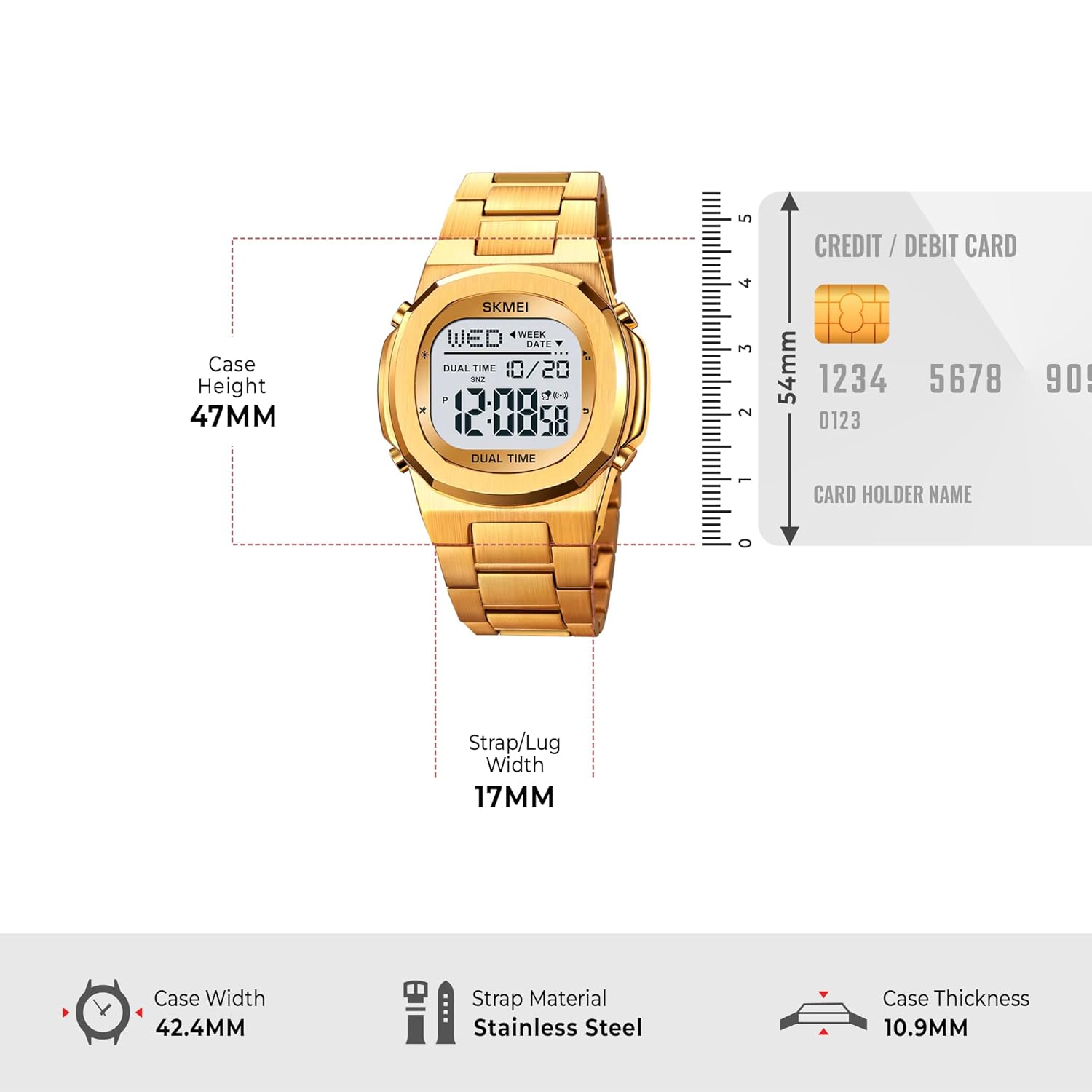
| Varens vægt | 97.4 g |
| Æske diameter | 4.24 cm |
| Produktdimensioner | 20 x 4.24 x 1.09 cm |
8. Garanti og support
8.1. Garantioplysninger
This SKMEI watch comes with a manufacturer's warranty. Please refer to the warranty card included with your purchase for specific terms and conditions. Retain your proof of purchase for warranty claims.
8.2. Kundesupport
For any questions, technical assistance, or service requests, please contact SKMEI customer support through their official website or the retailer where the watch was purchased.
Visit the official SKMEI store: SKMEI Store on Amazon


