1. Produktet er slutview
The Mibro Watch A2 is a versatile smartwatch designed to enhance your daily life with advanced features and robust performance. It integrates a dual-core 2-in-1 Bluetooth chip for seamless connectivity, allowing for direct Bluetooth calls from your wrist. Featuring a vibrant 1.39-inch HD display, it offers clear visuals and intuitive navigation. The watch is equipped with an updated 4 PD heart rate monitor for comprehensive health tracking, including SpO2 measurement and sleep monitoring. With 70 dedicated sport modes and 2 ATM water resistance, it is suitable for various activities. The long-lasting battery provides up to 10 days of usage on a single charge.
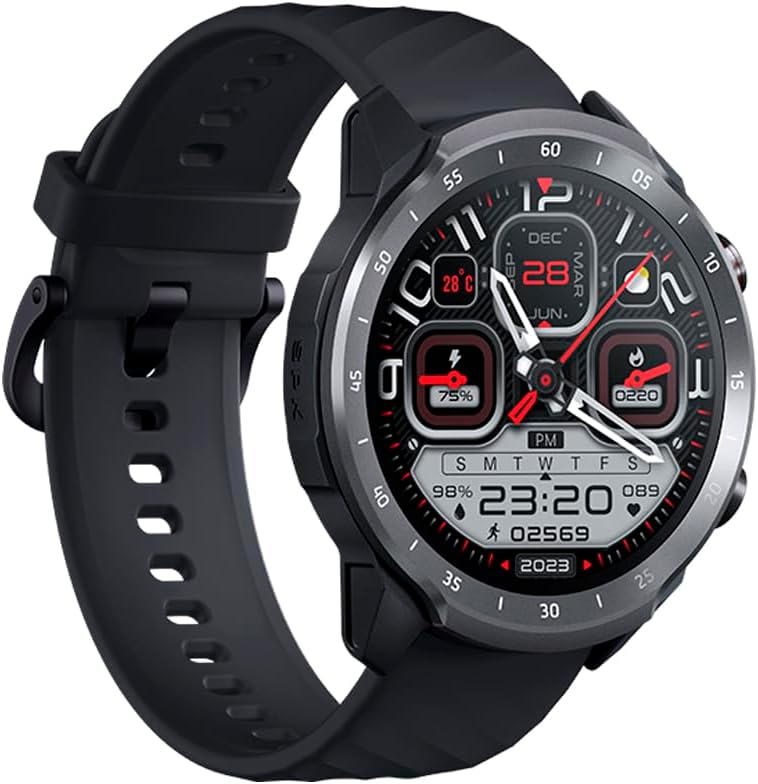
Figure 1.1: Mibro Watch A2, showcasing dens design og rem.
2. Sikkerhedsoplysninger
- Forsøg ikke at adskille, reparere eller ændre enheden. Dette kan forårsage skade, brand eller elektrisk stød.
- Keep the device away from extreme temperatures (hot or cold), direct sunlight, and moisture.
- Undgå at udsætte enheden for kraftige stød eller vibrationer.
- Use only the provided charging cable and adapter. Using unauthorized accessories may damage the device or pose safety risks.
- Consult a medical professional before starting any new exercise regimen or if you have pre-existing health conditions, especially if relying on the watch for health monitoring.
- The device is 2 ATM water-resistant, suitable for splashes and brief immersion. Do not use it for diving, hot showers, or high-speed water sports.
3. Pakkens indhold
Kontroller venligst pakkens indhold ved udpakning:
- Mibro Watch A2 Smartwatch
- Magnetisk opladningskabel
- Brugermanual
4. Produktlayout og komponenter
Familiarize yourself with the main components of your Mibro Watch A2:

Figur 4.1: Forside view of the Mibro Watch A2 display and physical buttons.
- Vise: 1.39-inch HD touchscreen for interaction and information display.
- Sideknapper: Typically used for power on/off, screen wake-up, and navigating menus.
- Pulssensor: Located on the back of the watch, used for heart rate and SpO2 monitoring.
- Opladningskontakter: Magnetic contacts on the back for connecting the charging cable.
- Rem: Adjustable and replaceable strap for comfortable wear.
5. Opsætningsvejledning
5.1. Opladning af enheden
Before first use, fully charge your Mibro Watch A2.
- Connect the magnetic charging cable to the charging contacts on the back of the watch. Ensure the cable is securely attached.
- Plug the USB end of the charging cable into a standard USB power adapter (5V/1A recommended) or a computer's USB port.
- The watch display will show the charging progress. A full charge typically takes approximately 2 hours.
5.2. Appinstallation og parring
To unlock the full potential of your Mibro Watch A2, download and install the official Mibro Fit application on your smartphone.
- Download appen: Søg efter "Mibro Fit" in the Apple App Store (for iOS) or Google Play Store (for Android) and install it.
- Registrer/Log ind: Open the Mibro Fit app and follow the on-screen instructions to register a new account or log in if you already have one.
- Aktiver Bluetooth: Sørg for, at Bluetooth er aktiveret på din smartphone.
- Par enheden: In the Mibro Fit app, navigate to the "Device" or "Add Device" section. Select "Mibro Watch A2" from the list of available devices.
- Bekræft parring: A pairing request will appear on both your watch and smartphone. Confirm the pairing on both devices.
- Komplet opsætning: Follow any remaining prompts in the app to complete the initial setup, including personal information and notification permissions.
6. Betjeningsvejledning
6.1. Grundlæggende navigation
- Vækningsskærm: Tryk på sideknappen, eller løft dit håndled.
- Stryg op/ned: Rul gennem menuer og notifikationer.
- Stryg til venstre/højre: Få adgang til hurtige funktioner eller forskellige dataskærme (f.eks. puls, vejr).
- Tryk på: Vælg et element eller bekræft en handling.
- Tryk på sideknappen: Gå tilbage til urskiven eller åbn applisten.
6.2. Bluetooth-opkald
The Mibro Watch A2 supports Bluetooth calling directly from your wrist.

Figure 6.1: Using the Mibro Watch A2 for Bluetooth calls.
- Ensure your watch is successfully paired with your smartphone via Bluetooth.
- Foretage opkald: Få adgang til tastaturet eller kontaktlisten på dit ur for at starte et opkald.
- Modtagelse af opkald: Når du modtager et opkald, kan du besvare eller afvise det direkte fra urets skærm.
6.3. Sundhedsovervågning
Uret tilbyder kontinuerlige sundhedsovervågningsfunktioner.
- Puls: Swipe to the heart rate interface or select the heart rate app to view your current heart rate. The watch supports 24/7 heart rate monitoring.
- SpO2 (blodilt): Access the SpO2 measurement function to check your blood oxygen saturation. Ensure the watch is snug on your wrist for accurate readings.
- Søvnovervågning: Tag uret på i seng, og det vil automatisk spore dine søvnmønstre, herunder dyb søvn, let søvn og vågentidspunkter. View detailed sleep data in the Mibro Fit app.

Figure 6.2: Blood oxygen measurement in progress on the Mibro Watch A2.
6.4. Sportstilstande
The Mibro Watch A2 offers 70 sport modes to track your workouts.
- From the watch face, navigate to the "Workout" or "Sport" app.
- Select your desired sport mode (e.g., Running, Cycling, Walking).
- Tap to start the activity. The watch will begin recording data such as duration, calories burned, and heart rate.
- To pause or end an activity, swipe or press the side button as prompted on the screen.

Figure 6.3: Mibro Watch A2 tracking an outdoor activity.
6.5. Notifikationer og andre funktioner
- Smarte meddelelser: Receive call, message, and app notifications directly on your watch. Configure notification settings in the Mibro Fit app.
- Se ansigter: Customize your watch face from a variety of options available in the Mibro Fit app or directly on the watch.
- Musik kontrol: Styr musikafspilning på din smartphone fra dit ur.
- Vejr: View real-time weather updates.
- Alarmer og timere: Set alarms and use timer/stopwatch functions.
7. Vedligeholdelse
- Rensning: Tør uret og remmen regelmæssigt af med en blød kludamp klæde. Undgå at bruge skrappe kemikalier eller slibende materialer.
- Vandtæthed: The Mibro Watch A2 is 2 ATM water-resistant. This means it can withstand splashes, rain, and brief immersion in shallow water. It is not suitable for swimming, diving, hot showers, or saunas. Always dry the watch thoroughly after exposure to water.
- Batteripleje: To prolong battery life, avoid fully discharging the battery frequently. Charge the watch when the battery level is low. Store the watch in a cool, dry place if not used for extended periods.
- Softwareopdateringer: Regularly check for and install software updates via the Mibro Fit app to ensure optimal performance and access to new features.
8. Fejlfinding
| Problem | Mulig årsag/løsning |
|---|---|
| Uret tænder ikke. | Battery might be depleted. Connect the watch to the charger and allow it to charge for at least 10 minutes before attempting to turn it on. |
| Kan ikke parres med smartphone. |
|
| Unøjagtige puls-/SpO2-aflæsninger. |
|
| Notifikationer vises ikke. |
|
9. Specifikationer
| Feature | Beskrivelse |
|---|---|
| Modelnavn | Mibro Watch A2 |
| Modelnummer | XPAW015 |
| Mærke | Mikro |
| Skærmstørrelse | 1.39 tommer |
| Forbindelse | Bluetooth |
| Særlige funktioner | Software available in 26 languages, Bluetooth Calling, Heart Rate Monitoring, SpO2 Measurement, Sleep Tracking, 70 Sport Modes |
| Kompatible enheder | Bluetooth-enabled smartphones, tablets, PCs, laptops |
| Batterisammensætning | Lithium-ion |
| Batterilevetid | Op til 10 dage (typisk brug) |
| Vandmodstand | 2 ATM |
| GPS | GPS via smartphone |
| Hukommelseslagringskapacitet | 1 GB |
10. Garanti og support
Mibro products typically come with a limited warranty. Please refer to the warranty card included in your product packaging or visit the official Mibro webwebstedet for detaljerede garantivilkår og -betingelser, der er specifikke for din region.
For technical support, troubleshooting assistance, or service inquiries, please contact Mibro customer support through their official website or the contact information provided in the Mibro Fit application.
Official Mibro Store: Visit Mibro Store on Amazon


