1. Introduktion
This manual provides detailed instructions for the installation, configuration, and operation of the Grandstream GWN7003 11-Port Wired Gigabit VPN Router. The GWN7003 is designed to establish robust wired, wireless, and VPN networks for various environments, offering advanced features for network management and security.
2. Produktet er slutview
2.1 Nøglefunktioner
- 1x GbE RJ45 port with IEEE 802.3af/at PoE Input.
- 2x GbE RJ45 ports with 48V Passive PoE output or IEEE802.3af.
- Multiple Gigabit RJ45 ports and Gigabit SFP ports for flexible connectivity.
- Integrated VPN support for secure remote access to corporate networks.
- Built-in firewall for enhanced network security.
- Multi-WAN capabilities for load balancing and failover.
2.2 Frontpanelets layout
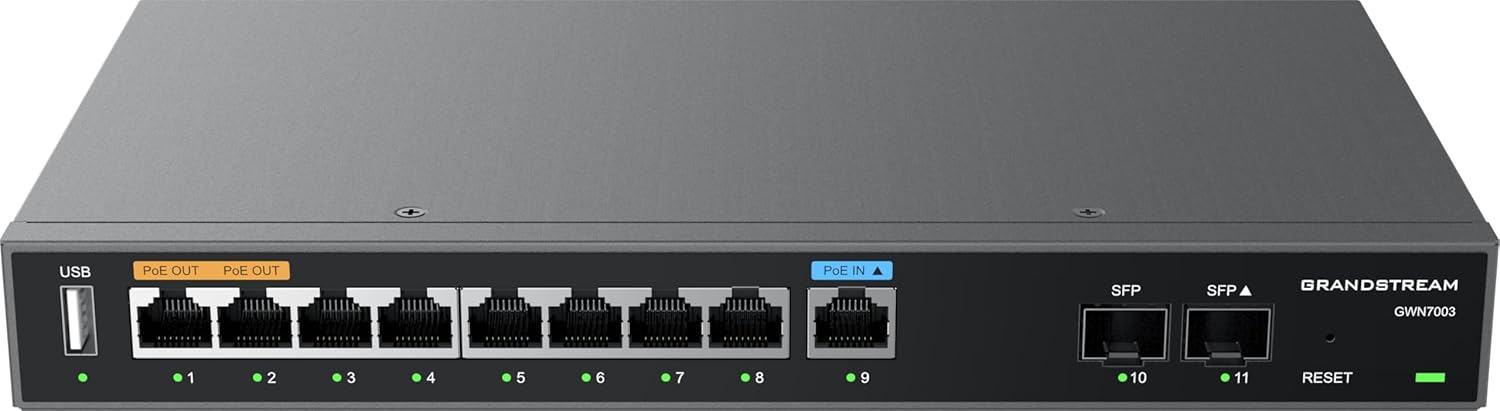
Figur 1: Front view of the Grandstream GWN7003 router, showing the USB port, PoE OUT ports, PoE IN port, standard Ethernet ports, SFP ports, and reset button.
- USB-port: For future use or external storage.
- PoE OUT Ports (Orange): Provide Power over Ethernet to compatible devices.
- PoE IN Port (Blue): Receives Power over Ethernet to power the router itself.
- Ethernet-porte (1-9): Standard Gigabit Ethernet ports for network connections.
- SFP-porte (10-11): Gigabit SFP ports for fiber optic connections.
- Nulstil knap: Bruges til at nulstille enheden til fabriksindstillingerne.
- LED-indikatorer: Indicate port status (link/activity) and device power.
2.3 Top View

Figur 2: Top view of the Grandstream GWN7003 router, showcasing its compact and durable metal casing.
3. Opsætningsvejledning
3.1 Pakkens indhold
Før du fortsætter, skal du sørge for at alle elementer er til stede:
- Grandstream GWN7003 Router
- Power Adapter (if not using PoE IN)
- Ethernet kabel
- Hurtig installationsvejledning
3.2 Fysisk installation
- Strømtilslutning: Connect the provided power adapter to the router's power input port, or connect an 802.3af/at compliant PoE source to the PoE IN port (blue).
- WAN-forbindelse: Connect your internet service provider's modem or main network cable to one of the WAN-configured Gigabit Ethernet ports. The GWN7003 supports multiple WAN ports for redundancy or load balancing.
- LAN-forbindelse: Connect your local network devices (computers, switches, access points) to the available LAN Gigabit Ethernet ports. Use the PoE OUT ports (orange) for devices requiring Power over Ethernet.
- SFP Connections (Optional): If using fiber optic connections, insert compatible SFP modules into the SFP ports and connect fiber cables.
3.3 Initial Access to Web Interface
- Sørg for, at din computer er tilsluttet en af routerens LAN-porte.
- Åbn a web browser (f.eks. Chrome, Firefox).
- Enter the default IP address of the router in the address bar. The default IP address is typically
192.168.1.1. Refer to the Quick Installation Guide for the exact default IP. - Indtast standardbrugernavn og adgangskode (normalt
adminfor begge, eller som angivet i vejledningen). - Follow the on-screen wizard for initial configuration, including changing the default password for security.
4. Betjeningsvejledning
4.1 Netværkskonfiguration
De web interface allows for comprehensive network configuration:
- WAN-indstillinger: Configure internet connection type (DHCP, Static IP, PPPoE).
- LAN-indstillinger: Manage IP address range, DHCP server, and VLANs.
- Multi-WAN: Set up load balancing or failover policies for multiple internet connections.
4.2 VPN-opsætning
The GWN7003 supports various VPN protocols for secure remote access:
- Navigate to the VPN section in the web interface.
- Configure VPN server or client settings based on your network requirements (e.g., OpenVPN, IPsec).
- Ensure proper firewall rules are in place to allow VPN traffic.
4.3 PoE Output Management
The router's PoE OUT ports can power compatible devices:
- Connect PoE-powered devices (e.g., IP cameras, VoIP phones, Wi-Fi access points) to the orange PoE OUT ports.
- Monitor PoE status and power consumption through the web interface.
5. Vedligeholdelse
5.1 firmwareopdateringer
Regularly update the router's firmware to ensure optimal performance, security, and access to new features:
- Visit the Grandstream website for the latest firmware for the GWN7003.
- Download firmwaren file til din computer.
- Få adgang til routerens web interface and navigate to the System Maintenance or Firmware Upgrade section.
- Upload den downloadede firmware file and follow the on-screen instructions. Do not power off the device during the update process.
5.2 Fabriksindstilling
Sådan gendanner du routeren til dens fabriksindstillinger:
- With the router powered on, press and hold the Reset button (located on the front panel) for approximately 10 seconds.
- Release the button when the LED indicators flash. The router will reboot with factory default settings.
- Alternatively, a factory reset option is available within the web interface under System Maintenance.
6. Fejlfinding
6.1 Ingen internetforbindelse
- Verify that the WAN cable is securely connected to the correct port and that your modem is operational.
- Check WAN settings in the web interface to ensure they match your ISP's requirements.
- Genstart både modemmet og routeren.
6.2 Kan ikke få adgang Web Interface
- Ensure your computer is connected to a LAN port and has obtained an IP address from the router (or has a static IP in the same subnet).
- Verify the router's IP address. Try
192.168.1.1. - Ryd din browsers cache, eller prøv en anden browser.
- Hvis alt andet fejler, skal du udføre en fabriksnulstilling (se afsnit 5.2).
6.3 PoE Devices Not Powering On
- Ensure the device connected to the PoE OUT port is PoE-compatible.
- Kontroller kabelforbindelsen.
- Verify PoE settings in the router's web interface.
7. Specifikationer
| Feature | Detalje |
|---|---|
| Model | GWN7003 |
| Produktdimensioner | 10.24 x 11.81 x 2.17 tommer |
| Varens vægt | 3.12 pund |
| Forbindelsesteknologi | Wired (Gigabit Ethernet, SFP) |
| PoE-input | 1x GbE RJ45 port with IEEE 802.3af/at |
| PoE-output | 2x GbE RJ45 ports with 48V Passive PoE or IEEE802.3af |
| Speciel funktion | QoS, VPN Support, Multi-WAN |
| Operativsystem | Grandstream GWN OS |
| Fabrikant | Grandstream |
8. Sikkerhedsoplysninger
Please read and follow these safety guidelines to prevent damage to the device or injury:
- Udsæt ikke enheden for vand eller fugt.
- Anbring ikke enheden i nærheden af varmekilder eller i direkte sollys.
- Brug kun den strømadapter, der er leveret af producenten.
- Sørg for korrekt ventilation omkring enheden.
- Forsøg ikke at åbne eller reparere enheden selv. Overlad al service til kvalificeret personale.
9. Garanti og support
The Grandstream GWN7003 router comes with a manufacturer's warranty. For detailed warranty information, technical support, or service inquiries, please visit the official Grandstream website or contact their customer support. Keep your purchase receipt for warranty validation.


