1. Introduktion
Thank you for choosing the LEMEGA BK230 Portable Karaoke Machine. This device combines a high-quality Bluetooth speaker with a wireless microphone, offering a versatile and enjoyable audio experience for various occasions. Designed for portability and ease of use, it features multiple connectivity options and fun voice effects.
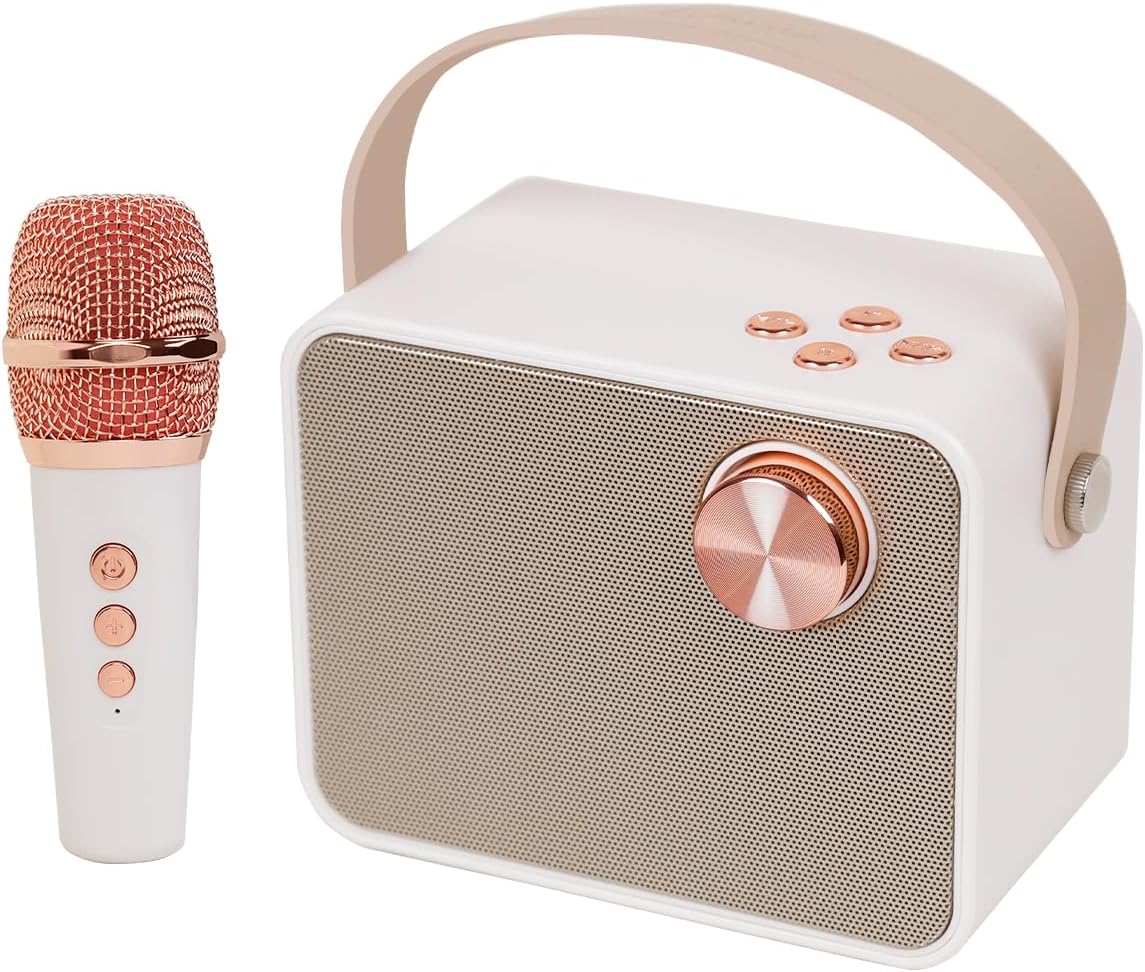
Figure 1: LEMEGA BK230 Karaoke Machine and Wireless Microphone.
The BK230 is equipped with two high-efficiency full-range speakers and DSP audio decoding processor technology, ensuring clear vocals and powerful stereo sound. Its compact size and integrated leather handle make it ideal for both indoor and outdoor activities.
2. Hvad er der i æsken
- LEMEGA BK230 Karaoke Machine Unit
- Trådløs mikrofon
- USB opladningskabel
- Brugervejledning (dette dokument)
3. Opsætning
3.1 Opladning af enheden
Before first use, fully charge the karaoke machine and the wireless microphone. The machine has a built-in 3600mAh lithium rechargeable battery. A full charge provides over 10 hours of music playback or over 4 hours of singing.

Figure 2: Battery indicator on the side of the unit.
3.2 Indledende tænding
To power on the karaoke machine, turn the main knob on the front panel to the right. To power off, turn it to the left. The microphone has a separate power button.

Figur 3: Bagside view showing USB, TF Card, and AUX ports.
4. Betjeningsvejledning
This section details the various functions and how to operate your LEMEGA BK230 Karaoke Machine.
Video 1: LEMEGA BK230 Karaoke Machine Overview and Operation. This video demonstrates power on/off, volume control, Bluetooth pairing, track navigation, microphone controls, and voice effects.
4.1 Bluetooth-forbindelse
The BK230 features Bluetooth 5.3 for quick and stable wireless connection. To connect:
- Ensure the karaoke machine is powered on.
- Aktiver Bluetooth på din smartphone, tablet eller pc, og søg efter tilgængelige enheder.
- Select "LEMEGA BK230" from the list to pair. A confirmation sound will indicate successful pairing.

Figure 4: The BK230 supports Bluetooth, Flash USB, TF Card, and AUX-in.
4.2 Brug af den trådløse mikrofon
The portable karaoke speaker comes with a wireless microphone that auto-connects to the main unit when both are powered on. The microphone has controls for power, volume, and voice effects.
4.3 Magic Voice Effects
The microphone offers six different magic voice effects to enhance your singing experience:
- Original Voice: Your natural voice.
- KTV Voice: Optimized for karaoke singing.
- Monster Voice: Deep, distorted voice.
- Baby stemme: High-pitched, childlike voice.
- Female Voice: Transforms your voice to a higher pitch.
- Mandsstemme: Transforms your voice to a lower pitch.
Press the dedicated button on the microphone to cycle through these effects.

Figure 5: Visual representation of the six magic voice effects.
4.4 Andre tilslutningsmuligheder
In addition to Bluetooth, the BK230 supports:
- TF-kort: Indsæt et TF-kort med musik files ind i den angivne plads.
- Flash-USB: Indsæt et USB-flashdrev med musik files i USB-porten.
- AUX-indgang: Connect external audio devices using an AUX cable (not included) to the AUX-in port.
4.5 Styringer
The main unit features a large knob and several buttons for control:
- Hovedknap: Turn right to power on, turn left to power off. Rotate to adjust speaker volume.
- Afspil/pause knap: Tryk for at afspille eller sætte den aktuelle lyd på pause.
- Forrige spor-knap: Tryk på for at gå til den forrige sang.
- Knappen til næste spor: Tryk på for at gå til næste sang.
5. Vedligeholdelse
5.1 Rengøring
Wipe the device with a soft, dry cloth. Do not use abrasive cleaners or solvents. Keep the speaker grilles free from dust and debris.
5.2 Opbevaring
Store the karaoke machine in a cool, dry place away from direct sunlight and extreme temperatures. If storing for an extended period, ensure the battery is partially charged (around 50%) to prolong its lifespan.
5.3 Pleje af batterier
To maximize battery life, avoid fully discharging the battery frequently. Recharge the device regularly, even if not in use, to prevent deep discharge.
6. Fejlfinding
If you encounter issues with your LEMEGA BK230, please refer to the table below for common problems and solutions.
| Problem | Mulig årsag | Løsning |
|---|---|---|
| Ingen strøm | Batteriet er afladet. | Oplad enheden ved hjælp af det medfølgende USB-kabel. |
| Kan ikke oprette forbindelse via Bluetooth | Bluetooth is not enabled on your device or the karaoke machine. The device is out of range. | Ensure Bluetooth is on for both devices. Move your device closer to the karaoke machine. Restart both devices. |
| Mikrofon virker ikke | Microphone is not powered on or battery is low. Microphone is not paired. | Ensure microphone is powered on and charged. It should auto-connect; if not, power cycle both devices. |
| Poor sound quality/feedback | Microphone too close to the speaker. Volume levels are too high. | Increase distance between microphone and speaker. Adjust speaker and microphone volume levels. |
| Cannot play from USB/TF card | Ikke understøttet file Format. Drev/kort er ikke isat korrekt. | Sørg for lyd files are in a supported format (e.g., MP3). Reinsert the USB drive or TF card firmly. |
7. Specifikationer

Figure 6: Product dimensions for the LEMEGA BK230 and its microphone.
| Feature | Detalje |
|---|---|
| Modelnummer | BK230 |
| Varens vægt | 2.14 pund |
| Produktdimensioner | 5.9 x 3.7 x 6.1 tommer |
| Batterier | 1 Lithium Metal batteri påkrævet (inkluderet) |
| Batteritype | Lithium Ion |
| Opladningstid | 3.5 timer |
| Talertal | 2 |
| Connector Type | USB Type A and USB Type C |
| Speciel funktion | Rechargeable, lightweight, Portable with handle |
| Farve | Beige |
8. Garanti og support
LEMEGA products are designed and manufactured to the highest quality standards. For warranty information and customer support, please refer to the official LEMEGA webwebstedet eller kontakt deres kundeservice direkte. Gem din købskvittering som købsbevis i tilfælde af garantikrav.


