1. Introduktion
This instruction manual provides detailed information on the operation, setup, and maintenance of your KETOTEK Digital Humidity and Temperature Controller. This device is designed for precise environmental management, offering control over both humidity and temperature. Made from durable ABS material, it is suitable for various applications where accurate environmental regulation is essential.
2. Sikkerhedsoplysninger
- Læs alle instruktioner omhyggeligt før brug.
- Sørg for, at strømforsyningen voltage matches the device's requirements (230V).
- Do not immerse the device or its probe in water or other liquids.
- Undgå at udsætte enheden for ekstreme temperaturer eller direkte sollys.
- Enheden må ikke skilles ad eller ændres. Overlad al service til kvalificeret personale.
- Opbevares utilgængeligt for børn.
- Tag stikket ud af stikkontakten før rengøring eller når den ikke er i brug i længere perioder.
3. Produktet er slutview og komponenter
The KETOTEK Digital Humidity and Temperature Controller features a clear digital display, intuitive control buttons, and an external probe for accurate readings. It integrates a standard power outlet for connecting external devices like humidifiers, dehumidifiers, heaters, or coolers.

Figure 3.1: KETOTEK Digital Humidity and Temperature Controller with its external sensor probe.
3.1. Enhedslayout

Figur 3.2: Detaljeret view of the controller's display and buttons.
- Skærm: Shows measured humidity/temperature, set points, and operating modes.
- MODE knap: Used to switch between operating modes and confirm settings.
- SET -knap: Enters setting mode for parameters.
- UP/CLK Button: Increases values or switches between Celsius/Fahrenheit. Also used for calibration.
- NED -knap: Reducerer værdier.
- Outputindikator: Lights up when the output socket is active.
- Stikkontakt: Connects to external devices (humidifier, dehumidifier, heater, cooler).
- Sensorprobe: Måler omgivende luftfugtighed og temperatur.
4. Typiske applikationer
The KETOTEK controller is versatile and can be used in various environments requiring precise humidity and temperature control.

Figur 4.1: Eksamples of the controller's use in greenhouses, homes, incubation setups, and reptile habitats.
- Inkubatorer: Maintain stable conditions for hatching eggs.
- Drivhuse: Regulate climate for optimal plant growth.
- Terrariums/Reptile Habitats: Create suitable environments for pets.
- Hjemmebrug: Control humidity and temperature in specific rooms or storage areas.
5. Opsætning
- Pakker ud: Carefully remove the controller and sensor probe from its packaging.
- Tilslut sonde: Plug the sensor probe cable securely into the designated port on the controller.
- Positionsføler: Place the sensor probe in the area where you wish to monitor and control humidity and temperature. Ensure it is not obstructed and has good air circulation.
- Tænd: Plug the controller into a standard 230V power outlet. The display will illuminate.
- Tilslut enhed: Plug the appliance you wish to control (e.g., humidifier, dehumidifier, heater, fan) into the power outlet on the front of the controller.
6. Betjeningsvejledning
The controller offers four main operating modes and various customizable settings.
6.1. Driftstilstande

Figur 6.1: Eksamples of the four operating modes and alarm displays.
- HC Mode (Humidity Control): Manages humidity levels. Can be set for humidification or dehumidification.
- TC Mode (Temperature Control): Manages temperature levels. Can be set for heating or cooling.
- TC Alarm (Temperature Alarm): Activates an alarm if temperature exceeds or falls below set thresholds.
- HC Alarm (Humidity Alarm): Activates an alarm if humidity exceeds or falls below set thresholds.
Tryk på MODE button to cycle through these main display modes.
6.2. Setting Humidity/Temperature Parameters
To set the desired start and stop values for humidity or temperature:
- Tryk på SÆT button once. The "Start" value will flash.
- Brug UP/CLK or NED buttons to adjust the "Start" value.
- Trykke SÆT again. The "Stop" value will flash.
- Brug UP/CLK or NED buttons to adjust the "Stop" value.
- Trykke SÆT a third time to save the settings and exit. If no button is pressed for 10 seconds, the device will automatically save and exit.
Kontrolområde: Humidity: 20~95% RH; Temperature: -10°C~50°C (14°F~122°F).
6.3. Temperature Unit Switch (°C / °F)
Sådan skifter du mellem Celsius og Fahrenheit:
- I hoveddisplayets interface skal du trykke på og holde nede UP/CLK button for approximately 3 seconds. The temperature unit will change.
6.4. Kalibreringsfunktion
To calibrate humidity and temperature readings:
- Tryk og hold på begge UP/CLK og MODE buttons simultaneously for approximately 3 seconds to enter calibration mode.
- The humidity correction value will flash. Use UP/CLK or NED to adjust the humidity offset (-10~10%RH).
- Trykke MODE to switch to temperature correction. The temperature correction value will flash. Use UP/CLK or NED to adjust the temperature offset (-9.9~9.9°C).
- Tryk og hold på MODE button again to save the calibration settings and exit.
6.5. Alarm funktion
The device can sound an alarm if measured humidity or temperature exceeds predefined thresholds.
- To set alarm thresholds, navigate to the TC Alarm or HC Alarm display mode using the MODE knap.
- Trykke SÆT for at gå ind i alarmindstillingstilstand.
- Adjust the upper and lower alarm limits using the UP/CLK og NED knapper.
- Trykke SÆT to confirm each value and exit.
If the measured value goes beyond the set alarm range, the controller will emit an audible alarm.
6.6. Data Storage and Reset
- Datalagring: All configured settings are automatically saved and retained even after a power outage.
- Nulstil funktion: To reset the device to factory default settings, consult the manufacturer's website or support for specific instructions, as this may vary.
7. Vedligeholdelse
- Rensning: Disconnect the device from power before cleaning. Wipe the surface with a soft, dry cloth. Do not use abrasive cleaners or solvents.
- Probepleje: Keep the sensor probe clean and free from dust or debris to ensure accurate readings. Avoid bending or damaging the probe cable.
- Opbevaring: When not in use, store the controller in a cool, dry place, away from direct sunlight and extreme temperatures.
8. Fejlfinding
| Problem | Mulig årsag | Løsning |
|---|---|---|
| Display shows "Err" or error code | Sensor not connected, sensor damaged, or measured data is out of range/short circuit. |
|
| Controlleren tænder ikke | No power supply or faulty power outlet. |
|
| Connected appliance not turning on/off | Incorrect settings, appliance malfunction, or controller output issue. |
|
| Unøjagtige aflæsninger | Sensor dirty, sensor placement, or calibration needed. |
|
9. Specifikationer
| Modelnummer | FR-KT3400 |
| Mærke | KETOTEK |
| Strømforsyning | 230V AC |
| Max udgangsbelastning | 16A / 230V |
| Fugtkontrolområde | 20% RF ~ 95% RF |
| Temperaturkontrolområde | -10 ° C ~ 50 ° C (14 ° F ~ 122 ° F) |
| Humidity Correction Range | -10% RH ~ 10% RH |
| Temperature Correction Range | -9.9°C ~ 9.9°C |
| Materiale | ABS |
| Dimensioner (Controller) | Ca. 13.1 cm (H) x 6.2 cm (B) x 3.2 cm (D) |
| Probekabellængde | Ca. 137 cm |
| Vægt | 270 grams (package) |
| Oprindelsesland | Kina |
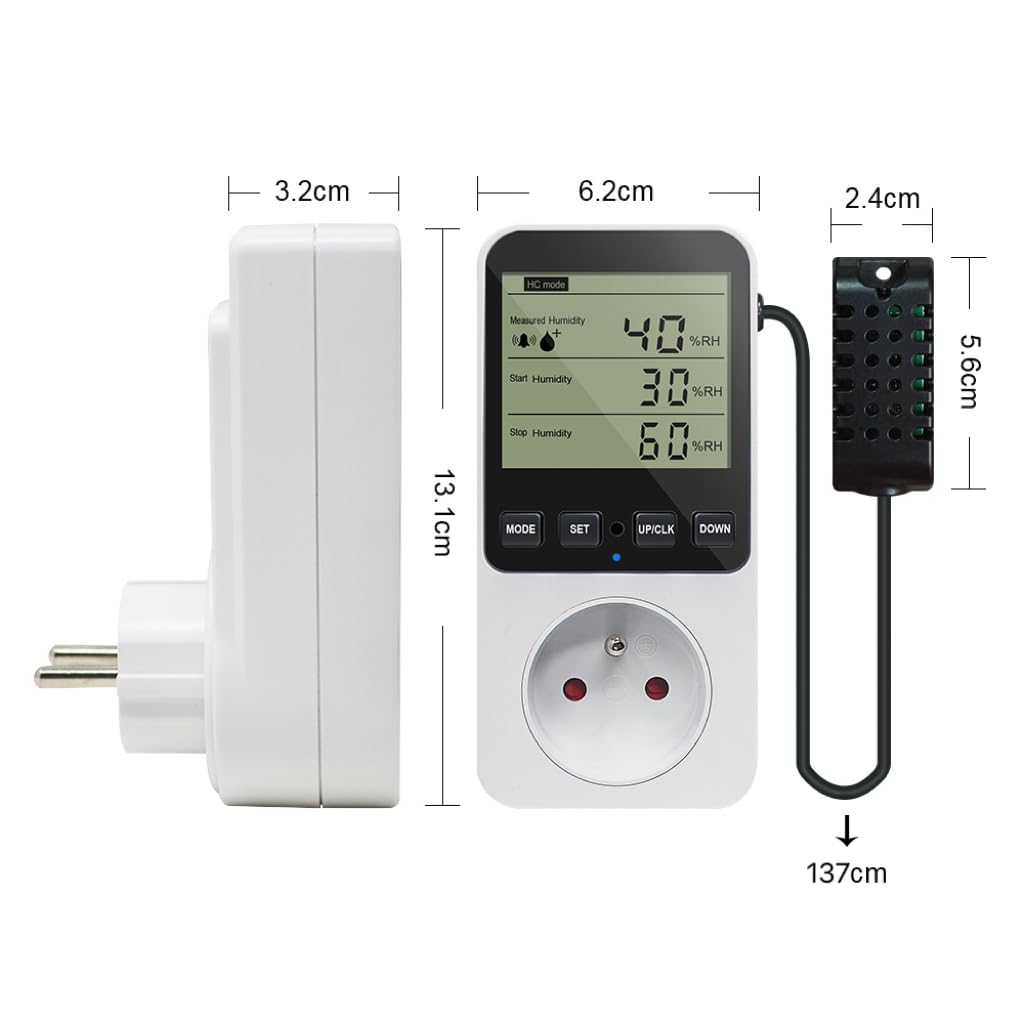
Figure 9.1: Physical dimensions of the KETOTEK controller and its sensor probe.
10. Garantioplysninger
Specific warranty details for this product are not provided in the available information. Please refer to the retailer's return policy or contact the manufacturer directly for warranty terms and conditions.
11. Kundesupport
For technical assistance, troubleshooting beyond this manual, or inquiries regarding your KETOTEK Digital Humidity and Temperature Controller, please contact KETOTEK customer support through their official webwebstedet eller forhandleren, hvor produktet blev købt.


