1. Introduktion
This manual provides detailed instructions for the setup, operation, and maintenance of your AJAZZ AJ199 Wireless Gaming Mouse. Please read this manual thoroughly before using the product to ensure optimal performance and longevity.
2. Pakkens indhold
Bekræft, at alle varer er til stede i din produktpakke:
- AJAZZ AJ199 Gaming Mouse *1
- 1.5M USB-C Pro Cable *1
- Honeycomb Shell *1 (Detachable)
- Brugervejledning *1

Image: Contents of the AJAZZ AJ199 Wireless Gaming Mouse package, including the mouse, USB-C cable, honeycomb shell, and user manual.
3. Produktet er slutview
The AJAZZ AJ199 is a lightweight wireless gaming mouse designed for performance and customization. It features a PAW3395 26K sensor, Huanuo micro switches, and a detachable back panel for weight and breathability adjustments.

Image: The AJAZZ AJ199 Wireless Gaming Mouse in pink, shown with its standard solid back panel and a detached honeycomb back panel, alongside the USB receiver.
3.1 Ergonomi og design
The mouse features a symmetrical ergonomic design suitable for various grip styles, including claw, fingertip, and palm grip. Its lightweight construction (59g) is ideal for users with hand lengths under 17cm.

Image: Illustration demonstrating different grip types (claw, fingertip, palm) on the AJAZZ AJ199 mouse, highlighting its symmetrical ergonomic design.
3.2 Detachable Back Panel
The mouse includes a detachable back panel. You can replace the standard solid panel with the included honeycomb shell to reduce weight further and improve breathability during extended use.

Image: The AJAZZ AJ199 mouse with its standard solid back panel attached.
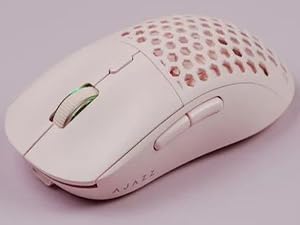
Image: The AJAZZ AJ199 mouse with the honeycomb back panel attached.

Image: The AJAZZ AJ199 mouse body with the solid back panel detached, showing the internal structure.
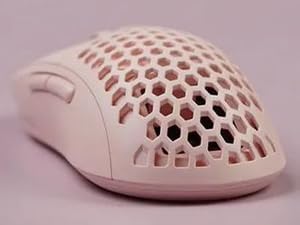
Image: The AJAZZ AJ199 mouse body with the honeycomb back panel detached, showing the internal structure.
4. Opsætning
4.1 Wireless Connection (2.4GHz)
- Locate the USB receiver: The receiver is stored in a compartment under the detachable back panel of the mouse.
- Remove the receiver: Gently detach the back panel and retrieve the USB receiver.
- Connect to computer: Insert the USB receiver into an available USB port on your computer.
- Power on the mouse: Turn on the mouse using the power switch located on the underside.
- Pairing: The mouse should automatically pair with the receiver. No additional driver installation is typically required for basic functionality.
4.2 Kablet forbindelse (USB-C)
- Connect the USB-C cable: Plug the USB-C end of the provided cable into the front port of the mouse.
- Connect to computer: Plug the USB-A end of the cable into an available USB port on your computer.
- Operation: The mouse will function in wired mode and will also charge its internal battery.
5. Betjeningsvejledning
5.1 Grundlæggende funktioner
- Venstre klik: Primær handling.
- Højreklik: Sekundær handling/kontekstmenu.
- Scrollhjul: Scroll up/down, Middle click.
- Sideknapper: Typically configured for forward/backward navigation.
5.2 DPI-justering
The mouse features a dedicated DPI button (usually located behind the scroll wheel) to cycle through preset DPI levels. The current DPI setting may be indicated by the scroll wheel backlight color, which can be customized via software.
5.3 PTFE fødder
The mouse is equipped with 100% pure virgin PTFE feet for reduced friction and smoother glide on various surfaces. These feet contribute to a fluid connection during use.

Image: Underside of the AJAZZ AJ199 mouse, highlighting the large PTFE feet for smooth gliding and the power switch.
6. Software Installation and Customization
To unlock the full potential of your AJAZZ AJ199 mouse, including programmable buttons, DPI settings, LOD (Lift-Off Distance) adjustment, and backlight customization, download the official software.
- Download software: Visit the official AJAZZ webwebsted: http://www.a-jazz.com/en/ to download the latest driver and software for the AJ199.
- Installation: Følg instruktionerne på skærmen for at installere softwaren.
- Tilpasningsmuligheder:
- Knap tildeling: Tildel funktioner til de 6 programmerbare knapper igen.
- DPI-indstillinger: Adjust DPI levels and corresponding scroll wheel backlight colors.
- LOD-justering: Fine-tune the Lift-Off Distance.
- Makro Editor: Create and assign custom macros.
- Afvisningstid: Adjust debounce settings for click responsiveness.

Image: Screenshot of the AJAZZ software interface, showing options for DPI settings, key assignments, and macro creation for the AJ199 mouse.
7. Vedligeholdelse
- Rensning: Brug en blød, tør klud til at rengøre musen. Ved genstridigt snavs, brug en let tør klud.amp klud kan bruges, så det sikres, at der ikke trænger fugt ind i de indvendige komponenter.
- Opbevaring: Store the mouse in a dry, cool place away from direct sunlight and extreme temperatures.
- Batteripleje: For at forlænge batteriets levetid bør du undgå at aflade musen helt ofte. Oplad den, når batteriindikatoren indikerer lav strøm.
8. Fejlfinding
- Musen svarer ikke:
- Sørg for, at musen er tændt.
- Kontroller batteriniveauet og oplad om nødvendigt.
- For wireless mode, ensure the USB receiver is securely plugged into a working USB port. Try a different USB port.
- Sørg for, at USB-C-kablet er korrekt tilsluttet til både musen og computeren, hvis du bruger kabelbaseret tilstand.
- Genstart din computer.
- Lag eller hakken i trådløs tilstand:
- Ensure the mouse is within range of the USB receiver (typically close proximity).
- Minimér interferens fra andre trådløse 2.4 GHz-enheder.
- Sørg for, at USB-modtageren ikke er blokeret.
- Update mouse firmware via the AJAZZ software if available.
- Knapperne virker ikke som forventet:
- Check button assignments in the AJAZZ software.
- Ensure the software is running correctly.
- Software registrerer ikke mus:
- Sørg for, at musen er tilsluttet (kablet eller trådløs) og tændt.
- Reinstall the AJAZZ software.
- Temporarily disable any antivirus or firewall software that might be blocking the application.
9. Specifikationer
| Feature | Detalje |
|---|---|
| Model | AJ199 |
| Forbindelse | 2.4 GHz trådløs, USB-C kablet |
| Sensor | PAW3395 Optical Sensor (up to 26,000 DPI) |
| Afbrydere | Huanuo Micro Switches (80 million click lifespan) |
| IPS | 650 IPS |
| Acceleration | 50 ACC |
| LOD (Lift-Off Distance) | 1mm/2mm adjustable |
| Programmerbare knapper | 6 |
| Vægt | 59 g (ca.) |
| Feet Material | 100% PTFE |
| Batterilevetid | Op til 40 timer (ca.) |
| Dimensioner | 118 mm (L) x 52 mm (B) x 38.6 mm (H) / 4.65 x 2.05 x 1.52 tommer |
10. Garanti og support
For warranty information and technical support, please refer to the official AJAZZ webwebstedet eller kontakt deres kundeservice direkte. Gem din købsbevis til garantikrav.
Officiel Webwebsted: http://www.a-jazz.com/en/


