1. Introduktion
Thank you for choosing BUGANI Open Ear Headphones, Model MH22109. These headphones are designed to provide a comfortable, open-ear listening experience with advanced Bluetooth 5.3 technology, immersive stereo sound, and clear call functionality. This manual will guide you through the setup, operation, and maintenance of your new headphones.
2. Sikkerhedsoplysninger
- Udsæt ikke hovedtelefonerne eller opladningsetuiet for ekstreme temperaturer, direkte sollys eller ild.
- Avoid using the headphones at excessively high volumes for prolonged periods to prevent hearing damage.
- Keep the device away from water and liquids, although it is IPX5 rated for sweat and light splashes, it is not designed for submersion.
- Forsøg ikke at skille enheden ad eller ændre den. Dette vil ugyldiggøre garantien.
- Brug kun det medfølgende opladningskabel eller et certificeret Type-C-kabel til opladning.
- Be aware of your surroundings when using open-ear headphones, especially in traffic or hazardous environments.
3. Pakkens indhold
The BUGANI Open Ear Headphones package includes the following items:
- BUGANI Open Ear Headphones (Left and Right)
- Opladningsetui
- USB Type-C opladningskabel (ikke eksplicit angivet, men standard)
- Brugervejledning (dette dokument)

Image: The BUGANI Open Ear Headphones and their transparent charging case.
4. Produktet er slutview
The BUGANI Open Ear Headphones feature a unique design that rests gently on your ears without entering the ear canal, providing comfort and situational awareness. The charging case protects the earbuds and provides extended battery life.

Image: A woman wearing the BUGANI Open Ear Headphones, illustrating the open-ear design and comfortable fit.

Image: A man relaxing and listening to music with the headphones, highlighting the immersive stereo sound.
5. Opsætning
5.1 Opladning af hovedtelefoner og etuiet
Oplad hovedtelefonerne og opladningsetuiet helt inden første brug.
- Placer ørepropperne i opladningsetuiet. Sørg for, at de er korrekt isat.
- Connect the Type-C charging cable to the charging port on the case and plug the other end into a USB power adapter (not included) or a computer's USB port.
- The LED indicator on the charging case will show the charging status. A full charge for the case typically takes 1-2 hours.
- The earbuds provide up to 6 hours of playtime on a single charge, and the charging case extends total playtime to approximately 30 hours.

Image: The charging case with earbuds, displaying the battery level, next to a smartphone playing music, illustrating the 30-hour playtime.
5.2 Bluetooth -parring
Hovedtelefonerne har automatisk parring i ét trin for nemheds skyld.
- Åbn opladningsetuiet. Ørepropperne tændes automatisk og går i parringstilstand.
- Aktiver Bluetooth på din enhed (smartphone, tablet, computer).
- Søg efter available Bluetooth devices and select "BUGANI OpenFit" from the list.
- Once connected, you will hear an audible confirmation, and the device will show "Connected".
- Hovedtelefonerne genopretter automatisk forbindelse til den sidst parrede enhed, når de tages ud af etuiet, hvis Bluetooth er aktiveret på enheden.

Image: A smartphone screen displaying the Bluetooth settings, with "BUGANI OpenFit" listed as a connected device, demonstrating the one-step auto-pairing process.
6. Betjeningsvejledning
6.1 Sådan tager du hovedtelefonerne på
The open-ear design ensures a secure and comfortable fit without blocking your ear canal.
- Identificér venstre (V) og højre (H) ørepropper.
- Gently hook the earbud over your ear, ensuring the speaker portion is positioned near your ear canal without entering it.
- Justér for en tætsiddende og behagelig pasform.
6.2 Smarte berøringskontroller
The headphones feature touch-sensitive areas for controlling various functions:
| Handling | Øretelefon | Fungere |
|---|---|---|
| Tryk på x1 | R/L | Afspil/pause musik, besvar opkald |
| Tryk på x2 | R | Lydstyrke op |
| Tryk på x2 | L | Lydstyrke ned |
| Tryk på x3 | R | Næste spor |
| Tryk på x3 | L | Forrige spor |
| Tryk og hold (2s) | R/L | Afslut opkald, afvis opkald |
| Tryk og hold (2s) | L | Aktiver Voice Assistant |
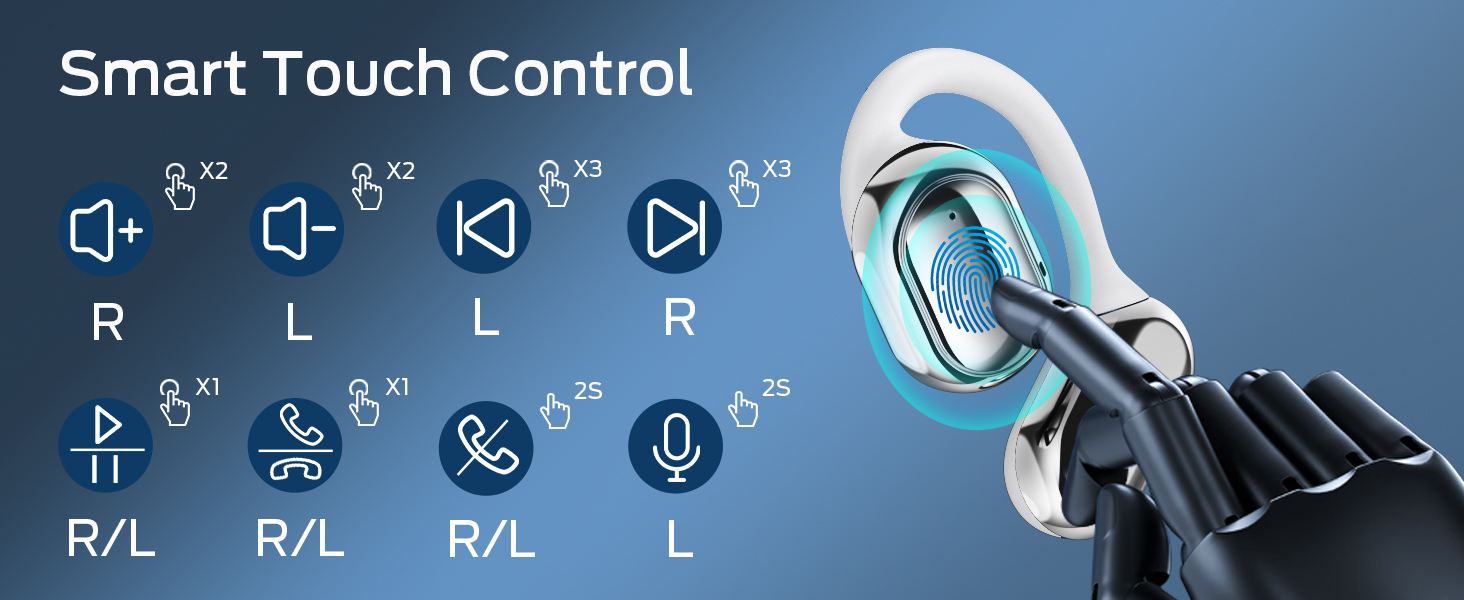
Image: A visual guide to the smart touch controls on the BUGANI Open Ear Headphones, detailing single, double, triple taps, and long presses for various functions.
6.3 Foretage og modtage opkald
The built-in dual microphones with environmental noise reduction technology ensure clear calls.
- Besvar opkald: Tryk én gang på en af øretelefonerne.
- Afslut opkald: Tryk på en af øretelefonerne, og hold den nede i 2 sekunder.
- Afvis opkald: Tryk på en af øretelefonerne, og hold den nede i 2 sekunder.

Image: A man using the BUGANI Open Ear Headphones to make a phone call, emphasizing the clear call feature.
7. Vedligeholdelse
7.1 Rengøring
- Tør ørepropperne og opladningsetuiet af med en blød, tør og fnugfri klud.
- Brug ikke slibende rengøringsmidler, alkohol eller kemiske opløsningsmidler.
- Sørg for, at opladningskontakterne er rene og tørre.
7.2 Opbevaring
- Opbevar hovedtelefonerne i deres opladningsetui, når de ikke er i brug, for at beskytte dem og holde dem opladede.
- Opbevares køligt og tørt, væk fra ekstreme temperaturer.
7.3 Vandtæthed (IPX5)
The headphones are rated IPX5, meaning they are protected against low-pressure water jets from any direction. This makes them suitable for sports and running, protecting against sweat and light rain. They are not designed for swimming or submersion in water.
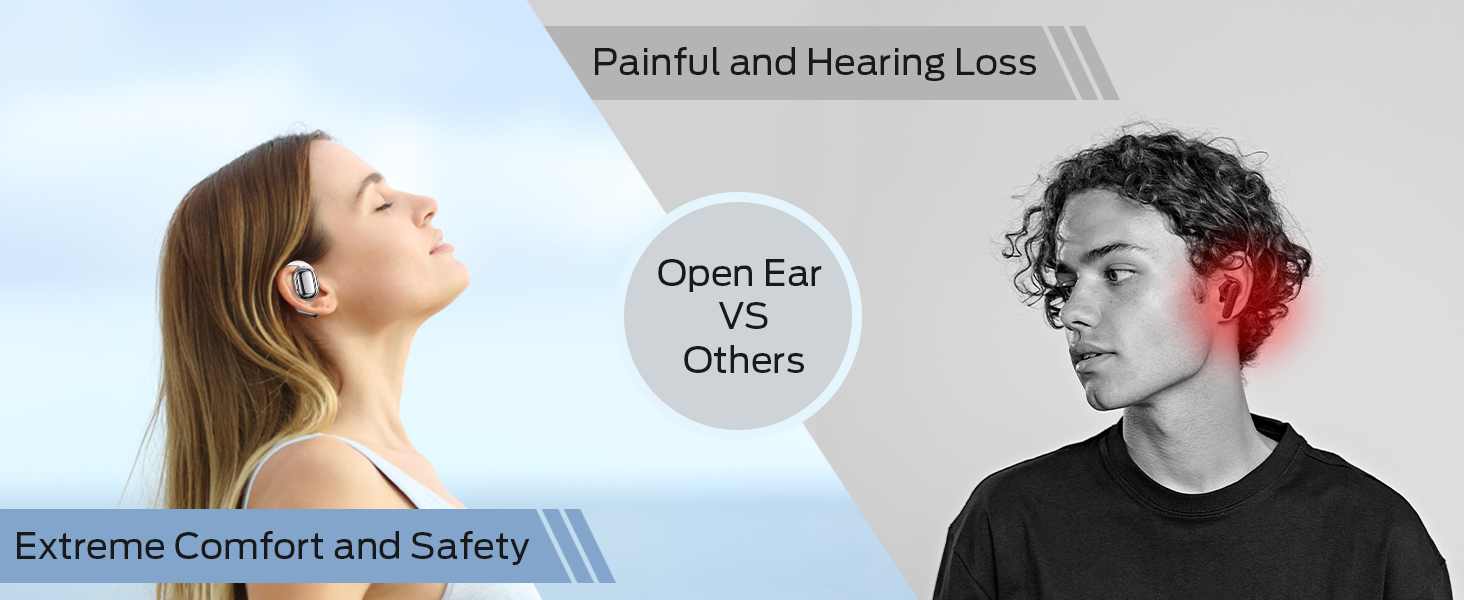
Image: A man running with water splashing on him, demonstrating the IPX5 waterproof feature of the headphones, suitable for active use.
8. Fejlfinding
If you encounter issues with your BUGANI Open Ear Headphones, please refer to the following common solutions:
- Ingen lyd: Ensure the headphones are charged, paired correctly, and the volume on both the headphones and your device is turned up.
- Parringsproblemer: Turn off Bluetooth on your device, then turn it back on. Place the earbuds back in the case, close it, then open it again to re-enter pairing mode. Try pairing again.
- Intermitterende forbindelse: Ensure you are within the Bluetooth range (up to 10 meters) and there are no significant obstacles between the headphones and your device. Avoid strong electromagnetic interference.
- Øretelefoner oplader ikke: Check that the charging cable is securely connected and the charging contacts on the earbuds and case are clean. Ensure the charging case itself has power.
- Én øretelefon virker ikke: Try placing both earbuds back in the case, closing it, and then taking them out again to reset the connection. If the issue persists, try re-pairing.
9. Specifikationer
| Feature | Specifikation |
|---|---|
| Modelnavn | BUGANI OpenFit |
| Modelnummer | MH22109 |
| Forbindelsesteknologi | Trådløs (Bluetooth) |
| Bluetooth version | 5.3 |
| Bluetooth rækkevidde | 10 meter |
| Øreplacering | Åbent øre |
| Driver størrelse | 16mm (Dual Large Driver) |
| Batterilevetid (enkelt opladning) | Op til 6 timer |
| Samlet spilletid (med opladningsetui) | Op til 30 timer |
| Opladningsport | Type-C |
| Vandmodstandsvurdering | IPX5 |
| Mikrofoner | Built-in Dual Microphones with Environmental Noise Reduction |
| Kompatible enheder | Bluetooth-enabled devices (smartphones, computers, TVs) |
| Materiale | Plast |
| Varens vægt | 6.4 ounce |
10. Garanti og support
BUGANI products are designed for reliability and performance. For warranty information, please refer to the warranty card included with your purchase or visit the official BUGANI website. If you require technical support or have questions not covered in this manual, please contact BUGANI customer service through their official channels.
You can often find support contact information on the BUGANI brand store page: BUGANI Store on Amazon


