Produkt overview
MUB'enVIEW PK320-F Indoor Security Camera is designed to provide comprehensive surveillance for your home, pets, elders, or babies. Featuring stunning 2K resolution, Pan-Tilt-Zoom (PTZ) capabilities, two-way audio, and advanced motion tracking with human/pet detection, this camera ensures you stay connected and informed. It supports both 2.4GHz and 5GHz WiFi for stable connectivity and offers 24/7 recording with clear night vision. Flexible storage options include local storage via an SD card and secure cloud backup.

Image: Four MUBVIEW PK320-F cameras, highlighting the multi-pack offering.

Image: Key features of the MUBVIEW PK320 Smart Camera, including two-way audio, 2K resolution, motion tracking, and dual-band WiFi.
Opsætningsvejledning
Follow these steps to set up your MUBVIEW PK320-F camera:
- Download MUBVIEW APP: Søg efter "MUBVIEW" in your mobile device's app store (iOS or Android) and download the official application.
- Power On and Connect to WiFi: Plug the camera into a power outlet using the provided 2M power cable. Ensure your mobile device is connected to a 2.4GHz or 5GHz WiFi network. The camera supports both frequencies for flexible connectivity.
- Tilføj enhed i appen: Åbn MUBVIEW app, create an account or log in, and follow the on-screen instructions to add your new camera. You will typically scan a QR code on the camera or enter its device ID.
- Komplet opsætning: Once connected, you can name your camera and configure settings such as motion detection zones, alert preferences, and storage options.

Image: Visual guide for the quick and easy setup process.
Vigtig bemærkning: The camera requires continuous power and must be plugged into an outlet while operating.

Image: Illustration of dual-band WiFi compatibility and power requirement.
Betjeningsvejledning
Pan-Tilt-Zoom (PTZ) and 2K Resolution
MUB'enVIEW PK320-F camera offers a wide viewing angle with its Pan-Tilt capabilities, allowing you to remotely adjust the camera's view through the app. It provides 355° horizontal pan and 80° vertical tilt. The 2K (3MP) resolution ensures clear and detailed video footage, capturing essential details for monitoring.

Image: Visual comparison highlighting the clarity of 2K (3MP) resolution over 1080P.

Image: Demonstrates the camera's auto-tracking feature with 355° pan and 80° tilt.
To-vejs lyd
Engage in real-time conversations with family members, pets, or visitors through the camera's built-in microphone and speaker. This feature allows for seamless communication directly from your smartphone app.

Image: Illustrates the clear two-way audio function for interacting with pets or people.
Human/Pet Detection & Instant Alerts
The camera is equipped with intelligent human and pet detection capabilities. When motion is detected, the camera can automatically track the movement and send instant message alerts to your connected device, keeping you informed of any significant activity.

Billede: Eksample of real-time alerts and interaction with a pet via the camera.
24/7 Recording & Night Vision
Benefit from continuous surveillance with 24/7 recording. The camera's advanced night vision ensures clear visibility even in low-light or completely dark environments, capturing important moments around the clock.
Image: Demonstrates the camera's clear night vision capability.
Multiple Device Viewing & Sharing
MUB'enVIEW app giver dig mulighed for view the camera feed from multiple devices simultaneously. You can also securely share access to your camera with trusted family members or friends, enabling collaborative monitoring.
Opbevaringsmuligheder
Kameraet tilbyder fleksible lagringsløsninger til dine optagelser:
- Lokal opbevaring: Insert a compatible storage card (MicroSD, not included) into the camera for local recording. Ensure the card is formatted correctly.
- Cloud Storage: Securely upload your recordings to the cloud. This option provides off-site backup and can be accessed from anywhere. Subscription may be required for certain cloud services.
Opretholdelse
To ensure optimal performance and longevity of your MUBVIEW PK320-F camera, follow these maintenance guidelines:
- Rensning: Gently wipe the camera lens and body with a soft, dry, lint-free cloth. Avoid using harsh chemicals, solvents, or abrasive cleaners, as these can damage the surface or lens.
- Placering: Place the camera in a stable location, away from direct sunlight, heat sources, and excessive moisture. Ensure it is positioned where it has a clear line of sight and is within range of your WiFi network.
- Softwareopdateringer: Regularly check the MUBVIEW app for firmware updates. Keeping your camera's software up-to-date ensures you have the latest features, security enhancements, and bug fixes.
- Strømforsyning: Use only the original power adapter provided with the camera. Do not use damaged cables or adapters.
Fejlfinding
If you encounter issues with your MUBVIEW PK320-F camera, refer to the following common troubleshooting steps:
| Problem | Mulig årsag/løsning |
|---|---|
| Camera not connecting to WiFi. |
|
| Poor video quality or blurry image. |
|
| Tovejslyd virker ikke. |
|
| Motion detection alerts are inconsistent or not received. |
|
| SD-kort optager ikke eller genkendes ikke. |
|
Specifikationer
| Feature | Detalje |
|---|---|
| Modelnummer | PK320-F |
| Indendørs/Udendørs brug | Indendørs |
| Videooptagelsesopløsning | 3 MP (2K) |
| Forbindelsesprotokol | Wi-Fi (2.4 GHz og 5 GHz) |
| Strømkilde | Ledningsbaseret elektrisk (220 volt, 5 watt) |
| Controller type | iOS, Android-app |
| Monteringstype | Surface Mount, Wall Mount, Ceiling Mount, Countertop |
| Inkluderede komponenter | Indoor Camera with 2M Power Cable |
| Formfaktor | Kuppel |
| Viewi vinkel | 360 grader (panorering: 355°, hældning: 80°) |
| Night Vision Range | 33 fod |
| Billedhastighed | 15-20fps |
| Materiale | Acrylonitril Butadien Styren (ABS) |
| Produktdimensioner | 6.8 x 5 x 6.8 tommer |
| Varens vægt | 2.59 pund |
| Alert Type | Lyd og bevægelse |
| Fotosensorteknologi | CMOS |
| Særlige funktioner | 2-Way Audio, Color Night Vision, Smart Tracking, Human Detection, Share with Family |
Garanti og support
MUBVIEW is committed to providing excellent customer service and support for its products.
- Kundesupport: For technical assistance or inquiries, MUBVIEW offers support via phone and email.
- Call Service: Available 9AM-5PM EST
- Online Email Support
- Cloud Service: Enjoy lifetime free cloud service for your recordings, ensuring your footage is securely backed up and accessible.
- Bekræftelse af gennemsigtighed: Each MUBVIEW product includes a unique code that can be verified using the Transparency app to confirm authenticity and prevent counterfeits.
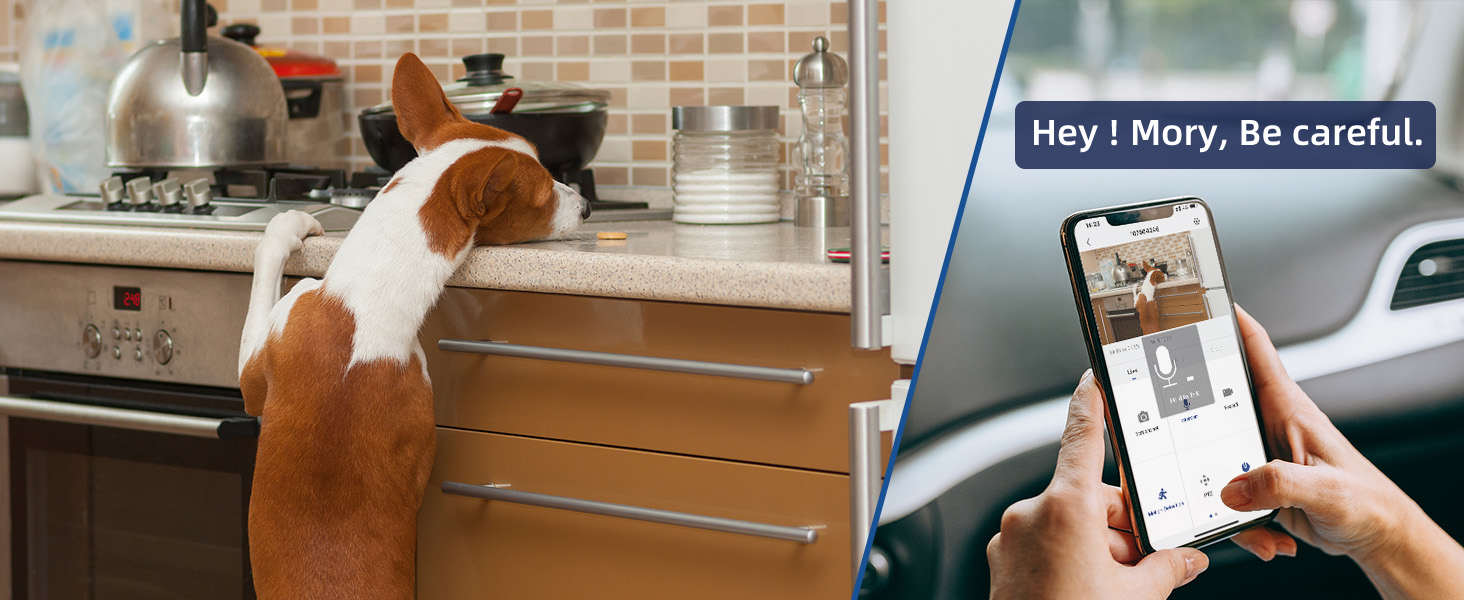
Image: MUBVIEW customer support contact information.

Image: MUBVIEW's commitment to customer-first service, including lifetime free cloud service and 24/7 technical support.

Image: Information on Transparency verification for product authenticity.


