Indledning
This manual provides essential information for the safe and efficient operation of your TECNO Pova 5 Pro 5G smartphone. Please read it thoroughly before using your device to ensure optimal performance and longevity.

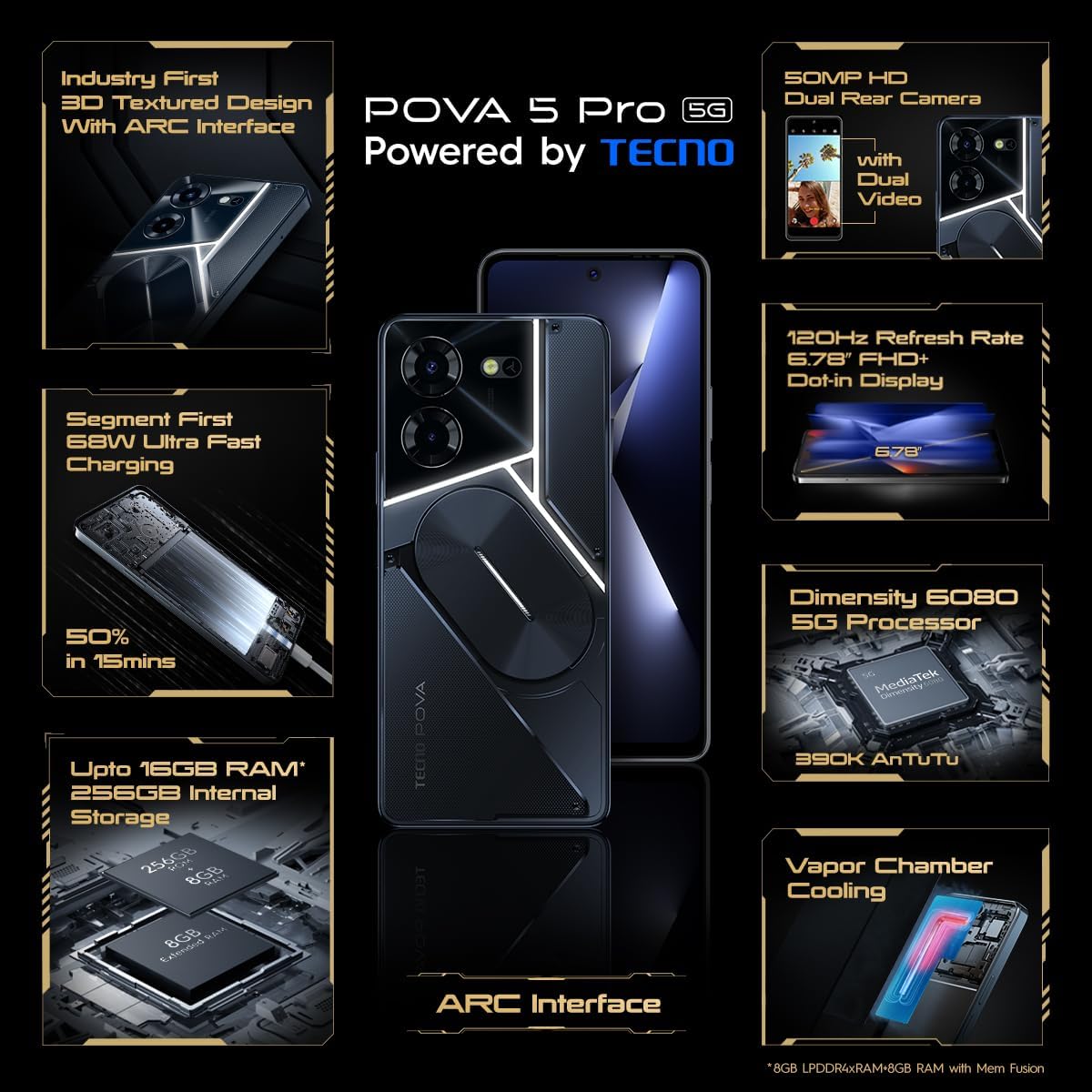
Image: The TECNO Pova 5 Pro 5G smartphone, showcasing its design and key feature of 68W Ultra Fast Charging.
Hvad er der i æsken
Kontroller, at alle varer er til stede i emballagen:
- Smartphone
- 68 W strømadapter
- Type-C kabel
- TPU-cover
- SIM Ejector Tool

Image: A flat lay of the TECNO Pova 5 Pro 5G packaging contents, showing the smartphone, 68W power adapter, USB-C cable, TPU protective cover, and the SIM ejector tool.
Opsætning
Indledende opsætning
- Insert SIM/SD Card: Locate the SIM tray on the side of the device. Use the provided SIM ejector tool to open the tray. Insert your Nano-SIM card(s) and/or microSD card into the designated slots. Ensure the tray is fully reinserted.
- Tænd: Press and hold the Power button (located on the right side) until the TECNO logo appears.
- Følg instruktionerne på skærmen: The device will guide you through initial setup, including language selection, Wi-Fi connection, Google account setup, and security settings.
Opladning af enheden
The TECNO Pova 5 Pro 5G supports 68W Ultra Fast Charging.
- Tilslut Type-C-kablet til opladningsporten i bunden af telefonen.
- Tilslut den anden ende af kablet til 68W strømadapteren.
- Sæt strømadapteren i en stikkontakt.
- A full charge typically takes approximately 45 minutes, with 50% charge achievable in about 15 minutes.
Billede: En klar front view of the TECNO Pova 5 Pro 5G smartphone, highlighting its display and front camera.
Betjening af enheden
Grundlæggende navigation
- Touchskærm: Tryk for at vælge, swipe for at rulle, knib for at zoome.
- Power knap: Tryk for at vække/sætte skærmen i dvaletilstand. Tryk og hold nede for at slukke eller genstarte.
- Lydstyrkeknapper: Juster medielydstyrke, opkaldslydstyrke eller ringetonelydstyrke.
Brug af kamera
The device features a 50MP AI Dual Rear Camera and a 16MP Selfie Camera.
- Åbn Kamera-appen fra startskærmen eller appskuffen.
- Vælg den ønskede tilstand (Foto, Video, Portræt osv.).
- Tryk på udløserknappen for at tage billeder eller starte/stoppe videooptagelse.
- Utilize AI enhancements for optimized scene recognition and image quality.
ARC Interface and Notifications
The TECNO Pova 5 Pro 5G features a unique multi-color ARC interface with backlighting.
- The ARC interface provides customizable light effects for notifications, incoming calls, gaming, and music playback.
- Access settings to personalize the light patterns and colors for different alerts.

Billede: Bagsiden view of the TECNO Pova 5 Pro 5G, showcasing its distinctive 3D textured design and the illuminated ARC interface.

Billede: En detaljeret view of the TECNO Pova 5 Pro 5G's ARC interface, illustrating the multi-color backlighting feature.
Opretholdelse
- Batteripleje: To prolong battery life, avoid exposing the device to extreme temperatures. Do not fully discharge the battery regularly.
- Rensning: Brug en blød, fnugfri klud til at rengøre skærmen og kabinettet. Undgå at bruge skrappe kemikalier eller slibende materialer.
- Softwareopdateringer: Regularly check for and install system updates to ensure optimal performance, security, and access to new features. Navigate to Settings > System > System update.
- Lagerstyring: Ryd periodisk unødvendigt files og apps for at opretholde tilstrækkelig lagerplads og enhedshastighed.
Fejlfinding
- Enheden tænder ikke: Ensure the battery is charged. Connect the device to the charger for at least 15 minutes before attempting to power on again. If the issue persists, perform a forced restart by holding the Power button for 10-15 seconds.
- Opladningsproblemer: Verify that the charging cable and adapter are securely connected and undamaged. Try using a different outlet.
- App nedbrud/fryser: Close the problematic app and reopen it. If the issue continues, clear the app's cache and data in Settings > Apps. As a last resort, uninstall and reinstall the app.
- Dårlig netværksforbindelse: Check if Airplane Mode is off. Restart the device. If using mobile data, ensure your SIM card is properly inserted and your data plan is active.
- Overophedning: Avoid using the device in direct sunlight or during intensive tasks for extended periods. Close background applications.
Specifikationer
| Feature | Specifikation |
|---|---|
| Modelnavn | Pova 5 Pro 5G |
| Operativsystem | Android 13.0 |
| Processor | Dimensity 6080 (2.4 GHz Octa-Core) |
| VÆDDER | 8 GB (expandable up to 16 GB with Memory Fusion) |
| Intern opbevaring | 256 GB (UMCP) |
| Vise | 6.78-inch FHD+ Dot-in Display |
| Opdateringshastighed | 120 Hz |
| Bagkamera | 50 MP AI dobbeltkamera |
| Forreste kamera | 16 MP Selfie Camera |
| Batteri | 5000 mAh Lithium-Polymer |
| Opladning | 68W Ultra Fast Charging |
| Dimensioner | 16.9 x 7.7 x 16.9 cm |
| Vægt | 214 gram |
| Forbindelse | 5G (10 bands supported), NFC, Bluetooth 5.1 |

Image: An internal diagram or view of the TECNO Pova 5 Pro 5G, illustrating its vapor chamber cooling system for efficient heat dissipation.
Garanti og support
Your TECNO Pova 5 Pro 5G comes with a manufacturer's warranty. Please refer to the warranty card included in your product packaging for specific terms and conditions.
For technical support, service, or warranty claims, please contact TECNO customer service. TECNO maintains a large service network with over 1200 service centers in India.
You can find more information and support resources by visiting the official Tecno store on Amazon: Tecno Store


