Indledning
Thank you for choosing the GOBOULT Z60 Wireless Earbuds. This manual provides detailed instructions to help you set up, operate, and maintain your earbuds for an optimal audio experience. Please read this manual thoroughly before use and retain it for future reference.

Image: GOBOULT Z60 Earbuds, illustrating the brand transition from BOULT to GOBOULT, highlighting the new logo and packaging while assuring consistent product performance.
Hvad er der i æsken
Sørg for at alle varer er til stede i pakken:
- GOBOULT Z60 Wireless Earbuds (Left and Right)
- Opladningsetui
- USB Type-C opladerkabel
- Ørepropper (forskellige størrelser)
- Brugermanual
- Garantikort

Image: The GOBOULT Z60 Wireless Earbuds and their charging case, showcasinproduktets design og medfølgende tilbehør.
Produkt overview
The GOBOULT Z60 earbuds are designed for comfort and high-quality audio. Each earbud features a 13mm bass driver and multiple microphones for clear calls. The charging case provides extended battery life.
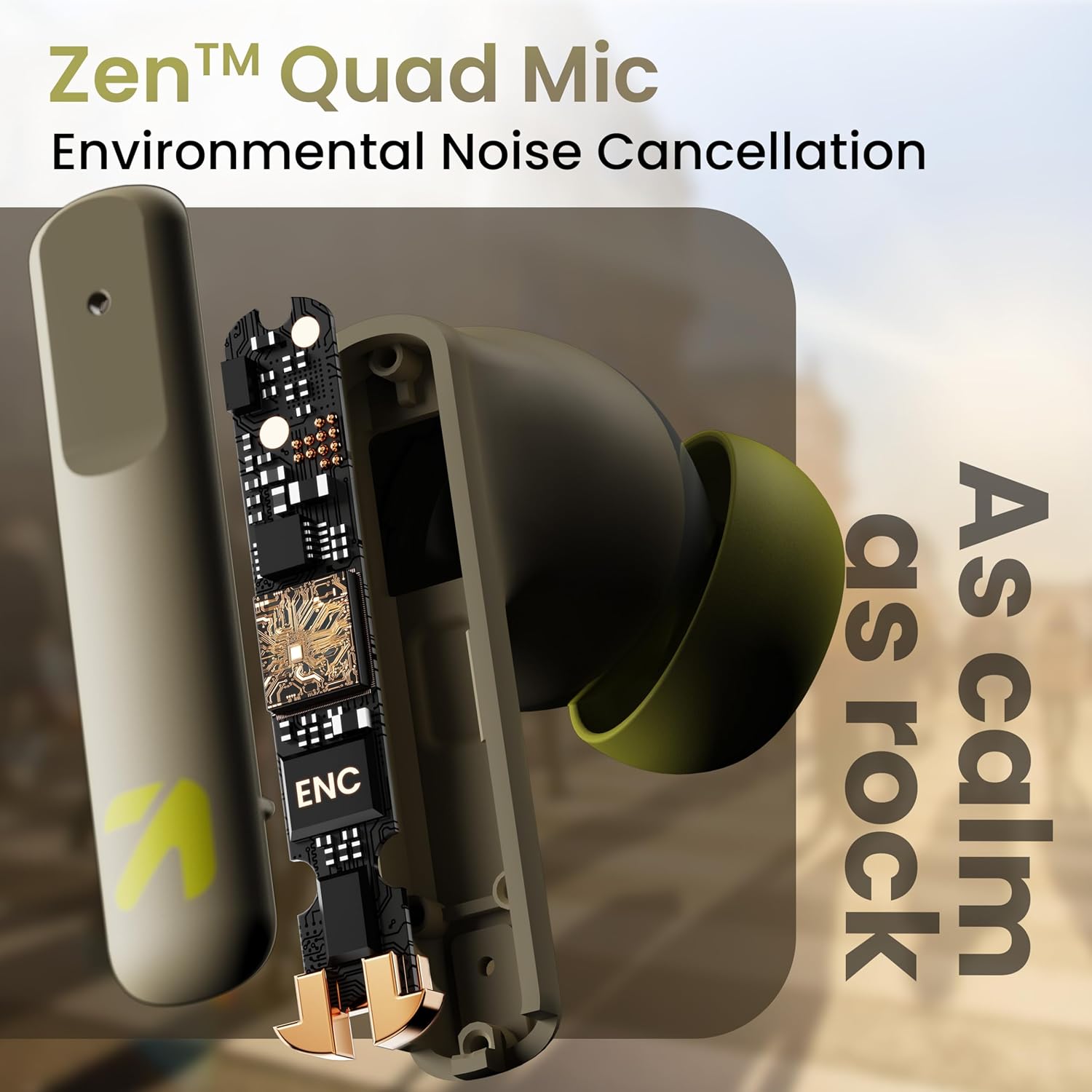
Billede: En intern view of a GOBOULT Z60 earbud, highlighting the Zen Quad Mic Environmental Noise Cancellation (ENC) technology for clear audio.

Image: A close-up of a GOBOULT Z60 earbud, emphasizing the 13mm BoomX Drivers responsible for rich bass and superior sound quality.
Opladning
To charge your GOBOULT Z60 earbuds and charging case:
- Placer ørepropperne i opladningsetuiet. Sørg for, at de er korrekt isat.
- Tilslut USB Type-C-opladerkablet til opladningsporten på etuiet og til en strømkilde.
- LED-indikatoren på etuiet viser opladningsstatus.
A full charge provides up to 60 hours of total playtime with the charging case. A quick 10-minute charge can provide up to 150 minutes of playtime.

Image: The GOBOULT Z60 charging case connected via a Type-C cable, illustrating the fast charging capability with indicators for 10 minutes charge yielding 150 minutes playtime.

Image: GOBOULT Z60 earbuds in their charging case, highlighting the impressive 60 hours of total playtime and 8 hours of playtime on a single earbud charge.
Setup: Pairing with Your Device
The GOBOULT Z60 earbuds utilize Bluetooth 5.3 for stable and efficient wireless connectivity.
- Indledende parring:
- Åbn opladningsetuiet. Ørepropperne går automatisk i parringstilstand.
- Aktiver Bluetooth på din enhed (smartphone, tablet, bærbar computer).
- Søg efter "GOBOULT Z60" in the list of available Bluetooth devices and select it to connect.
- Once connected, you will hear an audio prompt, and the LED indicator on the case will change.
- Genparring: The earbuds will automatically connect to the last paired device when taken out of the case, if Bluetooth is enabled on the device.

Image: GOBOULT Z60 earbuds and their open charging case next to a smartphone, illustrating the Bluetooth 5.3 "Blink & Pair" feature for quick and stable connection.
Betjening af dine øretelefoner
Tryk på kontrolelementer
The GOBOULT Z60 earbuds feature intuitive touch controls. The specific functions are:
- Musikafspilning:
- Enkelt tryk: Afspil/Pause
- Dobbelttryk (højre øreprop): Næste nummer
- Dobbelttryk (venstre øreprop): Forrige nummer
- Tredobbelt tryk (højre øreprop): Lydstyrke op
- Tredobbelt tryk (venstre øreprop): Lydstyrke ned
- Opkaldshåndtering:
- Enkelt tryk: Besvar/afslut opkald
- Langt tryk: Afvis opkald
- Stemmeassistent: Long press (either earbud) to activate Google Assistant or Siri.
- Spiltilstand: Tap 4 times on either earbud to activate/deactivate Combat Gaming Mode (50ms low latency).

Image: A visual guide to the GOBOULT Z60's touch controls, detailing actions for music playback (play/pause, next/back, volume), call management, activating voice assistance, and toggling game/music mode.
Spiltilstand
Activate the 50ms low latency Combat Gaming Mode for a synchronized audio-visual experience during gaming. Tap 4 times on either earbud to switch between gaming and normal modes.

Image: GOBOULT Z60 earbuds in use with a smartphone displaying a racing game, emphasizing the "Combat Gaming Mode" with 50ms ultra-low latency, activated by tapping the earbud 4 times.
Stemmeassistent
Access your device's voice assistant (Google Assistant or Siri) by long-pressing either earbud. This allows for hands-free control of your device.

Image: GOBOULT Z60 earbuds and their charging case, illustrating how to activate voice assistance (Ok Google, Hey Siri) with a long press on an earbud.
Opretholdelse
To ensure the longevity and optimal performance of your GOBOULT Z60 earbuds:
- Rensning: Rengør regelmæssigt ørepropperne og opladningsetuiet med en blød, tør klud. Undgå at bruge skrappe kemikalier eller slibende materialer.
- Ørespidser: Remove and clean the eartips periodically. Ensure they are dry before reattaching.
- Vandtæthed: The earbuds are IPX5 water-resistant, meaning they can withstand sweat and light rain. Do not submerge them in water or expose them to heavy downpours. Ensure the charging port is dry before charging.
- Opbevaring: Når ørepropperne ikke er i brug, skal de opbevares i deres opladningsetui for at beskytte dem og holde dem opladede.

Image: A GOBOULT Z60 earbud with water droplets on its surface, illustrating its IPX5 water resistance, suitable for protection against sweat, rain, and splashes.
Fejlfinding
If you encounter issues with your GOBOULT Z60 earbuds, refer to the following common solutions:
| Problem | Mulig løsning |
|---|---|
| Øretelefoner parrer ikke |
|
| Ingen lyd fra et ørepropp |
|
| Øretelefoner oplader ikke |
|
| Lav lydstyrke eller dårlig lydkvalitet |
|
Specifikationer
| Feature | Detalje |
|---|---|
| Modelnavn | AirBass (Z60) |
| Forbindelsesteknologi | Trådløs (Bluetooth) |
| Bluetooth version | 5.3 |
| Bluetooth rækkevidde | 10 meter |
| Audio driver størrelse | 13 millimeter |
| Audio driver type | Dynamisk Driver |
| Batterilevetid (i alt) | Op til 60 timer (med opladningsetui) |
| Opladningstid | Cirka 90 minutter |
| Hurtig opladning | 10 minutters opladning = 150 minutters spilletid |
| Opladningsport | Type-C |
| Mikrofoner | 4 ENC Mics for Clear Calling |
| Lydforsinkelse | 50 millisekunder (spiltilstand) |
| Vandmodstand | IPX5 (svedtæt, regntæt, stænktæt) |
| Kontrolmetode | Tryk, stemme |
| Varens vægt | 41.5 gram |
| Oprindelsesland | Indien |
Garanti og support
Your GOBOULT Z60 Wireless Earbuds come with a 1 års producentgaranti fra købsdatoen.
For any support, warranty claims, or technical assistance, please refer to the contact information provided on your warranty card or visit the official GOBOULT support webwebsted.


