1. Produktet er slutview
The Joysico USB C Wired Type C Earbuds are designed for comfort, durability, and clear audio, featuring an over-ear hook design for secure fit during activities and an in-line remote for easy control.
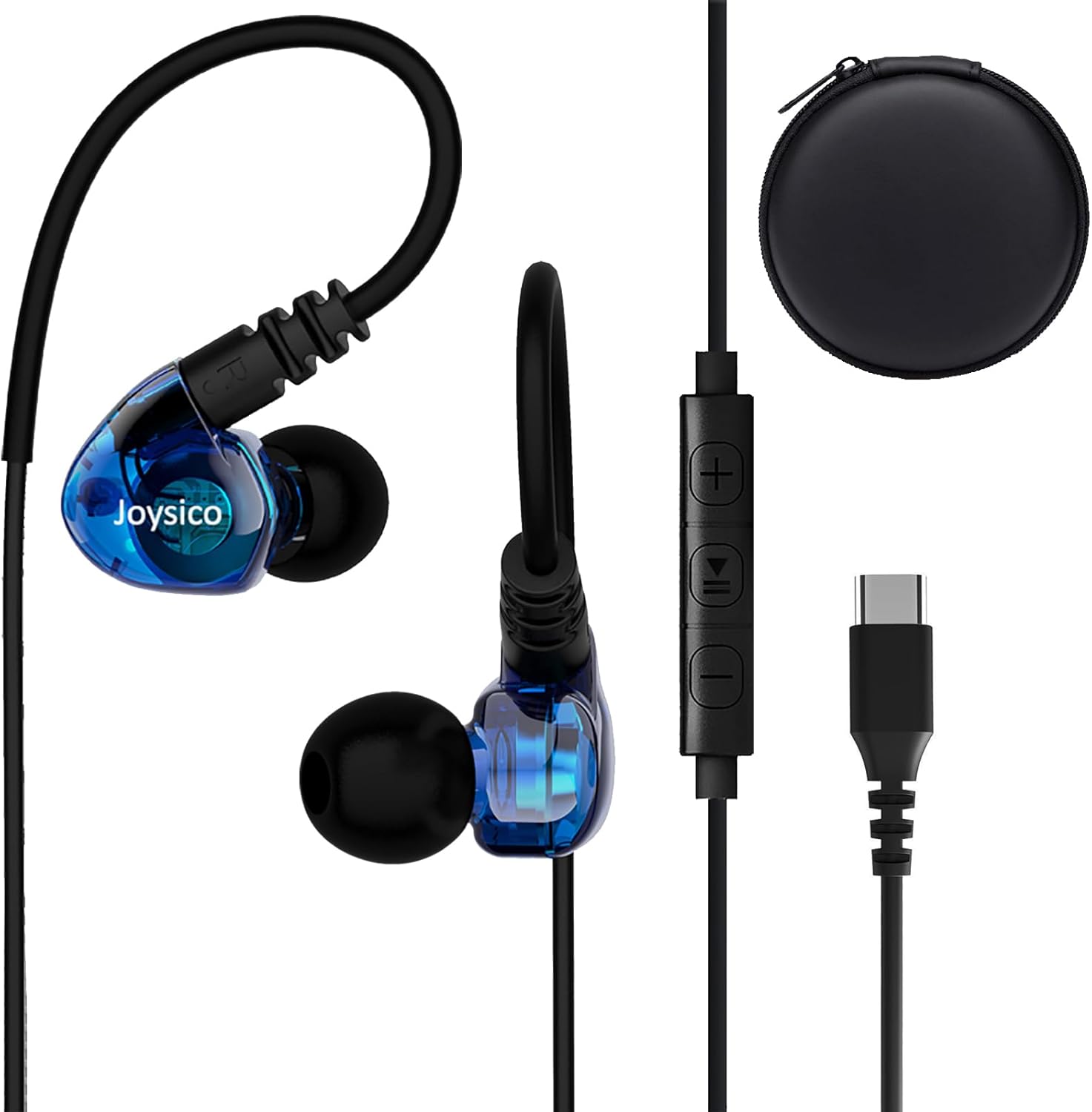
Image: Joysico USB C Wired Type C Earbuds, showing the earbuds, in-line remote, USB-C connector, and included carrying case.
Nøglefunktioner:
- USB-C tilslutning: Direct plug-and-play with USB-C devices.
- Over-Ear Hook Design: Provides a secure and comfortable fit, ideal for sports and active use.
- Indbygget mikrofon: For clear hands-free calls and voice commands.
- Multi-function Remote: Control volume, playback, and calls.
- Holdbart kabel: Thick and sturdy cable with reinforced plug.
2. Pakkens indhold
Kontroller venligst, at alle varer er til stede i pakken:
- Joysico USB C Wired Type C Earbuds
- Brugervejledning (dette dokument)
- Eartips (various sizes: Small, Medium, Large silicone, and Memory Foam)
- Beskyttende bæretaske
- Skjorte klip

Image: An illustration of the package contents, including the earbuds, a 52-inch cord, a carrying case, a shirt clip, and four pairs of replacement ear tips (S, M, L silicone, and memory foam).
3. Opsætning og tilslutning
These earbuds are designed for simple plug-and-play operation with USB-C compatible devices.
Tilslutning til din enhed:
- Locate the USB-C port on your device (e.g., smartphone, tablet, laptop).
- Sæt USB-C-stikket på ørepropperne godt fast i enhedens USB-C-port.
- Your device should automatically recognize the earbuds as an audio output device.
Note: For some devices, especially certain Macbook models, you may need to manually select the earbuds as the audio output device in your system's sound settings.

Billede: En detaljeret view of the USB-C connector and its robust design, highlighting its ease of insertion and removal, and the sturdy construction of the earbud cable.
4. Sådan tager du ørepropperne på
Proper fit is crucial for comfort, sound quality, and secure wear, especially during physical activity.
Achieving a Comfortable and Secure Fit:
- Vælg de rigtige ørepropper: Experiment with the included silicone (S, M, L) and memory foam eartips to find the size that creates a comfortable seal in your ear canal. A good seal enhances bass response and noise isolation.
- Position the Earbuds: Indsæt forsigtigt øretelefonen i din øregang.
- Adjust the Over-Ear Hook: Guide the flexible ear hook over the top of your ear. The hook should rest comfortably behind your ear, securing the earbud in place.
- Use the Shirt Clip: Attach the included shirt clip to your clothing to minimize cable movement and reduce microphonics (noise from cable rubbing).

Image: A person wearing the earbuds, illustrating how the over-ear hook and ergonomic design provide a comfortable and secure fit, even for users with smaller ear canals.

Image: A person engaged in a workout, demonstrating the earbuds' ability to stay securely in place without falling out or requiring adjustments during physical activity.
5. Betjening af betjeningselementerne
The in-line remote provides convenient control over your audio and calls.

Image: A diagram detailing the functions of the in-line remote, including volume up/down, play/pause, next/previous track, answer/end/reject calls, and voice assistant activation. The microphone's position is also indicated.
Fjernbetjeningsfunktioner:
| Knap/handling | Fungere |
|---|---|
| + Knap | Lydstyrke op |
| - Knap | Lydstyrke ned |
| Center Button (Single Press) | Afspil/pause musik; Besvar/afslut opkald |
| Center Button (Double Press) | Næste spor |
| Center Button (Triple Press) | Forrige spor |
| Center Button (Long Press) | Afvis opkald; Aktiver stemmeassistent |
Note: Remote functions may vary or be limited on certain devices or applications. Refer to your device's manual for specific compatibility details regarding external audio controls.
6. Kompatibilitet
These USB C headphones are designed for broad compatibility with devices featuring a USB-C audio output.
Kompatible enheder inkluderer:
- Apple-enheder: iPhone 15 series (15, 15 Plus, 15 Pro, 15 Pro Max), iPad Pro, iPad Air, iPad Mini, MacBook Pro, MacBook Air.
- Samsung Galaxy: S24, S23, S22, S21 Ultra, S20 FE, Note 10, Note 20, and other USB-C enabled Galaxy phones and tablets.
- Google Pixel: All Pixel phones with USB-C.
- OnePlus: Various models with USB-C.
- Other Android Phones: Most Android smartphones and tablets with a USB-C port.
- Laptops/Chromebooks: Devices with USB-C audio output.
No adapter is needed, and the earbuds are designed to work even with phone cases on.

Image: An illustration demonstrating the wide compatibility of the USB-C earbuds with various devices, including popular smartphone brands, tablets, and laptops.
7. Pleje og vedligeholdelse
Proper care will extend the life and maintain the performance of your earbuds.
- Rensning: Regularly clean the eartips with a soft, dry cloth. For the earbuds themselves, use a slightly damp cloth and ensure they are completely dry before storage. Do not use harsh chemicals or abrasive materials.
- Opbevaring: When not in use, store the earbuds in the provided protective carrying case to prevent tangling and damage.
- Undgå ekstreme forhold: Do not expose the earbuds to extreme temperatures, high humidity, or direct sunlight for prolonged periods. While sweatproof, avoid submerging them in water.
- Håndteres med forsigtighed: Avoid pulling the cable forcefully when disconnecting from your device. Always grasp the USB-C plug.
8. Fejlfinding
Hvis du støder på problemer, kan du prøve følgende løsninger:
Almindelige problemer og løsninger:
- Ingen lyd:
- Sørg for, at USB-C-stikket er sat helt i din enhed.
- Tjek din enheds lydstyrkeindstillinger, og sørg for, at den ikke er slået fra.
- Verify that the earbuds are selected as the audio output device in your device's sound settings.
- Test the earbuds with another compatible device to rule out a device-specific issue.
- Mikrofonen virker ikke:
- Sørg for, at mikrofonen ikke er dækket.
- Tjek din enheds mikrofonindgangsindstillinger.
- Some apps or devices may not fully support the in-line microphone. Test with a standard call app.
- Fjernbetjeningen reagerer ikke:
- Ensure the earbuds are properly connected.
- Some remote functions may not be supported by all devices or applications.
- Dårlig lydkvalitet / Forvrængning:
- Ensure eartips provide a good seal in your ear canal. Try different eartip sizes.
- Tjek lydkilden for kvalitetsproblemer.
- Rengør eventuelt snavs fra øreproppernes dyser.
9. Specifikationer
| Feature | Detalje |
|---|---|
| Modelnavn | YC-1 BLUE |
| Forbindelsesteknologi | Kablet (USB-C) |
| Hovedtelefonstik | USB C |
| Øreplacering | In-Ear med Over-Ear Hook |
| Støjkontrol | Lydisolering |
| Mikrofon | Integrated, Noise Canceling |
| Kontroltype | Volume Control, Remote (Button) |
| Kabellængde | 52 tommer / 131 cm |
| Varens vægt | 20 gram / 0.705 ounce |
| Vandmodstandsniveau | Vandafvisende (svedtæt) |
| Frekvensområde | 20 Hz - 20,000 Hz |
| Impedans | 32 Ohm |
| Materiale | Plast |
10. Garantioplysninger
Joysico provides a 1-års garanti for these USB C Wired Type C Earbuds from the date of purchase. This warranty covers manufacturing defects and issues arising from normal use.
Garantien dækker ikke skader forårsaget af misbrug, ulykker, uautoriserede ændringer eller normal slitage.
To Claim Warranty Support:
Please retain your proof of purchase. For warranty claims or technical support, contact Joysico customer service through the retailer where the product was purchased or visit the official Joysico support webwebsted (hvis tilgængeligt).
Image: An illustration highlighting the 1-year warranty provided with the product, alongside the earbuds and the various ear tip sizes and shirt clip.


