Indledning
This manual provides detailed instructions for the proper use, setup, maintenance, and troubleshooting of your Motorola Solutions PMMN4051B Remote Speaker Microphone (RSM). The PMMN4051B is designed to enhance communication clarity and convenience for users of compatible Motorola Solutions XTS radio series.
The PMMN4051B RSM features a 3.5mm audio jack, IP54 water resistance, and Windporting technology to reduce background noise. It allows for hands-free communication without needing to remove the radio from its belt or case.

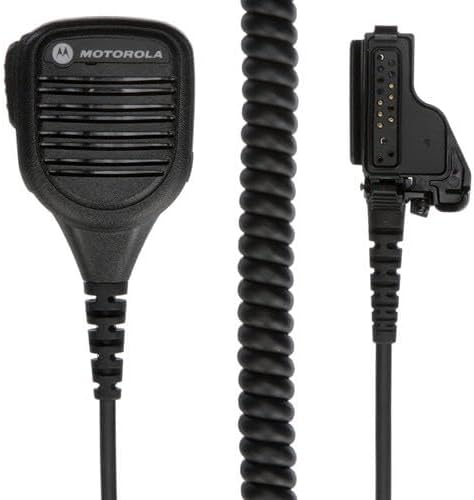
Figur 1: Motorola Solutions PMMN4051B Remote Speaker Microphone with its accompanying instruction sheet (part number 68012000015-A). The microphone features a speaker grille, a Push-To-Talk (PTT) button on the side, and a coiled cable terminating in a multi-pin connector for radio attachment.
Nøglefunktioner
- 3.5 mm lydstik: Allows connection of an external earpiece for private listening.
- IP54-klassificeret: Provides protection against dust ingress and water spray from any direction, ensuring durability in various environments.
- Windporting Feature: Advanced technology that significantly reduces background noise caused by high winds and severe weather, ensuring clear communication.
- Superior Audio Clarity: Engineered to deliver clear and sharp audio transmission and reception.
- Bekvem betjening: Enables users to speak and listen without removing the radio from its carrying position.

Figur 2: Front view of the PMMN4051B Remote Speaker Microphone, highlighting the speaker grille and the Motorola logo. This view emphasizes the compact and ergonomic design of the microphone.
Kompatibilitet
The Motorola Solutions PMMN4051B Remote Speaker Microphone is fully compatible with the following Motorola Solutions XTS Radio Series:
- XTS1500
- XTS2500
- XTS5000
Figur 3: An illustration showing four different models from the Motorola XTS radio series, which are compatible with the PMMN4051B Remote Speaker Microphone. These radios vary in their display and keypad configurations.
Opsætningsinstruktioner
Follow these steps to properly connect your PMMN4051B Remote Speaker Microphone to your compatible Motorola Solutions radio:
- Sluk radioen: Sørg for, at din radio er slukket, før du tilslutter tilbehør.
- Locate Accessory Port: Identify the accessory port on the side of your Motorola XTS series radio. This port is typically covered by a protective flap.
- Connect RSM: Align the multi-pin connector of the PMMN4051B RSM with the radio's accessory port. Gently push the connector in until it is fully seated. Secure the connection if your radio model features a locking screw.
- Position RSM: Use the integrated swivel clip on the back of the RSM to attach it securely to your uniform, vest, or collar for easy access.
- Tænd radioen: Once the RSM is securely connected, power on your radio. The radio should recognize the accessory automatically.

Figur 4: En detaljeret view of the PMMN4051B Remote Speaker Microphone, showing its coiled cable and the multi-pin connector designed for attachment to compatible Motorola XTS series radios. This image illustrates the components involved in connecting the RSM.
Betjeningsvejledning
The PMMN4051B Remote Speaker Microphone simplifies radio communication. Here are the basic operating procedures:
- Modtagelse af lyd: Audio from the radio will be routed through the RSM's speaker. Ensure the speaker grille is not obstructed for optimal sound clarity.
- Transmitting (Push-To-Talk - PTT): To transmit, press and hold the PTT button located on the side of the RSM. Speak clearly into the microphone grille. Release the PTT button to stop transmitting and return to receive mode.
- Brug af 3.5 mm lydstik: For private listening, insert a compatible 3.5mm earpiece into the audio jack on the side of the RSM. When an earpiece is connected, audio will typically be routed to the earpiece, muting the RSM's internal speaker.
- Windporting Functionality: The Windporting feature automatically reduces wind noise. Position the microphone to minimize direct wind impact for best performance.
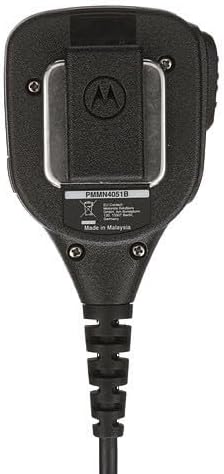
Figur 5: Bag view of the PMMN4051B Remote Speaker Microphone, displaying the robust swivel clip for attachment and the model number label (PMMN4051B). This clip allows for flexible positioning on clothing or gear.
Pleje og vedligeholdelse
Proper care ensures the longevity and optimal performance of your PMMN4051B RSM:
- Rensning: Wipe the exterior of the RSM with a soft, damp cloth. Do not use harsh chemicals, solvents, or abrasive cleaners. Ensure the 3.5mm audio jack and radio connector are free from dirt and debris.
- Vandtæthed: The RSM is IP54 rated, meaning it is resistant to dust and splashing water. It is not designed for submersion. If the RSM gets wet, dry it thoroughly before use. The Windporting design allows audio transmission even if water blocks the port.
- Opbevaring: Store the RSM in a clean, dry environment away from extreme temperatures and direct sunlight. Avoid tightly coiling the cable to prevent damage.
- Inspektion: Periodically inspect the cable for any signs of wear, cuts, or damage. Check the integrity of the radio connector and the 3.5mm audio jack.
Fejlfinding
If you encounter issues with your PMMN4051B Remote Speaker Microphone, refer to the table below for common problems and solutions:
| Problem | Mulig årsag | Løsning |
|---|---|---|
| Ingen lyd fra RSM-højttaleren. | RSM not fully connected; radio volume too low; external earpiece connected. | Ensure RSM connector is fully seated. Increase radio volume. Disconnect external earpiece if not intended for use. |
| Kan ikke sende (PTT-knappen reagerer ikke). | RSM not fully connected; radio not powered on; PTT button malfunction. | Verify RSM connection. Power on radio. If issue persists, contact support. |
| Forvrænget eller uklar lyd. | Microphone/speaker obstructed; cable damage; radio settings. | Clear any obstructions from microphone/speaker. Inspect cable for damage. Check radio audio settings. |
| Overdreven vindstøj. | Microphone directly exposed to strong wind. | Reposition RSM to shield it from direct wind. The Windporting feature will mitigate most wind noise. |
Tekniske specifikationer
The following table outlines the key technical specifications for the Motorola Solutions PMMN4051B Remote Speaker Microphone:
| Specifikation | Detalje |
|---|---|
| Modelnummer | PMMN4051B |
| Fabrikant | Motorola løsninger |
| Mikrofon formfaktor | Lavalier |
| Strømkilde | Radio (powered by connected radio) |
| Signal-støjforhold | 78 dB |
| Antal kanaler | 1 |
| Varens vægt | 8.2 ounce (ca. 232 gram) |
| Pakkedimensioner | 8.27 x 3.66 x 2.44 tommer |
| Farve | Sort |
| Forbindelsesteknologi | Radio interface adapter cable |
| Connector Type | Multi-pin Motorola Radio cable, 3.5mm audio jack |
| Særlige funktioner | IP54 Water Resistance, Windporting |
| Kompatible enheder | Motorola XTS1500, XTS2500, XTS5000 series radios |
| Inkluderede komponenter | Fjernhøjttalermikrofon |
| Polar mønster | Ensrettet |
| UPC | 00748091005336 |

Figur 6: The product packaging box for the Motorola Solutions PMMN4051B, displaying the kit number, a description of 'BASIC RSM THREADED AJACK', and the UPC (00748091005336). The box also indicates 'MADE IN MALAYSIA'.
Garanti og support
The Motorola Solutions PMMN4051B Remote Speaker Microphone is covered by a manufacturer's warranty. For specific warranty terms, duration, and conditions, please refer to the documentation included with your purchase or visit the official Motorola Solutions website. For technical support, service, or to inquire about replacement parts, please contact Motorola Solutions customer service directly.
Du kan finde flere oplysninger og supportressourcer på Motorola Solutions Store.


