1. Introduktion
Welcome to the user manual for your new THOMSON 50UA5S13 50-inch 4K UHD Smart Android TV. This manual provides essential information for setting up, operating, and maintaining your television. Please read it thoroughly to ensure optimal performance and safe use of your device.
Your THOMSON TV offers a stunning 4K UHD display, providing four times the detail of Full HD. It features the Android TV operating system, granting access to a vast array of applications, intelligent voice control via Google Assistant, and seamless content streaming with Chromecast built-in. Enjoy immersive audio with Dolby Audio technology and versatile content reception through its integrated triple tuner (DTT, cable, or satellite).

Figur 1: Forside view of the THOMSON 50UA5S13 4K UHD Smart Android TV displaying various streaming app icons.
2. Sikkerhedsoplysninger
Before operating your television, please read all safety instructions carefully. Keep this manual for future reference.
- Strømforsyning: Sørg for, at tv'et er tilsluttet en stikkontakt med den korrekte lydstyrke.tage som angivet på produktetiketten.
- Ventilation: Bloker ikke ventilationsåbningerne. Sørg for tilstrækkelig plads omkring tv'et til korrekt luftgennemstrømning for at forhindre overophedning.
- Placering: Place the TV on a stable, level surface. Avoid placing it in direct sunlight, near heat sources, or in environments with high humidity or dust.
- Vand og fugt: Udsæt ikke tv'et for regn eller fugt. Placer ikke genstande fyldt med væsker, såsom vaser, oven på tv'et.
- Rensning: Tag stikket ud af tv'et før rengøring. Brug en blød, tør klud. Brug ikke flydende rengøringsmidler eller rengøringsmidler på sprayform.
- Service: Forsøg ikke selv at reparere TV'et. Overlad al service til kvalificeret servicepersonale.
3. Pakkens indhold
Bekræft at alle varer er til stede i pakken:
- THOMSON 50UA5S13 50-inch 4K UHD Smart Android TV
- Remote Control (Premium backlit)
- Strømkabel
- TV-stativ (2 stk.) og skruer
- Garantikort
- Lynstartguide (kan medfølge separat)
4. Fysisk opsætning
4.1 Montering af tv-stativet
- Placer forsigtigt tv'et med forsiden nedad på en blød, ren overflade for at forhindre, at skærmen beskadiges.
- Juster stativstykkerne med de tilsvarende riller i bunden af tv'et.
- Fastgør stativerne med de medfølgende skruer. Sørg for, at de er spændt godt fast.
4.2 Vægmontering (valgfrit)
This TV supports VESA wall mounts with a 200x200 pattern. A wall mount bracket is not included and must be purchased separately. Follow the instructions provided with your wall mount bracket for proper installation. Ensure the wall can support the weight of the TV and the mount.
4.3 Dimensioner og placering
Consider the TV's dimensions for optimal placement in your viewing område.

Figure 2: Diagram showing the dimensions of the THOMSON 50UA5S13 TV: 112 cm width, 69 cm height (with stand), 26 cm depth (with stand).
5. Forbindelser
Connect your TV to various external devices using the ports located on the back and side panels.

Figure 3: Illustration of the back panel ports including HDMI, LAN, USB, Audio Out, Satellite, Antenna, AV In, and Common Interface.
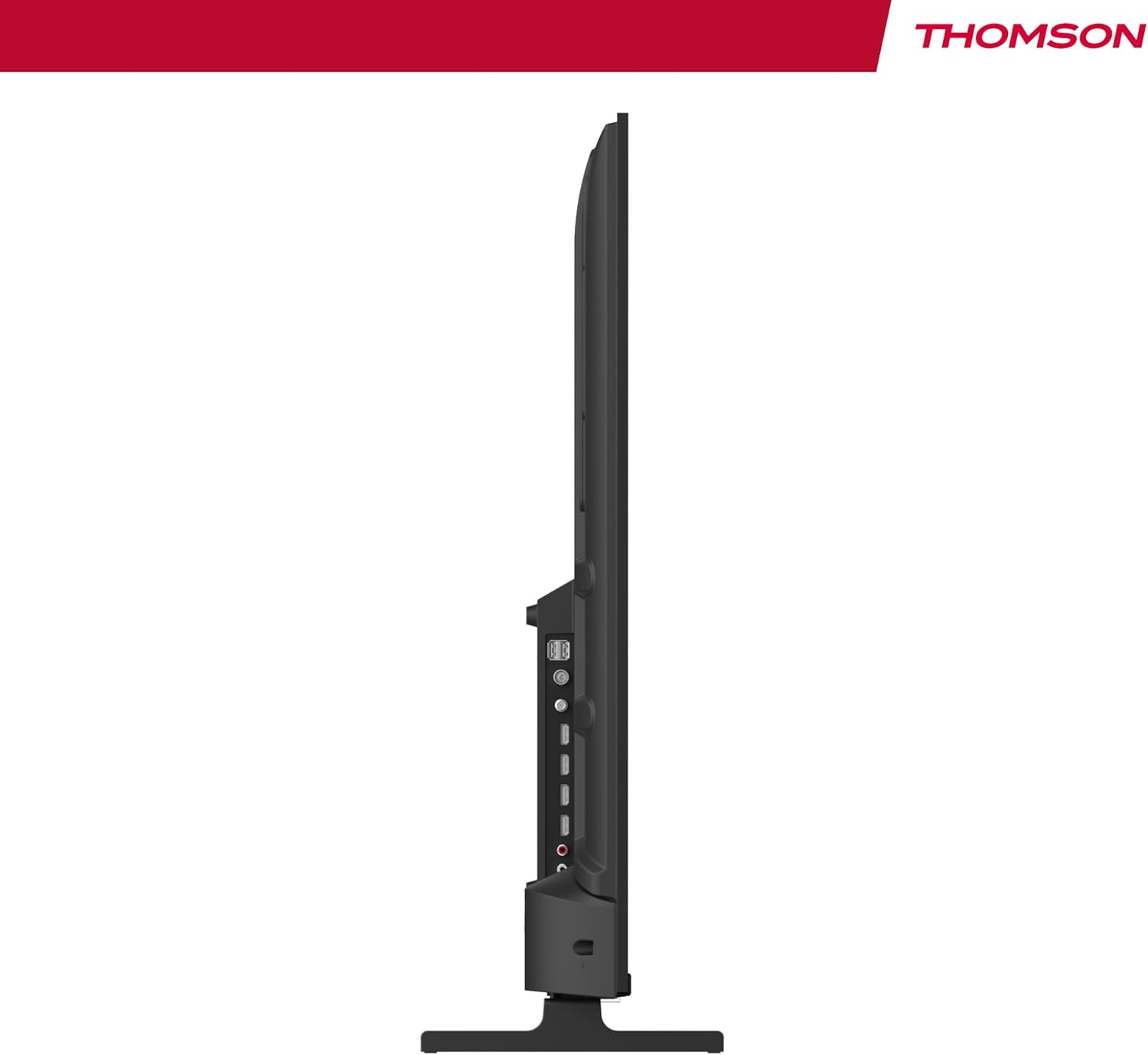
Figur 4: Sideprofile view of the TV, showing accessible ports on the side.
- Magt: Tilslut strømkablet til tv'et og en stikkontakt.
- Antenne/Kabel/Satellit: Use the appropriate input for your broadcast signal (DTT, cable, or satellite).
- HDMI (x4): Tilslut eksterne enheder såsom Blu-ray-afspillere, spillekonsoller eller set-top-bokse.
- USB (x2): Tilslut USB-lagerenheder til medieafspilning.
- LAN: Tilslut et Ethernet-kabel for en kablet internetforbindelse.
- Lydudgang (digital optisk): Tilslut til et eksternt lydsystem for forbedret lyd.
- AV-indgang: Tilslut ældre enheder ved hjælp af kompositvideo- og stereolydkabler.
- Fælles grænseflade (CI+): Insert a CI+ module and smart card for encrypted digital services.
- Bluetooth: Pair wireless headphones, speakers, or other compatible Bluetooth devices.
6. Initial Setup and Android TV
6.1 Første gang tændes
- After connecting all necessary cables, plug the TV into a power outlet.
- Tryk på tænd/sluk-knappen på fjernbetjeningen eller på tv'et.
- Følg vejledningen på skærmen for at vælge dit foretrukne sprog.
6.2 Netværksopsætning
Connect your TV to the internet for access to Android TV features and apps.
- Wi-Fi: Vælg dit Wi-Fi-netværk på listen, og indtast adgangskoden.
- Kablet (LAN): If you connected an Ethernet cable, the TV should automatically detect the wired connection.
6.3 Google Account Sign-in
Sign in with your Google Account to access the Google Play Store, Google Assistant, and personalized recommendations.
6.4-kanals scanning
After network setup, the TV will guide you through scanning for available channels based on your antenna, cable, or satellite connection.
7. Betjening af dit TV
7.1 Fjernbetjening
The premium backlit remote control allows easy navigation, even in low light. Key features include:
- Power knap: Tænder eller slukker for tv'et.
- Navigationsknapper: Til menu navigation.
- Lydstyrke-/kanalknapper: Juster lydstyrken og skift kanal.
- Google Assistent-knap: Aktiverer stemmestyring.
- Favoritter-knap: Quickly launch your designated favorite application.
- App-genvejsknapper: Direkte adgang til populære streamingtjenester.
7.2 Android TV-funktioner
Your THOMSON TV runs on Android TV, providing a smart and intuitive user experience.

Figure 5: The Android TV home screen displaying various applications and content recommendations.
- Ansøgninger: Access over 400,000 movies and TV shows from apps like Netflix, Prime Video, Disney+, YouTube, Spotify, and Apple TV.
- Google Assistant: Use your voice to control the TV, search for content, get answers, and manage smart home devices. Simply press the Google Assistant button on your remote and speak your command.

Figure 6: A user interacting with the Google Assistant via the TV remote control.
- Chromecast indbygget: Wirelessly stream movies, music, and videos from compatible smartphones, tablets, or computers directly to your TV.
7.3 Billedindstillinger
Optimer din viewing experience with advanced picture technologies:
- 4K UHD: Enjoy ultra-high definition resolution with 8 million pixels for incredibly detailed and precise images.
- HDR (High Dynamic Range) & Dolby Vision: These technologies enhance contrast, brightness, and color accuracy, providing a more realistic and vibrant picture.

Figure 7: Visual comparison illustrating the enhanced detail of 4K UHD (3840x2160) over Full HD (1920x1080).

Figure 8: Comparison showing the improved contrast and color depth with Dolby Vision compared to Standard Dynamic Range (SDR).
7.4 Lydindstillinger
Experience dynamic and immersive audio:
- Dolby Audio / Dolby Atmos: Creates a rich, room-filling sound experience. (Note: Dolby Atmos requires compatible sound equipment).

Figure 9: Visual representation of Dolby Atmos sound creating an immersive audio experience around viewers.
8. Vedligeholdelse
8.1 Rengøring af tv'et
- Tag altid stikket ud af tv'et inden rengøring.
- Use a soft, lint-free cloth to gently wipe the screen and TV body.
- For genstridige mærker, gnid letampen the cloth with water or a specialized screen cleaner (ensure it's safe for TV screens) and wipe gently. Never spray liquid directly onto the screen.
8.2 Softwareopdateringer
Your Android TV may receive periodic software updates to improve performance and add new features. Ensure your TV is connected to the internet to receive these updates. You can usually check for updates in the TV's settings menu.
9. Fejlfinding
Hvis du støder på problemer med dit tv, kan du bruge følgende almindelige løsninger:
| Problem | Mulig løsning |
|---|---|
| Ingen strøm | Kontroller, om strømkablet er korrekt tilsluttet tv'et og stikkontakten. Prøv en anden stikkontakt. |
| Intet billede/lyd | Ensure the correct input source is selected. Check cable connections to external devices. For sound, check volume levels and external audio system connections. |
| Fjernbetjening virker ikke | Check or replace the batteries. Ensure there are no obstructions between the remote and the TV's IR sensor. |
| Kan ikke oprette forbindelse til Wi-Fi | Ensure your Wi-Fi router is on and working. Re-enter the Wi-Fi password. Try restarting the TV and router. |
| Slow performance or apps | Close unused applications. Clear cache for problematic apps in settings. Restart the TV. Ensure a stable internet connection. |
10. Specifikationer
Detailed technical specifications for the THOMSON 50UA5S13 TV:
| Feature | Specifikation |
|---|---|
| Mærke | Thomson |
| Modelnummer | 50UA5S13 |
| Skærmstørrelse | 50 tommer (126 cm) |
| Displayteknologi | UHD (LED LCD) |
| Opløsning | 3840 x 2160 (4K UHD) |
| Opdateringshastighed | 60 Hz |
| Særlige funktioner | Flat Screen, Android TV, Google Assistant, Chromecast built-in, HDR, Dolby Vision, Dolby Audio |
| Forbindelse | Bluetooth, Wi-Fi, 4x HDMI, 2x USB, LAN, Digital Optical Audio Out, AV In, CI+ |
| Tuner | Triple Tuner (ATSC for Antenna, Cable, Satellite) |
| Lydkonfiguration | 2.0 |
| Dimensioner (L x B x H) | 111.1 x 26 x 69.2 cm (med stativ) |
| Vægt | 8.5 kg |
| VESA vægbeslag | 200x200 mm (beslag medfølger ikke) |
| Energieffektivitetsklasse | E |
For detaljerede energioplysninger henvises til EU's EPREL-database:

Figure 10: The EU Energy Label for the THOMSON 50UA5S13 TV, indicating its energy efficiency class and consumption.
11. Garanti og support
Your THOMSON 50UA5S13 TV comes with a full 3-year manufacturer's warranty, demonstrating its reliability and quality. For warranty claims or technical support, please refer to the warranty card included in your package or visit the official THOMSON support webwebsted for din region. Gem din købsbevis for at validere garantien.


