Indledning
Welcome to the user manual for your SEMAITU TH0029DAB Car Radio. This advanced multimedia system is designed to enhance your driving experience with features such as DAB digital radio, Android 12 operating system, Wireless Apple CarPlay, Android Auto, GPS navigation, Bluetooth connectivity, and a reverse camera. This manual provides detailed instructions for installation, operation, maintenance, and troubleshooting to ensure optimal performance and longevity of your device.
Læs venligst denne manual grundigt, inden du bruger produktet, og gem den til senere brug.
Produkt overview
The SEMAITU TH0029DAB Car Radio is a state-of-the-art in-car entertainment and navigation system. Key features include:
- Operativsystem: Android 12.0
- Vise: 9-inch QLED Quantum Touchscreen (1280x720 resolution)
- Hukommelse: 2 GB RAM + 32 GB intern lagerplads
- Radio: DAB Digital Radio, FM/RDS Radio (NXP6856 chip)
- Forbindelse: Wireless Apple CarPlay, Wireless Android Auto, GPS Navigation (Europe maps), WiFi, Bluetooth (with dual microphone), Dual USB ports
- Lyd: DSP EQ for Hi-Fi sound
- Kamerasupport: AHD Reverse Camera (170° wide angle, night vision, waterproof)
- Kompatibilitet: Designed for VW, Seat, and Skoda models (specific models listed in compatibility section)
- Yderligere funktioner: Steering Wheel Control (SWC) function, Mirror Link for iOS and Android

Figure 1: SEMAITU TH0029DAB Car Radio main unit with included accessories (DAB antenna, USB cable, reverse camera).
Kompatibilitet
This car radio is specifically designed for certain VW, Seat, and Skoda models. Please verify your vehicle's compatibility before installation.
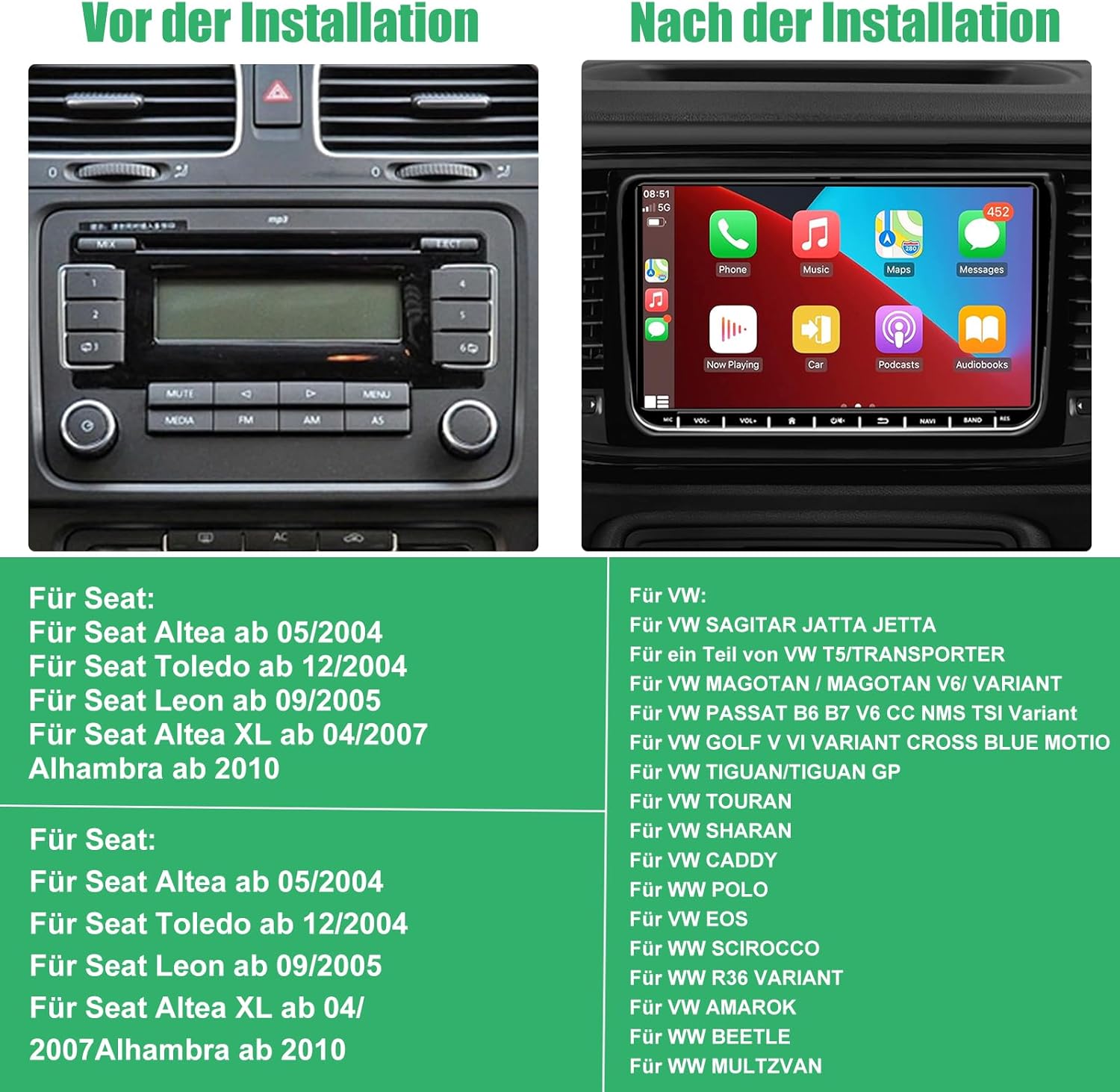
Figure 2: Visual comparison of a car dashboard before and after installation, alongside a list of compatible Seat and VW vehicle models.
Kompatible modeller:
Til sæde:
- Seat Altea from 05/2004
- Seat Toledo from 12/2004
- Seat Leon from 09/2005
- Seat Altea XL from 04/2007
- Alhambra fra 2010
Til VW:
- VW SAGITAR JETTA
- VW T5/TRANSPORTER (partial models)
- VW MAGOTAN / MAGOTAN V6 / VARIANT
- VW PASSAT B6 B7 V6 CC NMS TSI VARIANT
- VW GOLF V VI VARIANT CROSS BLUE MOTIO
- VW TIGUAN/TIGUAN GP
- VW TOURAN
- VW SHARAN
- VW CADDY
- VW POLO
- VW EOS
- VW SCIROCCO
- VW R36 VARIANT
- VW AMAROK
- VW BEETLE
- VW MULTZVAN
Pakkens indhold
Before installation, please check that all components are present in the package:
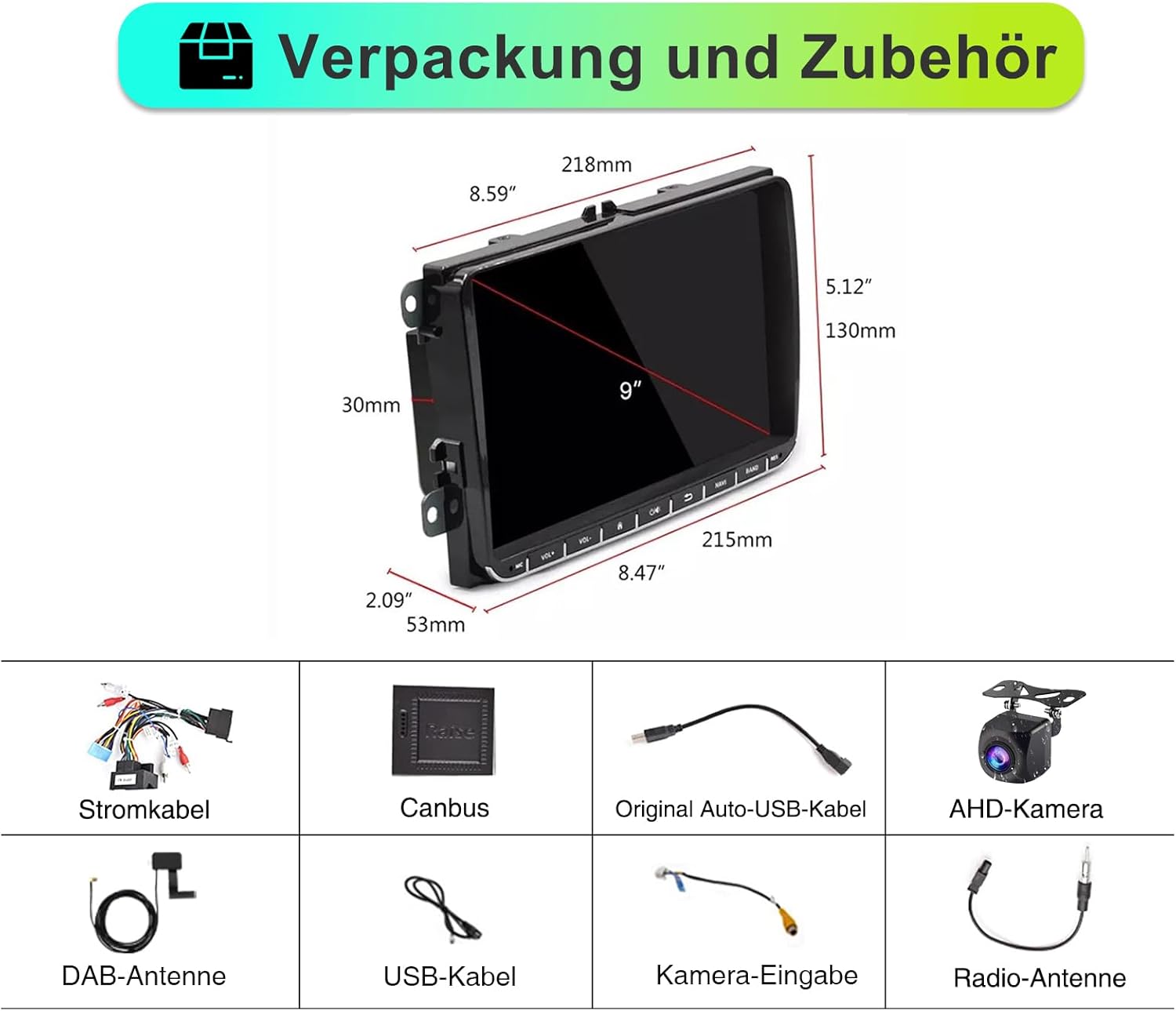
Figur 3: Overview of the car radio dimensions and all included accessories.
- SEMAITU TH0029DAB Car Radio Unit
- Strømkabel
- Canbus-dekoder
- Original Auto USB Cable
- AHD Camera (Reverse Camera)
- DAB -antenne
- USB kabel
- Kamera input kabel
- Radio Antenne
Opsætning og installation
Professionel installation anbefales. Sørg for, at køretøjets batteri er frakoblet, inden installationen påbegyndes, for at forhindre elektrisk skade.
Generelle installationstrin:
- Forberedelse: Disconnect the negative terminal of the car battery. Remove the original car radio unit from the dashboard.
- Ledningsforbindelser:
- Connect the main power cable harness from the new radio to the vehicle's wiring harness.
- Connect the Canbus decoder to ensure proper communication with the vehicle's systems (e.g., steering wheel controls, door status).
- Connect the radio antenna and DAB antenna.
- Tilslut USB-kablerne til eksterne enheder.
- If installing the reverse camera, route the camera cable from the rear of the vehicle to the radio unit and connect it to the camera input. Ensure the camera's power is connected to the reverse light circuit.
- Montering: Secure the new SEMAITU car radio into the dashboard opening. Ensure all cables are neatly tucked away and not pinched.
- Test: Reconnect the car battery. Turn on the ignition and test the radio's basic functions: power on/off, radio reception, touchscreen responsiveness, and sound output.
- Afsluttende samling: Saml instrumentbrættets beklædningspaneler igen.
For detailed wiring diagrams and specific vehicle instructions, please refer to the included installation guide or consult a professional installer.
Betjeningsvejledning
Grundlæggende betjening:
- Tænd/sluk: Press the power button (usually located on the front panel or integrated with volume knob) to turn the unit on or off.
- Lydstyrkekontrol: Use the volume knob or touchscreen controls to adjust audio levels.
- Startskærm: Tap the home icon on the touchscreen to return to the main menu.
- Navigation: Swipe left/right on the touchscreen to access different application pages.
Radio Functions (DAB/FM/RDS):

Figure 4: DAB Digital Radio interface showing station selection and signal strength.
- Skiftemetoder: Select "Radio" from the main menu. Choose between FM or DAB mode.
- Scanning Stations: In FM mode, use the "Scan" or "Seek" function to find available stations. In DAB mode, the unit will automatically scan for digital stations upon first use or when entering a new area.
- Gem forudindstillinger: Tune to your desired station, then press and hold a preset button (P1-P6) on the screen to save it.
- RDS (Radio Data System): When available, RDS will display station information, song titles, and traffic announcements on FM.
Trådløs Apple CarPlay og Android Auto:
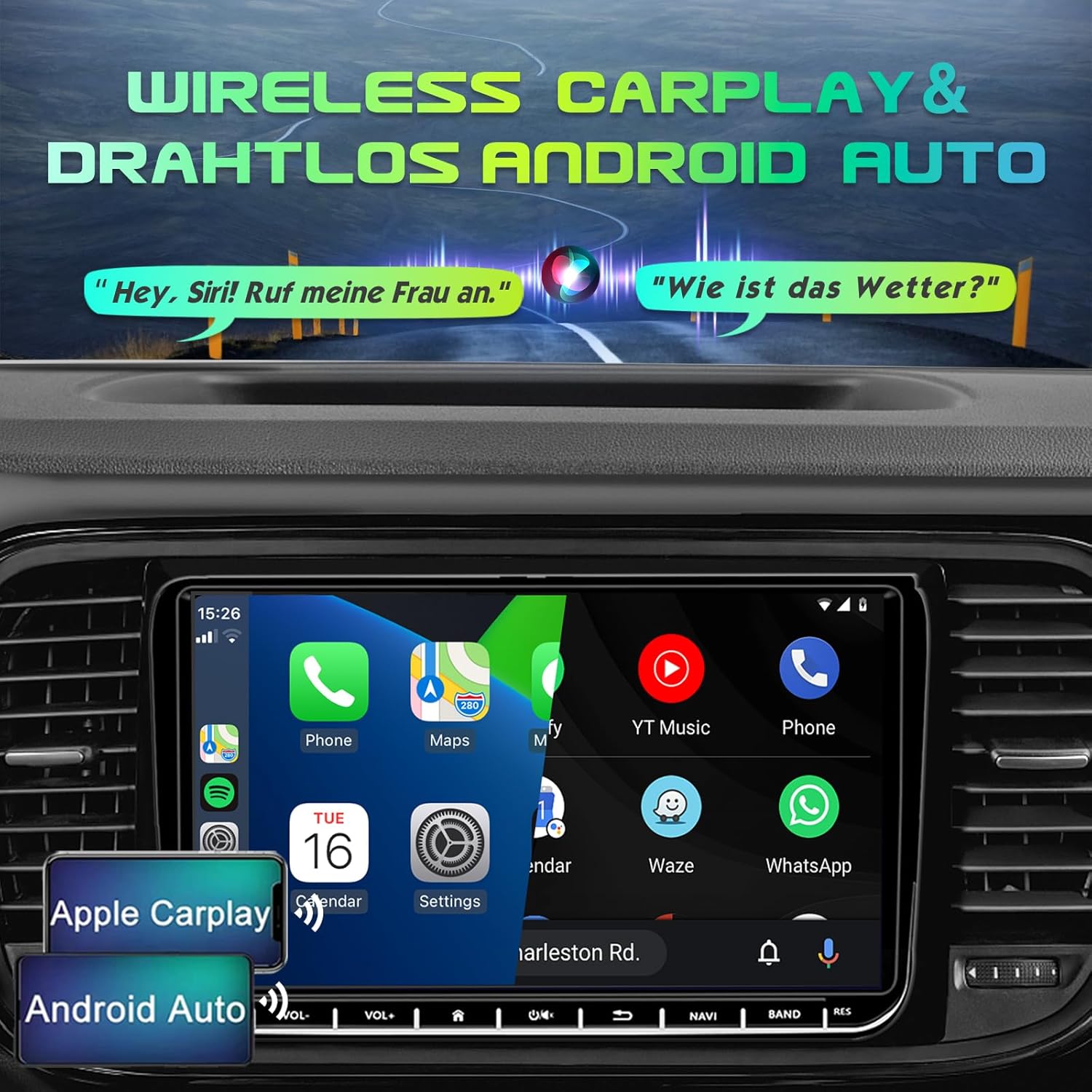
Figure 5: Display demonstrating Wireless Apple CarPlay and Android Auto functionality.
Connect your smartphone wirelessly to access navigation, music, calls, and messages directly on the car radio screen.
- Aktivér Bluetooth og Wi-Fi: Sørg for, at Bluetooth og Wi-Fi er aktiveret på din smartphone.
- Parring: On the car radio, go to the Bluetooth settings and search for your phone. Pair the devices.
- Launch CarPlay/Android Auto: Once paired, the system should prompt you to launch Apple CarPlay or Android Auto. Follow the on-screen instructions.
- Stemmestyring: Use voice commands (e.g., "Hey Siri" for CarPlay, "Hey Google" for Android Auto) for hands-free operation.
GPS-navigation:

Figure 6: GPS Navigation interface displaying map, current location, and route details.
The unit comes with pre-installed Europe maps and supports online and offline navigation.
- Start af navigation: Tap the "Navigation" icon on the main screen.
- Indtastning af destination: Use the on-screen keyboard to enter your destination address or select from recent destinations/points of interest.
- Kortopdateringer: Connect to Wi-Fi to download map updates or use online navigation services.
Bluetooth-forbindelse:

Figure 7: Bluetooth interface for hands-free calling and audio streaming.
- Parring: Go to "Bluetooth" settings, enable Bluetooth on your phone, and select the car radio from the list of available devices.
- Håndfri opkald: Make and receive calls directly through the car radio. Your phonebook can be synchronized.
- Lydstreaming: Play music from your phone via Bluetooth audio streaming (A2DP).
Reverse Camera (AHD Camera):
When the vehicle is shifted into reverse gear, the display will automatically switch to the rear view camera feed, providing a wide 170° view med nattesynsfunktioner.
Figure 8: AHD Reverse Camera display showing day and night vision modes.
DSP EQ (Digital Sound Processor Equalizer):
Customize your audio experience with the built-in DSP EQ. Adjust frequency bands to match your preferences and vehicle acoustics.
Figure 9: DSP EQ interface for advanced audio customization.
- Accessing EQ: Navigate to the "Sound Settings" or "DSP" menu.
- Justering af indstillinger: Use the sliders to adjust individual frequency bands. Select from preset sound modes (e.g., Pop, Rock, Jazz) or create custom profiles.
Ratbetjening (SWC):
If your vehicle supports it and the Canbus is correctly connected, you can program the steering wheel buttons to control the car radio functions (e.g., volume, track skip, mode change).
Figure 10: Steering Wheel Control (SWC) setup interface.
- Opsætning: Go to "Settings" > "Steering Wheel Control" and follow the on-screen instructions to map your vehicle's steering wheel buttons to the radio functions.
Mirror Link:
Mirror Link allows you to display your smartphone's screen directly on the car radio, supporting both iOS and Android devices. This enables you to view content like navigation, videos, and messages from your phone on the larger display.
Figure 11: Mirror Link feature displaying a mirrored smartphone screen.
- Forbindelse: Connect your smartphone via USB or Wi-Fi (depending on the specific Mirror Link app/protocol).
- Aktivering: Launch the Mirror Link application on the car radio and follow the pairing instructions on both devices.
Opretholdelse
- Rengøring af skærm: Brug en blød, fnugfri klud til forsigtigt at tørre berøringsskærmen af. Ved genstridige pletter, tør let afampRengør kluden med vand eller et skærmsikkert rengøringsmiddel. Undgå slibende materialer eller barske kemikalier.
- Generel rengøring: Hold enheden fri for støv og snavs. Brug en blød børste eller trykluft til at rengøre omkring knapper og porte.
- Softwareopdateringer: Periodically check for software updates from the manufacturer (if available) to ensure optimal performance and access to new features. Updates can usually be performed via Wi-Fi.
- Undgå ekstreme temperaturer: Udsæt ikke enheden for ekstrem varme eller kulde, da dette kan påvirke dens ydeevne og levetid.
- Strømstyring: Sørg for, at køretøjets elektriske system er stabilt. Undgå hyppige strømsvingninger.
Fejlfinding
If you encounter issues with your SEMAITU TH0029DAB Car Radio, please refer to the following common problems and solutions:
| Problem | Mulig årsag | Løsning |
|---|---|---|
| Enheden tænder ikke. | Ingen strømforsyning; Sprunget sikring; Forkert ledningsføring. | Check vehicle's fuse box and radio fuse. Verify power cable connections. Ensure battery is connected. |
| Ingen lydudgang. | Lydstyrken er for lav; Mute aktiveret; Problem med højttalerledningerne; Forkert lydkilde. | Increase volume. Check if mute is on. Verify speaker connections. Select correct audio source (e.g., FM, Bluetooth). |
| Poor radio reception (FM/DAB). | Antenne ikke tilsluttet; Beskadiget antenne; Område med svagt signal. | Ensure radio and DAB antennas are securely connected. Check antenna for damage. Try scanning for stations in a different location. |
| CarPlay/Android Auto opretter ikke forbindelse. | Bluetooth/Wi-Fi off on phone; Incorrect pairing; Software glitch. | Ensure Bluetooth and Wi-Fi are enabled on your phone. Re-pair the devices. Restart both phone and car radio. Update phone OS. |
| Bakkamera viser ikke. | Camera not powered; Incorrect camera input connection; Reverse trigger wire not connected. | Check camera power supply (usually from reverse light). Verify camera input cable is connected to the correct port. Ensure reverse trigger wire is connected. |
| Touchscreen reagerer ikke. | Systemfryser; Snavs på skærmen. | Restart the unit (press and hold power button). Clean the screen. If issue persists, a factory reset might be needed (consult support). |
| Ratbetjeningen virker ikke. | Canbus not connected; Incorrect SWC programming. | Ensure Canbus decoder is correctly installed. Re-program the steering wheel controls in the settings menu. |
Hvis problemet fortsætter efter at have prøvet disse løsninger, bedes du kontakte kundesupport.
Specifikationer
| Feature | Detalje |
|---|---|
| Modelnavn | Autoradio Android 12.0 9" (DAB) |
| Fabrikant | SEMAITU |
| Operativsystem | Android 12.0 |
| Skærmstørrelse | 9 tommer |
| Display Type | QLED Quantum Touchscreen |
| Opløsning | 1280 x 720 pixels |
| Hukommelse (RAM + Lagerplads) | 2 GB RAM + 32 GB ROM |
| Radio Tuner | DAB, FM, RDS (NXP6856) |
| Forbindelse | Bluetooth, Wi-Fi, USB (Dual ports) |
| Navigation | GPS (Europe maps included) |
| Smartphone integration | Trådløs Apple CarPlay, trådløs Android Auto, Mirror Link |
| Lydudgangstilstand | Stereo with DSP EQ |
| Særlige funktioner | Touchscreen, AHD Reverse Camera Support, Steering Wheel Control (SWC) |
| Type køretøjstjeneste | Bil |
| Monteringstype | Dashboard montering |
| Pakkedimensioner | 28 x 25.3 x 9 cm |
| Varens vægt | 1.4 kg |
Garanti og support
For warranty information and customer support, please refer to the documentation provided with your purchase or contact SEMAITU customer service directly. Keep your proof of purchase for warranty claims.
For technical assistance or further inquiries, please visit the official SEMAITU webwebsted eller kontakt deres supportteam.


