1. Introduktion
Thank you for choosing the AVATTO Smart ZigBee Light Switch ZTS02-EU-W2. This device integrates seamlessly into your smart home ecosystem, offering convenient control over your lighting. This manual provides essential information for the safe installation, operation, and maintenance of your new smart light switch. Please read it thoroughly before installation and keep it for future reference.
2. Produktet er slutview
The AVATTO Smart ZigBee Light Switch ZTS02-EU-W2 is a modern, touch-sensitive light switch designed for smart home integration. It utilizes ZigBee technology for reliable wireless communication and is compatible with the TUYA Smart App, allowing for remote control, scheduling, and automation of your lighting. This 2-way switch offers both manual touch control and smart functionality.
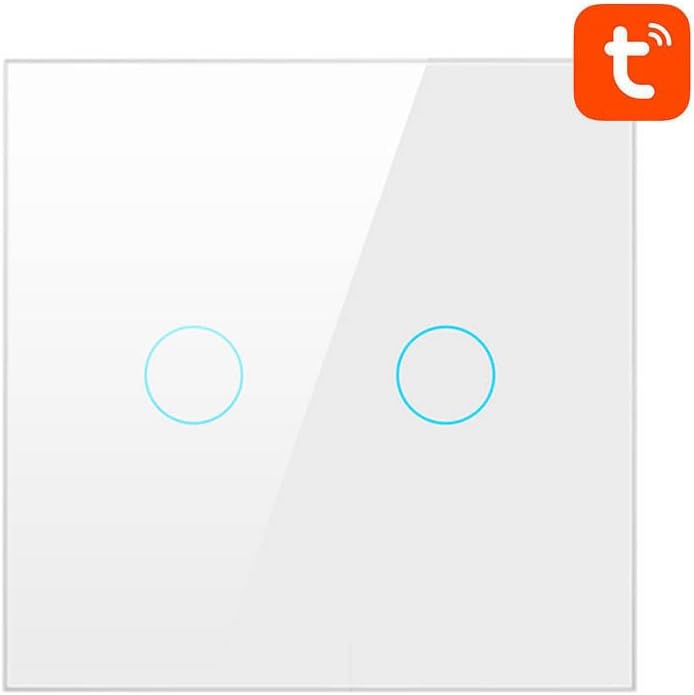
Billede 1: Front view of the AVATTO Smart ZigBee Light Switch ZTS02-EU-W2. It is white with two circular touch-sensitive areas, and the Tuya logo is visible in the top right corner, indicating its smart home compatibility.
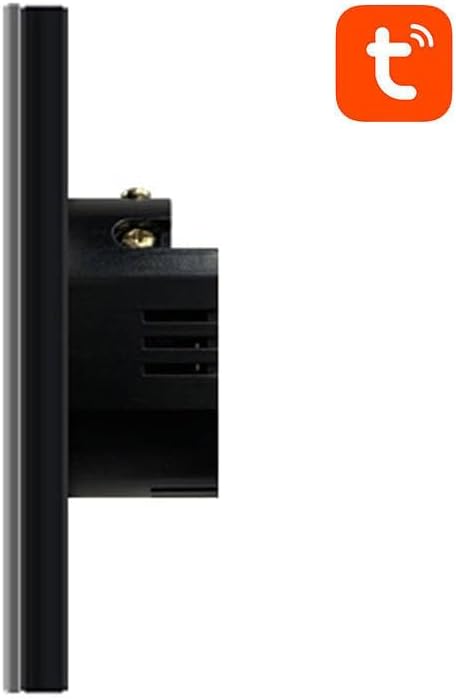
Billede 2: Side profile of the AVATTO Smart ZigBee Light Switch ZTS02-EU-W2, showing its depth and the wiring terminals on the back for electrical connection. The Tuya logo is also visible in the top right corner.
3. Sikkerhedsoplysninger
- Elektrisk fare: Installation must be performed by a qualified electrician or a person with a thorough understanding of electrical systems.
- Sluk: Always disconnect power at the circuit breaker before installing, removing, or servicing the switch.
- Voltage: Sørg for, at kontaktens lydstyrketage rating matches your electrical system.
- Kun indendørs brug: This device is designed for indoor use in dry locations. Avoid exposure to moisture or extreme temperatures.
- Overbelaste: Overskrid ikke afbryderens maksimale belastningsklassificering.
4. Pakkens indhold
Tjek venligst pakken for følgende varer:
- AVATTO Smart ZigBee Light Switch (ZTS02-EU-W2)
- Brugermanual
- Monteringsskruer
5. Opsætning
5.1. El-installation
- Sluk for strømmen: Locate your circuit breaker and turn off the power to the switch box you are working on. Verify power is off using a voltage tester.
- Fjern den gamle switch: Fjern forsigtigt den eksisterende vægplade, og skru den gamle afbryder af vægdåsen. Frakobl ledningerne.
- Identificér ledninger: Identify the Live (L), Load (L1/L2), and Neutral (N) wires. A Neutral wire is required for this smart switch. If you do not have a Neutral wire, consult a qualified electrician.
- Tilslutning af Smart Switch: Connect the wires to the corresponding terminals on the AVATTO Smart ZigBee Light Switch. Typically:
- Live wire to 'L' terminal.
- Load wire(s) to 'L1' and/or 'L2' terminals.
- Neutral wire to 'N' terminal.
- Monter kontakten: Gently push the wired switch into the wall box and secure it with the provided screws. Attach the new wall plate.
- Gendan strøm: Tænd for strømmen igen ved afbryderen. Indikatorlampen på kontakten skal lyse.
5.2. App Pairing (TUYA Smart App)
To enable smart features, you need a ZigBee gateway (sold separately) and the TUYA Smart App.
- Download app: Download the 'TUYA Smart' or 'Smart Life' app from your smartphone's app store (iOS/Android).
- Registrer/Log ind: Åbn appen, og opret en ny konto, eller log ind med en eksisterende.
- Add ZigBee Gateway: If you haven't already, add your ZigBee gateway to the TUYA Smart App. Follow the gateway's specific instructions for pairing.
- Gå ind i parringstilstand: On the AVATTO Smart ZigBee Light Switch, press and hold one of the touch buttons for approximately 5-10 seconds until the indicator light starts blinking rapidly. This indicates it's in pairing mode.
- Tilføj enhed i appen: In the TUYA Smart App, select your ZigBee gateway, then tap 'Add sub-device' or 'Add new device'. The app will scan for nearby ZigBee devices.
- Bekræft parring: Once the switch is discovered, confirm its addition in the app. You can then rename the switch and assign it to a room.
6. Betjeningsvejledning
6.1. Manuel kontrol
- Tænd/sluk: Lightly touch the circular touch area on the switch panel to toggle the connected light(s) on or off.
6.2. Smart Control (via TUYA Smart App)
- Fjernbetjening: Open the TUYA Smart App on your smartphone to remotely turn the light(s) on or off from anywhere with an internet connection.
- Planlægning: Set schedules or timers for your lights to turn on or off automatically at specific times.
- Automatisering: Create smart scenes and automations, such as turning lights on when motion is detected (requires compatible sensors) or when you arrive home.
- Stemmestyring: Integrate with voice assistants like Amazon Alexa or Google Assistant (requires compatible smart speaker and app integration) for hands-free control.
7. Vedligeholdelse
- Rensning: To clean the switch, ensure power is off at the circuit breaker. Use a soft, damp klæde. Brug ikke slibende rengøringsmidler eller opløsningsmidler.
- Ingen dele, der kan serviceres af brugeren: The switch contains no user-serviceable parts. Do not attempt to disassemble or repair the device yourself.
8. Fejlfinding
- Kontakten reagerer ikke:
- Kontroller om afbryderen er slået til.
- Sørg for, at ledningsføringen er korrekt og sikker.
- Verify the light bulb is working.
- Kan ikke parres med app:
- Ensure you have a ZigBee gateway and it is powered on and connected to your network.
- Make sure the switch is in pairing mode (indicator light blinking rapidly).
- Bring the switch closer to the ZigBee gateway during pairing.
- Reset the switch by holding the touch button for 10-15 seconds until the indicator light blinks differently, then try pairing again.
- Lights Flicker:
- Ensure the connected lights are compatible with smart switches (e.g., dimmable LEDs may require specific compatibility).
- Tjek for løse ledningsforbindelser.
9. Specifikationer
- Model: ZTS02-EU-W2
- Dimensioner: 16.8 x 8.6 x 3 cm
- Vægt: 1 kg
- Forbindelse: ZigBee
- Kompatibilitet: TUYA Smart App / Smart Life App
- Input bindtage: AC 100-240V (Typical for EU/Global smart switches, specific value not provided)
- Max belastning: (Specific value not provided, refer to product packaging for exact rating)
10. Garanti og support
AVATTO products are designed for reliability and performance. This product comes with a standard manufacturer's warranty. For specific warranty terms and conditions, please refer to the warranty card included with your purchase or contact AVATTO customer support. If you encounter any issues or have questions regarding your AVATTO Smart ZigBee Light Switch, please contact our customer service team for assistance.


