Indledning
This manual provides detailed instructions for the operation and maintenance of your SKMEI Model 1049 Military Digital Sports Watch. Please read this manual thoroughly to ensure proper use and to maximize the watch's features.
Produktegenskaber
- Solenergi: Utilizes solar energy for extended battery life and environmental efficiency.
- Digital skærm: Clear, large digital display with LED backlight for visibility in low light.
- Dobbelt tidszone: Tillader indstilling og viewing of two different time zones.
- 50M vandtæthed: Suitable for daily use, including hand washing, rain, and cold showers. Not intended for diving or hot water exposure.
- Stopur funktion: Til måling af forløbet tid.
- Nedtællingstimer: For tracking specific time intervals.
- Alarm funktion: Daily alarm setting.
- Holdbar konstruktion: Features a robust PU material strap and stainless steel buckle.

Billede: Overview of the SKMEI 1049 watch highlighting its main functions and features.
Komponenter og kontroller

Billede: Forside view of the SKMEI 1049 watch, indicating the location and labels of its control buttons.
- LYS-knap (øverst til venstre): Activates the LED backlight for illumination of the digital display.
- MODE-knap (nederst til venstre): Cycles through the watch's various modes: Time Display, Stopwatch, Countdown Timer, Alarm, and Dual Time.
- START-knap (øverst til højre): Used to start/stop functions in Stopwatch and Countdown modes, and to adjust values during setting procedures.
- RESET-knap (nederst til højre): Used to reset functions in Stopwatch and Countdown modes, and to select items during setting procedures.
Opsætning
Initial Power and Solar Charging
The SKMEI 1049 watch is equipped with solar charging capabilities. For optimal performance, ensure the watch is regularly exposed to light. Direct sunlight is most effective for charging. Even if the internal battery is low, solar power can sustain basic functions.
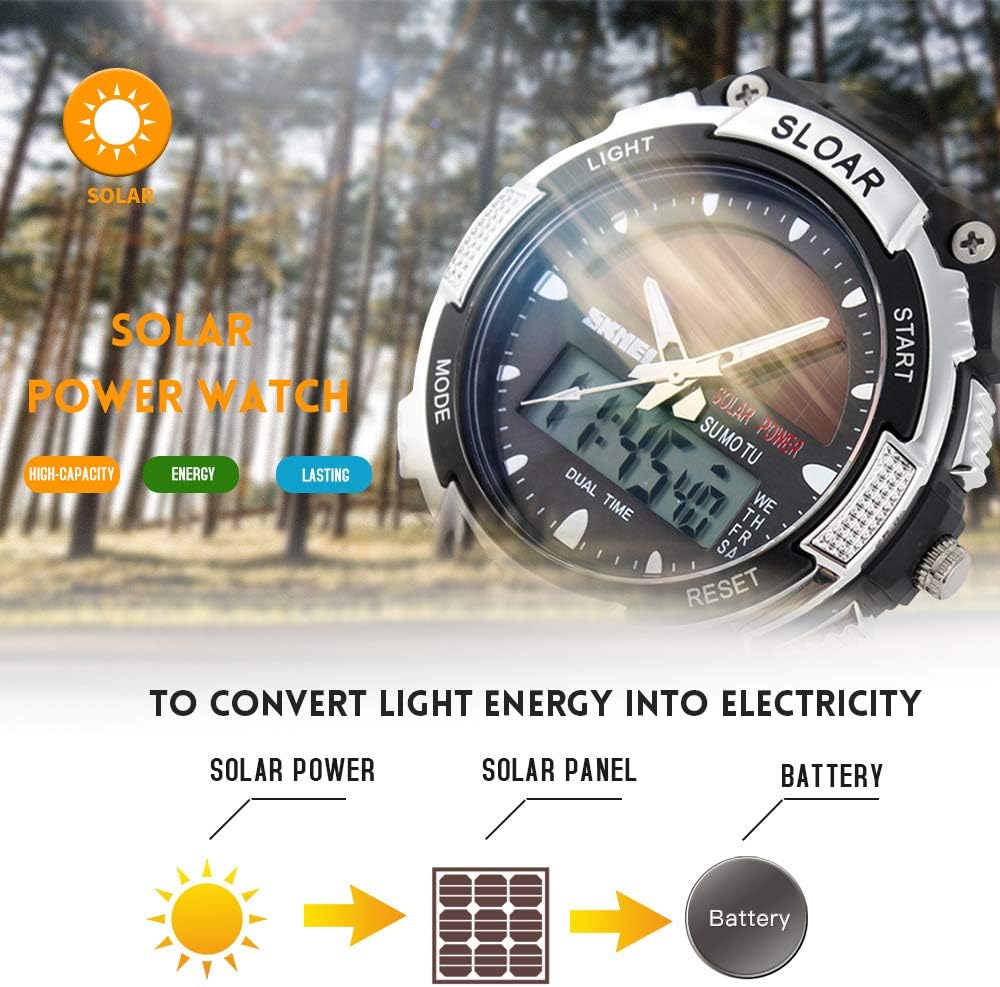
Image: Illustration of the solar power conversion process, from light to battery charge.
Indstilling af tid og dato
- I tidsvisningstilstand skal du trykke på og holde MODE knappen, indtil sekunderne begynder at blinke, hvilket angiver indstillingstilstand.
- Tryk på NULSTIL knappen for at gennemgå indstillingerne: Sekunder → Time → Minut → Måned → Dato → Ugedag.
- Brug STARTE knappen for at justere den blinkende værdi.
- Når alle indstillinger er korrekte, skal du trykke på MODE knappen igen for at afslutte indstillingstilstand.
- For at skifte mellem 12-timers og 24-timers format skal du trykke på STARTE button while the hour is flashing during time setting.
Betjeningsvejledning
Tilstandsnavigation
Tryk på MODE knappen gentagne gange for at gennemgå følgende tilstande:
- Time Display (main screen)
- Stopur (STW)
- Countdown Timer (TMR)
- Alarm (ALM)
- Dual Time (DT)
Stopur funktion
- Trykke MODE until "STW" or Stopwatch mode is displayed.
- Trykke STARTE for at begynde timingen.
- Trykke STARTE igen for at sætte tidtagningen på pause.
- Trykke NULSTIL for at nulstille stopuret.
- For at registrere splittider, tryk på NULSTIL while the stopwatch is running. The split time will display briefly, and the stopwatch will continue timing in the background. Press NULSTIL igen for at vende tilbage til spilletiden.
Countdown Timer Function
- Trykke MODE until "TMR" or Countdown Timer mode is displayed.
- Tryk og hold NULSTIL indtil timecifrene blinker.
- Trykke MODE to select hours, minutes, or seconds.
- Bruge STARTE for at justere den blinkende værdi.
- Trykke NULSTIL to confirm the setting and exit setting mode.
- Trykke STARTE for at begynde nedtællingen.
- Trykke STARTE igen for at sætte nedtællingen på pause/genoptage den.
- Når nedtællingen når nul, lyder en alarm. Tryk på en vilkårlig knap for at stoppe alarmen.
Alarm funktion
- Trykke MODE until "ALM" or Alarm mode is displayed.
- Tryk og hold NULSTIL indtil timecifrene blinker.
- Trykke MODE to select hours or minutes.
- Bruge STARTE for at justere den blinkende værdi.
- Trykke NULSTIL for at bekræfte alarmtidspunktet.
- Tryk på i alarmtilstand STARTE to toggle the alarm ON/OFF. An alarm icon will appear/disappear on the display.
Dual Time-funktion
The Dual Time function allows you to keep track of a second time zone.
- Trykke MODE until "DT" or Dual Time mode is displayed.
- Tryk og hold NULSTIL indtil timecifrene blinker.
- Trykke MODE to select hours or minutes.
- Bruge STARTE for at justere den blinkende værdi.
- Trykke NULSTIL to confirm the dual time setting.

Image: The SKMEI 1049 watch showcasing its dual time display capability.
Baggrundsbelysning
Tryk på LYS button (top left) to illuminate the digital display for a few seconds.
Opretholdelse
Vandtæthed (50M)
The watch is rated for 50 meters (5 ATM) water resistance. This means it is suitable for:
- Daglig brug
- Vask af hænder
- Regn eksponering
- Kolde brusebade
Important: Do not press any buttons while the watch is wet or submerged. Avoid exposure to hot water, steam, or diving, as this can compromise the water resistance seals.

Image: Details of the watch's durable components and water resistance marking on the back.
Solar Charging Care
To maintain optimal battery life, regularly expose the watch face to light. Avoid prolonged storage in dark places. While solar power is efficient, extreme temperatures can affect battery performance.
Rensning
Wipe the watch case and strap with a soft, dry cloth. For stubborn dirt, a slightly damp cloth can be used, followed by drying. Avoid using chemical cleaners, which can damage the watch materials.
Fejlfinding
- Skærmen er tom eller svag: Ensure the watch is exposed to sufficient light for solar charging. The battery may be low.
- Tidspunktet er forkert: Follow the "Setting the Time and Date" instructions to reset the time.
- Alarmen lyder ikke: Check if the alarm function is activated (alarm icon visible). Ensure the alarm time is set correctly.
- Vand inde i uret: If moisture appears inside the watch, stop using it immediately and contact customer support. This indicates a compromised seal.
Specifikationer
| Feature | Detalje |
|---|---|
| Mærke | SKMEI |
| Modelnummer | 1049 |
| Bevægelse | Digital |
| Æske diameter | 44 mm |
| Sags tykkelse | 17 mm |
| Båndbredde | 22 mm |
| Urlængde | 220 mm (ca. 8.7 tommer) |
| Remmateriale | PU Resin |
| Spændetype | Spænde |
| Vandmodstand | 50M (5 ATM) |
| Batteritype | 1 Lithium Ion (inkluderet) |

Image: Detailed dimensions of the SKMEI 1049 watch.
Garanti og support
For warranty information or technical support, please refer to the documentation provided with your purchase or contact SKMEI customer service directly. Keep your proof of purchase for warranty claims.
For further assistance, you may visit the official SKMEI store or contact their support channels.
Visit the SKMEI Store on Amazon


