Indledning
This user manual provides essential information for the safe and efficient operation, setup, and maintenance of your Sanctuary Diamond Series 1.25 cu ft Home & Office Safe (Model: SA-DIA2DP). Please read this manual thoroughly before using the safe and retain it for future reference.
The Sanctuary Diamond SA-DIA2 is designed to provide secure storage for your valuables, including letter and legal-sized documents. It features a robust construction with fire and water resistance capabilities.
Sikkerhedsoplysninger
Always follow basic safety precautions when handling and operating the safe. This product is heavy; ensure proper lifting techniques or assistance when moving. Keep the safe locked when not in use to prevent unauthorized access.
Forslag 65 Advarsel: Dette produkt kan udsætte dig for kemikalier, herunder bly, som er kendt af staten Californien for at forårsage kræft og fødselsdefekter eller anden reproduktionsskade. For mere information gå til www.P65Warnings.ca.gov.
Produkt overview
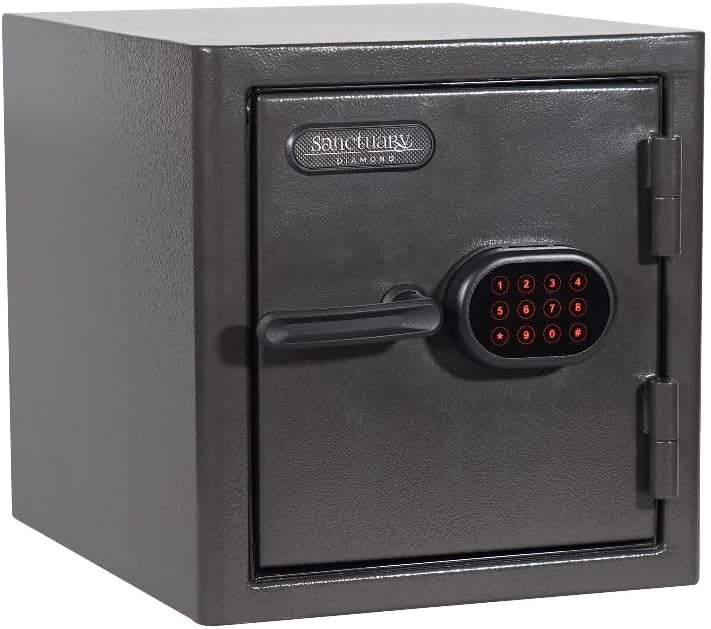
Figur 1: Front view of the Sanctuary Diamond Series 1.25 cu ft Home & Office Safe with the door closed, showing the electronic keypad and handle.

Figur 2: Indre view of the Sanctuary Diamond Series 1.25 cu ft Home & Office Safe with the door open, revealing the adjustable shelves and internal storage space.

Figur 3: Side view of the Sanctuary Diamond Series 1.25 cu ft Home & Office Safe illustrating its external dimensions: 17.5 inches deep, 14.5 inches wide, and 15 inches high.
Nøglefunktioner:
- Brandklassificeret 90 minutter ved 1,800 ° F
- 1.25 Cubic Feet interior volume
- Vandtæt i 7 dage op til håndtering
- Electronic Lock Face with Illuminated Touchpad
- Designed to store both letter and legal sized documents
Opsætning
Udpakning:
- Tag forsigtigt pengeskabet ud af emballagen.
- Inspect the safe for any signs of damage during transit. Report any damage to the retailer immediately.
- Remove all packing materials from around and inside the safe.
Batteri installation:
The electronic lock requires batteries for operation. Batteries are not included and must be purchased separately.
- Locate the battery compartment on the back of the electronic keypad or inside the safe door.
- Insert the required number of AA alkaline batteries, ensuring correct polarity (+/-).
- Luk batterirummets dæksel forsvarligt.
Placering:
- Place the safe on a flat, stable surface. It can be freestanding or tabletop mounted.
- Ensure the location is dry and away from direct heat sources or excessive humidity.
- For added security, consider bolting the safe to the floor or wall using the pre-drilled anchor holes (hardware not included).
Betjeningsvejledning
Initial Access and Setting Your Code:
Upon first use, the safe will have a factory default code. Refer to the quick start guide included with your safe for the specific default code and detailed instructions on how to change it to your personal code. It is highly recommended to change the default code immediately.
- Enter the default code on the illuminated touchpad.
- Turn the handle clockwise to open the safe door.
- With the door open, locate the reset button (usually a small red or green button) on the inside of the door or near the lock mechanism.
- Press the reset button. The keypad will beep, indicating it's ready for a new code.
- Enter your new 4-8 digit personal code, then press the '#' or 'ENTER' button.
- Test your new code with the door open to ensure it works correctly before closing the safe.
Åbning af pengeskabet:
- Press any key to activate the illuminated touchpad.
- Indtast din personlige kode.
- If the code is correct, the indicator light will turn green, and you will hear a click.
- Within 5 seconds, turn the handle clockwise to open the door.
Lukning og låsning af pengeskabet:
- Luk pengeskabslågen godt.
- Turn the handle counter-clockwise until it is fully engaged and the door is securely locked.
- Verify the safe is locked by gently pulling on the door.
Opretholdelse
Udskiftning af batteri:
When the batteries are low, the keypad may emit a warning beep or the lights may dim. Replace batteries promptly to avoid being locked out.
- Åbn batterirummet.
- Fjern gamle batterier, og bortskaf dem i henhold til lokale regler.
- Insert new AA alkaline batteries, observing correct polarity.
- Luk rummet.
Rensning:
- Tør ydersiden af pengeskabet af med en blød, tør klud.amp klæde.
- Brug ikke slibende rengøringsmidler eller opløsningsmidler, da de kan beskadige overfladen eller de elektroniske komponenter.
- Keep the keypad clean and free of dust or debris.
Door Hinge Lubrication:
Periodically check the door hinges for smooth operation. If they become stiff or noisy, apply a small amount of silicone-based lubricant to the hinge pins.
Fejlfinding
| Problem | Mulig årsag | Løsning |
|---|---|---|
| Pengeskabet åbner ikke med kode. | Forkert kode indtastet. Lave eller døde batterier. Handle not turned within 5 seconds. | Indtast koden omhyggeligt igen. Udskift batterierne. Enter code and turn handle immediately. |
| Tastaturet reagerer ikke. | Døde batterier. Keypad malfunction. | Udskift batterierne. Kontakt kundesupport. |
| Døren lukker ikke ordentligt. | Obstruction in door frame. Misaligned door. | Check for obstructions and remove. Contact customer support if misalignment persists. |
Specifikationer
| Feature | Detalje |
|---|---|
| Mærke | Helligdom |
| Modelnummer | SA-DIA2DP |
| Produktdimensioner | 17.5" D x 14.5" B x 15" H |
| Varens vægt | 71.4 pund |
| Kapacitet | 1.25 Kubikfod |
| Låsetype | Elektronisk |
| Farve | Sort |
| Særlige funktioner | Waterproof, Fire Resistant |
| Brandvurdering | 90 minutes at 1,800° F |
| Vandmodstand | 7 days up to handle |
| Monteringstype | Fritstående, Bordplade |
| Batterier påkrævet | Yes (AA, not included) |
| UPC | 813204027106 |
Garantioplysninger
Specific warranty details for the Sanctuary Diamond Series Safe are typically provided with the product packaging or can be found on the manufacturer's official website. Generally, safes come with a limited warranty covering defects in materials and workmanship. Please retain your proof of purchase for warranty claims.
For detailed warranty terms and conditions, please refer to the documentation included with your safe or visit the Sanctuary brand webwebsted.
Kundesupport
If you encounter any issues or have questions regarding your Sanctuary Diamond Series Safe that are not covered in this manual, please contact customer support.
- Fabrikant: Sports Afield (as per product specifications)
- Online support: Visit the official Sanctuary or Sports Afield webwebsted med ofte stillede spørgsmål, supportartikler og kontaktformularer.
- Telefonsupport: Se produktemballagen eller producentens webhjemmeside for aktuelle kontaktnumre.
When contacting support, please have your model number (SA-DIA2DP) and proof of purchase readily available.


