1. Produktet er slutview
The SubZero VOXLINK-1VL Wireless Lavalier and Headset Microphone System is engineered to deliver exceptional sound quality and versatility for various audio applications. This system provides reliable wireless performance, making it ideal for presentations, performances, interviews og mere.
- Wireless system including 1x receiver, 1x headset microphone, 1x lavalier microphone, and a bodypack transmitter.
- Offers a range of up to 50 meters and operates on UHF fixed frequencies 863.7 MHz and 864.9 MHz.
- Designed to be lightweight and compact for easy transport and dependable use in diverse environments.
- A durable carry case is included for convenient and secure transportation of the system components.
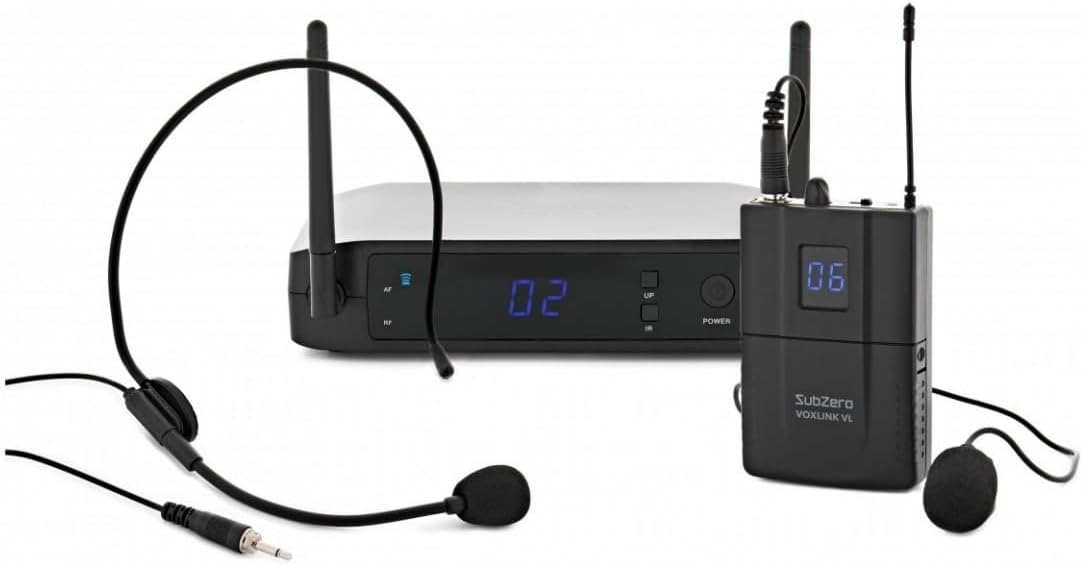
Figure 1.1: Complete SubZero VOXLINK-1VL Wireless Microphone System.
2. Pakkens indhold
Kontroller venligst pakken omhyggeligt for at sikre, at alle varer er til stede og i god stand:
- 1 x VOXLINK-1VL Wireless Receiver
- 1 x VOXLINK-1VL Bodypack Transmitter
- 1 x headset mikrofon
- 1 x Lavalier mikrofon
- 1 x strømadapter til modtager
- 1 x Audio Cable (e.g., 6.35mm Jack to Jack)
- 1 x bæretaske
- 1 x Brugermanual (dette dokument)

Figure 2.1: Wireless Receiver (Front)

Figure 2.2: Bodypack Transmitter

Figure 2.3: Headset Microphone

Figure 2.4: Lavalier Microphone
3. Opsætning
- Modtagerplacering: Place the wireless receiver on a stable, flat surface, away from large metal objects or other wireless devices that may cause interference. Ensure the antennas are fully extended and positioned vertically for optimal signal reception.
- Strømforsyning til modtageren: Connect the provided power adapter to the DC INPUT port on the rear of the receiver and plug it into a suitable power outlet. The receiver display should illuminate.
- Tilslutning til lydsystem:
- For balanced output, connect an XLR cable from the BALANCERET output on the receiver to an XLR input on your mixer or amplivligere.
- For unbalanced output, connect a 6.35mm (1/4") jack cable from the MIX.OUT port on the receiver to a 6.35mm input on your mixer or amplivligere.

Figure 3.1: Receiver Rear Panel Connections
- Bodypack Transmitter Battery Installation: Open the battery compartment on the bodypack transmitter. Insert two fresh AA batteries, ensuring correct polarity (+/-). Close the compartment securely.
- Connecting the Microphone to Transmitter:
- To use the lavalier microphone, plug its 3.5mm jack into the microphone input port on the bodypack transmitter. Secure the lavalier microphone to clothing, approximately 15-20 cm (6-8 inches) below the chin.
- To use the headset microphone, plug its 3.5mm jack into the microphone input port on the bodypack transmitter. Position the headset microphone boom approximately 2-3 cm (1 inch) from the corner of your mouth.
Note: Only one microphone (lavalier or headset) can be connected and used with the bodypack transmitter at a time.
- Tænder: Press and hold the POWER button on the receiver and the bodypack transmitter until their displays illuminate. The receiver and transmitter should automatically link to the pre-set frequency. The RF indicator on the receiver will light up when a stable connection is established.
4. Betjeningsvejledning
- Lydstyrkejustering: Adjust the output volume of the receiver using the BIND knob on the rear panel. Start with a low volume and gradually increase it to avoid sudden loud sounds. Fine-tune the overall audio level on your connected mixer or amplivligere.
- Mikrofonbrug:
- Lavalier mikrofon: Clip the microphone to your clothing, ensuring it is not covered by fabric. Speak clearly and directly towards the microphone.
- Headset mikrofon: Position the headset securely on your head. Adjust the microphone boom so the capsule is near your mouth for optimal sound capture.
- Signalovervågning: The receiver's display shows the active channel. The AF (Audio Frequency) indicator will light up when audio signal is being received from the transmitter. The RF (Radio Frequency) indicator confirms a stable wireless connection.
- Rækkevidde: The system has an operating range of up to 50 meters (164 feet) in open line-of-sight conditions. Obstacles such as walls, metal structures, and other wireless devices can reduce this range. Maintain a clear line of sight between the transmitter and receiver whenever possible.
- Sluk: To turn off the system, press and hold the POWER button on both the receiver and the bodypack transmitter until their displays turn off.
5. Vedligeholdelse
- Rensning: Use a soft, dry cloth to clean the surfaces of the receiver, transmitter, and microphones. Do not use liquid cleaners, aerosols, or solvents, as these may damage the components.
- Batteripleje: Remove batteries from the bodypack transmitter if the system will not be used for an extended period to prevent leakage and damage. Dispose of used batteries responsibly according to local regulations.
- Opbevaring: Store the system in its original carry case or a similar protective container when not in use. Keep it in a cool, dry place, away from direct sunlight, extreme temperatures, and high humidity.
- Antennepleje: Handle the receiver antennas with care. Avoid bending them excessively or applying undue force, as this can damage the internal connections and affect performance.
6. Fejlfinding
| Problem | Mulig årsag | Løsning |
|---|---|---|
| Ingen lydudgang |
|
|
| Interference/Poor sound quality |
|
|
| Kort driftsområde |
|
|
7. Specifikationer
| Feature | Detalje |
|---|---|
| Model | VOXLINK-1VL |
| Trådløs frekvens | UHF Fixed Frequencies: 863.7 MHz, 864.9 MHz |
| Driftsområde | Op til 50 meter (sigtelinje) |
| Modtager udgange | 1 x Balanced XLR, 1 x Unbalanced 6.35mm (1/4") Jack |
| Sendereffekt | 2 x AA batterier (medfølger ikke) |
| Modtagerens strøm | DC 12V-18V, 1A (Power Adapter included) |
| Produktdimensioner (modtager) | Approx. 1 x 1 x 1 cm (This dimension seems incorrect from source data, please refer to actual product for accurate measurements.) |
| Produktets vægt | Approx. 2.22 Kilograms (This weight seems incorrect for the given dimensions, please refer to actual product for accurate measurements.) |
| Fabrikant | SubZero |
| Oprindelsesland | Kina |
Note: Specifications are subject to change without notice. Dimensions and weight provided are based on available data and may vary.
8. Garanti og support
For warranty information, please refer to the documentation provided with your purchase or contact your retailer. SubZero products are designed for reliability and performance.
For technical support or further assistance, please visit the official SubZero webwebstedet eller kontakt deres kundeserviceafdeling. Kontaktoplysninger kan typisk findes på producentens webwebstedet eller din købsfaktura.
Online ressourcer:


