1. Introduktion
This manual provides essential instructions for the safe and efficient use of your SONY VAIO Pro PK VJPK11 laptop. Please read this manual thoroughly before operating your device and retain it for future reference. It covers setup, operation, maintenance, and troubleshooting to ensure optimal performance and longevity of your laptop.
2. Produktet er slutview
The SONY VAIO Pro PK VJPK11 is a portable computing device designed for productivity and multimedia. Familiarize yourself with its components and features.

Figur 2.1: Front view of the SONY VAIO Pro PK VJPK11 laptop. This image displays the laptop open, revealing the screen, keyboard, and touchpad. The VAIO logo is visible on the screen, and an Intel Core i5 sticker is on the palm rest.
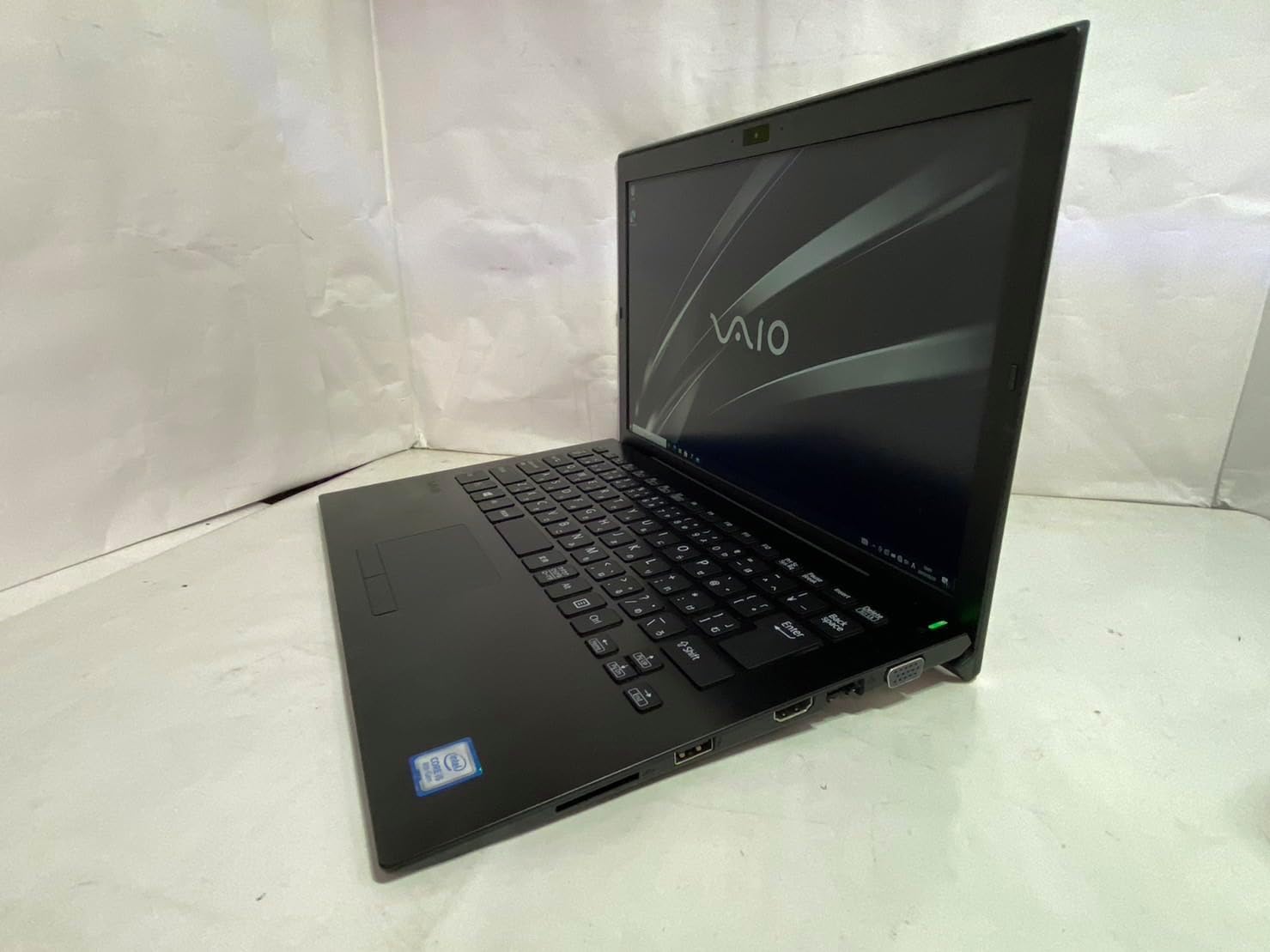
Figur 2.2: Venstre side view of the SONY VAIO Pro PK VJPK11 laptop. This image shows the left side of the laptop, highlighting various ports such as USB, HDMI, and a VGA port, along with a ventilation grille.

Figur 2.3: Top view of the SONY VAIO Pro PK VJPK11 laptop with the lid closed. This image displays the sleek black finish of the laptop's lid, featuring the prominent silver VAIO logo in the center.
3. Opsætning
3.1 Udpakning
Carefully remove the laptop and all accessories from the packaging. Ensure all components are present:
- SONY VAIO Pro PK VJPK11 Laptop
- AC-adapter og netledning
- Dokumentation (denne manual, garantioplysninger)
3.2 Tilslutning til strøm
- Tilslut AC-adapteren til strømindgangen på din bærbare computer.
- Sæt netledningen i AC-adapteren.
- Sæt netledningen i en jordforbundet stikkontakt.
- Allow the battery to charge fully before initial use, or use the laptop while connected to power.
3.3 Initial Boot-Up and Windows Setup
Press the power button to turn on the laptop. Follow the on-screen instructions to complete the Windows 10 Pro setup process. This typically involves selecting your region, language, accepting license agreements, and creating a user account.
4. Betjeningsvejledning
4.1 Tænd/sluk
- For at tænde: Press the power button located on the laptop.
- For at lukke ned: Click the Start button, then Power, and select 'Shut down'.
- For at genstarte: Click the Start button, then Power, and select 'Restart'.
- At sove: Click the Start button, then Power, and select 'Sleep', or close the laptop lid.
4.2 Tastatur og touchpad
The laptop features a standard QWERTY keyboard and a multi-touch touchpad. Use the touchpad for cursor control and gestures. Refer to Windows settings for customizing touchpad sensitivity and gestures.
4.3 Tilslutning af eksterne enheder
- USB-enheder: Connect USB devices (e.g., mouse, external drive) to the available USB 3.0 ports.
- Eksternt display: Use the HDMI or VGA port to connect an external monitor or projector. Press Windows-tasten + P til at administrere visningstilstande.
- Kablet netværk (LAN): Tilslut et Ethernet-kabel til LAN-porten for en kablet internetforbindelse.
- SD-kort: Insert an SD card into the dedicated SD card slot for data transfer.
4.4 Brug Webcam and Bluetooth
- Webcam: Den integrerede webcam can be used for video calls and conferencing. Access it through applications like Camera or communication software.
- Bluetooth: Enable Bluetooth in Windows settings to connect wireless devices such as headphones, speakers, or mice.
5. Vedligeholdelse
5.1 Rengøring af den bærbare computer
Brug en blød, fnugfri klud lidt dampened with water or a screen cleaner to clean the display and exterior surfaces. Avoid harsh chemicals or abrasive materials. Ensure the laptop is powered off and unplugged before cleaning.
5.2 Pleje af batterier
To prolong battery life, avoid extreme temperatures. If storing the laptop for an extended period, ensure the battery is charged to approximately 50%.
5.3 Softwareopdateringer
Regularly check for and install Windows updates and driver updates from the SONY support webwebsted for at sikre systemstabilitet og sikkerhed.
5.4 Datasikkerhedskopiering
Sikkerhedskopier dine vigtige data med jævne mellemrum til et eksternt drev eller en cloud-lagringsenhed for at forhindre datatab.
6. Fejlfinding
This section addresses common issues you might encounter with your SONY VAIO Pro PK VJPK11.
6.1 Ingen strøm
- Ensure the AC adapter is securely connected to the laptop and a working power outlet.
- Kontroller, at stikkontakten fungerer ved at tilslutte en anden enhed.
- Hvis batteriet er helt afladet, skal du lade det oplade i et par minutter, før du forsøger at tænde det.
6.2 Displayproblemer
- Hvis skærmen er blank, kan du prøve at justere displayets lysstyrke ved hjælp af funktionstasterne.
- If an external monitor is connected, ensure the correct display output mode is selected (Windows key + P).
- Genstart den bærbare computer.
6.3 Problemer med Wi-Fi-forbindelse
- Sørg for, at Wi-Fi er aktiveret i Windows-indstillingerne.
- Genstart din router og dit modem.
- Tjek om andre enheder kan oprette forbindelse til det samme Wi-Fi-netværk.
- Opdater dine trådløse netværksdrivere.
6.4 Bærbar computer kører langsomt
- Luk unødvendige programmer, der kører i baggrunden.
- Tjek Jobliste for processer, der bruger meget CPU eller RAM.
- Kør en diskoprydning og defragmentering (for harddisk, ikke nødvendigt for SSD).
- Sørg for, at Windows og drivere er opdaterede.
7. Specifikationer
Key technical specifications for the SONY VAIO Pro PK VJPK11 laptop:
| Feature | Specifikation |
|---|---|
| Model | SONY VAIO Pro PK VJPK11 (VJPK11C11N) |
| Processor | Intel Core i5-8250U (1.60GHz) |
| VÆDDER | 8.00 GB DDR3 SDRAM |
| Opbevaring | 256GB SSD (SATA) |
| Vise | 14.0-inch Wide (1920x1080 pixels) |
| Grafik | Intel integreret grafik |
| Operativsystem | Windows 10 Pro 64bit |
| Havne | VGA, HDMI, USB 3.0, LAN, SD Card Slot |
| Forbindelse | LAN, Bluetooth |
| Webcam | Integreret Webcam |
8. Garanti og support
For information regarding your product's warranty, please refer to the warranty card included with your purchase or visit the official SONY support website. For technical assistance, contact SONY customer support or your authorized dealer.
Online support: https://www.sony.com/electronics/support


