Indledning
Thank you for choosing the TAB ErasePro H6 Portable Carpet Cleaner. This user manual provides essential information for the safe and efficient operation, maintenance, and troubleshooting of your new appliance. Please read this manual thoroughly before first use and keep it for future reference.
Vigtige sikkerhedsoplysninger
Følg altid grundlæggende sikkerhedsforanstaltninger, når du bruger elektriske apparater, for at mindske risikoen for brand, elektrisk stød eller personskade.
- Læs alle instruktioner før brug af apparatet.
- Brug kun som beskrevet i denne manual. Brug kun producentens anbefalede tilbehør.
- Nedsænk ikke apparatet i vand eller andre væsker.
- Må ikke bruges med beskadiget ledning eller stik. Hvis apparatet ikke fungerer, som det skal, er blevet tabt, beskadiget, efterladt udendørs eller tabt i vand, skal det returneres til et servicecenter.
- Må ikke bruges som legetøj. Omhyggelig opmærksomhed er nødvendig, når den bruges af eller i nærheden af børn.
- Use only non-foaming cleaning solutions specifically designed for carpet cleaners.
- Ensure tanks are properly secured before operation.
- Do not tilt the machine or use it upside down.
Pakkens indhold
Bekræft at alle varer er til stede i din pakke:
- TAB ErasePro H6 Portable Carpet Cleaner Unit
- PowerBrush Attachment
- Extend Hose with cleaning head
- Type-C opladerkabel

Image: The TAB ErasePro H6 Portable Carpet Cleaner shown with its main unit, PowerBrush, and extendable hose attachment.

Image: Close-up of the extendable hose and its cleaning head, which are included with the cleaner.
Produkt overview
Familiarize yourself with the main components of your TAB ErasePro H6:
- Hovedenhed: Houses the motor, battery, and control panel.
- Ren vandtank (350 ml): Holds fresh water and cleaning solution.
- Beholder til snavset vand (260 ml): Opsamler snavset vand og snavs.
- PowerBrush: Integrated brush head for agitating and lifting stains.
- Extend Hose: For cleaning hard-to-reach areas.
- LED digitalt display: Shows battery level, hose connection status, and brush switch status.

Image: Close-up of the cleaner's LED digital display, indicating battery level, spray function, hose connection, and power brush status.
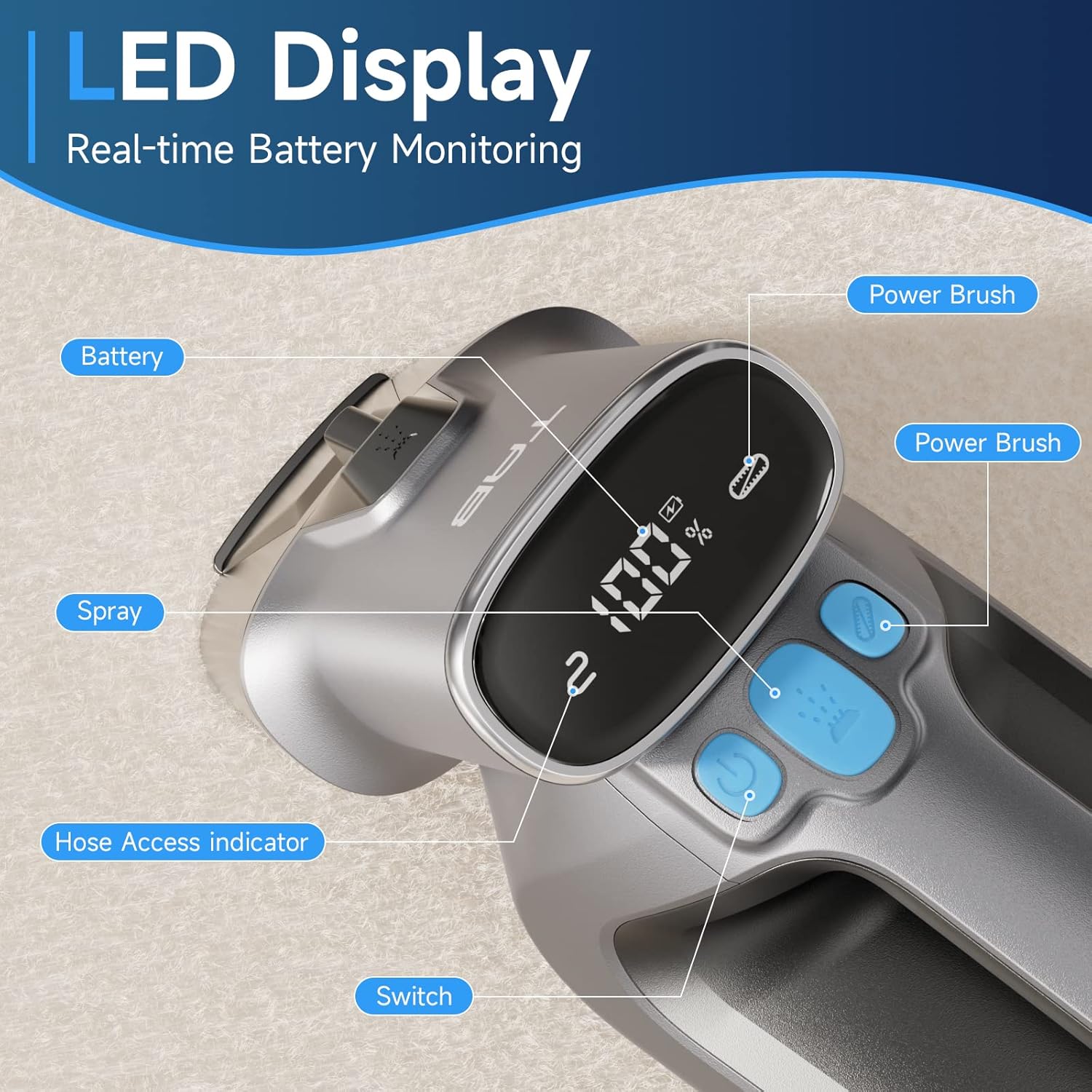
Image: Diagram showing the separate 350ml clean water tank and 260ml dirty water tank, highlighting their removable design.
Opsætning
Opladning af batteriet
Before first use, fully charge the appliance. The LED display will show the battery percentage.
- Locate the Type-C charging port on the cleaner.
- Connect the provided Type-C charging cable to the port and a 5V/2A adapter (not included).
- The LED display will show charging progress. A full charge provides up to 20 minutes of runtime.

Image: Close-up of the Type-C charging port on the cleaner, with the charging cable connected.
Fyldning af rentvandsbeholderen
- Fjern rentvandstanken fra hovedenheden.
- Open the tank cap and fill with clean water. You may add a non-foaming cleaning solution as recommended by the solution manufacturer. Do not overfill.
- Securely close the cap and reinsert the tank into the cleaner until it clicks into place.
Betjeningsvejledning
Generel drift
- Ensure the clean water tank is filled and the dirty water tank is empty and properly installed.
- Tryk på tænd/sluk-knappen for at tænde for støvsugeren.
- To activate the PowerBrush, press the dedicated PowerBrush button. The brush will rotate to agitate stains.
- To spray cleaning solution, press the spray button.
- Move the cleaner slowly over the stained area, allowing the PowerBrush and suction to work.

Image: The PowerBrush mechanism shown in operation, highlighting its high-speed automatic washing action for better cleaning.

Image: The cleaner demonstrating its strong suction power on a carpet, suitable for various fabric surfaces like mattresses and sofas.
Rengøring af forskellige overflader
- Carpets & Rugs: Use the main PowerBrush head directly on the carpet. For deep stains, pre-treat the area if necessary.
- Upholstery & Car Interiors: For delicate fabrics or hard-to-reach spots, attach the Extend Hose. Ensure the hose is securely connected; the LED display will indicate proper connection.
- Pet Stains: The PowerBrush is effective for agitating and lifting pet messes. Apply cleaning solution, scrub gently, and then suction up the dirty liquid.

Image: The cleaner being used to remove a pet stain from a carpet, illustrating its effectiveness for quick spot cleaning.

Image: A user demonstrating the use of the extended hose to clean curtains, showcasing its ability to reach various areas.

Image: The cordless cleaner being used to clean a car seat, emphasizing its portability and 20-minute run time for on-the-go cleaning.
Official Product Video: Usage Demonstration
Video: This official product video demonstrates the TAB ErasePro H6 Portable Carpet Cleaner in action, showing its effectiveness on various stains and surfaces, including the PowerBrush and extended hose features. It also illustrates the ease of use and maintenance.
Opretholdelse
Tømning og rengøring af tanke
For optimal performance and hygiene, empty and clean both water tanks after each use.
- Fjern beskidtvandsbeholderen fra hovedenheden.
- Open the tank and dispose of the dirty water. Rinse the tank thoroughly with clean water.
- Remove the clean water tank and rinse it if any cleaning solution residue remains.
- Allow both tanks to air dry completely before reassembling.

Image: A visual representation of the clean and dirty water tanks, indicating their positions on the cleaner for easy removal and cleaning.
Cleaning the PowerBrush
Regularly inspect and clean the PowerBrush to prevent hair and debris buildup.
- Detach the PowerBrush head from the main unit.
- Remove any tangled hair or debris from the brush bristles.
- Rinse the brush under running water.
- Allow the PowerBrush to air dry completely before reattaching.

Billede: Et nærbillede view of the detachable PowerBrush component, showing its bristles for effective cleaning and ease of maintenance.
Fejlfinding
If you encounter issues with your TAB ErasePro H6, refer to the table below for common problems and solutions.
| Problem | Mulig årsag | Løsning |
|---|---|---|
| Rengøringsmidlet tænder ikke. | Batteriet er lavt eller afladet. | Oplad batteriet helt. |
| Ingen spray eller svag spray. | Clean water tank is empty or improperly installed. Nozzle is clogged. | Refill clean water tank. Reinstall tank correctly. Clean the spray nozzle. |
| Dårligt sug. | Dirty water tank is full. Dirty water tank is improperly installed. Suction nozzle is blocked. | Empty dirty water tank. Reinstall tank correctly. Clear any blockages from the suction nozzle. |
| PowerBrush not rotating. | PowerBrush button not pressed. Brush is jammed by debris. | Press the PowerBrush button. Remove any hair or debris from the brush. |
| Cleaner leaks. | Water tanks are not properly sealed or installed. | Ensure tank caps are securely closed and tanks are correctly seated in the unit. |
Specifikationer
| Feature | Specifikation |
|---|---|
| Mærke | TAB |
| Modelnavn | H6-3 |
| Speciel funktion | Bærbar tæpperenser |
| Filtertype | Skum |
| Renvandstankkapacitet | 0.35 liter (350 ml) |
| Kapacitet til snavset vandtank | 0.26 liter (260 ml) |
| Batteri Wattage | 2200 milliarderamp_timer |
| Runtime | Op til 20 minutter |
| Anbefalede anvendelser | Carpet, Upholstery, Stairs, Car |
| Formfaktor | Håndholdt |
| Støjniveau | 80 dB |
| Varens vægt | 4.4 pund |
| Pakkedimensioner | 17.28 x 13.07 x 6.69 tommer |
Garanti og support
Your TAB ErasePro H6 Portable Carpet Cleaner comes with a standard manufacturer's warranty. For detailed warranty information, product support, or to purchase replacement parts, please visit the official TAB webwebstedet eller kontakt kundeservice gennem din forhandler.
For yderligere assistance henvises til de kontaktoplysninger, der følger med din købsdokumentation.


