1. Introduktion
Thank you for choosing the SwanScout 3-in-1 USB-C Charging Station. This device is designed to efficiently charge your Google Pixel Watch 1, compatible Google Pixel phones, and Pixel Buds Pro/2/A-Series simultaneously. It features a compact, foldable design, a 25W fast charging capability for phones, and a sleep-friendly digital clock with adjustable brightness. Please read this manual thoroughly to ensure proper setup and operation.
2. Pakkens indhold
Bekræft at alle varer er til stede i din pakke:
- 1x SwanScout 701G 3-in-1 Charging Station
- 1x 25W Charging Brick
- 1x 5A USB-A to USB-C Charging Cable
- 1x Brugermanual (dette dokument)
3. Produktet er slutview
The SwanScout 701G charging station integrates multiple charging points and a digital clock into a single, space-saving unit.

Figur 1: Forside view of the SwanScout 3-in-1 Charging Station with devices.
Nøglekomponenter omfatter:
- Phone Charging Stand: Features a Type-C connector for fast charging compatible Google Pixel and Samsung Galaxy phones.
- Earbuds Charging Pad: Includes a Type-C connector for charging compatible Pixel Buds and other earbuds.
- Watch Charging Module: Specifically designed for wireless charging of the Google Pixel Watch 1 (2022 release only).
- Digitalt ur display: Shows time with adjustable brightness levels.
- Sammenfoldeligt design: Allows the station to fold compactly for easy portability.

Figur 2: Overview of the 3-in-1 wired and wireless charging capabilities.
4. Opsætningsvejledning
Follow these steps to set up your charging station:
- Pak alle komponenter ud af æsken.
- Connect the provided 5A USB-A to USB-C charging cable to the USB-C input port on the back of the SwanScout 701G charging station.
- Plug the USB-A end of the cable into the provided 25W Charging Brick.
- Insert the 25W Charging Brick into a wall outlet. The digital clock display will illuminate, indicating the station is powered.
Figure 3: Visual guide for initial setup and device placement.
5. Betjeningsvejledning
5.1 Opladningsenheder
The station supports simultaneous charging of a phone, earbuds, and a Google Pixel Watch 1.
- Telefonopladning: Place your compatible Google Pixel or Samsung Galaxy phone onto the upright Type-C connector on the phone stand. Ensure the phone is securely seated for optimal connection.
- Opladning af øretelefoner: Place your Pixel Buds Pro/2/A-Series or other compatible earbuds onto the Type-C connector located on the base of the station.
- Ur opladning: Place your Google Pixel Watch 1 onto the magnetic wireless charging module. Ensure the watch is correctly aligned for charging to begin. This station is ikke kompatibel with Google Pixel Watch 2 or later models.
Video 1: Demonstration of charging a Google Pixel phone, Pixel Buds, and Pixel Watch 1 on the SwanScout station.
Video 2: Overståetview of the fast charging capabilities for Google Pixel devices.
Video 3: Short demonstration of the 3-in-1 charging station in use, highlighting watch charging.
Video 4: Demonstration of Type-C charging for Google Pixel devices on the station.
5.2 Adjusting Digital Clock
The integrated digital clock offers 4 levels of brightness and supports 12/24 hour mode. Note that it does not include an alarm function.
- Justering af lysstyrke: Press the light icon button on the front left of the display to cycle through 0%, 20%, 50%, and 100% brightness levels.
- Tidsindstilling: Use the '+' and '-' buttons on the side of the station to adjust the time. Press the '12H/24H Switch Button & Time Setting "Enter" Button' to confirm settings and switch between 12-hour and 24-hour formats.

Figure 4: Digital clock display with dimmable brightness options.
5.3 Foldning for bærbarhed
The charging station features a foldable design, making it convenient for travel and storage.
- Gently push the phone stand backward until it folds flat against the base.
- The watch charging module can also be adjusted to lay flat or at various angles (0-120 degrees).
- Once folded, the station becomes compact and can be easily stored in a bag or luggage.

Figure 5: The charging station in its folded, portable configuration.
6. Kompatibilitet
This charging station is designed for specific devices:
- Google Pixel Watch: Compatible with Google Pixel Watch 1 (2022 release) ONLY. Not compatible with Google Pixel Watch 2, 3, or 4.
- Google Pixel Phones: Supports Google Pixel 10 Pro Fold/10 Pro/10 Pro XL/9 Pro/Fold/9 Pro XL/9, Pixel 8a, Pixel 8/8 Pro, Pixel Fold, Pixel 7a, Pixel 7 Pro, Pixel 7, Pixel 6a, Pixel 6, Pixel 6 Pro, Pixel 5a, Pixel 5(5G), Pixel 5, Pixel 4a(5G), Pixel 4a, Pixel 4, Pixel 4 XL, Pixel 3, Pixel 3 XL, Pixel 2, Pixel 2 XL, Pixel, Pixel XL.
- Samsung Galaxy Phones: Compatible with Samsung Galaxy S23 Ultra-S7, Note 20-7, Galaxy A54, A53, A13, A14 Series, and other Type-C charging compatible devices.
- høretelefoner Compatible with Google Pixel Buds Pro/2/A-Series, Samsung Galaxy Buds 2/+/Live/Live 2, and other Type-C charging compatible earbuds.

Figure 6: Detailed compatibility information for various devices.
6.1 Case-Friendly Charging
The phone charging stand is designed to be compatible with most phone cases, including thick cases, card holders, pop sockets, metal rings, and magnet pads. You typically do not need to remove your phone's protective case when charging.
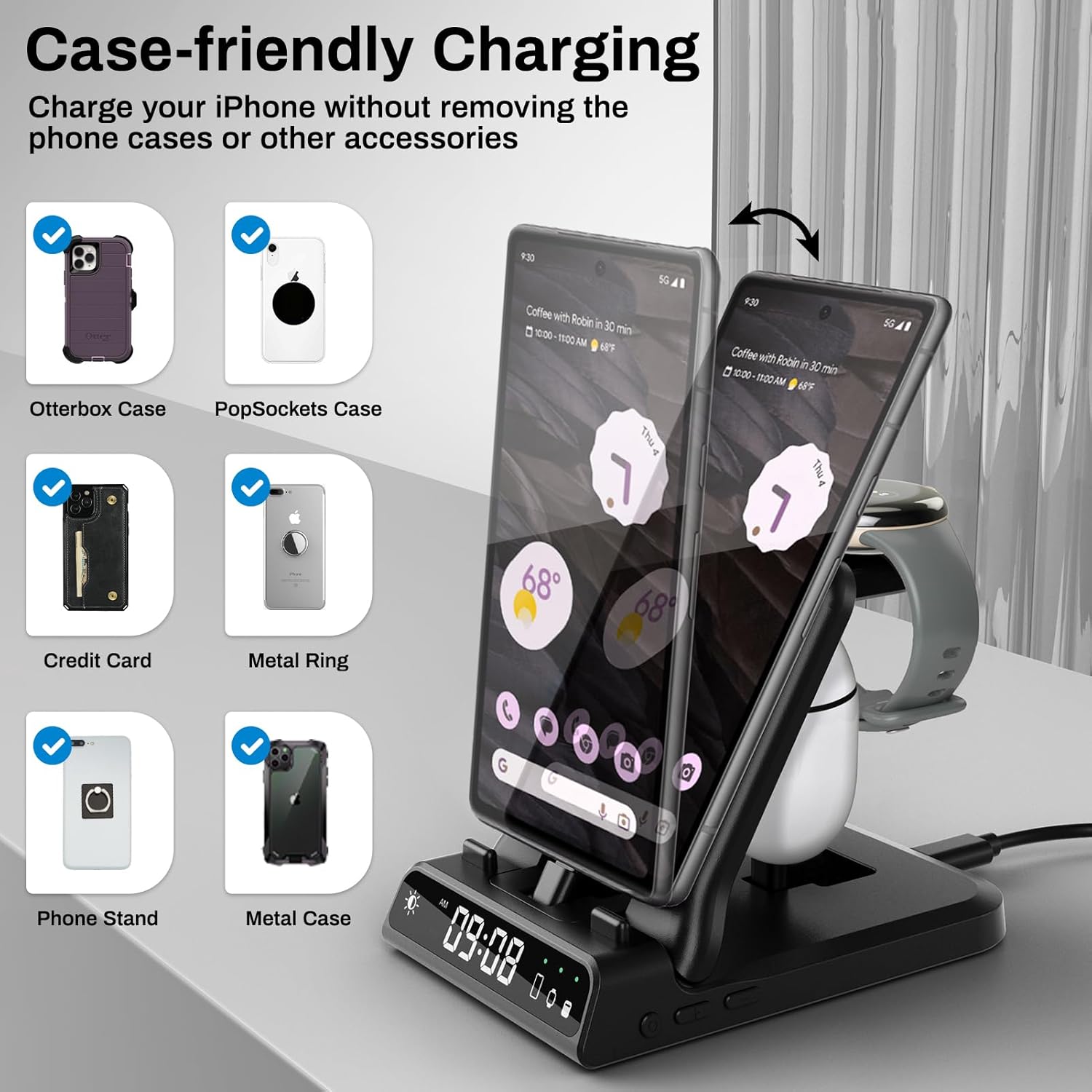
Figure 7: Case-friendly charging feature demonstration.
7. Specifikationer
| Feature | Detalje |
|---|---|
| Modelnummer | S10001 (701G) |
| Mærke | Svanespejder |
| Connector Type | USB Type C |
| Input bindtage | 9 volt |
| Ampslette | 3 Amps |
| Phone Charging Output | 20W (maks.) |
| Watch Charging Output | 3W (maks.) |
| Opladningsudgang for øretelefoner | 3W (maks.) |
| Særlige funktioner | 20W Fast Charging (for phone), Charging Indicator, Digital Clock (4-level dimming, 12/24H mode), Foldable and Portable Design |
| Farve | Sort |
| Varens vægt | 0.176 ounce |
| Pakkedimensioner | 5.59 x 3.7 x 3.03 tommer |
8. Fejlfinding
- Enheden oplader ikke: Ensure the charging station is properly connected to the power adapter and wall outlet. Verify that your device is correctly aligned on its respective charging point. For phones and earbuds, ensure the Type-C connector is fully inserted. For the Pixel Watch 1, confirm it is centered on the magnetic charging module.
- Langsom opladning: Ensure you are using the provided 25W charging brick and 5A USB-A to USB-C cable. Using a lower-wattage adapter or a different cable may result in slower charging speeds.
- Digital clock not displaying: Check the power connection. If the station is powered, press the brightness adjustment button to ensure the display is not set to 0% brightness.
- Watch not charging (Pixel Watch 2/3/4): This station is only compatible with Google Pixel Watch 1 (2022 release). It will not charge Pixel Watch 2 or newer models.
9. Sikkerhedsoplysninger
- Do not expose the charging station to water, moisture, or extreme temperatures.
- Undgå at tabe eller udsætte enheden for kraftige stød.
- Do not attempt to disassemble, repair, or modify the charging station.
- Opbevares utilgængeligt for børn.
- Use only the provided power adapter and cable to prevent damage and ensure optimal performance.
10. Garanti og support
For warranty information or technical support, please refer to the contact details provided on the product packaging or visit the official SwanScout webwebsted. Gem din købskvittering som købsbevis i tilfælde af garantikrav.


