Indledning
Tak for købetasing the iTOMA 728 DAB & FM Radio Alarm Clock. This device combines a digital radio with an alarm clock, offering features such as Bluetooth connectivity, dual alarms, a sleep timer, dimmer control, a USB charging port, and a headphone jack. This manual provides detailed instructions for setup, operation, and maintenance to ensure optimal performance and longevity of your product.
Sikkerhedsoplysninger
- Læs alle instruktioner omhyggeligt før brug, og gem dem til senere brug.
- Udsæt ikke enheden for dryppende eller sprøjtende væsker.
- Anbring ikke genstande fyldt med væske, såsom vaser, på apparatet.
- Sørg for ordentlig ventilation; bloker ikke ventilationsåbninger.
- Brug kun den strømadapter, der følger med enheden.
- Hold enheden væk fra direkte sollys, varmekilder og stærke magnetfelter.
- Rengør kun enheden med en blød, tør klud.
Pakkens indhold
- 1 × iTOMA 728 DAB & FM Radio Alarm Clock
- 1 × strømadapter
- 1 × User Manual (Six Languages)
Produkt overview
The iTOMA 728 features a clear LCD display and intuitive controls located on the top panel. Familiarize yourself with the buttons and ports for easy operation.
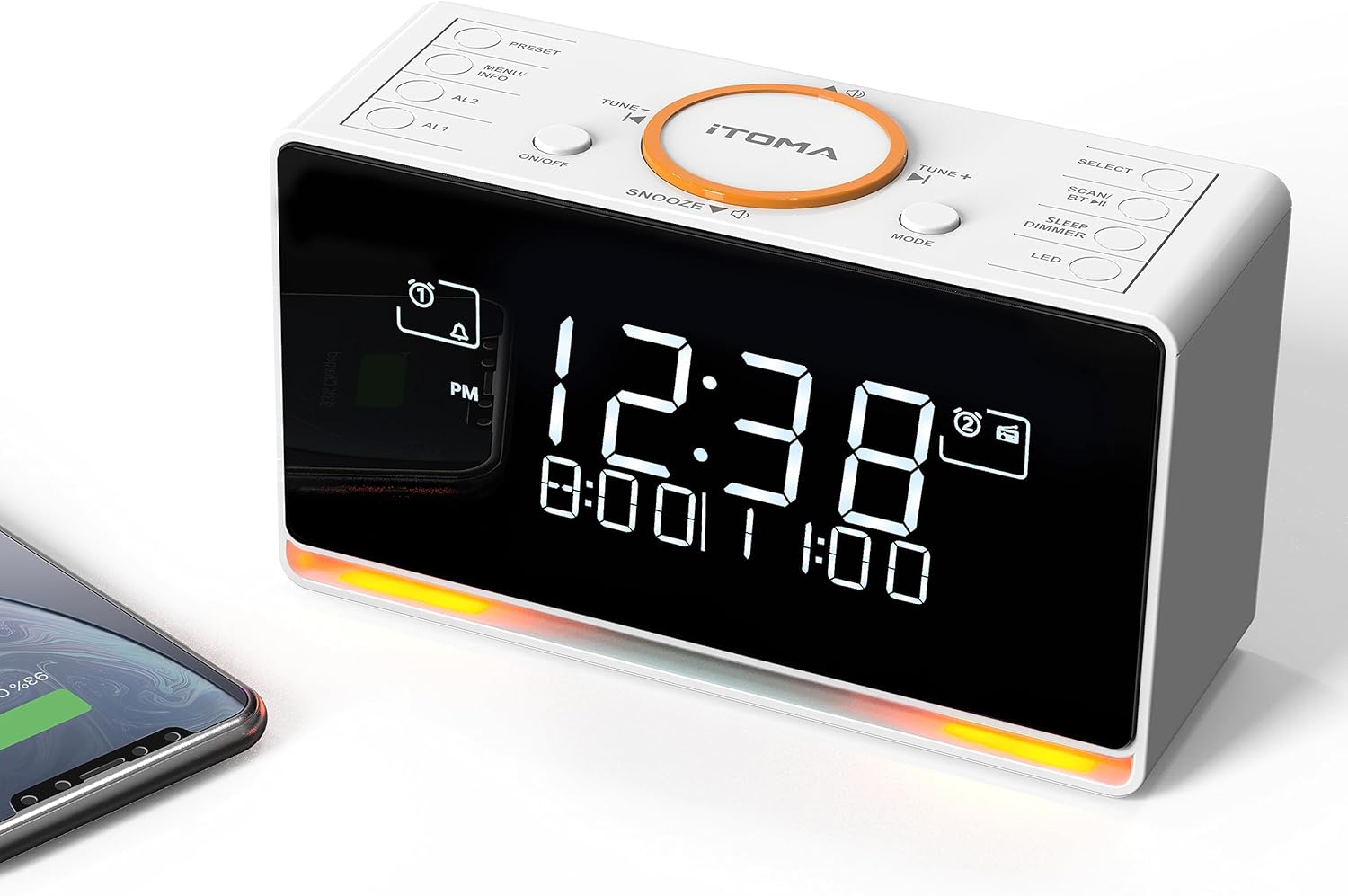
Billedbeskrivelse: A white iTOMA 728 DAB & FM Radio Alarm Clock is shown from a slightly elevated angle, highlighting its digital display and the control buttons on its top surface. The display shows '12:38' prominently, with smaller text below indicating alarm times. A smartphone is partially visible on the left, connected to the clock, suggesting its charging capability. The base of the clock emits a soft orange glow, indicating the night light feature.
Kontrolpanellayout
- Forudindstillet: Access and save radio presets.
- MENU/INFO: Access menu options or display information.
- AL1/AL2: Set and activate Alarm 1 and Alarm 2.
- TIL/FRA: Tænd eller sluk for enheden.
- SNOOZE: Temporarily silence an active alarm.
- TUNE - / TUNE +: Adjust radio frequency or navigate menu options.
- KØRSELSVEJLEDNING: Skift mellem DAB-, FM- og Bluetooth-tilstande.
- VÆLGE: Confirm selections in the menu.
- SCAN/BT: Initiate radio scan or activate Bluetooth pairing.
- SLEEP/DIMMER: Set sleep timer or adjust display brightness.
- LED: Control the night light feature.
Opsætning
1. Første opstart
- Connect the provided power adapter to the DC IN port on the back of the unit and then to a wall outlet.
- Enheden tændes automatisk.
2. Indstilling af tid og dato
Upon initial power-on and connection to a DAB radio station, the time and date will automatically update. Manual time setting is also possible via the menu if needed.
3. Justering af antenne
For optimal DAB and FM radio reception, fully extend the telescopic antenna located on the back of the unit. Adjust its position to achieve the clearest signal.
Betjeningsvejledning
Tænd/sluk
- Tryk på ON/OFF knappen for at tænde eller slukke for enheden.
DAB og FM radio
The radio supports both DAB and FM bands, allowing you to save up to 40 preset stations (20 DAB, 20 FM).

Billedbeskrivelse: The iTOMA 728 alarm clock is placed on a wooden bedside table, displaying 'BBC-RADIO' on its screen. Above the clock, large orange icons represent DAB and FM radio signals. Below the clock, smaller icons highlight key features: DAB & FM Radio, Adjustable Volume, Sleep Timer, and DAB+ compatibility.
- Skiftemetoder: Tryk på MODE button to cycle between DAB and FM radio.
- Automatisk scanning: I DAB- eller FM-tilstand skal du trykke på og holde nede SCAN knappen for automatisk at scanne efter tilgængelige stationer.
- Manuel indstilling: Brug TUNE - or TUNE + knapperne til manuelt at justere frekvensen.
- Gem forudindstillinger:
- Stil ind på den ønskede station.
- Tryk og hold på FORUDINDSTILLING knap.
- Bruge TUNE - or TUNE + to select a preset number (1-20 for DAB, 1-20 for FM).
- Trykke VÆLGE for at bekræfte.
- Genkaldelse af forudindstillinger: Tryk på FORUDINDSTILLING knappen gentagne gange for at bladre gennem gemte stationer.
- Lydstyrkekontrol: Use the dedicated volume buttons (often integrated with TUNE +/- or separate) to adjust the 16-level radio volume.
Bluetooth-funktion
Connect your smartphone or tablet wirelessly to play audio through the alarm clock.

Billedbeskrivelse: A person's hand holds a smartphone displaying a music playback screen, with the iTOMA 728 alarm clock visible in the background on a white surface. The image emphasizes the ability to stream music via Bluetooth from a mobile device to the alarm clock.
- Tryk på MODE button until 'BT' or 'Bluetooth' appears on the display. The unit will enter pairing mode, indicated by a flashing Bluetooth icon.
- On your mobile device, enable Bluetooth and search for 'iTOMA 728' (or similar).
- Select the device to pair. Once connected, a steady Bluetooth icon will appear on the clock's display.
- Du kan nu afspille lyd fra din enhed via vækkeuret.
Dobbelt alarmindstillinger
Set two independent alarms with various wake-up sounds and scheduling options.

Billedbeskrivelse: The iTOMA 728 alarm clock is shown with its display indicating two alarm times. An infographic next to it details the 'DUAL ALARM' feature with '3 Modes': All-7-Day, Weekday, and Weekend, showing which days each alarm can be set for. Above, icons represent 'WAKE-UP MODES' including FM/DAB radio, Vibration, and Buzzer. A person is shown sleeping with an eye mask, illustrating the alarm clock's function.
- Setting Alarm 1 or 2: Tryk og hold på AL1 or AL2 knap.
- Bruge TUNE - or TUNE + to set the desired wake-up time, then press VÆLGE.
- Wake-up tilstand: Select your preferred wake-up sound: DAB radio, FM radio, Buzzer, or Vibration. Press VÆLGE.
- Alarmvolumen: Adjust the alarm volume (for radio alarms) using TUNE - or TUNE +, og tryk derefter på VÆLGE.
- Alarm Week Modes: Choose from 'Every day', 'Weekdays only', or 'Weekends only'. Press VÆLGE for at bekræfte.
- Aktivering/deaktivering: Tryk kort på AL1 or AL2 for at slå alarmen til eller fra. Et alarmikon vises på displayet, når den er aktiv.
- Snooze-funktion: Når en alarm lyder, skal du trykke på SLUM button to temporarily silence it for a set duration (typically 9 minutes).
Sleep Timer
Set a timer for the radio to automatically turn off after a specified period.
- Mens radioen spiller, skal du trykke på SLEEP/DIMMER button repeatedly to cycle through sleep timer options (e.g., 5, 15, 30, 60, 90, 120 minutes, or OFF).
- Radioen slukker automatisk efter den valgte varighed.
Display Dimmer Control & Night Light
Adjust the display brightness and activate the integrated night light.

Billedbeskrivelse: The iTOMA 728 alarm clock is shown in two scenarios: one in a brightly lit room and another in a dim environment, illustrating its auto-dimmer function. Below this, four separate images of the clock demonstrate the '4 LEVEL MANUAL DIMMER' settings: High (L-3), Medium (L-2), Low (L-1), and Off, showcasing the adjustable brightness of the LCD display.

Billedbeskrivelse: The iTOMA 728 alarm clock is positioned on a dark surface in a dimly lit room, with its integrated orange night light glowing softly from its base. The digital display shows the time '12:38' and alarm settings, highlighting the clock's functionality in low-light conditions.
- Skærmens lysstyrke: Tryk på SLEEP/DIMMER button (when not setting sleep timer) to cycle through 4 brightness levels (L3-L2-L1-OFF).
- Automatisk dæmpning: The unit features an automatic dimming control function that adjusts display brightness based on ambient light.
- Natlys: Tryk på LED button to activate the 2-level orange night light. Press again to cycle through brightness levels or turn off.
USB-opladningsport
Den integrerede USB-port giver dig mulighed for at oplade dine mobile enheder.
- Connect your device's USB charging cable (not included) to the USB port on the back of the alarm clock.
- Ensure the alarm clock is powered on for charging functionality.
Hovedtelefonstik
For private listening, connect headphones to the 3.5mm headphone jack.

Billedbeskrivelse: The iTOMA 728 alarm clock is shown on a white desk, with a magnified inset highlighting the headphone jack on its side. A pair of white headphones rests near the clock, indicating the private listening feature. The clock's display shows the time and alarm settings.
- Plug your 3.5mm headphones into the headphone jack located on the side of the unit.
- Audio will automatically switch from the speaker to the headphones.
Opretholdelse
- Rensning: Tør enheden af med en blød, tør og fnugfri klud. Brug ikke slibende rengøringsmidler, voks eller opløsningsmidler.
- Opbevaring: Hvis enheden skal opbevares i længere tid, skal den afbrydes fra strømkilden og opbevares et køligt og tørt sted.
Fejlfinding
| Problem | Mulig årsag | Løsning |
|---|---|---|
| Ingen strøm | Strømadapteren er ikke tilsluttet, eller der er en defekt stikkontakt. | Sørg for, at strømadapteren er korrekt tilsluttet enheden og en fungerende stikkontakt. |
| Dårlig radiomodtagelse | Antennen er ikke strakt ud, eller signalet er dårligt i området. | Træk teleskopantennen helt ud og juster den. Prøv at flytte enheden. |
| Bluetooth-enhed kan ikke parres | Bluetooth not in pairing mode or device too far. | Ensure the alarm clock is in Bluetooth pairing mode. Move your device closer to the alarm clock. |
| Alarmen lyder ikke | Alarmen er ikke aktiveret, eller lydstyrken er for lav. | Check if the alarm icon is displayed. Ensure alarm volume is set appropriately. |
| USB charging is slow or not working | Cable incompatibility or device requires higher power. | Try a different USB cable. Note that the USB port is for basic charging and may not support fast charging for all devices. |
Specifikationer
- Mærke: iTOMA
- Model: 728
- Skærmtype: White LCD Display
- Strømkilde: Corded Electric (AC Adapter: 100-240V~50/60Hz)
- Radiobånd: DAB & FM
- Presets: 40 (20 DAB, 20 FM)
- Forbindelse: Bluetooth, 3.5mm Earphone Jack
- Alarmfunktioner: Dual Alarm, Snooze, 4 Wake-up Sounds (Vibration, Buzzer, DAB, FM), 3 Week Modes
- Timer: Sleep Timer (5-120 minutes)
- Belysning: 4-level Dimmer Control, 2-level Orange Night Light
- Opladning: USB Charging Port (cable not included)
- Produktdimensioner: 6 x 3.81 x 9.1 cm
- Varens vægt: 650 gram
Garanti og support
For warranty information or technical support, please refer to the documentation included with your purchase or contact iTOMA customer service through their official webwebstedet eller forhandleren, hvor produktet blev købt.


