Produkt overview
The Zooz ZEN55 DC Signal Sensor is designed to integrate your existing interconnected analog smoke and CO detectors into your Z-Wave smart home system. This device allows you to receive notifications on your Z-Wave hub when your smoke or CO detectors are triggered. It also features an optional 120V relay for additional smart control functionalities, such as activating lights or sirens.
This sensor supports Z-Wave Long Range technology for extended coverage and stable network performance, and acts as a signal repeater for traditional Z-Wave mesh networks.

Image: The Zooz ZEN55 DC Signal Sensor shown alongside its product packaging. The sensor is a small white module with pigtail wires, indicating its compact design and readiness for installation.
Vigtige sikkerhedsoplysninger
- ADVARSEL: This device is NOT a security alarm component and is NOT part of a life-safety system. It is intended for notification purposes only.
- Always check local regulations and building codes before installing any electrical device.
- Installationen skal udføres af en kvalificeret elektriker eller i overensstemmelse med lokale el-forskrifter.
- Afbryd strømmen ved afbryderen før installation eller service.
- Do NOT use the 120V relay for low-voltage applications. It is designed for 120V loads only.
- Ensure proper wiring connections to prevent electrical hazards.
Pakkens indhold
- Zooz ZEN55 DC Signal Sensor
- Pigtail wires (pre-attached)
- Instruktionsmanual (dette dokument)
Opsætning og installation
The ZEN55 sensor is designed for easy integration with your existing interconnected smoke and CO detectors. Follow these steps carefully:
1. Strømafbrydelse
Before beginning any wiring, ensure that power to the smoke and CO detector circuit is completely disconnected at the circuit breaker. Verify with a voltage tester.
2. Wiring the Sensor
The ZEN55 comes with pre-attached pigtail wires for simplified installation. Refer to the wiring diagram below for connecting the sensor to your interconnected smoke detectors. The sensor connects to the signal wire (typically red) that carries the alarm signal between detectors.
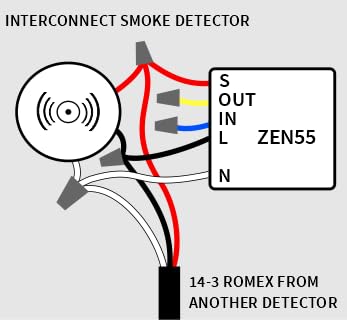
Image: A detailed wiring diagram illustrating how to connect the Zooz ZEN55 DC Signal Sensor to an interconnected smoke detector circuit. It shows connections for S (Signal), OUT, IN, L (Line), and N (Neutral) terminals, with a 14-3 Romex cable from another detector.
- Tilslut S (Signal) wire from the ZEN55 to the signal wire (usually red) of your interconnected smoke/CO detector system.
- Tilslut L (linje) wire from the ZEN55 to the hot (black) wire of the 120V power supply.
- Tilslut N (neutral) wire from the ZEN55 to the neutral (white) wire of the 120V power supply.
- De IN og UD wires are for the optional 120V relay control. Connect your 120V load (e.g., light, siren) to these terminals if you wish to use this functionality. Ensure the load does not exceed the sensor's relay rating.
3. Z-Wave-inkludering (parring)
Once wired, restore power to the circuit. The ZEN55 supports SmartStart for quick and secure network inclusion. Refer to your Z-Wave hub's instructions for adding new devices. Typically, you will put your hub into inclusion mode and then activate the ZEN55 (e.g., by pressing its Z-Wave button, if present, or by powering it on).
For SmartStart, scan the QR code on the device or its packaging with your Z-Wave hub's app, or manually enter the DSK (Device Specific Key) if prompted.
Betjeningsvejledning
After successful inclusion into your Z-Wave network, the ZEN55 will report the status of your interconnected smoke and CO detectors to your Z-Wave hub. When an alarm is triggered by any detector in the interconnected system, the ZEN55 will send a signal to your hub.
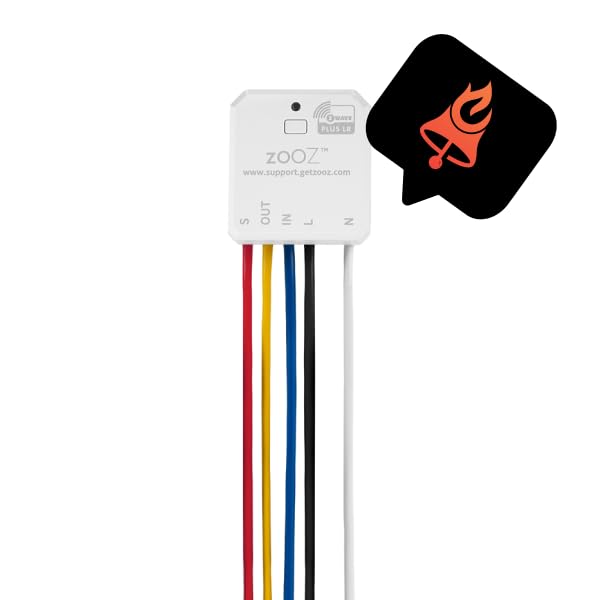
Billede: Et nærbillede view of the Zooz ZEN55 sensor, highlighting its compact size and the Z-Wave Plus LR logo. An overlaid graphic of a bell icon within a speech bubble signifies its notification capability.
You can then configure automations within your Z-Wave hub's software to receive notifications on your smartphone, activate the optional 120V relay (e.g., turn on lights, sound a siren), or trigger other smart home scenes.

Image: A person looking at their smartphone, with a large "GET NOTIFIED" banner and a notification icon, illustrating the primary function of the sensor to alert users.

Image: A person on a phone call while looking at a tablet, with a graphic indicating "ACT FAST" and a firefighter icon. This image emphasizes the quick response enabled by the sensor's notifications.
Hub-kompatibilitet
The ZEN55 is an advanced Z-Wave device and requires an updated Z-Wave hub for proper functionality and display. It has been tested and confirmed to work well with the following hubs:
- Z-Box Hub: Recommended for Zooz devices.
- Hubitat: Kræver en brugerdefineret driver.
- Hjemmeassistent: Compatible via Z-Wave JS.
- Ezlo
- SmartThings: Compatible through a custom Edge driver, available via the Zooz support portal.
Always ensure your Z-Wave hub's firmware is up to date for optimal performance and compatibility with the ZEN55.
Opretholdelse
The Zooz ZEN55 DC Signal Sensor requires minimal maintenance. Periodically check the wiring connections to ensure they remain secure. Keep the device free from dust and debris. No user-serviceable parts are inside. If the device appears to be malfunctioning, refer to the troubleshooting section or contact Zooz support.
Fejlfinding
| Spørgsmål | Mulig årsag/løsning |
|---|---|
| Enheden parres ikke med hubben. |
|
| No notifications when smoke/CO alarm sounds. |
|
| 120V relay not activating. |
|
Specifikationer
| Mærke | ZOOZ |
| Model | ZEN55 DC Signal Sensor |
| Strømkilde | Elektrisk med ledning |
| Produktdimensioner | 0.7" D x 1.4" B x 1.5" H |
| Alarm Type (Monitored) | Audible (from connected detectors) |
| Øverste temperaturvurdering | 40 grader Celsius |
| Sensortype | Signal |
| Antal genstande | 1 |
| Fabrikant | Zooz |
| UPC | 853478006551 |
Garanti og support
The Zooz ZEN55 DC Signal Sensor is backed by a 5 års garanti once registered. Zooz provides lifetime US-based support for their products.
For technical assistance, troubleshooting, or warranty claims, please visit the official Zooz support portal or contact their customer service directly. Refer to the product packaging or the Zooz webhjemmeside for de seneste kontaktoplysninger.
Online ressourcer:


