Indledning
This manual provides detailed instructions for the installation, operation, and maintenance of your Bileeko RV Backup Camera System. Please read this manual thoroughly before using the product to ensure proper function and safety.
The system includes a 7-inch monitor and a waterproof rear view camera designed for various vehicles such as RVs, trucks, trailers, vans, jeeps, and SUVs, offering enhanced visibility and safety during reversing maneuvers.
Pakkens indhold
Bekræft, at alle nedenstående varer er til stede i din pakke:
- 1 x 7-inch Monitor
- 1 x backup kamera
- 1 x 33Ft (10m) 4Pin Video Cable
- 1 x fjernbetjening
- 1 x Cigarette Lighter Switch
- 1 x strømkabel
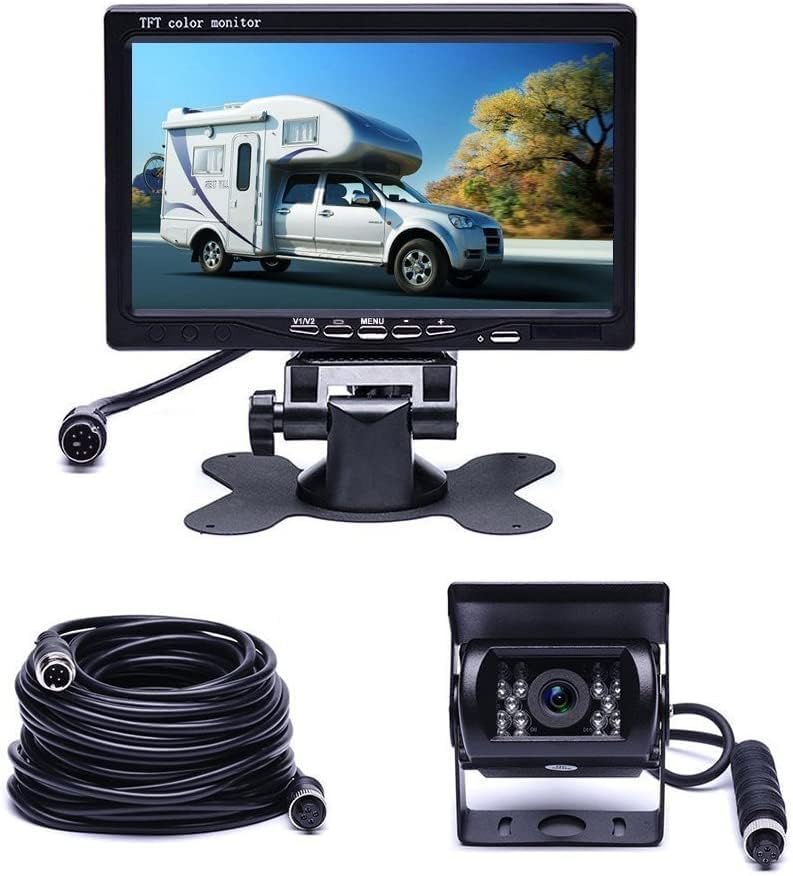
Billede: Overview of the Bileeko RV Backup Camera System components, including the 7-inch monitor, the waterproof backup camera, and the 33-foot 4-pin video cable.
Produktegenskaber
- 7-inch TFT LCD Monitor: Features a high-definition 800x480 resolution display with adjustable brightness, contrast, and color. Supports two video inputs and offers screen rotation for mirror or normal viewing.
- IP68 Vandtæt Kamera: Constructed with a hard metal casing, ensuring durability and resistance to water and mud.
- Forbedret nattesyn: Equipped with 18 IR LEDs for clear visibility in low-light conditions, aiding in safe reversing at night.
- Bred Viewvinkel: Provides a 120° horizontal wide view angle and 180° vertical adjustable angle to minimize blind spots.
- Stable Wired Transmission: Utilizes a 33Ft (10m) 4-pin cable for a reliable and stable video signal, preventing signal loss common with wireless systems.
- Automatic Reverse Display: The monitor automatically displays rear images and parking guidelines when the reverse gear is engaged.
- Betjening af fjernbetjening: Includes a remote control for convenient adjustment of monitor settings without direct interaction.

Image: Detail of the backup camera highlighting its built-in IR-CUT feature, which improves color accuracy during the day and enhances night vision. A visual comparison shows the difference in image quality.

Image: Demonstration of the camera's 18 IR LED lights for night vision. The top panel shows a clear view with IR LEDs in darkness, while the bottom panel shows a significantly darker view without them, illustrating the effectiveness of the night vision feature.
Opsætning og installation
The system is designed for straightforward installation. Follow these general steps:
- Monter skærmen: Choose a suitable location on your dashboard or windshield that does not obstruct your driving view. Secure the monitor using the provided mounting bracket.
- Installer kameraet: Mount the backup camera at the rear of your vehicle, ensuring a clear view of the area behind. The camera's adjustable angle allows for optimal positioning.
- Tilslut videokablet: Run the 33-foot 4-pin video cable from the camera to the monitor. Ensure connections are secure and routed safely away from moving parts or heat sources.
- Strømtilslutning:
- Connect the monitor's power cable to the cigarette lighter switch for easy power on/off.
- For automatic reverse activation, connect the camera's power wire to your vehicle's reverse light circuit (professional installation recommended for this step). The system supports DC 12V-24V power input.
- Test systemet: After all connections are made, turn on your vehicle and engage reverse gear to test the camera and monitor functionality. Adjust the camera angle and monitor settings as needed.
Note: For detailed wiring diagrams specific to your vehicle, consult your vehicle's service manual or a qualified automotive technician.
Betjeningsvejledning
The monitor and remote control provide various functions for optimal viewing and system management.
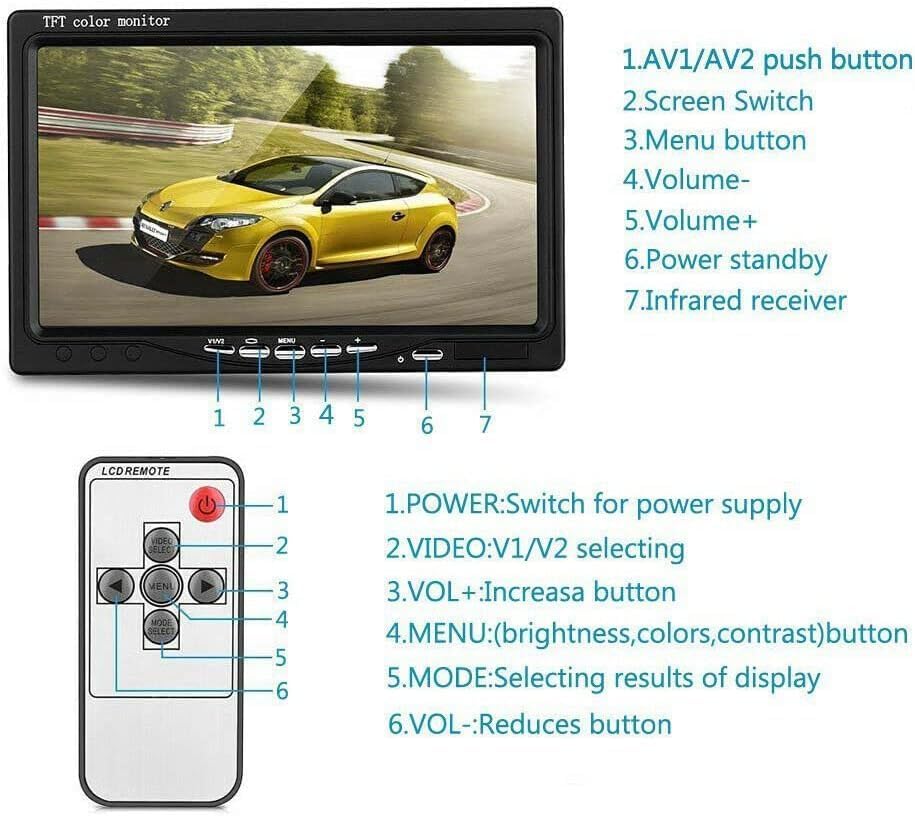
Image: This diagram illustrates the control interface of the Bileeko RV Backup Camera System. It labels the physical buttons on the 7-inch monitor (AV1/AV2 push button, Screen Switch, Menu button, Volume-, Volume+, Power standby, Infrared receiver) and the functions of each button on the included remote control (Power, Video V1/V2 selecting, VOL+, Menu for brightness/colors/contrast, Mode for display results, VOL-).
Skærmkontrol:
- AV1/AV2 Trykknap: Switches between video input channels (V1 and V2).
- Skærmskifter: Toggles display modes or views.
- Menu-knap: Accesses the on-screen display (OSD) menu for settings adjustments.
- Lydstyrke - / Lydstyrke +: Adjusts audio volume (if applicable, though typically not for backup cameras).
- Strømstandby: Sætter skærmen i standbytilstand.
- Infrarød modtager: Modtager signaler fra fjernbetjeningen.
Fjernbetjeningsfunktioner:
- MAGT: Tænder/slukker strømforsyningen.
- VIDEO V1/V2: Selects between video input channels.
- VOL+: Øger volumen.
- MENU: Accesses settings for brightness, colors, and contrast.
- KØRSELSVEJLEDNING: Selects display results or modes.
- VOL-: Reducerer lydstyrken.
When the vehicle is in reverse, the monitor will automatically display the camera feed from V2 (if configured for auto-reverse trigger) along with parking guidelines.
Opretholdelse
Proper maintenance ensures the longevity and optimal performance of your backup camera system.
- Rengøring af kameralinsen: Rengør kameralinsen regelmæssigt med en blød kludamp klud til at fjerne snavs, støv eller vandpletter, der kan blokere viewUndgå slibende rengøringsmidler.
- Rengøring af skærm: Use a soft, lint-free cloth specifically designed for electronic screens. Do not spray cleaning solutions directly onto the screen.
- Kabelinspektion: Periodically check all cables and connections for signs of wear, damage, or loose connections. Secure any loose cables to prevent interference or disconnection.
- Miljøbeskyttelse: While the camera is waterproof (IP68), extreme temperatures or prolonged exposure to harsh weather conditions can affect performance. Ensure the monitor is protected from direct sunlight and extreme cold when not in use.
Fejlfinding
If you encounter issues with your RV Backup Camera System, refer to the following common problems and solutions:
| Problem | Mulig årsag | Løsning |
|---|---|---|
| Intet billede på skærmen |
|
|
| Billedet er sløret eller forvrænget |
|
|
| Night vision is poor |
|
|
| Fjernbetjening virker ikke |
|
|
Specifikationer
7-inch TFT LCD Car Monitor:
- Skærmstørrelse: 7 tommer
- Opløsning: 800*480
- Bolig: ABS
- TV System: NTSC/PAL
- Videoindgang: 2 kanaler
- Bag-view: V2 auto reverse when trigger activated
- Skærmjustering: Up/down/left/right rotation
- Strømforsyning: DC 12V - 24V
- Strømforbrug: 5W
- Driftstilstand: Key operation and remote control
- Arbejdstemperatur: -10℃~+40℃
- Opbevaringstemperatur: -25℃~+80℃
18 IR LEDs Backup Camera:
- Vandtæt vurdering: IP68
- Horisontal opløsning: 420 TV linjer
- Effektive pixel: NTSC: 648×488 pixels
- Strømforsyning: DC 12V-24V
- Driftstemperatur: -20℃~70℃, RH95% MAX
- Opbevaringstemperatur: -40℃~85℃, RH95% MAX
- Virkelig vinkel på View: 120 grader
Garanti og support
For warranty information or technical support, please refer to the contact details provided with your purchase or visit the official Bileeko webwebsted. Behold din købskvittering som købsbevis i tilfælde af garantikrav.
If you require further assistance or have questions not covered in this manual, please contact Bileeko customer service.


