1. Introduktion
The Fodsports F1 PRO is a motorcycle Bluetooth headset designed to enhance communication and safety during rides. It features a unique safety light, intercom capabilities for two riders, high-fidelity audio with EQ sound modes, and a robust waterproof design. This manual provides detailed instructions for installation, operation, and maintenance to ensure optimal performance and user experience.

Image 1.1: Fodsports F1 PRO Headset highlighting key features.
2. Hvad er der i æsken
Bekræft at alle komponenter er til stede i pakken:
- F1 PRO Bluetooth Headset Unit
- Højttalere & Hard Tube mikrofon
- USB opladningskabel
- Kabelklemme
- Magnetisk base (x2)
- 3M Glue Velcro (x2)
- Velcro (for speakers)
- Højttalerforstærkerpuder
- User Manual (Start Guide)

Image 2.1: Package contents of the Fodsports F1 PRO.
3. Produktfunktioner
- Integrated Safety Light: Features 3 light colors (red, blue, green) and 9 light effects (long light, flashing, breathing) for enhanced visibility during night riding.
- 2-Rider Bluetooth Intercom: Supports communication between two riders with Bluetooth 5.0 technology, offering stable connectivity up to 1000 meters (0.62 miles).
- CVC Noise Cancellation & Hi-Fi Stereo Sound: Equipped with a professional noise-canceling microphone and a smart noise cancellation chip. Features 40mm high-fidelity speakers for clear audio even at high speeds.
- Magnetisk monteringssystem: Easy and secure magnetic base design for quick installation and removal on various helmet types.
- Lang batterilevetid: Built-in 1500 mAh battery provides up to 30 hours of talk time, 40 hours for the warning light, and 2 weeks of standby time.
- EQ-lydtilstande: Enjoy 3 different music styles: HiFi Bass, Popular Golden Classic, and Pure Human Voice.
- IP67 vandtæt: Advanced casting process ensures excellent sealing, meeting international IP67 waterproof standards for use in various outdoor weather conditions, even at -15°F.
- FM-radio: Integrated FM radio allows users to listen to their favorite channels.
- Intelligent Battery Display: When paired with a phone, the remaining power level is displayed on the phone screen.

Image 3.1: Advanced technologies in the F1 PRO headset.
4. Opsætning
4.1 Montering af headsettet
The F1 PRO uses a magnetic base for easy attachment to various helmet types, including full-face, modular, and 3/4 open-face helmets.
- Clean the desired mounting area on the back of your helmet thoroughly.
- Peel off the protective film from one of the 3M Glue Velcro pads and firmly attach it to the helmet.
- Attach the magnetic base to the 3M Glue Velcro pad on the helmet.
- Align the F1 PRO headset with the magnetic base and allow it to snap into place. Ensure it is securely attached.

Image 4.1: Magnetic mounting system.

Image 4.2: Helmet compatibility for F1 PRO.
4.2 Installation af højttaler og mikrofon
Install the speakers and microphone inside your helmet for optimal audio and communication.
- Locate the ear pockets inside your helmet.
- Attach the Velcro pads to the back of the speakers.
- Place the speakers inside the ear pockets, ensuring they are centered over your ears for clear sound. Use speaker booster pads if needed for better fit or volume.
- Route the microphone cable to the front of the helmet, positioning the microphone near your mouth. Secure the cable using the provided cable clips.
- Connect the speaker and microphone cables to the F1 PRO headset unit.
4.3 Opladning af enheden
Before first use, fully charge the F1 PRO headset.
- Connect the USB charging cable to the charging port on the F1 PRO unit.
- Tilslut den anden ende af USB-kablet til en standard USB-strømadapter (medfølger ikke) eller en USB-port på computeren.
- Opladningsindikatorlampen lyser. En fuld opladning tager typisk cirka 3 timer.
- Indikatorlampen skifter eller slukker, når opladningen er færdig.
5. Betjeningsvejledning
5.1 Tænd/sluk
- Tænd: Tryk på tænd/sluk-knappen og hold den nede i cirka 3 sekunder, indtil du hører en lydmeddelelse.
- Sluk: Tryk på tænd/sluk-knappen og hold den nede i cirka 3 sekunder, indtil du hører en lydmeddelelse.
5.2 Bluetooth Pairing (with Phone)
- Ensure the F1 PRO is powered off.
- Tryk på tænd/sluk-knappen og hold den nede i cirka 5-7 sekunder, indtil indikatorlampen blinker skiftevis rødt og blåt, hvilket angiver parringstilstand.
- Aktiver Bluetooth på din mobiltelefon, og søg efter tilgængelige enheder.
- Select "Fodsports F1 PRO" from the list of devices.
- Når parringen er afsluttet, blinker indikatorlampen langsomt blåt, og du hører en bekræftelsestone.
5.3 Intercom Pairing (with another F1 PRO)
- Ensure both F1 PRO units are powered off.
- On both units, press and hold the Intercom button (refer to device layout for specific button) for approximately 5 seconds until the indicator lights flash red and blue alternately.
- Briefly press the Intercom button on one of the units. The units will search for each other.
- Når der er oprettet forbindelse, blinker indikatorlamperne på begge enheder langsomt blåt, og du vil høre en bekræftelsestone.
5.4 Musikafspilning
- Afspil/pause: Briefly press the Multi-function button (or designated music control button).
- Næste nummer: Tryk på knappen Lydstyrke op.
- Forrige nummer: Tryk på knappen Lydstyrke ned.
- Lydstyrkejustering: Press and hold the Volume Up or Volume Down buttons.
5.5 Telefonopkald
- Besvar opkald: Tryk kort på multifunktionsknappen.
- Afslut opkald: Tryk kort på multifunktionsknappen.
- Afvis opkald: Tryk og hold multifunktionsknappen nede i 2 sekunder.
- Genopkald sidste nummer: Tryk to gange på multifunktionsknappen.
5.6 Safety Light Modes
The F1 PRO features 3 light colors (red, blue, green) and 9 light effects. Use the dedicated Light Mode button to cycle through options.
- Briefly press the Light Mode button to change the light color (Red > Blue > Green).
- Double-press the Light Mode button to cycle through light effects (Long Light > Flashing > Breathing).
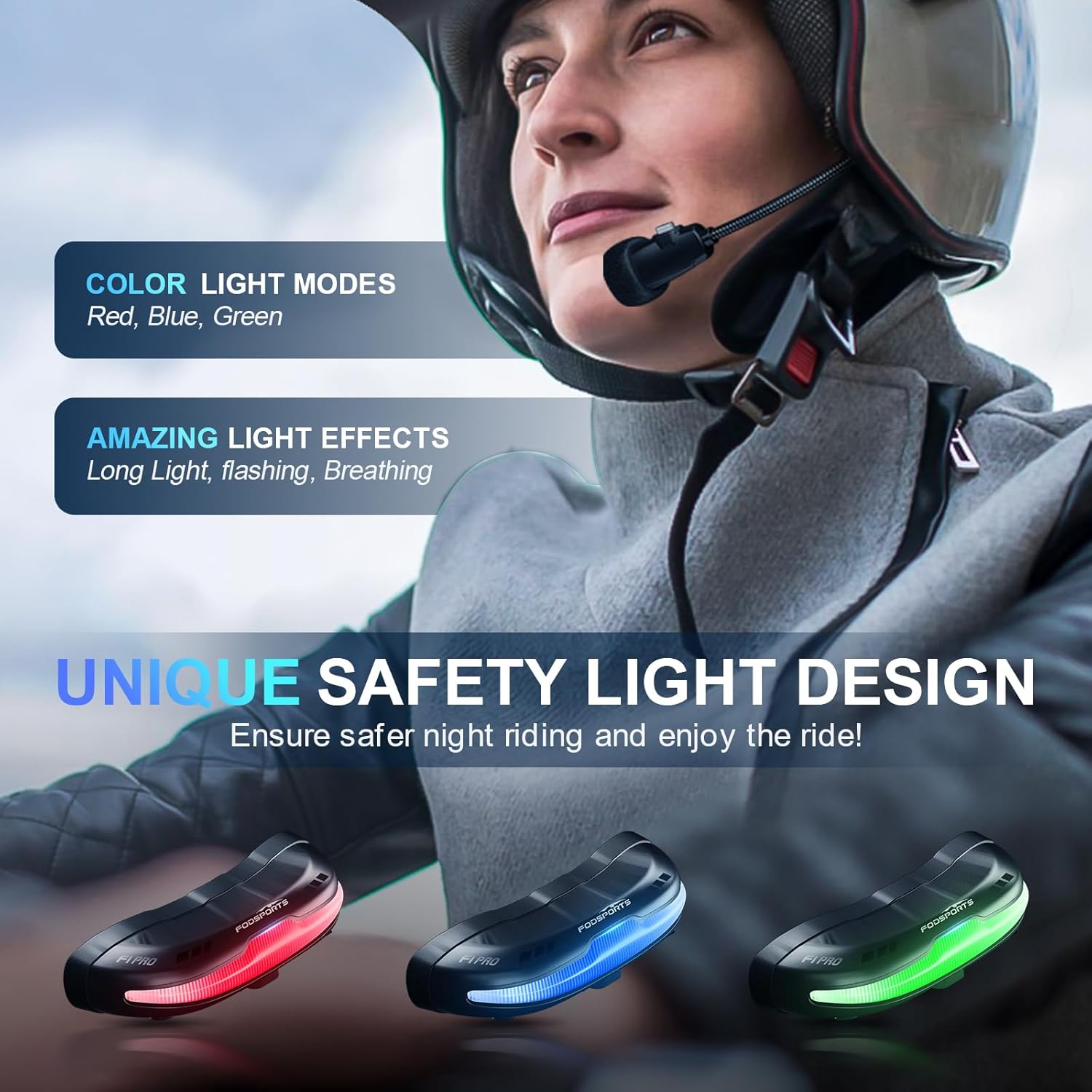
Image 5.1: Available safety light colors.
5.7 EQ-lydtilstande
The F1 PRO offers three distinct EQ sound modes. Press the EQ button (refer to device layout) to switch between them:
- HiFi-bas
- Populær Golden Classic
- Ren menneskelig stemme

Image 5.2: EQ Sound Effects and Microphone.
5.8 FM radio
To activate the FM radio, press the FM button (refer to device layout). Use the Volume Up/Down buttons to scan for stations.
5.9 Stemmeassistent
Activate your phone's voice assistant (e.g., Siri) by briefly pressing the Voice Assistant button (refer to device layout).
6. Vedligeholdelse
- Rensning: Tør headsetenheden af med en blød kludamp klæde. Undgå at bruge skrappe kemikalier eller slibende rengøringsmidler.
- Opbevaring: Opbevar enheden et køligt og tørt sted, når den ikke er i brug. Undgå ekstreme temperaturer.
- Batteripleje: For at forlænge batteriets levetid bør du undgå at aflade batteriet helt ofte. Oplad enheden regelmæssigt, selvom den ikke er i brug i længere perioder.
- Vandeksponering: While IP67 waterproof, avoid prolonged submersion. Ensure the charging port cover is securely closed before exposure to water.
7. Fejlfinding
- Enheden tændes ikke: Sørg for, at batteriet er opladet. Tilslut til en strømkilde, og prøv igen.
- Kan ikke parres med telefon/intercom: Ensure the device is in pairing mode (flashing red and blue). Make sure other Bluetooth devices are not interfering. Try resetting the device (refer to specific reset instructions if available in a full manual).
- Ingen lyd fra højttalere: Check speaker connections to the main unit. Ensure volume is not set to minimum. Verify successful Bluetooth connection.
- Mikrofonen virker ikke: Ensure the microphone is properly connected and positioned correctly near your mouth.
- Intercom-forbindelsen afbrydes: Ensure both units are within the specified range (1000 meters) and there are no significant obstructions.
- Safety light not working: Check if the device is powered on. Cycle through light modes to ensure it's not off or in a very dim setting.
- Magnetic mount not holding: Ensure the helmet surface is clean and dry before applying the 3M adhesive. Allow sufficient time for the adhesive to cure.
8. Specifikationer
| Feature | Specifikation |
|---|---|
| Modelnavn | F1 PRO |
| Forbindelsesteknologi | Bluetooth, Trådløs |
| Bluetooth version | 5.0 |
| Støjkontrol | Active Noise Cancellation (CVC) |
| Batterikapacitet | 1500 mAh Lithium Ion |
| Battery Life (Talk/Music) | Op til 30 timer |
| Battery Life (Warning Light) | Op til 40 timer |
| Standby tid | Up to 2 Weeks (350 Hours) |
| Opladningstid | 3 timer |
| Vandmodstandsniveau | IP67 vandtæt |
| Audio driver størrelse | 40 mm |
| Frekvensområde | 20 Hz - 20,000 Hz |
| Varens vægt | 74 gram (2.61 ounce) |
| Materiale | Plast |
| Særlige funktioner | 9 Modes Safety Light, EQ Sounds, Magnetic Quick Mount, Noise Cancellation, Rechargeable Battery |
9. Garanti og support
Fodsports provides customer support for the F1 PRO Motorcycle Bluetooth Headset. For any issues or inquiries regarding this product, please contact the seller directly. The seller, YUANKUN-US, commits to replying within 12 hours.
To contact support, navigate to the product page on Amazon, locate the seller information (usually under the 'Add to Cart' button), and click on the seller's name (e.g., "YUANKUN-US") then select "Ask a question".
Gem venligst dit købsbevis for garantikrav.


