1. Vigtige sikkerhedsoplysninger
Please read all safety warnings and instructions carefully before using the device. Keep this manual for future reference.
Advarsel:
The face line is particularly prone to skin entering the irradiation port, so please be careful not to press too hard during flash irradiation.
2. Produktet er slutview
The YA-MAN Blue Green Shot is an innovative IPL LED facial device designed to address various skin concerns using a combination of green LED light and IPL (Intense Pulsed Light) technology. It features a smart focus sensor that detects skin dullness and automatically adjusts irradiation power for targeted care.

Figure 2.1: The YA-MAN Blue Green Shot IPL LED Facial Device.
Nøglefunktioner:
- Green LED x IPL Technology: Japan's first device combining green LED (505nm wavelength) and IPL for comprehensive skin care.
- Focus Sensor: Quickly detects skin dullness and automatically switches to high-power irradiation for targeted treatment.
- To tilstande: Daily Mode for regular maintenance and Special Mode for intensive weekly care.
- Minimal Downtime: Designed to be gentle with approximately 95% of users reporting no pain during use.
- Kompakt og praktisk: Ergonomic design for comfortable home use.

Figure 2.2: The device highlighting its core "Green" technology.

Figure 2.3: Illustration of the focus sensor detecting skin tone and adjusting power.
3. Opsætning
- Pak enheden ud: Carefully remove the Blue Green Shot device, AC adapter, and user manual from the packaging.
- Undersøg for skader: Before first use, inspect the device for any visible damage. Do not use if damaged.
- Tilslut strøm: Connect the AC adapter to the device and plug it into a suitable power outlet. The device is wired for stable high-power output.
- Initial Patch Test: Before using on your face, perform a patch test on a small, inconspicuous area of your skin (e.g., inner arm) to check for any adverse reactions. Follow the operating instructions for the patch test.
4. Betjeningsvejledning
Follow these steps for effective use of your YA-MAN Blue Green Shot device.
- Forberedelse: Remove all makeup and thoroughly wash your face before use. Ensure your skin is clean and dry.
- Tænd: Press and hold the power button for 3 seconds to turn on the device. The cooling fan will start.
- Vælg tilstand: Press the "MODE" button to switch between Daily Mode and Special Mode.
- Select Level: Press the "LEVEL" button to adjust the intensity level. Start with the lowest level and gradually increase as your skin tolerates.
- Begynd behandling: Place the irradiation head firmly against your skin. The device will automatically detect skin contact and emit flashes.
4.1. Daily Mode
Daily Mode is designed for regular, quick facial care. It provides 5 continuous flashes at short intervals, allowing for speedy and easy light facial treatment.
- Frekvens: Use daily for approximately 10 minutes.
- Anvendelse: Gently glide the device over your skin, ensuring full contact. The device will flash automatically.
- Anbefalet brug: Apply after applying your regular lotion or skincare product to reduce friction.

Figure 4.1: Using the device in Daily Mode for continuous flashes.
4.2. Specialtilstand
Special Mode uses powerful IPL irradiation for intensive care, targeting specific areas affected by daily stressors like UV rays and dryness.
- Frekvens: Use once a week. Do not combine with Daily Mode on the same day.
- Anvendelse: Place the irradiation head on the desired area and press firmly to activate a single flash, similar to stamping. Move to the next area and repeat. Close your eyes during flashes.
- Forsigtighed: Avoid using on areas with hair growth or around the eyes (eyelids, under-eye bags).
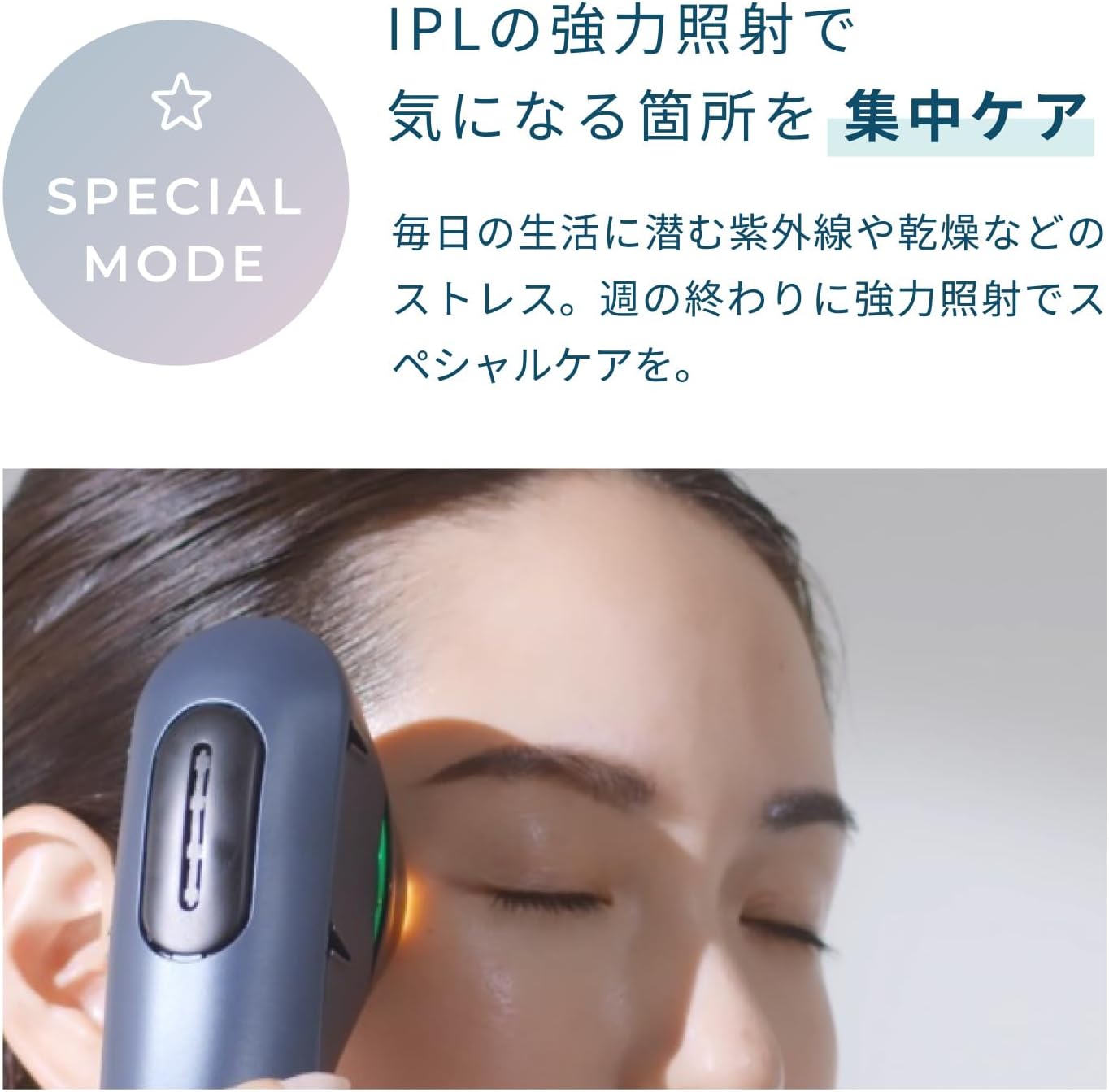
Figure 4.2: Using the device in Special Mode for targeted care.
4.3. Sluk
Press and hold the power button for 3 seconds to turn off the device. The cooling fan may continue to run for up to 10 minutes after shutdown. You may unplug the power cord once the fan stops or if you need to store the device immediately.
5. Vedligeholdelse
Korrekt vedligeholdelse sikrer din enheds levetid og optimale ydeevne.
- Cleaning the Irradiation Head: After each use, wipe the irradiation head with a soft, dry cloth to remove any residue. Do not use abrasive cleaners or solvents.
- Enhedens krop: Wipe the main body of the device with a clean, damp klæde.
- Opbevaring: Store the device in a cool, dry place away from direct sunlight and extreme temperatures. Keep out of reach of children.
- Vandtæthed: The device is designed to be water-resistant, allowing for use with lotions. However, do not submerge the device in water.
6. Fejlfinding
Hvis du støder på problemer med din enhed, bedes du følge disse almindelige fejlfindingstrin:
| Problem | Mulig årsag | Løsning |
|---|---|---|
| Enheden tændes ikke. | Not properly plugged in; power button not held long enough. | Ensure AC adapter is securely connected and plugged into a working outlet. Press and hold the power button for 3 seconds. |
| No flashes during treatment. | Irradiation head not in full contact with skin; incorrect mode/level selected. | Ensure the irradiation head is firmly and completely pressed against the skin. Check that the correct mode and level are selected. |
| Device feels warm. | Normal operation; fan running. | This is normal. The device generates heat during operation, and the fan helps dissipate it. If it feels excessively hot, discontinue use and contact support. |
| Ventilatorstøjen er høj. | Normal drift. | The fan noise is part of normal operation to cool the device. It may be noticeable but does not indicate a malfunction. |
Hvis problemet fortsætter efter at have prøvet disse trin, bedes du kontakte kundesupport.
7. Specifikationer
| Feature | Detalje |
|---|---|
| Modelnummer | YJFC0B |
| Dimensioner (B x D x H) | Ca. 43 mm x 214 mm x 65 mm (1.7 x 8.4 x 2.6 tommer) |
| Vægt | Approx. 290g (0.64 lbs) (main unit only) |
| Power Rating | DC12V 5.0A |
| Strømforbrug | Standby: Approx. 5.0W (Instantaneous Max: Approx. 55W) |
| Materialer | Polycarbonate resin, Acrylic resin |
| Farve | Sort |
| Fremstillingsland | Japan |
8. Garanti og support
This product comes with a manufacturer's warranty. Please refer to the warranty card included in your package for specific terms and conditions, including the warranty period and coverage.
For technical support, troubleshooting assistance, or warranty claims, please contact YA-MAN customer service. Contact information can typically be found on the official YA-MAN webwebstedet eller på garantikortet.
Du kan også finde yderligere supportressourcer og ofte stillede spørgsmål på YA-MAN Brand Store on Amazon.


