1. Introduktion
This manual provides comprehensive instructions for the installation, operation, and maintenance of your Amerec K3 Steam Controller. The K3 is a modern, surface-mounted glass touchscreen designed to enhance your steam bath experience by allowing precise control over time and temperature settings.
Please read this manual thoroughly before installation and operation to ensure proper function and longevity of your product.
2. Vigtige kompatibilitetsnoter
- Kompatibilitet: The K3 Steam Controller is ikke kompatibel with Amerec AK Series steam generators manufactured prior to August 18, 2021. Please verify the manufacturing date of your AK unit before attempting installation.
- Damphoved: This K3 Steam Controller unit does not include a steam head. A separate steam head is required for a complete steam bath system.
3. Opsætning og installation
The Amerec K3 Steam Controller is designed for surface mounting. It can be installed either inside or outside the steam room, depending on your preference and installation requirements.
3.1. Pakkens indhold
- K3 Steam Controller Unit
- Tilslutningskabel
3.2. Installationstrin (generelle retningslinjer)
- Valg af sted: Choose a suitable location for surface mounting the controller. Ensure it is easily accessible and within reach of the provided connection cable to the steam generator.
- Montering: Securely mount the K3 controller to the wall surface according to the detailed instructions provided in the full installation guide (not included in this manual, refer to Amerec's official documentation for specific wiring and mounting details).
- Kabelforbindelse: Connect the provided cable from the K3 controller to the designated port on your compatible Amerec AK Series steam generator. Ensure all connections are secure and follow local electrical codes.
- Tænd: Once all connections are made and verified, power on your steam generator system. The K3 controller display should illuminate.
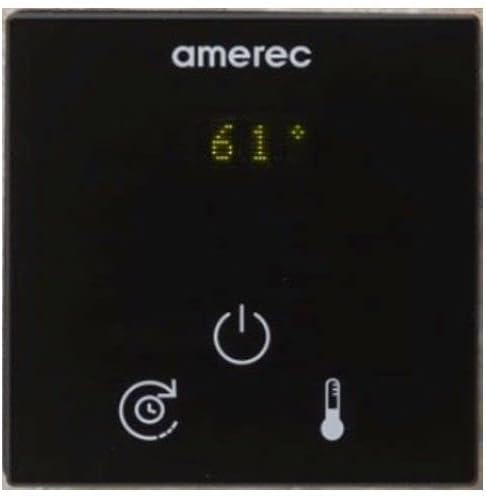
Figure 1: Amerec K3 Steam Controller. The image displays the Amerec K3 Steam Controller. It features a black glass touchscreen with the 'amerec' logo at the top. A digital display shows '61°'. Below the display are three touch-sensitive icons: a power symbol (circle with a vertical line), a timer symbol (clock with an arrow), and a thermometer symbol.
4. Betjeningsvejledning
The K3 Steam Controller features a user-friendly glass touchscreen interface for managing your steam bath settings.
4.1. Grundlæggende funktioner
- Tænd/sluk: Tryk på ⏻ (power) icon to turn the steam generator on or off. When powered on, the display will show the current temperature or set temperature.
- Indstil temperatur: Tryk på 🌡 (thermometer) icon to adjust the desired temperature. Use the on-screen controls (usually up/down arrows or a slider, depending on the interface) to set your preferred temperature.
- Indstil tid: Tryk på ⏱ (timer) icon to set the duration of your steam bath session. Adjust the time using the on-screen controls.
4.2. Avancerede funktioner
Refer to the full Amerec K3 product guide for detailed instructions on any advanced features or customization options available through the touchscreen interface.
5. Vedligeholdelse og pleje
To ensure the longevity and optimal performance of your K3 Steam Controller, follow these simple maintenance guidelines:
- Rensning: Gently wipe the glass touchscreen with a soft, damp cloth. Avoid abrasive cleaners, solvents, or harsh chemicals, as these can damage the surface and electronic components.
- Inspektion: Periodically inspect the controller and its connections for any signs of wear or damage. If any issues are observed, contact qualified service personnel.
- Miljøforhold: Ensure the controller is not exposed to extreme temperatures or excessive moisture beyond its operational specifications.
6. Fejlfinding
If you encounter issues with your Amerec K3 Steam Controller, please review følgende almindelige problemer og løsninger:
| Problem | Mulig årsag | Løsning |
|---|---|---|
| Controllerens display er tomt. | No power to the steam generator or controller. Loose cable connection. | Check power supply to the steam generator. Verify the connection cable between the controller and generator is securely attached. |
| Steam generator not activating. | Controller not powered on. Incorrect settings. Incompatible steam generator. | Ensure the controller is powered on. Check temperature and time settings. Confirm your AK Series generator was manufactured after August 18, 2021. |
| Temperature or time settings cannot be adjusted. | Controller may be in a locked mode or experiencing a temporary software issue. | Try powering the controller off and on again. Consult the full product manual for specific lockout features. |
If the problem persists after attempting these solutions, please contact Amerec customer support or a qualified service technician.
7. Specifikationer
- Model: K3 Steam Controller
- Mærke: Amerec
- Farve: Mat sort
- Dimensioner: 0.6 x 2.6 x 2.6 tommer
- Montering: Overflademontering
- Interface: Black Glass Touchscreen
- Kontrolelementer: Time, Temperature
- Inkluderede komponenter: Unit and Cable
- Kompatibilitet: Amerec AK Series steam generators (manufactured after August 18, 2021)
8. Garantioplysninger
Specific warranty details for the Amerec K3 Steam Controller are typically provided with the product packaging or can be found on the official Amerec website. Generally, Amerec products come with a limited warranty covering manufacturing defects.
Please retain your proof of purchase for warranty claims. For full terms and conditions, visit the Amerec Support Page or contact Amerec customer service directly.
9. Kundesupport
For technical assistance, troubleshooting beyond this manual, or warranty inquiries, please contact Amerec customer support:
- Webwebsted: www.amerec.com
- Supportside: www.amerec.com/support
- Telefon: Refer to the Amerec webhjemmeside for de seneste kontaktnumre.
When contacting support, please have your product model (K3 Steam Controller) and purchase information readily available.


