1. Produktet er slutview
The Poly Voyager 4320 UC is a wireless stereo headset designed for professionals requiring seamless connectivity and productivity in various work environments. It features a noise-canceling boom microphone with Acoustic Fence technology, ensuring clear audio transmission by blocking background noise. The headset connects to PC/Mac via a BT700 USB-C Bluetooth adapter (with an included USB-C to USB-A adapter) and to mobile devices via Bluetooth 5.2. It offers up to 24 hours of talk time and includes a desktop charging stand for convenient power management. This model is Microsoft Teams certified and integrates with other communication platforms like Zoom.

Image 1.1: The Poly Voyager 4320 UC Wireless Headset shown on its included desktop charging stand. The headset features over-the-head stereo design with a flexible boom microphone.
2. Nøglefunktioner
- Klar lydkvalitet: Features a noise-canceling dual microphone with Acoustic Fence technology to minimize background noise, ensuring your voice is heard clearly.
- Fleksibel tilslutning: Connects wirelessly to computers (PC/Mac) via the included BT700 USB-C Bluetooth adapter (with USB-C to USB-A adapter) and to mobile phones via Bluetooth 5.2.
- Extended Mobility: Offers a wireless range of up to 164 feet (50 meters) from your computer, allowing freedom of movement during calls.
- Lang batterilevetid: Provides up to 24 hours of talk time on a single charge. Can also be used as a wired headset via audio-over-USB mode.
- Komfortabelt design: Equipped with an adjustable padded headband and memory foam ear cushions for comfortable extended wear.
- Dedicated Microsoft Teams Button: Instant access to the Microsoft Teams app for seamless collaboration. Also compatible with Zoom and other platforms.
- Desktop Charging Stand: Simplifies charging and provides a convenient storage solution.
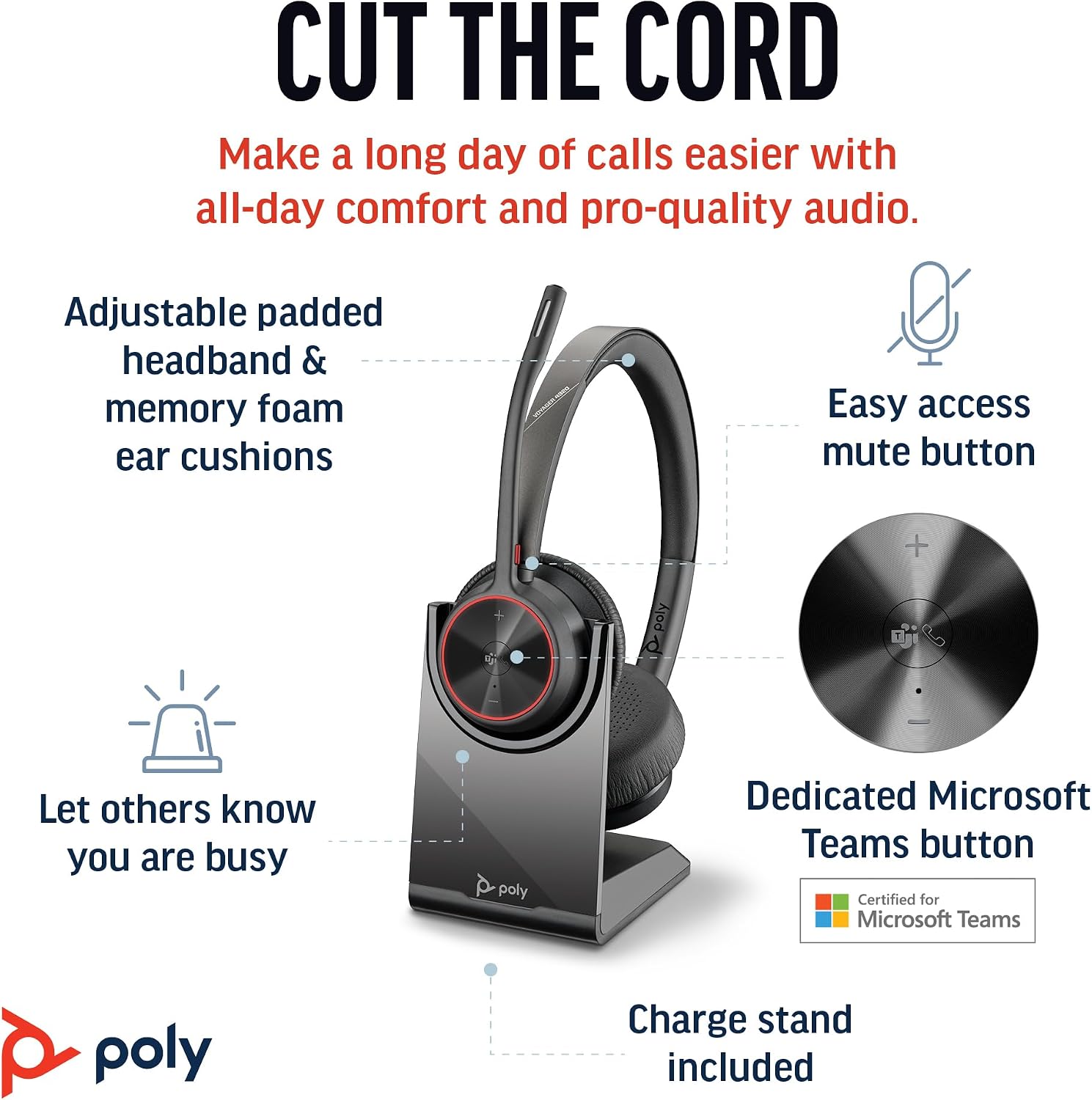
Image 2.1: The Poly Voyager 4320 UC Headset highlighting its adjustable padded headband, memory foam ear cushions, easy access mute button, dedicated Microsoft Teams button, and included charge stand.

Image 2.2: Illustration demonstrating the noise-canceling dual microphone with Acoustic Fence technology, which filters out background noise for clear communication.
3. Opsætningsvejledning
3.1 Pakkens indhold
Bekræft at alle varer er til stede i din pakke:
- Poly Voyager 4320 UC trådløst headset
- Desktop ladestander
- BT700 USB-C Bluetooth-adapter
- USB-C til USB-A-adapter
- USB opladningskabel
- Travel Pouch (may be included with some versions)
3.2 Opladning af headsettet
Before first use, fully charge your headset. The headset can be charged using the included desktop charging stand or directly via the USB charging cable.
- Brug af ladestanderen: Connect the USB charging cable to the charging stand and then to a powered USB port (e.g., computer, wall adapter). Place the headset onto the charging stand. The headset's LED indicator will show charging status.
- Direkte USB-opladning: Connect the USB charging cable directly to the headset's USB-C port and then to a powered USB port.
A full charge takes approximately 1.5 hours. The headset provides up to 24 hours of talk time and 47 hours of listening time.
3.3 Tilslutning til enheder
The Voyager 4320 UC headset offers multiple connection options:
3.3.1 Connecting to PC/Mac (via USB Adapter)
- Insert the BT700 USB-C Bluetooth adapter into an available USB-C port on your computer. If your computer only has USB-A ports, use the included USB-C to USB-A adapter.
- The adapter's LED will flash blue, indicating it is searching for the headset.
- Power on your headset. The headset and adapter are pre-paired and should connect automatically. The adapter's LED will turn solid blue when connected.
- Select the Poly Voyager 4320 UC as your audio input and output device in your computer's sound settings and communication applications (e.g., Microsoft Teams, Zoom).
3.3.2 Connecting to Mobile Phone (via Bluetooth)
- With the headset powered on, press and hold the Bluetooth pairing button on the headset until the headset's LED flashes red and blue, indicating pairing mode.
- On your mobile phone, go to Bluetooth settings and enable Bluetooth.
- Vælg "Poly Voyager 4320 UC" fra listen over tilgængelige enheder.
- Once paired, the headset's LED will stop flashing and remain solid blue.

Image 3.1: Diagram illustrating the multiple connection options for the Poly Voyager 4320 UC headset, including connection to a PC/Mac via the USB-C BT700 Bluetooth adapter (with USB-A adapter option) and direct Bluetooth connection to a mobile device.
4. Betjeningsvejledning
4.1 Sådan bærer du headsettet
The headset can be worn with the microphone boom on either the right or left side. Rotate the boom up and over to align with the desired side. For optimal microphone performance, position the boom approximately two finger-widths from the corner of your mouth.
4.2 Headset-kontroller
- Lydstyrke op/ned (+/-): Adjusts listening volume.
- Opkaldsknap: Tryk for at besvare eller afslutte et opkald.
- Mute-knap: Located on the microphone boom. Press to mute/unmute your microphone. A dynamic mute alert will notify you if you speak while muted.
- Microsoft Teams-knap: Dedicated button for instant access to the Microsoft Teams application.
- Power knap: Slide to power on/off.
4.3 LED-indikatorer
The headset and USB adapter feature LED indicators to provide status information:
- Headset LED:
- Solid Blue: Connected/In call
- Flashing Red/Blue: Pairing mode
- Fast rød: Dæmpet
- Solid rav: Oplader
- Flashing Red: Low battery
- USB Adapter LED (BT700):
- Solid Blue: Connected/In call
- Flashing Blue: Searching for headset
- Fast rød: Dæmpet
5. Vedligeholdelse
5.1 Rengøring
To maintain the headset's performance and hygiene:
- Tør ørepuderne og hovedbøjlen af med en blød kludamp klæde. Undgå at bruge skrappe kemikalier eller slibende materialer.
- Do not immerse the headset in water or any liquids.
- Keep the charging contacts on the headset and stand clean and free of debris.
5.2 Opbevaring
When not in use, store the headset on its charging stand or in the included travel pouch to protect it from dust and damage. Avoid storing in extreme temperatures.
6. Fejlfinding
6.1 Ingen lyd eller dårlig lydkvalitet
- Tjek forbindelsen: Ensure the headset is properly connected to your device (solid blue LED on headset and adapter).
- Lydstyrkeniveauer: Verify that headset, computer, and application volume levels are not muted or set too low.
- Standardenhed: Confirm that the Poly Voyager 4320 UC is selected as the default playback and recording device in your computer's sound settings and communication software.
- Rækkevidde: Ensure you are within the wireless range (up to 50 meters) of your connected device.
- Interferens: Gå væk fra andre trådløse enheder, der kan forårsage interferens.
6.2 Mikrofonen virker ikke
- Tjek mute: Ensure the microphone is not muted (headset LED should not be solid red).
- Mikrofonposition: Adjust the microphone boom to be two finger-widths from your mouth.
- Standardenhed: Confirm the headset is selected as the default recording device in your computer's sound settings and communication software.
- Softwareindstillinger: Tjek mikrofonens privatlivsindstillinger i dit operativsystem.
6.3 Headset Not Pairing/Connecting
- Power Cycle: Turn the headset off and on again.
- Reparation: Follow the pairing instructions in Section 3.3 to re-pair the headset with your device or USB adapter.
- Adapter Reset: If using the USB adapter, try unplugging and re-inserting it.
- Clear Device List: On your mobile device, forget the headset from the Bluetooth device list and attempt to pair again.
7. Specifikationer
| Feature | Specifikation |
|---|---|
| Modelnavn | Voyager 4320 Teams Version with Charge Stand, USB-C BT700 with USB-C to USB-A Adapter |
| Forbindelsesteknologi | Trådløs (Bluetooth 5.2) |
| Wireless Range | Op til 50 meter (164 fod) |
| Taletid | Op til 24 timer |
| Lyttetid | Op til 47 timer |
| Opladningstid | Ca. 1.5 timer for fuld opladning |
| Mikrofon | Støjreducerende dobbeltmikrofon med Acoustic Fence-teknologi |
| Kompatible enheder | Mobiltelefoner, stationære computere, bærbare computere, tablets |
| Kontroltype | Mediekontrol, berøring |
| Varens vægt | 162 gram (5.7 ounce) |
| Produktdimensioner | 3.94 x 0.79 x 1.06 tommer |
| Batteritype | 1 lithium-ion batteri (medfølger) |
| UPC | 017229196667, 196548548736 |
8. Garanti og support
For garantioplysninger og teknisk support henvises til den officielle Poly webwebstedet eller kontakt deres kundeservice. Gem din købsbevis til garantikrav.


