Indledning
This manual provides detailed instructions for the setup, operation, and maintenance of your DOVIICO H13 Smart Watch. Please read this manual thoroughly to ensure proper use and to maximize the benefits of your device. The DOVIICO H13 Smart Watch features a 1.69-inch full touch screen, comprehensive fitness tracking, and health monitoring capabilities, compatible with both iOS and Android smartphones.

Image: The DOVIICO H13 Smart Watch, showcasing its vibrant display and user interface with various application icons.
Hvad er inkluderet
The DOVIICO H13 Smart Watch package contains the following items:
- 1 x DOVIICO H13 Smart Watch
- 1 x håndledsrem
- 1 x ladekabel
- 1 x Brugermanual (dette dokument)
Opsætningsvejledning
1. Opladning af enheden
Before first use, fully charge your DOVIICO H13 Smart Watch. Connect the provided charging cable to the charging port on the back of the watch and to a standard USB power adapter (not included). A full charge typically takes approximately 2.5 hours.
2. App Installation
To unlock the full functionality of your smart watch, download and install the companion mobile application on your smartphone. The app is compatible with iOS 9.0 and above, and Android 5.0 and above devices. Søg efter the app name (usually mentioned in the quick start guide or on the watch screen during initial setup) in your phone's app store (Apple App Store for iOS, Google Play Store for Android).
3. Enhedsparring
- Ensure your smart watch is charged and powered on.
- Aktiver Bluetooth på din smartphone.
- Åbn den installerede ledsagende app på din smartphone.
- Follow the in-app instructions to search for and connect to your DOVIICO H13 Smart Watch. The watch will typically appear as "H13" or "DOVIICO H13" in the list of available devices.
- Bekræft parringsanmodningen på både dit ur og din smartphone, hvis du bliver bedt om det.
Når uret er parret, synkroniserer det data med din telefon, og du kan tilpasse indstillingerne via appen.
Betjeningsvejledning
Grundlæggende navigation
- Stryg op/ned: Rul gennem menuer og notifikationer.
- Stryg til venstre/højre: Få adgang til hurtigfunktioner eller forskellige dataskærme.
- Tryk på: Vælg et element eller bekræft en handling.
- Side knap: Typically used to return to the home screen or power on/off the device (long press).
Custom Watch Faces
The DOVIICO H13 Smart Watch allows for extensive customization of its watch face. Through the companion mobile application, you can browse and download a variety of pre-designed dials. Additionally, you can upload your own photos to personalize the watch background.

Billede: Eksamples of customizable watch faces available for the DOVIICO H13 Smart Watch, including digital and analog styles.
Sundhedsovervågning
The DOVIICO H13 Smart Watch provides comprehensive health data tracking to help you monitor your well-being.
Pulsovervågning
The watch continuously monitors your heart rate throughout the day. You can view real-time heart rate data directly on the watch or access historical data and trends in the companion app.
Blood Pressure and Blood Oxygen (SpO2) Tracking
The device is equipped to measure your blood pressure and blood oxygen saturation levels. For accurate readings, ensure the watch is worn snugly on your wrist. Consult the app for detailed insights and historical data.
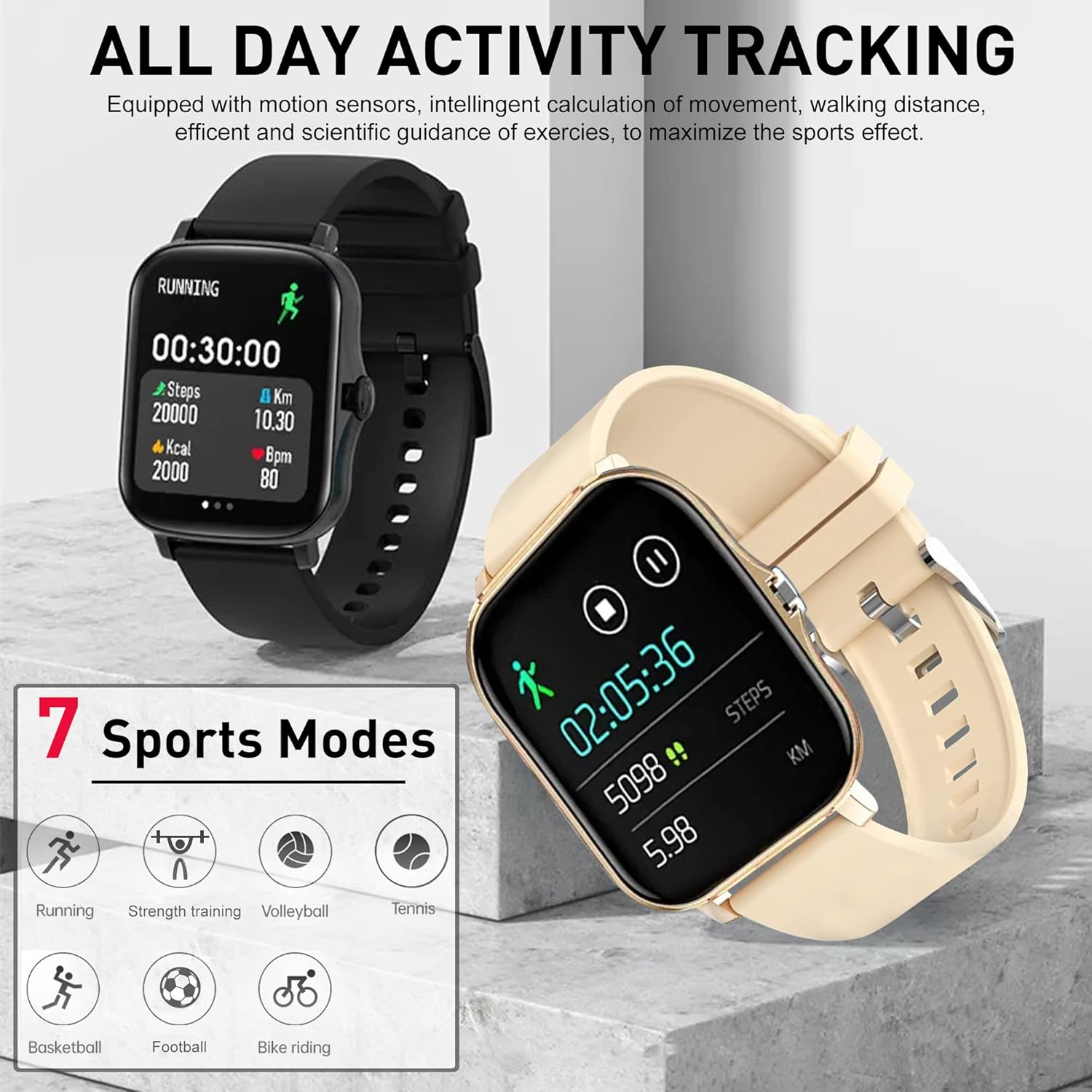
Image: The DOVIICO H13 Smart Watch showing real-time blood pressure (128/90 mmHg) and blood oxygen (98% SpO2) measurements.
Søvnovervågning
Wear your smart watch to bed to track your sleep patterns. It records deep sleep, light sleep, and awake times, providing a comprehensive analysis of your sleep quality in the mobile application.

Image: The DOVIICO H13 Smart Watch displaying sleep duration and a breakdown of sleep stages (deep, light, awake).
Aktivitetssporing
The DOVIICO H13 Smart Watch is designed to track your daily activities and workouts, helping you stay motivated and achieve your fitness goals.
All-Day Activity Monitoring
The watch automatically tracks your steps, distance traveled, and calories burned throughout the day. This data is synchronized with the mobile app for detailed analysis and progress tracking.
Sportstilstande
The DOVIICO H13 supports 7 different sports modes to provide more accurate tracking for specific activities. These include:
- Løb
- Køre på cykel
- Tennis
- Styrketræning
- Basketball
- Volleyball
- Fodbold
Select the appropriate mode before starting your workout for optimized data collection.

Image: The DOVIICO H13 Smart Watch showing a running activity screen with duration, steps, distance, calories, and heart rate, alongside icons representing the 7 supported sports modes.
Smarte funktioner
Beyond health and fitness, the DOVIICO H13 Smart Watch offers a range of smart features to keep you connected and organized.
Smarte meddelelser
Receive alerts for incoming calls, SMS messages, and notifications from social media applications (e.g., WeChat, QQ, Facebook, Twitter, Line, WhatsApp, Instagram) directly on your wrist. The watch will vibrate to notify you, ensuring you don't miss important updates.

Image: Two DOVIICO H13 Smart Watches showing real-time message notifications from social media platforms.
Yderligere værktøjer
The watch includes several convenient tools for daily use:
- Timer og stopur: Til tidsstyringsaktiviteter.
- Vækkeur: Set silent vibrating alarms.
- Musikcontroller: Styr musikafspilning på din smartphone.
- Vejr: View current weather conditions.
- Stillesiddende påmindelse: Beder dig om at bevæge dig efter perioder med inaktivitet.
- Find din telefon: Hjælper med at finde din parrede smartphone.
- Fjernfotografering: Styr din telefons kamera på afstand.
- Bluetooth-opkald: Foretag og modtag opkald direkte fra uret.
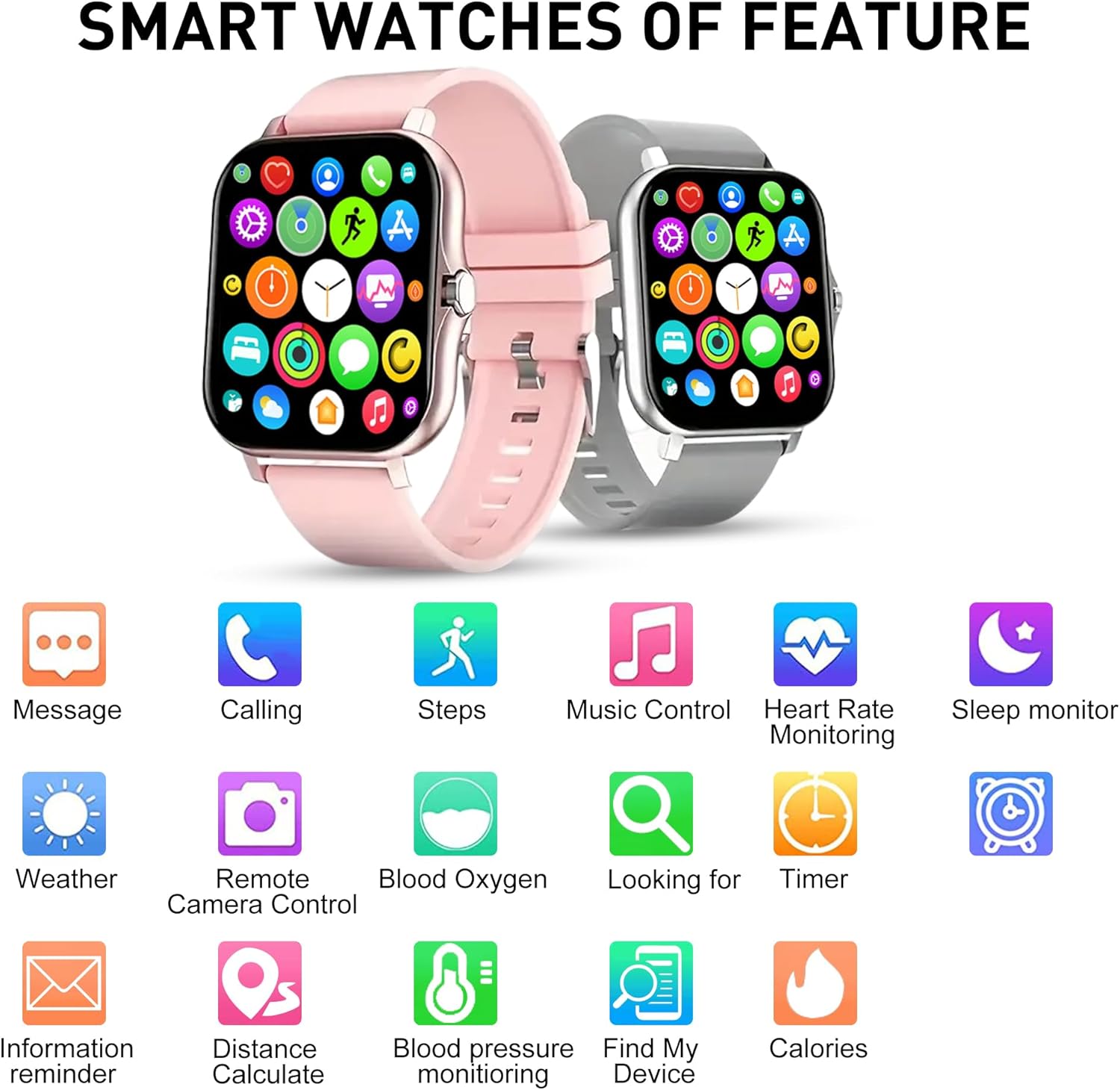
Billede: En overview of the DOVIICO H13 Smart Watch's key features, represented by various icons for functions such as messaging, calling, step tracking, music control, and health monitoring.
Opretholdelse
Rengøring af dit smartwatch
- Wipe the watch screen and strap regularly with a soft, damp, fnugfri klud.
- Undgå at bruge skrappe kemikalier, slibende rengøringsmidler eller opløsningsmidler, da disse kan beskadige urets finish og komponenter.
- Sørg for, at opladningskontakterne er rene og tørre før opladning for at forhindre korrosion.
Batteripleje
- To prolong battery life, avoid fully discharging the watch frequently.
- Opbevar uret et køligt og tørt sted, når det ikke er i brug i længere perioder.
- The watch has a battery capacity of 160 mAh and typically lasts for 7 days with normal use, with a standby time exceeding 30 days.
Almen pleje
- Avoid exposing the watch to extreme temperatures, direct sunlight for prolonged periods, or high humidity.
- While the watch may have some water resistance, avoid submerging it in water or exposing it to high-pressure water jets unless explicitly stated in product specifications.
Fejlfinding
Uret tænder ikke
- Sørg for, at uret er fuldt opladet. Tilslut det til opladeren i mindst 30 minutter.
- Tryk og hold sideknappen nede i flere sekunder for at tænde den.
Unable to Pair with Smartphone
- Sørg for, at Bluetooth er aktiveret på din smartphone.
- Ensure the watch is within Bluetooth range of your phone (typically 10 meters).
- Restart both your smartphone and the smart watch.
- Tjek om den tilhørende app er opdateret til den nyeste version.
- Hvis den tidligere har været parret, kan du prøve at ophæve parringen af enheden fra din telefons Bluetooth-indstillinger og derefter parre den igen via appen.
Unøjagtige sundhedsmålinger
- Sørg for, at uret sidder tæt på dit håndled, men ikke for stramt.
- Keep your wrist still during measurements.
- Rengør sensoren på bagsiden af uret regelmæssigt.
- Note that smart watch readings are for reference only and should not be used for medical diagnosis.
Notifications Not Appearing
- Bekræft, at uret er parret med din telefon.
- Check notification permissions for the companion app in your phone's settings.
- Ensure that notification alerts are enabled within the companion app settings for the specific applications you wish to receive alerts from.
- Disable "Do Not Disturb" mode on both your watch and phone.
Specifikationer
| Feature | Detalje |
|---|---|
| Mærke | DOVICO |
| Model | H13 |
| Skærmstørrelse | 1.69 tommer |
| Display Type | LCD |
| Opløsning | 240 x 240 |
| Operativsystemkompatibilitet | Android 5.0+, iOS 9.0+ |
| Forbindelse | Bluetooth |
| Batterikapacitet | 160 mioamp Timer (mAh) |
| Opladningstid | Cirka 2.5 timer |
| Batterilevetid (typisk brug) | Op til 7 dage |
| Standby tid | Over 30 Days |
| Produktdimensioner | 14.99 x 7.49 x 3 cm |
| Varens vægt | 80 g |
| Særlige funktioner | Heart Rate, Blood Pressure, Blood Oxygen, Sleep Monitoring, Step/Distance/Calorie Tracking, 7 Sports Modes, Call/SMS/Social App Alerts, Alarm, Sedentary Reminder, Music Control, Weather, Remote Camera, Find Phone, Bluetooth Calling. |
Garanti og support
For information regarding warranty coverage and customer support for your DOVIICO H13 Smart Watch, please refer to the warranty card included in your product packaging or visit the official DOVIICO website. If you encounter any issues not covered in this manual, please contact DOVIICO customer service for assistance.


