1. Introduktion
Thank you for choosing the CAMKORY DC403 Digital Camera. This compact and easy-to-use camera is designed for capturing high-quality photos and videos, making it suitable for beginners and children. This manual provides essential information on setting up, operating, and maintaining your camera to ensure optimal performance and longevity.

Image 1.1: The CAMKORY DC403 camera is designed to be pocket-sized and easy to use, making it ideal for children and beginners. It has passed drop tests for durability.
2. Produktet er slutview
2.1 Nøglefunktioner
- Høj opløsning: 44 Megapixel photos and 1080p Full HD video recording.
- Digital zoom: 16x digital zoom for capturing distant subjects.
- Billedstabilisering: Optical image stabilization to reduce blur.
- Vise: 2.5-inch LCD screen for clear viewing.
- Alsidige tilstande: Includes self-timer, fill light, fun filters, smile capture, burst shooting, and webcam funktionalitet.
- Portabilitet: Compact and lightweight design (9.5 x 5.5 x 2 cm, 120g) for easy carrying.
- Magt: Comes with two 3.7V 700mAh rechargeable lithium-polymer batteries.
- Forbindelse: USB Type-C for charging and data transfer to PC.
2.2 Kamerakomponenter
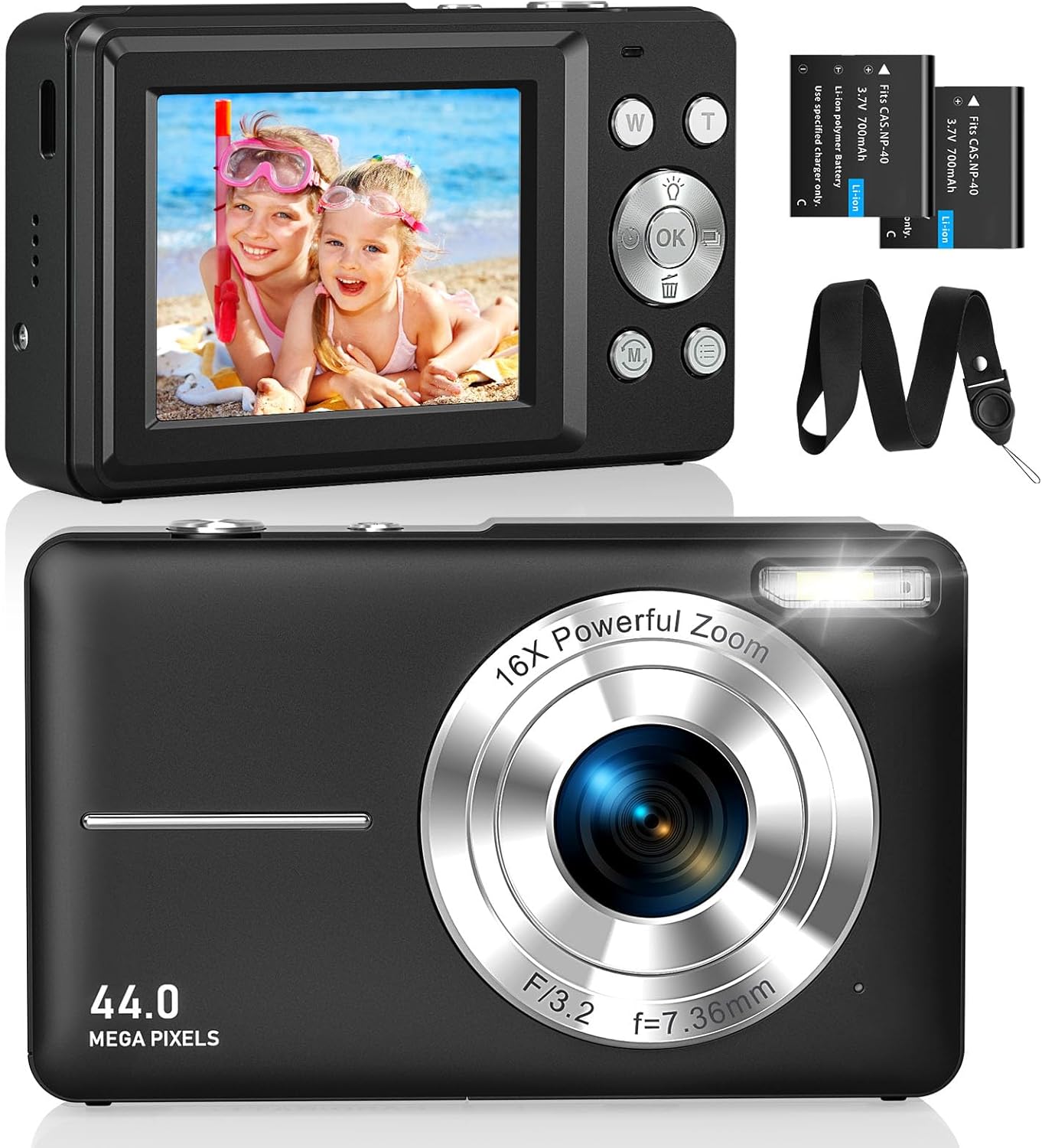
Billede 2.1: Foran og bagpå views of the CAMKORY DC403 Digital Camera, illustrating the lens, flash, LCD display, and various control buttons. Two rechargeable batteries are also shown.
The camera features an intuitive layout with ergonomically placed buttons suitable for small hands. Key controls include the power button, shutter button, zoom (W/T) buttons, mode button, and an OK button for menu navigation.

Billede 2.2: Detaljeret view of the camera's side controls, including the ON/OFF button, Shutter, W/T (Zoom), Fill Light, and Mode button.
3. Opsætning
3.1 Batteriinstallation og opladning
- Åbn batteridækslet i bunden af kameraet.
- Insert the two provided 3.7V 700mAh rechargeable lithium-polymer batteries, ensuring correct polarity.
- Luk batterirummets dæksel forsvarligt.
- Connect the camera to a power source using the supplied USB Type-C cable for charging. The charging indicator will show the charging status.
3.2 Installation af hukommelseskort
The camera supports Micro SD memory cards from 4GB to 32GB. A memory card is required to save photos and videos.
- Locate the Micro SD card slot, usually near the battery compartment.
- Insert the Micro SD card with the metal contacts facing the front of the camera until it clicks into place.
- Before first use, it is recommended to format the memory card directly within the camera's settings menu. This ensures compatibility and optimal performance.
3.3 Indledende tænding
Press and hold the power button (usually located on the top or side of the camera) to turn on the device. The LCD screen will illuminate, and the camera will be ready for use.
4. Betjeningsvejledning
4.1 Optagelse af billeder
- Tænd kameraet.
- Komponer dit billede ved hjælp af den 2.5-tommer LCD-skærm.
- Use the W/T buttons to adjust the 16x digital zoom.
- Press the shutter button halfway down to focus, then press it fully to capture the 44MP image.

Image 4.1: The camera captures 44MP images, allowing for detailed and clear photographs.
4.2 Optagelse af videoer
- Skift til videotilstand ved hjælp af Tilstandsknappen.
- Press the shutter button to start recording 1080p FHD video.
- Press the shutter button again to pause or stop recording.

Image 4.2: The camera supports 1080p Full HD video recording, allowing users to capture moments with clarity.
4.3 Særlige funktioner
- Digital zoom: Use the W/T buttons to zoom in and out. The camera features 16x digital zoom.
- Billedstabilisering: The optical image stabilization feature helps reduce blur from camera shake.
- Fyld lys: Activate the fill light for better illumination in low-light conditions.
- Selvudløser: Set a delay (e.g., 2s, 5s, 10s) before taking a photo, useful for group shots or selfies.
- Kontinuerlig optagelse: Tag en hurtig rækkefølge af billeder ved at holde udløserknappen nede.
- Filtre: Experiment with 20 different built-in filters to add creative effects to your photos.
- Smilregistrering: The camera can automatically detect and capture a photo when a smile is detected.
- Webcam tilstand: Tilslut kameraet til en computer via USB for at bruge det som en webkamera til livestreaming eller videoopkald.

Image 4.3: Demonstrations of 16x digital zoom and image stabilization. The zoom feature allows for closer shots, while stabilization helps maintain clarity during movement.

Billede 4.4: Eks.amples of self-timer, continuous shooting, and fill light functions. These features enhance photographic flexibility and quality in various scenarios.

Image 4.5: The camera can be used as a webcam when connected to a computer, suitable for streaming or video calls.
5. Vedligeholdelse
5.1 Rengøring af kameraet
- Brug en blød, fnugfri klud til at rengøre kamerahuset.
- Brug en specialklud og -opløsning til rengøring af objektivet og LCD-skærmen. Undgå skrappe kemikalier.
- Sørg for, at kameraet er slukket, inden rengøring.
5.2 Opbevaring
- Opbevar kameraet et køligt og tørt sted, væk fra direkte sollys og ekstreme temperaturer.
- Hvis produktet opbevares i længere tid, skal batterierne fjernes for at forhindre lækage.
- Use the provided long strap and pouch to protect the camera from drops and scratches during transport.
6. Fejlfinding
If you encounter issues with your CAMKORY DC403 camera, please refer to the following common solutions:
| Problem | Mulig løsning |
|---|---|
| Kameraet tændes ikke | Ensure batteries are correctly inserted and fully charged. Try using the second battery if available. |
| Kan ikke tage billeder/videoer | Check if a Micro SD card is inserted and has sufficient free space. Ensure the card is formatted in the camera. |
| Billeder er slørede | Ensure the lens is clean. Hold the camera steady or use the image stabilization feature. Check lighting conditions. |
| Camera not recognized by PC | Ensure the USB Type-C cable is securely connected to both the camera and the PC. Try a different USB port or cable. |
| Batteriet aflades hurtigt | Reduce screen brightness. Turn off features like flash or continuous shooting when not needed. Ensure batteries are fully charged before use. |
7. Specifikationer
| Feature | Detalje |
|---|---|
| Mærke | CAMKORY |
| Modelnavn | DC403 |
| Farve | Sort |
| Produkttype | Kompakt digitalkamera |
| Effektiv stillopløsning | 44 megapixel |
| Video opløsning | 1080p fuld HD |
| Digital Zoom | 16x |
| Optisk zoom | 16x (Note: This appears to be a mislabeling in the source data, likely referring to digital zoom) |
| Billedstabilisering | Optisk |
| Skærmstørrelse | 2.5 tommer LCD |
| Forbindelsesteknologi | USB (Type-C) |
| Understøttet hukommelseskort | Micro SD (4-32GB) |
| Batteritype | Lithium-polymer (2 x 3.7V 700mAh included) |
| Dimensioner (L x B x H) | 9.5 x 2 x 5.5 cm |
| Varens vægt | 120 gram |
| Burst-tilstandshastighed | 30 billeder i sekundet |
| ISO rækkevidde | ISO 100 to ISO 1600 |
| Blænde | F3.5-F5.6 |
| Fokus Type | Autofokus |
| Vandmodstandsniveau | Ikke vandtæt |
8. Garanti og support
For any questions, technical support, or warranty inquiries regarding your CAMKORY DC403 Digital Camera, please contact CAMKORY customer service through the retailer's platform or the official CAMKORY webwebsted. Gem venligst din købsbevis til garantikrav.


